Repository navigation
Conversation


Add opt-in pivot table support modelled on Excel PivotTables, Power Pivot
and MS Access crosstab queries (refs #1020):

- PivotEngine: DOM-free pivot computation with 15 built-in aggregators,
  custom aggregators, filters (include/exclude, label, top/bottom N,
  predicates), calculated measures, "Show Values As", natural and
  by-value sorting, predefined items and a column cap. Subtotals and
  grand totals are accumulated from the source rows, so non-additive
  aggregators are correct at every level.
- SlickPivot plugin: renders the result with compact, outline and
  tabular layouts, subtotals and grand totals, multi-level column group
  headers in the pre-header panel, row and column expand/collapse,
  sorting, drill-down, pinned row headers and grand total row, and
  pluggable (e.g. server-side) providers.
- SlickPivotPanel control: Excel style fields pane with a searchable
  field list, Filters/Columns/Rows/Values areas, pointer-event drag and
  drop, pill menus, Value Field Settings, filter popups, deferred
  updates, keyboard support and live region announcements.

Also rewrite example-pivot.html on top of the plugin (output unchanged),
add the PivotTable Fields and crosstab/measures examples, a pivot docs
page and Cypress tests.

Co-Authored-By: Claude Opus 5.5 <noreply@anthropic.com>
In RTL mode getVisibleRange treated the native negative scrollLeft as an
offset measured from the far edge of the canvas, so on grids wider than
the viewport the computed pixel range missed the columns actually in
view and they were left blank, even before scrolling. The columns are
laid out from the right edge, so the distance scrolled is simply the
absolute value of scrollLeft.

Co-Authored-By: Claude Opus 5.5 <noreply@anthropic.com>
- Write-back: with enableWriteBack, editing a value cell (including
  subtotals and grand totals) allocates the new value over the source
  rows behind it using the weighted, equal or equalIncrement method,
  with optional precision that keeps the total exact. Aggregators can
  provide allocate(); sum, avg, first and last do. Adds the cancelable
  onBeforeWriteBack and onWriteBack events, applyChanges() for undo and
  a provider writeBack hook. Showing-as values, cells with no source
  rows and computed fields without a setter stay read-only.
- Date hierarchies: every date field exposes year, quarter, month and
  day level fields ({field}.year etc.) on demand, sorted
  chronologically and labelled in the engine locale. The fields pane
  lists the levels under their date field and groups a date dropped on
  Rows or Columns by year, quarter and month (autoDateGrouping).
- Right-to-left: the column group headers, row header indentation,
  value alignment and fields pane all mirror in RTL grids.
- Docking: the grand total row is merged into the grid's pinned or
  sticky rows instead of replacing them, and is sticky by default
  (pinGrandTotalRow). Adds pinGrandTotalColumns, getRowById() so row
  references to pivot rows resolve, and keeps the column group headers
  aligned over left, right and sticky columns.
- Fields pane: add Summarize Values By to the value pill menu.

The example now uses the Order Date hierarchy and has toolbar controls
for docking, write-back with undo and RTL.

Co-Authored-By: Claude Opus 5.5 <noreply@anthropic.com>

|
wow that's cool, I had in mind to maybe look at this after the release, but ok that's earlier than I imagine 😆 |

|
This is non breaking so no need to wrap it into v6. |
|
haha yeah I'm just surprised to see this before the column auto-sizing 😆 The auto-sizing is the last missing piece for the major release I think since I've completed all the PRs I was thinking about. Did you want to include this pivot in v6.0 or in v6.1? |
|
Me too actually, I just gave Claude all the info in that issue that was just closed and it came up with this in about 30 minutes. I'm not going to get to the auto-sizing issues this month, possibly in December. So I think go ahead with the release and we'll bundle that in a later breaking version, along with a possible DataProvider. At least there are some fixes for the current autosize algorithm. |
|
@6pac oh ok yeah we could proceed with a major release this week then. Did you want to do a Beta first or go straight to major release? I think to go straight to major release is fine by me (without Beta). Also note that there's still the a11y (accessibility) audit to do but we could also do that later as a feature PR. Another question, did you wanted to add your personal repo stuff before we release or is that also included for next major in what you call the DataProvider? @6pac-ai the PRs #1331, #1332 and #1333 were merged, you might need to rebase accordingly, but the most important thing is PR #1331 brings unit tests with Vitest, I think you should start adding unit tests instead of Cypress quirks. |
|
Yeah let's go straight to major. Not a bad idea to do the a11y audit first I think to at least see if there's anything breaking. Is is hard to do? My personal repo changes are extensive and breaking in a way that makes this release look tame - it should be a separate major release if it goes ahead at all. I may end up having a separate fork, or just reapplying major patches each release for my personal build. |
Not hard at all, just ask the AI to be more accessible (a11y) and it should be able to do the work. But since I've already pushed a few PRs on my project, it's probably better to reference my project as a base. I can maybe look at that tomorrow and then ask Claude to review the PR |
Co-Authored-By: Claude Fable 5.1 <noreply@anthropic.com>
The options of the PivotTable Fields pane are deep-merged with the
defaults, and that merge combines arrays by index. A shorter list
therefore kept the end of the default one: `autoDateGrouping: ['year']`
still grouped by years, quarters and months, and
`summarizeByAggregators: ['sum', 'avg']` still listed six aggregators.

Both lists now replace the default list, as `numberFormats` and
`showAsOptions` already did.

Co-Authored-By: Claude Fable 5.1 <noreply@anthropic.com>
- slickPivotEngine.spec.ts: built-in and custom aggregators, include,
  exclude, label, predicate and top N filters, subtotals and grand
  totals accumulated from the source rows, measures, "show values as",
  date hierarchies and write-back allocation.
- slickPivot.spec.ts: compact, outline and tabular rendering against a
  mocked grid, expand and collapse, write-back events and read-only
  cells, row ids, docking of the grand total row and columns, providers,
  sorting and drill-down.
- slickPivotPanel.spec.ts: field list and search, moving fields between
  the areas from the API, the menus, the keyboard and by dragging, date
  grouping, value settings, item filters and deferred updates.

Co-Authored-By: Claude Fable 5.1 <noreply@anthropic.com>

Codecov Report❌ Patch coverage is Additional details and impacted files@@ Coverage Diff @@
## master #1334 +/- ##
==========================================
+ Coverage 85.72% 90.22% +4.50%
==========================================
Files 34 40 +6
Lines 13383 16333 +2950
Branches 4062 4935 +873
==========================================
+ Hits 11472 14736 +3264
+ Misses 1482 1237 -245
+ Partials 429 360 -69 ☔ View full report in Codecov by Harness. 🚀 New features to boost your workflow:
|

|
it has some similarities with Ag-Grid, however I noticed that Ag-Grid has an extra "Pivot Mode" toggle which seems to be to deactivate the Pivot momentary without clearing all the Pivot form, which could be useful I guess. You can see Ag-Grid Pivot here: https://www.ag-grid.com/vue-data-grid/pivoting/#enabling-pivoting Also their pivot is integrated in the grid as a sidebar menu, but I think I prefer the UI you have above. Qeustion though, is the UI above for the picot config (on the right), part of the plugin or is it totally custom html code in an example? I assume that the panel being part of the plugin would be the best solution... I guess I should check the code a bit more myself to find out 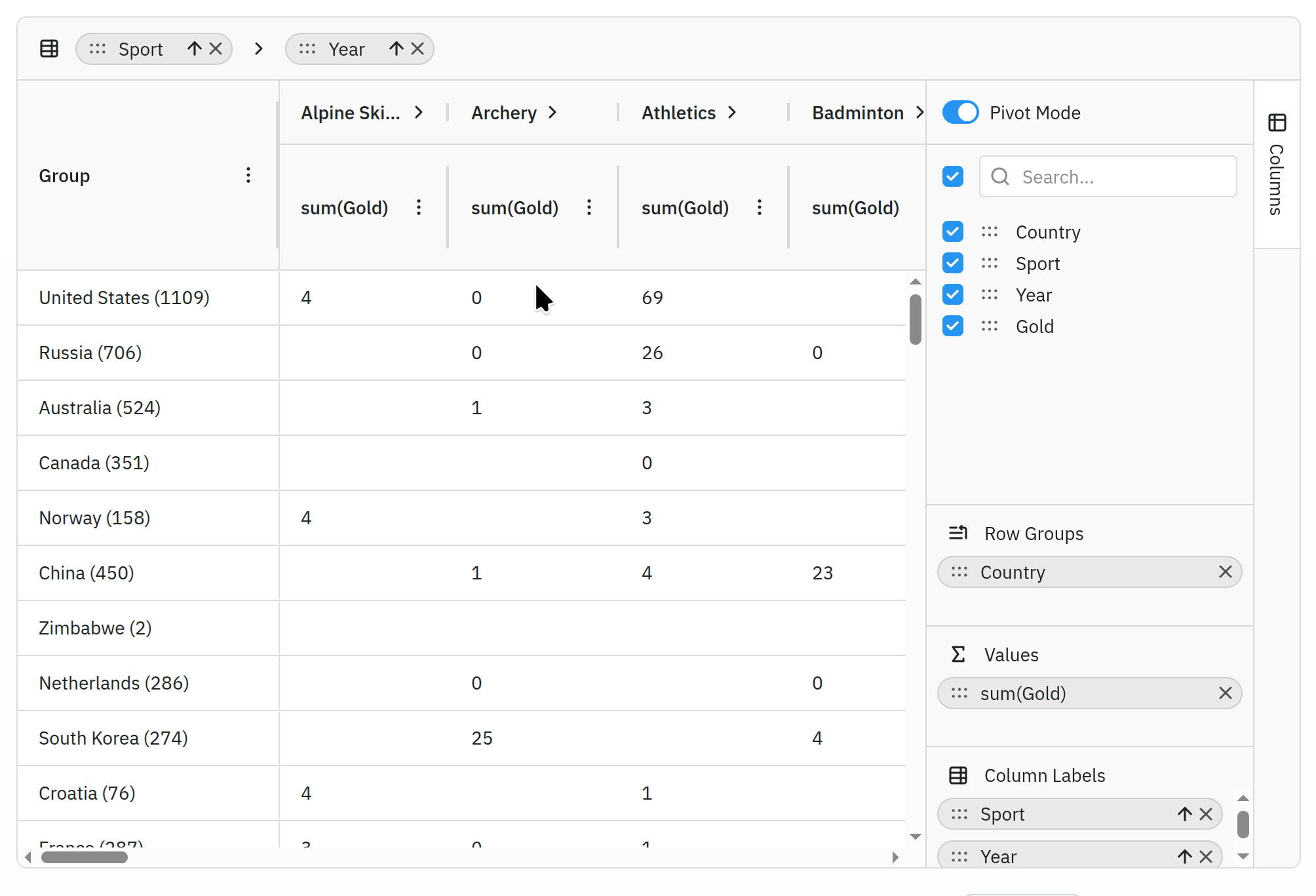
|
…d undo

Move what the PivotTable Fields example used to build itself into the
library, so an application gets the whole pivot table from one
constructor:

- SlickPivotTable (Slick.Controls.PivotTable): builds the toolbar, the
  grid with the pivot plugin, the PivotTable Fields pane, a status bar
  and the details dialog in one container. The pane can be placed at
  the start or the end, resized with a splitter (pointer or arrow keys)
  and hidden from the toolbar or its own close button; every part stays
  reachable for what the options do not cover.
- SlickPivotToolbar: Report Layout, Subtotals and Grand Totals
  dropdowns, Expand All / Collapse All, Undo / Redo (while write-back is
  on) and an optional Field List toggle, following the spec however it
  changes.
- SlickPivotDetails: the "Show Details" dialog, a modal <dialog> with a
  sortable grid of the source rows of a double-clicked cell, columns
  made from the fields (computed ones included) and formatted like the
  pivot.
- Write-back history in the plugin: undo(), redo(), canUndo(),
  canRedo(), clearHistory(), onHistoryChanged, Ctrl+Z / Ctrl+Y and
  writeBack.undoLimit. Undo restores the exact previous values of the
  source rows (typing the old total again would allocate it anew), and
  onWriteBack now tells whether an edit, an undo or a redo wrote them.

example-pivot-panel.html is rebuilt on SlickPivotTable and keeps only
its data and demo options (487 lines down to 343). Vitest specs cover
the three new controls and the undo history; the Cypress spec covers
them in the example.

Co-Authored-By: Claude Opus 5.5 <noreply@anthropic.com>

|
note yesterday I got Claude to pull this all into several plugins. Should be a lot more encapsulated now. |
|
yeah i just made it a draft so that we can delay it for v6.1.0 instead |
|
@6pac I pushed the v6 release since I assume we were ready for it... so I guess we could resume this Pivot table PR. I'm about to release my major version for my repo as well, I'll probably look at replicating this in my repo as well. |
|
@6pac @6pac-ai I like the UI shown above, but I have concerns with the implementation (mostly the fact that it's a wrapper on top of SlickGrid and that we're not defining grid like other grids), so after re-implementing this PR into my Slickgrid-Universal project, I then provided my concerns to my AI with my implementation and this is the audit and feedback with all my concerns and what I like about it. I also asked the AI to also compare it with Ag-Grid (https://www.ag-grid.com/javascript-data-grid/pivoting/) After investigating how this would integrate with SlickGrid Universal, I think we should reconsider making I like the pivot functionality and particularly the separate sidebar with its Filters, Columns, Rows, and Values areas. My concerns are about grid ownership, configuration, and compatibility with existing applications. 1. The goal is normal grid creation plus explicit plugin registration AG Grid provides integrated pivot support. Once the required modules are available, applications use ordinary grid configuration and enable pivot mode with Our architecture is different: pivoting will be an optional plugin, so setting Applications will need to explicitly register the pivot implementation:
After registration, options and APIs can control whether pivot mode is enabled. The comparison with AG Grid is about preserving the normal grid creation model. I am not suggesting that SlickGrid should automatically provide pivot functionality from a boolean option or make it part of core. The expected workflow is:
2. SlickGrid Universal already provides Angular, React, Vue, Aurelia, and vanilla wrappers. These manage:
Using it would require bypassing our established initialization or reproducing that behavior inside another component. I do not want a wrapper on top of a wrapper. A standalone convenience component may be useful, but framework integrations should be able to obtain the complete pivot experience by registering a plugin on the grid they already own. 3. Existing menus and extensions are bypassed This is a major practical disadvantage. Our applications already configure HeaderMenu, ContextMenu, GridMenu, ColumnPicker, and other extensions. Those integrations include:
These extensions are initialized through Universal’s infrastructure. Creating another bare grid inside Passing similar grid options to the new grid is insufficient. The configuration may still exist, but the new grid does not automatically participate in the infrastructure that makes it work. I could manually recreate those integrations, but that would introduce duplicated setup, additional subscriptions, and another lifecycle to maintain. Applications should not have to redefine their menus and services to enable pivoting. 4. Ordinary columns and datasets should remain the starting point The composed API introduces a different configuration model: new SlickPivotTable(container, {
fields,
source,
spec,
gridOptions,
fieldList,
});That differs substantially from normal grid usage and introduces a second representation of information already present in column definitions. Field identifiers, property names, captions, and types should generally come from the existing columns. Otherwise, applications must keep two schemas synchronized as columns change or captions are translated. Pivot-specific metadata is still necessary—for aggregation, calculated fields, date hierarchies, allowed field placement, and generated-value formatting. My expectation is that this information supplements the ordinary configuration. The application should supply its source dataset through its normal mechanism. The plugin should derive pivot results while retaining the original source data and column configuration. 5. A container can accommodate the complete UI without owning grid creation I would expect to provide a parent container that accommodates: The application or framework wrapper would create the grid normally. The registered plugin would receive the grid instance and a reference to the surrounding container, then mount its sidebar and optional controls. A layout container around the grid is reasonable. It does not require a second component that constructs and owns the grid. The plugin should respect framework-owned DOM and have a clear contract for mounting, resizing, and removing its controls. 6. The separate sidebar should remain I prefer this PR’s separate sidebar to an embedded grid sidebar and would like to preserve it. The AG Grid comparison concerns the application configuration model, not adopting its sidebar design. The pivot sidebar should remain independently mountable. Its Pivot Mode toggle would control the registered plugin attached to the existing grid. Optional toolbar and footer controls would use the same plugin. 7. Pivot Mode should operate on one grid instance The expected behavior is:
During our Universal experimentation, we added a toggle that created a second grid for source rows and switched visibility. That was our addition, not a requirement introduced by this PR. It exposed the ownership problem further. Two grids require separate extension registrations, subscriptions, selection state, options, and disposal. They also make APIs ambiguous when the grid returned to application code is not the currently visible grid. The application-owned grid instance should remain stable across mode changes. 8. Plugin registration alone does not resolve data and service integration The existing lower-level Our wrappers already maintain a source DataView, original columns, and services that reference them. Changing the grid’s displayed representation without coordinating those references can leave application services operating on different data from what users see. For example, source row index 20 and pivot row index 20 do not necessarily identify related records. The plugin integration needs defined behavior for:
Implementing 9. Existing commands need appropriate behavior in pivot mode Preserving the menu infrastructure is essential, but some operations need different handling on aggregated data.
These differences should be addressed through supported behavior, meaningful callback context, and usability rules. Applications should not need another complete set of menu definitions. Unsupported combinations should also be documented explicitly. 10. Proposed integration direction For the fork, the conceptual API would be ordinary grid creation followed by explicit plugin registration: // Illustrative proposal; not an existing supported API.
const grid = new Slick.Grid(
gridContainer,
dataView,
columnDefinitions,
gridOptions
);
const pivot = new Slick.Pivot({
container: '#gridAndPivotContainer',
pivotMode: true,
spec: initialPivotSpec,
});
grid.registerPlugin(pivot);For Universal, registration would happen through the existing external-resource lifecycle: // Illustrative proposal; not an existing supported API.
const pivot = new SlickPivot();
const gridOptions = {
// Existing application configuration.
enableHeaderMenu: true,
enableContextMenu: true,
enableGridMenu: true,
// Explicitly register the optional functionality.
externalResources: [pivot],
// Configure the registered resource.
pivotMode: true,
pivotOptions: {
container: '#gridAndPivotContainer',
spec: initialPivotSpec,
},
};
// Create the grid through the normal framework or vanilla wrapper,
// using the ordinary column definitions and dataset.The exact option names and whether settings belong in the constructor or grid options remain open. The architectural requirements are explicit registration, ordinary grid creation, and a stable host-owned grid. Requirements that must be prepared before grid creation, such as grouped-header infrastructure, need an initialization contract. The first sketch does not resolve that timing detail; it illustrates the desired ownership model. 11. Scope and acceptance criteria
The primary integration example should demonstrate:
|
|
I hadn't really looked at the architecture, and I 100% agree with all your concerns. Happy to go with what you've proposed. It definitely should be a plug-in and shouldn't own the grid. I don't think we need to preserve the wrapper version. |
|
Note that I actually wrote 100% of the pivot engine. All Claude did was wrap it up into an object. Claude was responsible for the UI. |
|
yeah reimplemented it in Slickgrid-Universal, then noticed the differences and give my feedback and things I don't like to the AI so that it could inspect my comments which was then transformed into the audit you see above. And yes my biggest concern is that this should be a plugin like all other plugins. I saw that you also asked the AI to create an Excel Pivot like and an Access Pivot like, I'm more interested in keeping only the Excel like. Are there big advantage to keep the Access one? Perhaps that could be a separate plugin? Because personally I'm fine with just 1 plugin (Excel like). |
|
OK, working on it. I think it comes down to what you're used to. I understand the Access UI inside out, but I'm still a little mysified by the Excel one, just because I've never used it. TBH I avoid Excel like the plague. |


fixes #1020
Summary
This adds pivot table support, modelled on Excel PivotTables, Power Pivot and MS Access crosstab queries. It is fully opt-in. The core parts are a DOM-free pivot engine, a grid plugin that renders its result, and an optional Excel-style PivotTable Fields pane. A toolbar, a "Show Details" dialog and a ready-made pivot table that puts everything together in one container complete it, so an application gets a full pivot table from one constructor.
Why
Issue #1020 asked for pivot tables. Until now,
example-pivot.htmlwas the only pivot support: it hand-builds the columns and groupings for one fixed layout. This turns that into a reusable feature that can be driven from code, from a fields pane, or from a server.Changes
Pivot engine (
src/slick.pivotengine.ts)OrderDate.yearand so on). They are created when first used, sorted chronologically and labelled in the engine's locale.weighted,equalandequalIncrement, as in Excel's What-If analysis. An optionalprecisionrounds the written values while keeping the total exact.Grid plugin (
src/plugins/slick.pivot.ts)enableWriteBack): editing a value cell, including subtotals and grand totals, writes the change back to the source rows.onBeforeWriteBack, which can cancel the change, andonWriteBack, which lists every changed row.writeBackhook.undo(),redo(),canUndo(),canRedo(),clearHistory(),onHistoryChanged, Ctrl+Z / Ctrl+Y on the grid, andwriteBack.undoLimit(100 by default). Undo restores the exact previous values of the source rows, andonWriteBacknow says whether an edit, an undo or a redo wrote them (source).setter.pinGrandTotalRow).pinGrandTotalColumnsoption pins the grand total columns to the edge or makes them sticky.getRowById(), so row references to pivot rows resolve.Fields pane (
src/controls/slick.pivotpanel.ts)autoDateGrouping).autoDateGrouping,summarizeByAggregators,numberFormats,showAsOptions) replace the default list instead of being merged into it.Toolbar (
src/controls/slick.pivottoolbar.ts)itemspicks and orders the items,labelstranslates them, and an optional Field List toggle raisesonFieldListToggle.Details dialog (
src/controls/slick.pivotdetails.ts)<dialog>listing its source rows in a sortable grid.maxRows,fields,columns,gridOptionsandlabelsoptions, and a cancelableonBeforeShow.Ready-made pivot table (
src/controls/slick.pivottable.ts)SlickPivotTablebuilds the toolbar, the grid with the pivot plugin, the fields pane, a status bar and the details dialog in one container, from the pivot options plus one entry per part (each can be turned off).role="separator") and hidden from the toolbar or its own close button.getPivot(),getGrid(),getFieldList(),getToolbar(),getDetails().Examples, docs and tests
example-pivot.htmlis rewritten on top of the plugin, with unchanged output (checked against a golden fixture).example-pivot-panel.html, built onSlickPivotTable(toolbar, resizable fields pane, details dialog, docking, write-back with undo and redo, RTL; the page itself is now mostly sample data), andexample-pivot-crosstab.html(crosstab and measures).docs/in-depth/pivot.md.src/__tests__/slickPivotEngine.spec.ts,src/plugins/__tests__/slickPivot.spec.tsandsrc/controls/__tests__/slickPivot{Panel,Toolbar,Details,Table}.spec.ts.Validation
Run on the branch after merging
master(up to #1340), with the toolbar, details dialog, pivot table and undo history:npm run buildpasses: lint, ESM, IIFE, Sass and types.npm test(Vitest on jsdom) passes: 40 spec files and 1,339 tests, 155 of them in the six pivot specs. Statement coverage is 98.6% for the engine, 96.5% for the plugin, 98.5% for the fields pane, 98.0% for the toolbar, 97.9% for the details dialog and 98.3% for the pivot table.quirk-rtl-wide-grid(fix(grid): render the visible columns of wide right-to-left grids #1333).npm run api,npm run drift -- --strict(no undocumented symbols) andnpm run links(623 links OK).Run before rebasing onto that merge:
quirk-docking-header-scrollbar-corner, fails the same way without these changes, because its precondition needs visible scrollbars and macOS uses overlay scrollbars.Comments
master. The RTLgetVisibleRange()fix that this PR used to carry landed as fix(grid): render the visible columns of wide right-to-left grids #1333, so it is no longer part of the diff.dist/is not included, as it is refreshed on release commits.editCommandHandler: undoing an edit through the grid would allocate the old total anew instead of restoring the source rows.AI / LLM assistance
Checklist
🤖 Generated with Claude Code