Repository navigation
[HOLD for payment 2023-04-28] [HOLD for payment 2023-04-27] FAB - There is no "New workspace" button in FAB menu #17684

Description

If you haven’t already, check out our contributing guidelines for onboarding and email contributors@expensify.com to request to join our Slack channel!
Action Performed:
- Access staging.new.expensify.com
- Sign into a valid account that is ready for Error tests (In this case: applausetester+disabledpolicy@applause.expensifail.com
) - Click on the FAB menu
Expected Result:
User expects to see an option of "Add workspace"
Actual Result:
The Add workspace option is completely gone, seems to have been replaced by "Assign task". Both options should be shown to the user. Now the user has to go to Profile > Workspace > New workspace to be able to create a workspace
Workaround:
Unknown
Platforms:
Which of our officially supported platforms is this issue occurring on?
- Android / native
- Android / Chrome
- iOS / native
- iOS / Safari
- MacOS / Chrome / Safari
- MacOS / Desktop
Version Number: 1.3.2.2
Reproducible in staging?: Yes
Reproducible in production?: No
If this was caught during regression testing, add the test name, ID and link from TestRail:
Email or phone of affected tester (no customers):
Logs: https://stackoverflow.com/c/expensify/questions/4856
Notes/Photos/Videos: Any additional supporting documentation
Bug6024396_No_workspace_button.mp4
Expensify/Expensify Issue URL:
Issue reported by: Applause - Internal Team
Slack conversation:
Activity
OSBotify commentedon Apr 19, 2023
👋 Friendly reminder that deploy blockers are time-sensitive ⏱ issues! Check out the open
StagingDeployCashdeploy checklist to see the list of PRs included in this release, then work quickly to do one of the following:MelvinBot commentedon Apr 19, 2023
Triggered auto assignment to @cead22 (
Engineering), see https://stackoverflow.com/c/expensify/questions/4319 for more details.kbecciv commentedon Apr 19, 2023
Production
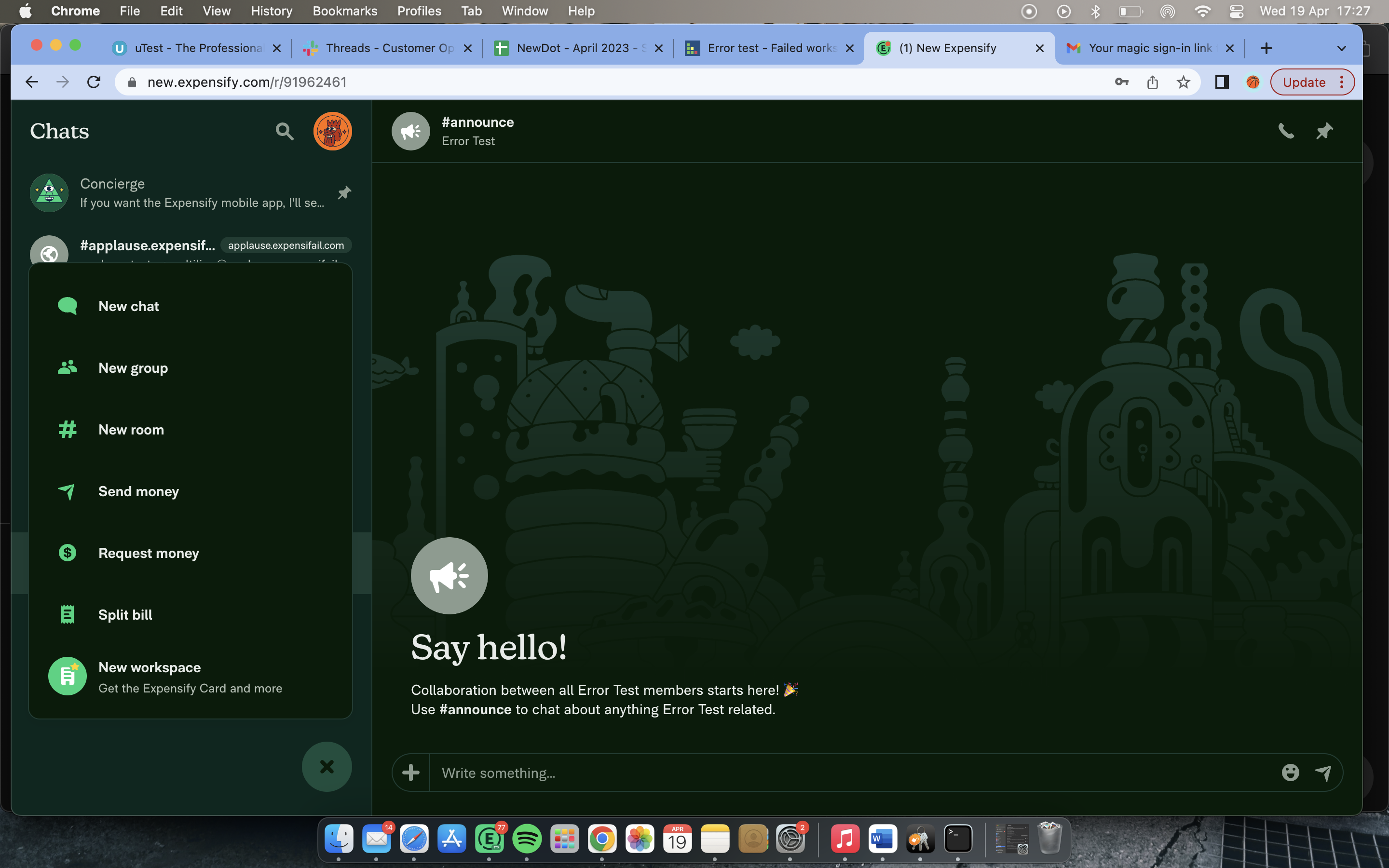
[-]Web - FAB - There is no "New workspace" button in FAB menu[/-][+]FAB - There is no "New workspace" button in FAB menu[/+]mountiny commentedon Apr 19, 2023
Asking in slack here https://expensify.slack.com/archives/C01GTK53T8Q/p1681937327369879
Seems like that the button only shows now if you dont have any Workspace created
mountiny commentedon Apr 19, 2023
@kbecciv this is intentional, the accounts you have tested with already had an active workspace in which case we dont show this option in the global create
its only visible when the user has no workspace yet
Can you please create the test which triggered this issue? Thank you!
5 remaining items
mountiny commentedon Apr 19, 2023
Lets consolidate it to the deploy blocker linked above.
kbecciv commentedon Apr 20, 2023
@mountiny Re-uploaded
[-]FAB - There is no "New workspace" button in FAB menu[/-][+][HOLD for payment 2023-04-27] FAB - There is no "New workspace" button in FAB menu[/+]MelvinBot commentedon Apr 20, 2023
Reviewinglabel has been removed, please complete the "BugZero Checklist".MelvinBot commentedon Apr 20, 2023
The solution for this issue has been 🚀 deployed to production 🚀 in version 1.3.2-5 and is now subject to a 7-day regression period 📆. Here is the list of pull requests that resolve this issue:
If no regressions arise, payment will be issued on 2023-04-27. 🎊
After the hold period is over and BZ checklist items are completed, please complete any of the applicable payments for this issue, and check them off once done.
As a reminder, here are the bonuses/penalties that should be applied for any External issue:
[-][HOLD for payment 2023-04-27] FAB - There is no "New workspace" button in FAB menu[/-][+][HOLD for payment 2023-04-28] [HOLD for payment 2023-04-27] FAB - There is no "New workspace" button in FAB menu[/+]MelvinBot commentedon Apr 21, 2023
The solution for this issue has been 🚀 deployed to production 🚀 in version 1.3.3-2 and is now subject to a 7-day regression period 📆. Here is the list of pull requests that resolve this issue:
If no regressions arise, payment will be issued on 2023-04-28. 🎊
After the hold period is over and BZ checklist items are completed, please complete any of the applicable payments for this issue, and check them off once done.
As a reminder, here are the bonuses/penalties that should be applied for any External issue: