Repository navigation
Mobile app - Let users choose where to save the downloaded pictures or files #3513


Description
Activity
Triggered auto assignment to @robertjchen (
Engineering), see https://stackoverflow.com/c/expensify/questions/4319 for more details.Triggered auto assignment to @jliexpensify (
External), see https://stackoverflow.com/c/expensify/questions/8582 for more details.Sounds like a great self-contained task for our contributors, tagging as
ExternalPosted to Upworks: https://www.upwork.com/ab/applicants/1403186180271632384/job-details
EDIT: Removed this post, as it had been 18 days without a proposal. Re-posted below!
Triggered auto assignment to @NikkiWines (
Exported), see https://stackoverflow.com/c/expensify/questions/7972 for more details.Still awaiting proposals.
I tried to find an app on my phone that allows me to select a destination folder, I couldn't find one. All of them save the files to their own folders, some use the downloads directory. Also there are not many resources online on this particular topic in regards to react-native.
However, very recently a
pickDirectorymethod has been merged intoreact-native-document-picker(a lib you are already using), it is android only and I actually wanted to give it a quick try.Seems like it requires permissions that are different from default
pickmethod, so I couldn't actually verify if it works.
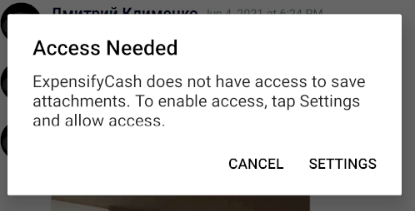
Anyway, even it worked flawlessly it is still android only, so the way I see it, this feature request requires some contributions to native libraries. That is probably why there were zero proposals in a week.
10 remaining items
@marcaaron We will be definitely using rn-fetch-blob to save the actual file, in fact it is already used but with a hardcoded path. The idea with react-native-document-picker was to make use of native file browser to pick a directory. Or do you mean we can create a hand-made file browser using RNFetchBlob.fs.ls()?
Sorry, I'm not sure. Just tossing out a suggestion in the hopes someone would investigate.
So my suggestion here is to use this lib https://www.npmjs.com/package/react-native-directory-picker and complete the above feature.
@parasharrajat Submitting a PR against
react-native-document-pickeris a good idea.react-native-directory-pickershould probably be avoided since it does not have much community traction.Could we maybe build this ourselves as a native module? It doesn't feel like there is a clear 3rd party package that does exactly what we need.
Yeah creating our own native module is good idea as we can decide the behaviour. and if this works great then we can submit a PR to
react-native-document-picker. Its fine if they won't accept it.Hello, is this issue still up for grabs? I thought the suggestion by @parasharrajat makes sense and is to be approved, but the price on the upwork job has doubled and I've received an "Invitation to interview". Is it just to get more eyes on the issue? What's up with that?
EDIT: nvm, the price has been doubled 3 days ago. Haven't noticed that comment, sorry.
@dklymenk this is still available, yes.
But... to be honest, I really don't know that users need the ability to choose where to download their image/file to. As @dklymenk said earlier on: "I tried to find an app on my phone that allows me to select a destination folder, I couldn't find one.". My experience is the same, I don't think I have a single app that lets me choose where downloaded items go.
This issue was created because it was confusing that downloading attachments had no feedback for the user. That's been addressed since there's now a pop-up that lets you know that we've successfully downloaded that attachment.
So, maybe the solution (if we even need one) should instead be something simpler. An option could be to change the download location so that it goes to the general folder in
Photosinstead of Files > Expensify.cash. Alternatively, we could modify theDownloaded! Attachment successfully downloadedpop-up so it's clearer where the image/file is being downloaded to. Was chatting with @marcaaron and he brought up the suggestion of modifying that pop-up so that the user can choose to go to the downloaded file.Please let us know what needs to be done here. Are we need what NikkiWines suggested here #3513 (comment)?
Brought this to slack to discuss what we're looking for in terms of a solution. Putting a HOLD on this until we know what way we want to move forward.
Reacted by Rafael, Jason Li and parasharrajat- changed the title
[-]Mobile app - Let users choose where to save the downloaded pictures or files[/-][+][HOLD] Mobile app - Let users choose where to save the downloaded pictures or files[/+]on Jul 9, 2021 Looks like we voted to close the issue. Thanks everyone!
- changed the title
[-][HOLD] Mobile app - Let users choose where to save the downloaded pictures or files[/-][+]Mobile app - Let users choose where to save the downloaded pictures or files[/+]on Jul 28, 2021 Hello, I'm sorry to notify everyone here, but I think the upwork job for this issue wasn't closed: https://www.upwork.com/jobs/~01d4cfe8b8011b7d5a
If that's not a correct way to notify Expensify about stuff like this, please let me know where should I message about it in the future.
Hi @dklymenk - thanks for letting us know. This was on me, I forgot to close the job when the GH was closed! I've just closed it.
You can definitely comment in the GH, or bring it up in the Open Source channel. Thanks again!


If you haven’t already, check out our contributing guidelines for onboarding and email contributors@expensify.com to request to join our Slack channel!
Expected Result:
Users should be able to choose where to save the files that were downloaded from e.cash
Actual Result:
User is not able to choose on where to save the file.
Action Performed:
Workaround:
Image can be downloaded but it's located in Files > On my iPhone > Expensify.cash (For iOS)
Platform:
Where is this issue occurring?
Web
iOS ✔️
Android ✔️
Desktop App
Mobile Web
Version Number: 1.0.66-0
Logs: https://stackoverflow.com/c/expensify/questions/4856
Notes/Photos/Videos:
Please check the slack thread linked below, it provides more information on why this is an issue.
Expensify/Expensify Issue URL:
View all open jobs on Upwork
From @coleaeason https://expensify.slack.com/archives/C01GTK53T8Q/p1623207405117800