Repository navigation
[CFI] Add primary receipt scan option on mobile and web #72030


Description

Proposal: Add primary receipt scan option on mobile and web
Background: Taking a photo of a receipt and allowing us to do the rest has been the most well known pain point we solve for a long time. We’ve always strived to be the most simple way for employees to submit their expenses. Enter New Expensify and we do so much more now.
- When building New Expensify, we built the platform to try and be platform agnostic as much as possible. This led to decisions in us having one Global create button to rule them all.
- Early on we got feedback that we made our flagship receipt capture flow (scanning receipts from mobile) harder to do.
- We tried to shore this up with the quick action button, but that largely has not been that successful at getting people to use. And as we put more #migrate users in the platform, we’re fighting a lot of inertia of a product they love and flows they know well.
Problem: When users with New Expensify want to scan a receipt on the go, if they use Global Create, then they must tap four times instead of three, causing them like Classic more than New Expensify.
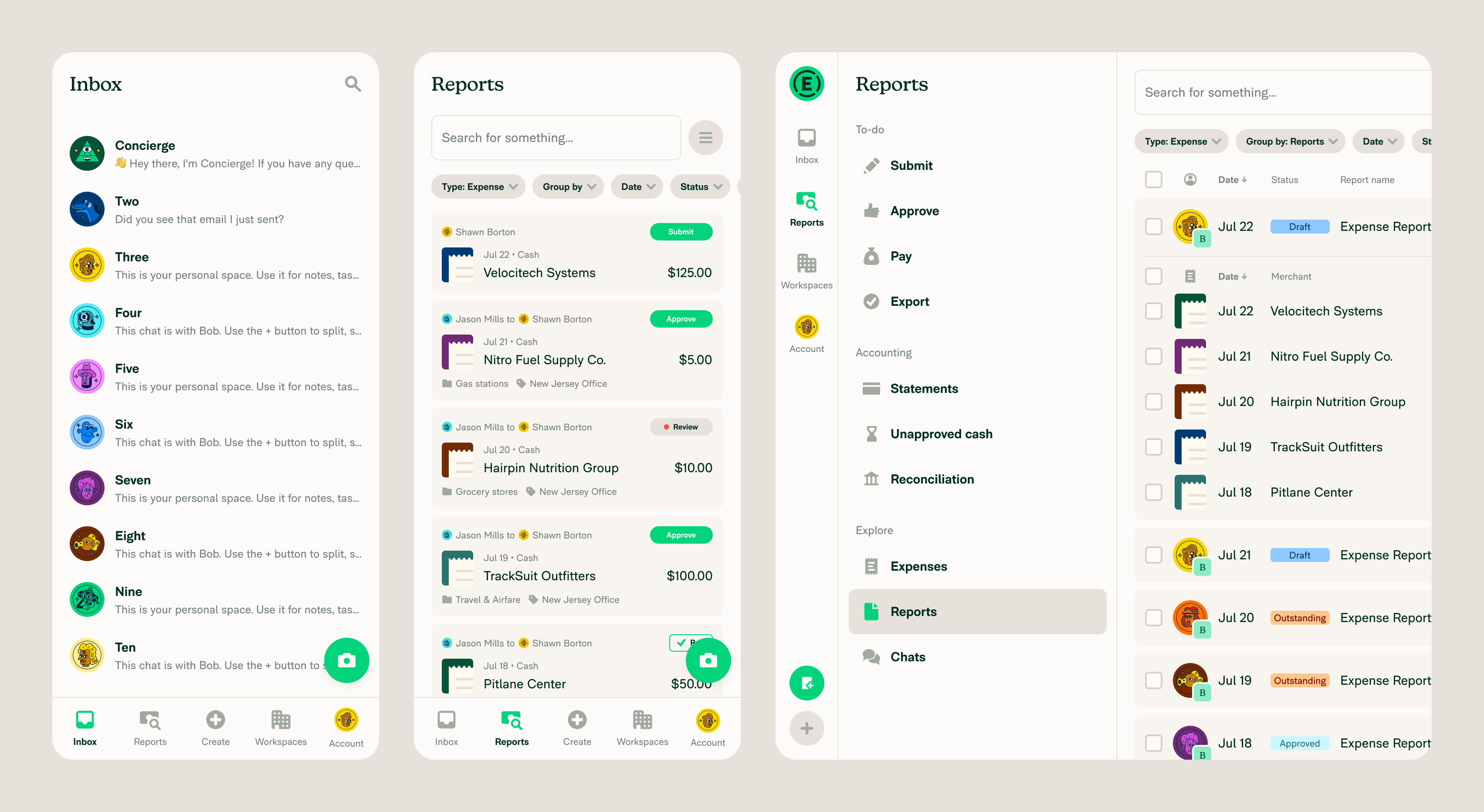
Solution: On mobile, update the bottom nav to have a deemphasized Create button and add a primary receipt button for fast receipt scanning. Here are the changes.
- Mobile - Introduce a primary Camera button that use the default workspace and skips the confirmation screen if coding isn’t required as we do in the QAB flow and Classic.
- Mobile - Update the Create button to no longer be primary (green) and be more aligned with other formatting of the bottom nav.
- Web - Introduce a primary Receipt button which opens the receipt scanning option.
- Web - Update the Create button to be a + and not primary (green). It would open the normal Global create options.
Here is the mock the @Expensify/design helped us align on:
Internal design thread
Original internal issue
Issue Owner
Current Issue Owner: @heyjennahayMetadata
Metadata
Labels
Type
Projects
- Status
Activity
[-]Add primary receipt scan option on mobile and web[/-][+][CFI] Add primary receipt scan option on mobile and web[/+]mountiny commentedon Oct 8, 2025
Looking for champion to develop this as a sprint project
JKobrynski commentedon Oct 9, 2025
Hi, I'm Julian from Callstack - expert agency - and I'd like to work on this issue.
ZhenjaHorbach commentedon Oct 9, 2025
@mountiny
Could you assign me here, please?
So as not to forget 😅
88 remaining items
danielrvidal commentedon Nov 11, 2025
Still waiting on the help site before closing.
My bad on closing @heyjennahay, I think I closed the wrong one.
melvin-bot commentedon Nov 12, 2025
@heyjennahay Huh... This is 4 days overdue. Who can take care of this?
melvin-bot commentedon Nov 14, 2025
@heyjennahay 6 days overdue. This is scarier than being forced to listen to Vogon poetry!
danielrvidal commentedon Nov 17, 2025
@heyjennahay is still working on the help materials.
heyjennahay commentedon Nov 18, 2025
Was at a conference last week but should have time to do it this week
Update Create-an-Expense.md for Add primary receipt scan option on mo…
heyjennahay commentedon Nov 20, 2025
Help doc updates PR ready for review
heyjennahay commentedon Dec 3, 2025
Also found another page that needs updating https://help.expensify.com/articles/new-expensify/getting-started/Navigating-New-Expensify
heyjennahay commentedon Dec 8, 2025
Updated PR submitted for review. Commented in Slack https://expensify.slack.com/archives/C07NMDKEFMH/p1765215162371749?thread_ts=1764013958.554589&cid=C07NMDKEFMH
heyjennahay commentedon Dec 9, 2025
PR merged so I think we're done here