Repository navigation
[No QA] [Payment due @ikevin127] [No QA] Docs updates for E/A#100113 Correct bank account status badges and pending validation paths - #100750
Conversation


…idation entry points

Co-authored-by: Kevin Brian Bader <ikevin127@users.noreply.github.com>
 MelvinBot
added
the
HelpDot

|
@MelvinBot mark this PR as ready for review. |

Concierge reviewer checklist:
For more detailed instructions on completing this checklist, see How do I review a HelpDot PR as a Concierge Team member? |

|
🤖 Done — this PR is now ready for review. Checks: all passing except One thing left for you: the
The PR Author Checklist is also still unchecked. view run · no recording available |

|
@strepanier03 Please copy/paste the Reviewer Checklist from here into a new comment on this PR and complete it. If you have the K2 extension, you can simply click: [this button] |

HelpDot Documentation ReviewOverall AssessmentThis PR corrects a factual error across three wallet-and-payments articles (a non-existent Action required badge) and replaces it with the real state-based badges (Incomplete, Pending, Verifying, Locked), then documents the previously-undocumented Workflows > Payments validation path for pending US business bank accounts. The changes are well-scoped, accurate to the product source of truth, and align closely with the HelpDot governance files. Scores Summary
Key Findings
Recommendations
Files Reviewed
Note: Detailed line-by-line feedback has been provided as inline comments. |

| An account that still needs your attention displays a badge that tells you what is left to do: | ||
|
|
||
| - **Incomplete** with a **Finish** action means setup was not submitted. Click the account row to resume setup from where you left off. | ||
| - **Pending** with a **Please confirm test transactions** message and a **Confirm** action means the account was submitted and is waiting on test transactions. Click the account row to go straight to **Validate your bank account**. Learn how to [validate a business bank account](/articles/new-expensify/wallet-and-payments/Validate-a-Business-Bank-Account). |

There was a problem hiding this comment.
Cross-linking / link placement: This bullet mixes an action instruction ("Click the account row to go straight to Validate your bank account.") with an inline cross-link in the same item. Per HELP_AUTHORING_GUIDELINES.md (Link Formatting), links should follow explanatory sentences and not interrupt procedural/action flow. Consider moving the "Learn how to [validate a business bank account]" link to a separate explanatory sentence after the badge list.


There was a problem hiding this comment.
💡 Codex Review
Here are some automated review suggestions for this pull request.
Reviewed commit: 8fd8f5f275
ℹ️ About Codex in GitHub
Codex has been enabled to automatically review pull requests in this repo. Reviews are triggered when you
- Open a pull request for review
- Mark a draft as ready
- Comment "@codex review".
If Codex has suggestions, it will comment; otherwise it will react with 👍.
When you sign up for Codex through ChatGPT, Codex can also answer questions or update the PR, like "@codex address that feedback".
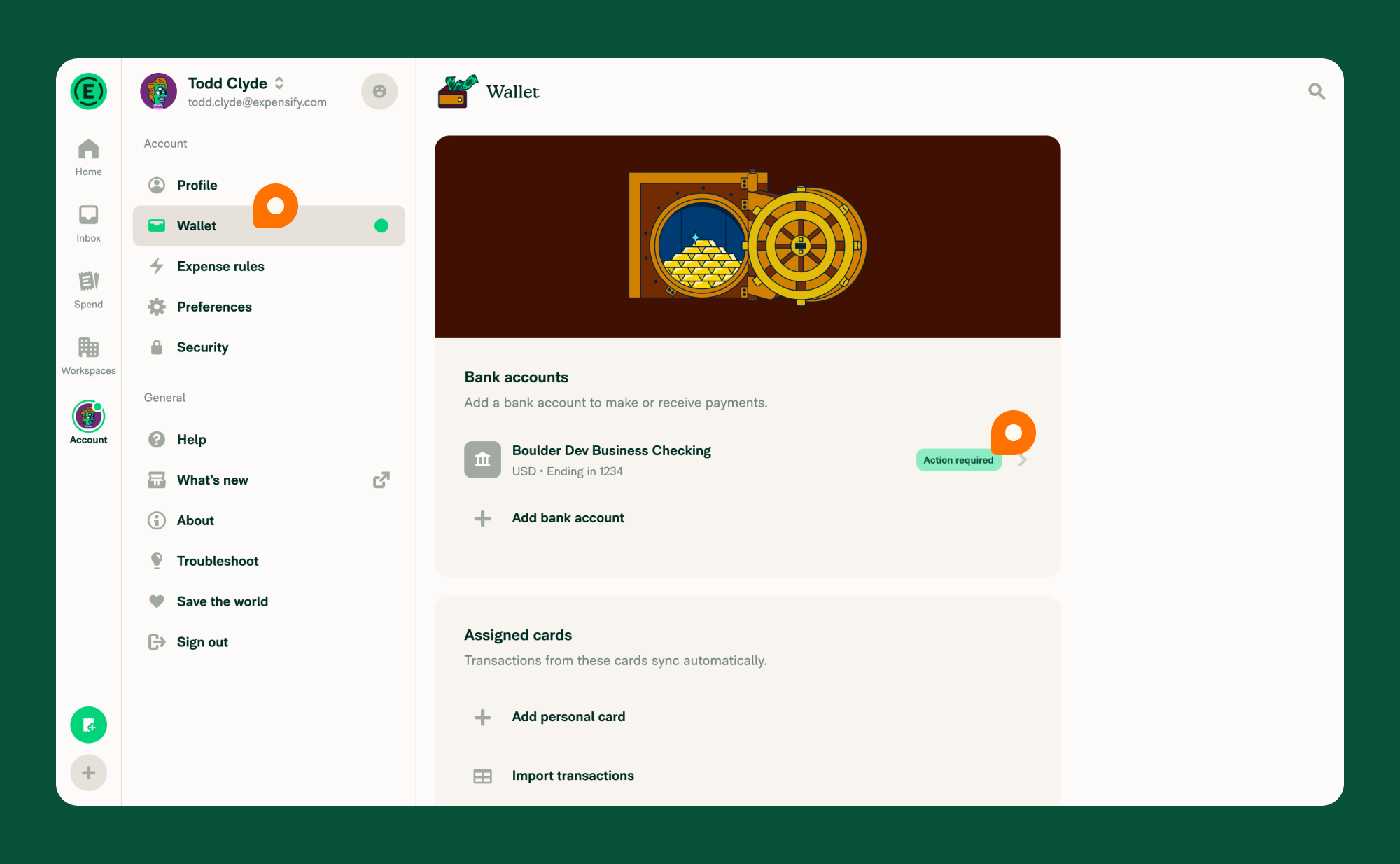
| 2. In the **Bank accounts** section, click the business bank account with the **Action required** badge. | ||
| 3. In the **Validate your bank account** section that appears, enter each transaction amount. | ||
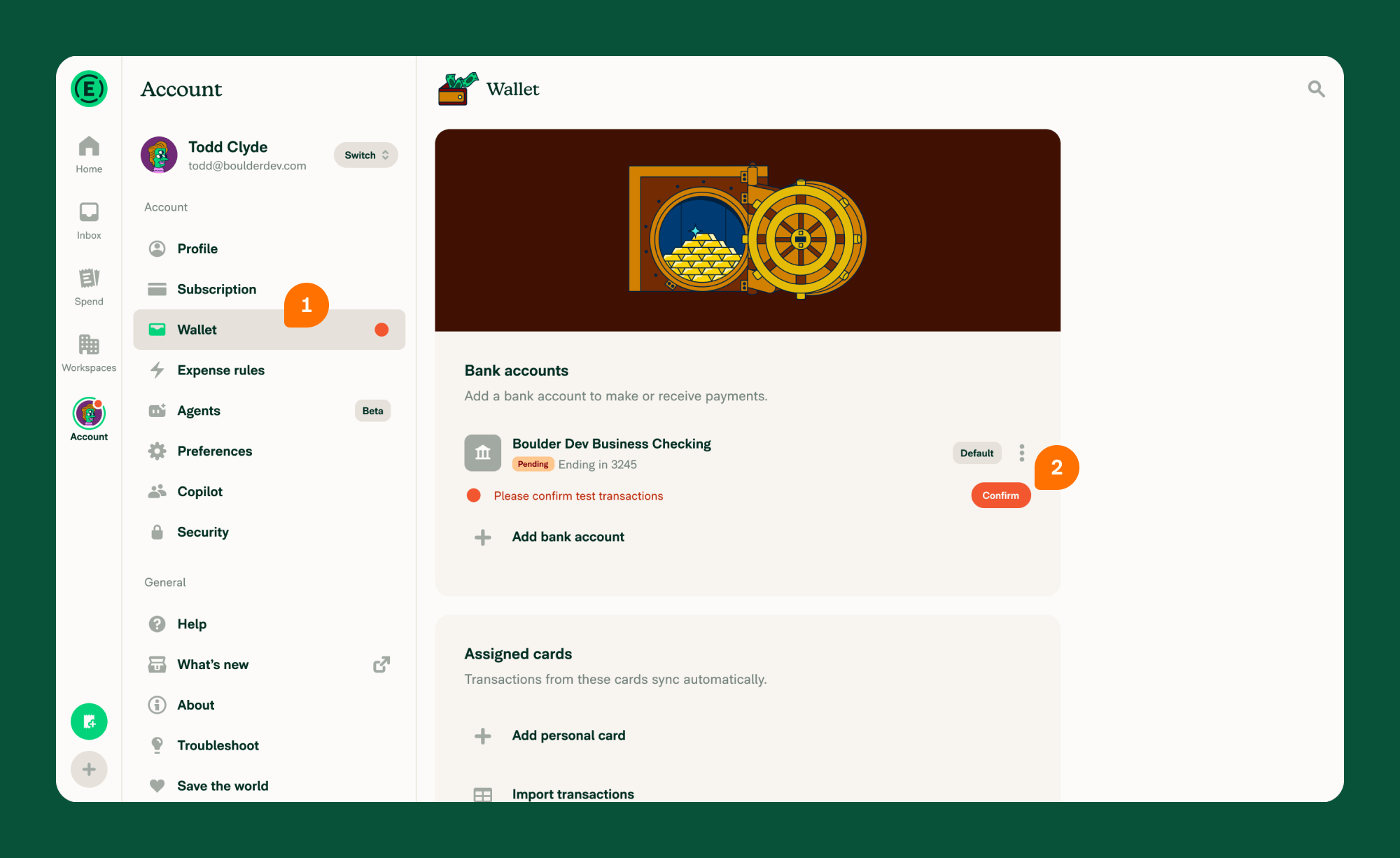
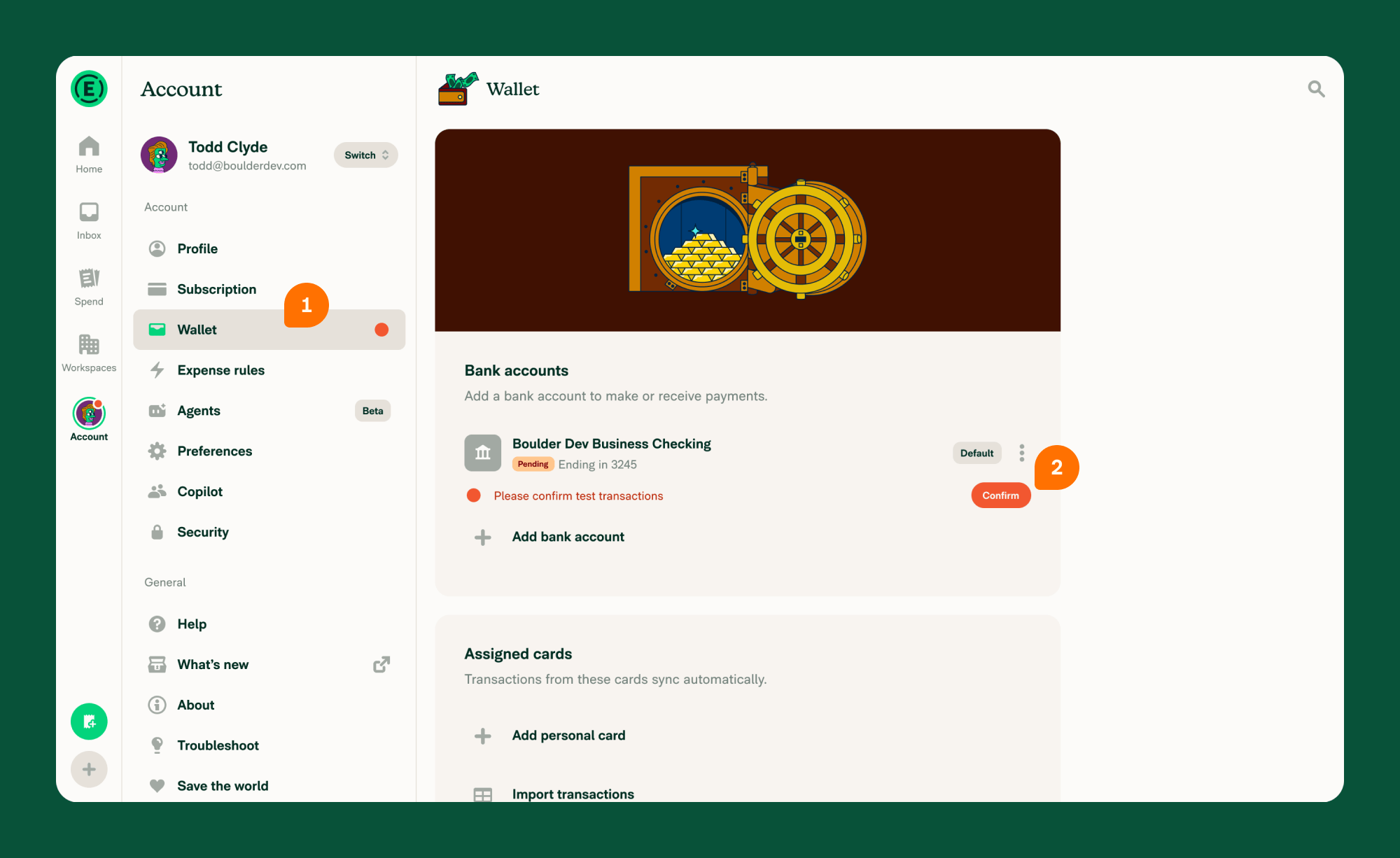
| 2. In the **Bank accounts** section, click the business bank account with the **Pending** badge. It shows the message **Please confirm test transactions** and a **Confirm** action. | ||
| 3. On the **Validate your bank account** screen that appears, enter each amount in **Transaction 1**, **Transaction 2**, and **Transaction 3**. |
There was a problem hiding this comment.

For members without write access to the account's workspace—the group directed to use Account > Wallet above—WalletPage opens the account by bankAccountID because shouldOpenBankAccountByPolicy() returns false, while ReimbursementAccountPage requires a matching policyIDParam for the direct validation redirect. These members therefore see Continue setup and Start over, not this validation screen immediately, so the instructions omit the required Continue setup action.
Useful? React with 👍 / 👎.
There was a problem hiding this comment.
@MelvinBot Address this code comment accordingly.
There was a problem hiding this comment.
The feedback is correct — fixed in a197bd8.
Opening a pending account from Account > Wallet only skips straight to validation when the account has a policyID and you can write to that workspace's Workflows/Payments feature. WalletPage/index.tsx:236-240 otherwise navigates by bankAccountID, which passes no policyID, so shouldRedirectToPendingValidation is false and the Continue setup / Start over entry point renders. That group was exactly the one the article told to use Account > Wallet, so the steps were missing the click they need.
What changed
Validate-a-Business-Bank-Account.md— added a step for the Continue setup screen in the Wallet flow, and rewrote What happens when you open a pending US business bank account to split the two cases instead of claiming both routes skip the entry point.Connect-a-Business-Bank-Account.md,Share-a-Business-Bank-Account.md— same over-broad "goes straight to Validate your bank account" claim corrected.
Details
shouldOpenBankAccountByPolicyreturnscanMemberWrite(policy, login, WORKFLOWS_PAYMENTS)—WalletPage/utils.ts:9-17. It is also false when the account has noadditionalData.policyIDat all, so a business bank account not attached to a workspace hits the entry point too — the doc now covers that case, not just non-admins.- Continue setup is safe to click here:
continueUSDVBBASetupmapsachData.currentStepthroughstepToPageName, and a pending account'sVALIDATIONstep maps to the validation page —ReimbursementAccountPage.tsx:536-553. No company or ownership details are re-asked, which is why the doc points at Continue setup and warns off Start over (bankAccount.clearProgress: "Starting over will clear the progress you've made so far."). - The Workflows section needed no change: that route always carries a
policyID, and a member without Workflows/Payments write access gets the not-authorized screen there instead —ReimbursementAccountPage.tsx:652. npm run spell-changedpasses on all three files (0 issues). I did not verify this on a live account — reproducing it needs a real USD business bank account sitting inPENDINGwith test transactions issued, which is not something a test account can be driven into. The behavior above is read off the routing conditions rather than observed.
Separately, strepanier03's note on the other thread about the two screenshots still showing the old Action required badge is still open — I left those alone since they need new images rather than a text edit. Let me know if you want them removed pending replacements.
view run · no recording available
| {:width="100%"} | ||
|
|
||
| {:width="100%"} |
There was a problem hiding this comment.
Both referenced PNGs still visibly display the old Action required badge (_02 prominently and _03 behind the validation pane); changing only their alt text does not update the rendered images. Since this change specifically explains that this badge does not exist and tells members to find Pending, the screenshots directly contradict the corrected instructions and should be replaced or removed.
Useful? React with 👍 / 👎.
There was a problem hiding this comment.
This is good feedback and we should address the image if it's going to be outdated to the copy updates this PR is for.
There was a problem hiding this comment.
@strepanier03 https://help.expensify.com/assets/images/ExpensifyHelp-BetterBusinessBankAccount_02.png resolves to:

The OP issue's video shows Pending state like so:

while the ExpensifyHelp-BetterBusinessBankAccount_02.png works for Action required badge (previous), it doesn't quite match for Pending state.
So I'm not sure who's supposed to help with these illustrations but that's what needs updated before merging this PR, let me know!
There was a problem hiding this comment.
@MelvinBot Replace the screenshot with the new one: https://raw.githubusercontent.com/Expensify/App/refs/heads/main/docs/assets/images/wallet-test-transactions.png
There was a problem hiding this comment.
Replaced in 3789a00. The first Wallet screenshot (ExpensifyHelp-BetterBusinessBankAccount_02.png) now uses wallet-test-transactions.png, which shows the Pending badge and Confirm action. I also updated its alt text to match.
Two things to know:
ExpensifyHelp-BetterBusinessBankAccount_03.png(the validation pane) still shows a faded Action required badge behind the pane. Do you want a new version of that one too, or should I remove it?- The new image is on
mainbut not on this branch, so the HelpDot preview may show it as broken. It will render on the help site after merge.

|
Review checklist is mostly done but I want to highlight the screenshot inconsistency and make sure it's handled in this or another PR before I approve. |
…pened from Wallet

Co-authored-by: Kevin Brian Bader <ikevin127@users.noreply.github.com>
 github-actions
Bot
changed the title

This comment has been minimized.
This comment has been minimized.
|
I'm going to see if I can get the image using the extension. |
|
Actually, I don't know how to get this image because I don't have an account with this type of setup. I think we might need to ask @Expensify/design for some help recreating the original image with the new button and UI. |

|
Happy to help. What specifically do you need? |
|
@dubielzyk-expensify Checkout this comment 🙌 |
|
Yeah, I saw that, was hoping for some more clarification. So we want this visual here: inserted in here? 
Cause the comment above shows two different screens. |

|
@dubielzyk-expensify Yes, we want that UI with the error / Confirm badge as opposed to the green Action required badge. |

|
Added you @dubielzyk-expensify for the images, thank you again! |
|
What about this? 
|

|
Ugh mono looks so good and I still think it's a pity that we don't use it more 🤣 |
|
@dubielzyk-expensify Thanks for the artwork - looks great. Before I ask Melvin to update the docs in this PR, can we get the URL for this image uploaded at this location (e.g https://help.expensify.com/assets/images/ExpensifyHelp-BetterBusinessBankAccount_02.png) - like wherever this
|
|
I believe that's where @stephanieelliott comes in? I've never uploaded these but here's the file if Stephanie can help 😇 |


|
Added the file here: docs/assets/images/wallet-test-transactions.png Heads up there are instructions for adding images on the README.md file 😀 https://github.com/Expensify/App/tree/main/docs#add-images |
…e and Confirm action

Co-authored-by: Kevin Brian Bader <ikevin127@users.noreply.github.com>
|
@MelvinBot Merge main to resolve conflicts, then explain how come the |
…BankAccountValidation

Co-authored-by: Kevin Brian Bader <ikevin127@users.noreply.github.com>

# Conflicts:
#	docs/articles/new-expensify/wallet-and-payments/Connect-a-Business-Bank-Account.md
#	docs/articles/new-expensify/wallet-and-payments/Share-a-Business-Bank-Account.md
#	docs/articles/new-expensify/wallet-and-payments/Validate-a-Business-Bank-Account.md
|
Merged Why How
|

 ikevin127
left a comment
ikevin127
left a comment
There was a problem hiding this comment.
🟢 LGTM - Thanks for the /docs/ upload guide, will use that moving forward 🙌
melvin-bot
Bot
changed the title
|
🎯 @ikevin127, thanks for reviewing and testing this PR! 🎉 A payment issue will be created for your review once this PR is deployed to production. If payment is not needed (e.g., regression PR review fix etc), react with 👎 to this comment to prevent the payment issue from being created. |
github-actions
Bot
changed the title
|
A preview of your ExpensifyHelp changes have been deployed to https://e21ee240.helpdot.pages.dev ⚡️ Updated articles: |

 strepanier03
left a comment
strepanier03
left a comment
There was a problem hiding this comment.
Re-reviewed the changes and then reviewed the new builds as well. Looking solid.

|
🚀 Deployed to staging by https://github.com/strepanier03 in version: 9.5.0-0 🚀
|
|
🤖 Payment issue created: #102817 |
|
🚀 Deployed to production by https://github.com/Julesssss in version: 9.5.0-5 🚀
Bundle Size Analysis (Sentry): |



Explanation of Change
Help site follow-up for #100113, which made a pending USD bank account open Validate your bank account directly instead of painting the Continue setup / Start over entry point.
Reviewing
docs/articlesagainst that change surfaced two problems — one caused by the change, one a pre-existing inaccuracy in the same flow.1. The
Action requiredbadge does not exist in the product.Three articles told members to look for an Action required badge. That string appears nowhere in
src/languages/en.ts. The real badges come fromsrc/libs/BankAccountUtils.ts:88-125, and they differ by account state:SETUPPENDINGVERIFYINGLOCKEDThis mattered more than a naming nit: a member with a pending account was told to hunt for a badge that never renders, and the distinction between Incomplete (setup not submitted) and Pending (submitted, waiting on test transactions) is exactly what tells them whether there is any setup left to finish.
2. The workspace Workflows path was undocumented.
The redirect in #100113 is gated on
!!policyIDParam && achData?.policyID === policyIDParam, so it covers the workspace entry point — Workspaces > [Workspace name] > Workflows > Payments. That path is the one that previously showed the Continue setup / Start over screen for a pending account, and no article described it;Validate-a-Business-Bank-Account.mddocumented only the Account > Wallet path. The Wallet entry points pass nopolicyIDand are excluded from the redirect, but still reach validation, so both paths are now documented separately.What changed
Validate-a-Business-Bank-Account.md— corrected the badge to Pending with its Please confirm test transactions message and Confirm action; named the amount fields Transaction 1, Transaction 2, Transaction 3 (connectBankAccountStep.validationInputLabel); added a## How to validate a workspace business bank account from Workflowssection; added a## What happens when you open a pending US business bank accountsection explaining that setup is never re-offered, and why this is US-only; noted the Workspace Admin / Payments Admin requirement for the Workflows path; noted that Payments in Workflows is offline-disabled so Wallet is the offline route; fixed fourSettings > Walletreferences to Account > Wallet.Connect-a-Business-Bank-Account.md— replaced the single "Partially set-up accounts display an Action required badge" sentence with the real four-state badge list, and pointed Pending at the validation article.Share-a-Business-Bank-Account.md— corrected the same Action required claim for a shared US account.Label verification
The
app-web-testersession could not be used — its browser page never rendered (0 accessibility nodes, blank screenshots, zero network requests over ~100s), which looks like test-infra rather than a product bug. Every label below was instead verified againstsrc/languages/en.tsand the components that render it, which is the source of truth for UI copy:connectBankAccountStep.validateYourBankAccount→ Validate your bank account, rendered as the header title for a pending account atConnectBankAccount.tsx:130connectBankAccountStep.validateButtonText→ ValidateconnectBankAccountStep.validationInputLabel→ Transaction (fields render asTransaction 1–3)walletPage.bankAccountStatus.*→ Pending, Incomplete, Verifying, Finish, Unlock,Please confirm test transactionswalletPage.personalBankAccounts/businessBankAccounts→ Personal bank accounts / Business bank accountsworkflowsPage.makeOrTrackPaymentsTitle→ Payments;bankAccount.addBankAccount→ Add bank account;workspace.common.workflows→ Workflowscommon.account→ Account,common.wallet→ Wallet (hence Account > Wallet, not Settings > Wallet)Guidelines applied
HELP_AUTHORING_GUIDELINES.md,HELPSITE_NAMING_CONVENTIONS.md, andTEMPLATE.md: both new headings are task-based and start with a question word; only##is used; every UI label is bolded, unquoted, and matches the product's capitalization; the Workflows section gives one unified navigation sentence since web and mobile differ only in tab placement; the one added screenshot placeholder uses the non-rendered HTML comment format and states the specific confusion it resolves.npm run spell-changedpasses (3 files, 0 issues).One pre-existing violation left in place:
Validate-a-Business-Bank-Account.mdhas a third#heading (# Troubleshooting), which the spec allows only for the title and# FAQ. Fixing it means either demoting its children to a banned###depth or splitting the article, so I left it rather than restructure an article beyond the scope of this change. Flagging it for a follow-up.Fixed Issues
$
PROPOSAL:
Docs follow-up requested on #100113. There is no separate help site issue to link.
Tests
// TODO: The human co-author must fill out the tests you ran before marking this PR as "ready for review"
// Please describe what tests you performed that validates your changed worked.
Reviewer note — this is a documentation-only change, so verification means confirming the copy matches the product. With a pending USD business bank account, check that: the Wallet row shows a Pending badge (not Action required), opening it from either Account > Wallet or Workspaces > [Workspace name] > Workflows > Payments lands on Validate your bank account, the three fields read Transaction 1–3, and the submit button reads Validate.
Offline tests
Not applicable — this change only edits Markdown files under
docs/articlesand adds no app behavior.QA Steps
// TODO: The human co-author must fill out the QA tests you ran before marking this PR as "ready for review".
// Please describe what QA needs to do to validate your changes and what areas do they need to test for regressions.
PR Author Checklist
### Fixed Issuessection aboveTestssectionOffline stepssectionQA stepssectionAvatar, I verified the components usingAvatarare working as expected)StyleUtils.getBackgroundAndBorderStyle(theme.componentBG))npm run compress-svg)Avataris modified, I verified thatAvataris working as expected in all cases)Designlabel and/or tagged@Expensify/designso the design team can review the changes.mainbranch was merged into this PR after a review, I tested again and verified the outcome was still expected according to theTeststeps.Screenshots/Videos
Android: Native
Android: mWeb Chrome
iOS: Native
iOS: mWeb Safari
MacOS: Chrome / Safari
@ikevin127, please review the files changed and confirm they reflect the current behavior. Then post a new comment saying
@MelvinBot mark this PR as ready for review.