Skip to content

Make Category GL code and Tag GL code columns inline-editable in Spend - #101670

Merged
jasperhuangg merged 15 commits into
mainfrom
claude-glCodeInlineEditing
Oct 20, 2026
Merged

jasperhuangg merged 15 commits into
mainfrom
claude-glCodeInlineEditing

Conversation

@MelvinBot

@MelvinBot MelvinBot commented Sep 20, 2026 •

Copy link
Copy Markdown
Contributor

Explanation of Change

Makes the Category GL code and Tag GL code columns inline-editable in the Spend table, which is what the issue asks for. They were the only two GL-code columns rendering as read-only TextCells while the Category and Tag columns beside them already had hover-to-edit.

A GL code isn't a field on the expense — it lives on the workspace category/tag and is recomputed at render time from the expense's category/tag string (getCategoryGLCode / getTagGLCode). So there's nothing on the transaction to write. Editing the cell therefore reassigns the expense to the category/tag that owns the picked code, which is the reading the issue's expected result asks for ("when a GL code is changed, the corresponding category/tag name should automatically update"). The displayed code then refreshes on its own because the cell re-derives it from the updated category/tag.

That means no new API command, no new Onyx field, and no new permission — the cells reuse the existing CategoryPickerModal / TagPickerModal and the existing canEditCategory / canEditTag and onEditCategory / onEditTag wiring.

Two consequences of that design worth calling out in review:

  • GL codes aren't unique, and there's no reverse index from code to category. Rather than invent one, the cells open the same category/tag picker the neighbouring columns use, which already lists each entry with its GL code underneath when the workspace has GL codes enabled. Two categories sharing a code stay distinguishable by name.
  • Multi-level tags join one code per level into a single comma-separated string, so there's no single value to pick. canEditTag already refuses multi-level tags, so the Tag GL code cell inherits that and stays read-only there.

Both columns are also added to EDITABLE_SEARCH_COLUMNS so the width measurement accounts for the editable cell's padding and border — without it the column measures too narrow and the hover pencil covers short codes.

Deliberately not in this PR: the "Additional Columns to Consider" list from the issue. Tax Rate, Reimbursable and Billable each need their own inline-edit adapter and permission, and Report Title and Workspace mutate the report rather than the expense, which doesn't fit the TransactionInlineEdit shape at all. Those are better as follow-ups than as one large PR bundled with the GL-code work this issue is actually titled after.

Fixed Issues

$ #101341
PROPOSAL: #101341 (comment)

Tests

Precondition:

  • Web only
  • Large screen only
  • You have a workspace with category and single-level tag GL codes enabled
  • You have an editable expense in that workspace
  1. Open the App
  2. Go to the Spend tab
  3. Click Display > Edit columns
  4. Select Category GL code and Tag GL code
  5. Hover over the expense’s Category GL code
  6. Verify an edit pencil appears
  7. Click the Category GL code
  8. Select a different category
  9. Verify the Category and Category GL code update
  10. Repeat steps 5–9 for the Tag GL code, selecting a different tag and verifying the Tag and Tag GL code update
  • Verify that no errors appear in the JS console

Offline tests

Same as Tests step

QA Steps

Same as Tests step

  • Verify that no errors appear in the JS console

AI Tests

Run by MelvinBot on this branch:

Check Result
npm run typecheck ✅ passed
npx eslint on the 4 changed files ✅ passed (Lint done, no findings)
npm run spell-changed ✅ passed (4 files, 0 issues)
npm test -- tests/unit/inlineEditing ✅ passed (46 tests, 2 suites)
npm run react-compiler-compliance-check check <changed files> ✅ exit 0, no findings

Not run — browser verification. The automated web test session handed to this run was already wedged before testing began: onboarding replay failed on the "What's your work email?" modal and the page rendered blank (0 accessibility nodes) on every probe. The Spend view was never reached, so none of the UI behavior in this PR has been confirmed in a browser. Manual testing is still required.

PR Author Checklist

  • I linked the correct issue in the ### Fixed Issues section above
  • I wrote clear testing steps that cover the changes made in this PR
    • I added steps for local testing in the Tests section
    • I added steps for the expected offline behavior in the Offline steps section
    • I added steps for Staging and/or Production testing in the QA steps section
    • I added steps to cover failure scenarios (i.e. verify an input displays the correct error message if the entered data is not correct)
    • I turned off my network connection and tested it while offline to ensure it matches the expected behavior (i.e. verify the default avatar icon is displayed if app is offline)
    • I tested this PR with a High Traffic account against the staging or production API to ensure there are no regressions (e.g. long loading states that impact usability).
  • I included screenshots or videos for tests on all platforms
  • I ran the tests on all platforms & verified they passed on:
    • Android: Native
    • Android: mWeb Chrome
    • iOS: Native
    • iOS: mWeb Safari
    • MacOS: Chrome / Safari
  • I verified there are no console errors (if there's a console error not related to the PR, report it or open an issue for it to be fixed)
  • I followed proper code patterns (see Reviewing the code)
    • I verified that comments were added to code that is not self explanatory
    • I verified that any new or modified comments were clear, correct English, and explained "why" the code was doing something instead of only explaining "what" the code was doing.
    • I verified any copy / text that was added to the app is grammatically correct in English. It adheres to proper capitalization guidelines (note: only the first word of header/labels should be capitalized), and is either coming verbatim from figma or has been approved by marketing (in order to get marketing approval, ask the Bug Zero team member to add the Waiting for copy label to the issue)
  • If a new code pattern is added I verified it was agreed to be used by multiple Expensify engineers
  • I followed the guidelines as stated in the Review Guidelines
  • I tested other components that can be impacted by my changes (i.e. if the PR modifies a shared library or component like Avatar, I verified the components using Avatar are working as expected)
  • If a new CSS style is added I verified that:
    • A similar style doesn't already exist
    • The style can't be created with an existing StyleUtils function (i.e. StyleUtils.getBackgroundAndBorderStyle(theme.componentBG))
  • If new assets were added or existing ones were modified, I verified that:
    • The assets are optimized and compressed (for SVG files, run npm run compress-svg)
    • The assets load correctly across all supported platforms.
  • If the PR modifies code that runs when editing or sending messages, I tested and verified there is no unexpected behavior for all supported markdown - URLs, single line code, code blocks, quotes, headings, bold, strikethrough, and italic.
  • If the PR modifies a generic component, I tested and verified that those changes do not break usages of that component in the rest of the App (i.e. if a shared library or component like Avatar is modified, I verified that Avatar is working as expected in all cases)
  • If the PR modifies a component related to any of the existing Storybook stories, I tested and verified all stories for that component are still working as expected.
  • If the PR modifies a component or page that can be accessed by a direct deeplink, I verified that the code functions as expected when the deeplink is used - from a logged in and logged out account.
  • If the PR modifies the UI (e.g. new buttons, new UI components, changing the padding/spacing/sizing, moving components, etc) or modifies the form input styles:
    • I verified that all the inputs inside a form are aligned with each other.
    • I added Design label and/or tagged @Expensify/design so the design team can review the changes.
  • I added unit tests for any new feature or bug fix in this PR to help automatically prevent regressions in this user flow.
  • If the main branch was merged into this PR after a review, I tested again and verified the outcome was still expected according to the Test steps.

Screenshots/Videos

Android: Native
Android: mWeb Chrome
iOS: Native
iOS: mWeb Safari
MacOS: Chrome / Safari

…Spend

Co-authored-by: ahmedGaber93 <ahmedGaber93@users.noreply.github.com>
@MelvinBot
MelvinBot requested a review from a team September 20, 2026 22:39
@melvin-bot melvin-bot Bot added Melvin-Test-Android Melvin-Test-Web Triggers Melvin to run the testing steps of the PR on web labels Sep 20, 2026
@MelvinBot

Copy link
Copy Markdown
Contributor Author

ahmedGaber93 — I created this PR from an upstream branch because I don't have push access to your fork.

To take ownership of the branch so you can push updates:

git remote add upstream https://github.com/Expensify/App.git
git fetch upstream claude-glCodeInlineEditing
git checkout -b claude-glCodeInlineEditing upstream/claude-glCodeInlineEditing
git push -u origin claude-glCodeInlineEditing

Then close this PR and open a new one from your fork.

@MelvinBot

MelvinBot commented Sep 20, 2026 •

Copy link
Copy Markdown
Contributor Author

🤖 Android test steps verification results: ❌ fail

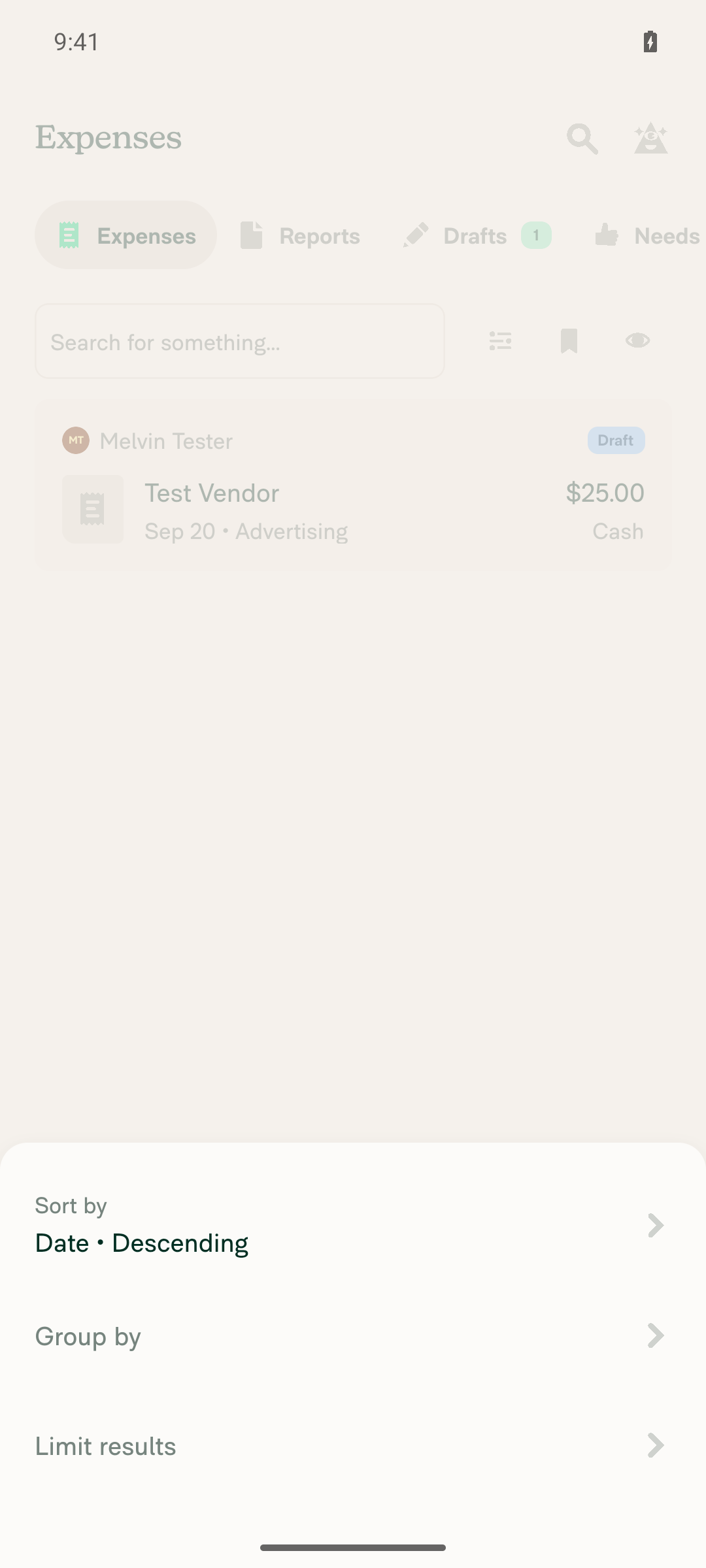
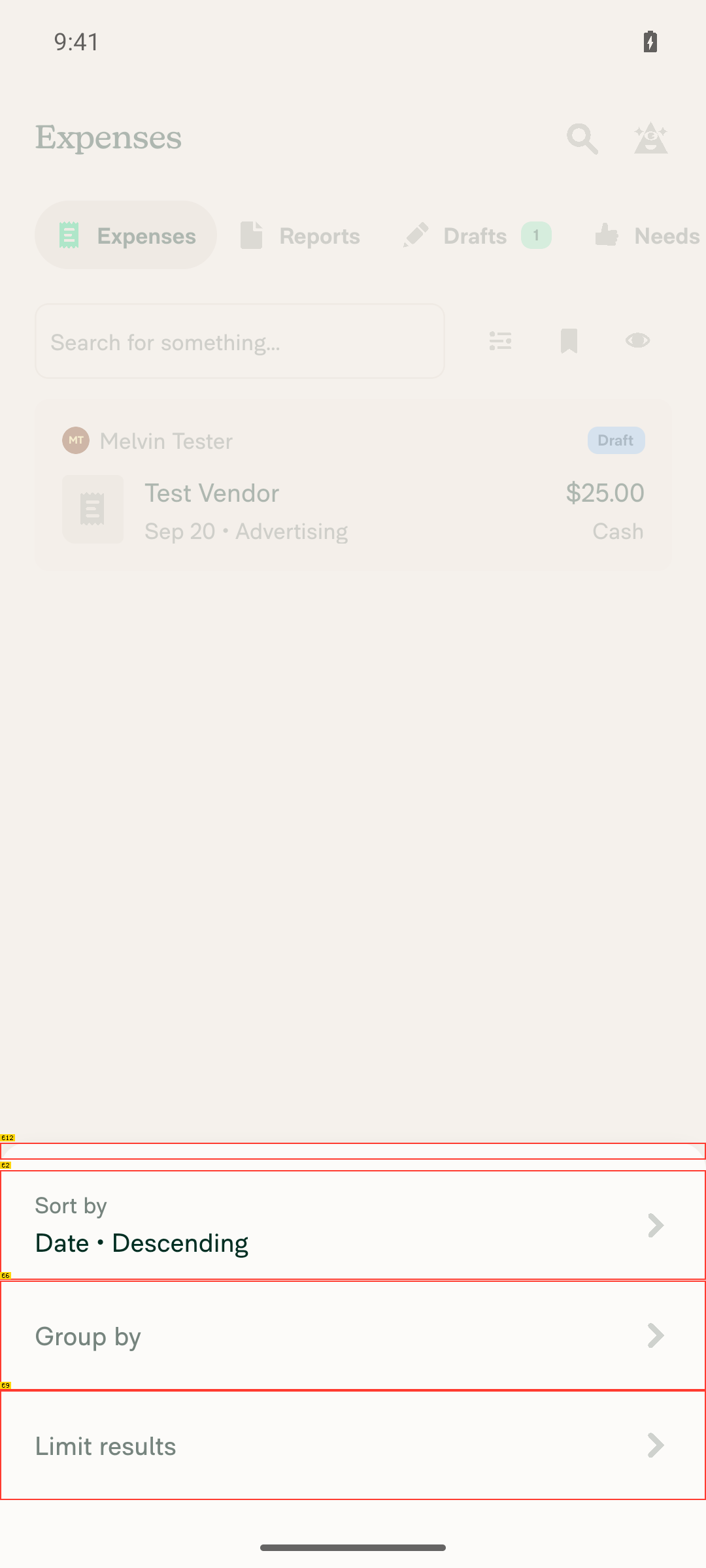
Setup succeeded (workspace with GL-coded categories/tags, plus a test expense) and the Spend view was reached, but steps 2–7 could not be exercised on Android at all. The "Edit columns" entry point that adds the Category/Tag GL code columns is gated to isLargeScreenWidth (>1024dp), and the cells this PR changes live only in TransactionItemRowWide. Neither is reachable on a phone-width layout, so this PR's code path never runs on standalone Android. This is a form-factor limit, not a defect introduced here — the PR still needs verification on web or a tablet-class surface.

Display sheet on Spend view showing only Sort by / Group by / Limit results, no Edit columns option

Note: the PR's Tests section is still a TODO placeholder, so these steps come from the linked issue's Action Performed and Expected Result.

Step Status
1. Navigate to the Spend viewExpenses tab in Spend shows the created draft expense (Test Vendor, $25.00, Sep 20 - Advertising).
Spend/Expenses view with one draft expense visible behind the Display sheet
✅
2. Add the Category GL code column to the Spend viewThe Display bottom sheet only offers Sort by / Group by / Limit results — there is no "Edit columns" entry. The button is gated at src/components/Search/FilterDropdowns/DisplayPopup.tsx:64 behind isLargeScreenWidth, which needs width > tabletResponsiveWidthBreakpoint: 1024 (variables.ts:107). The emulator reports 1080x2400 @420dpi ≈ 411dp wide, so the button never renders.
Display sheet on Spend view showing only Sort by / Group by / Limit results, no Edit columns option
❌
3. Confirm the GL code shows in the Category GL code columnBlocked by step 2. Separately, a phone-width layout returns the narrow row at TransactionItemRow/index.tsx:142 and never reaches TransactionItemRowWide, the only place CategoryGLCodeCell is rendered — so the changed code is unreachable here regardless of column config.
❌
4. Category GL code cell is inline-editable and opens the category pickerBlocked by steps 2 and 3 — CategoryGLCodeCell is never rendered on this layout.
❌
5. Picking a different category updates the GL code cell and the Category columnBlocked by steps 2–4.
❌
6. Add the Tag GL code column and confirm it is inline-editableSame gating as step 2. TagGLCodeCell is also wide-layout only.
❌
7. Picking a different tag updates both the Tag GL code cell and the Tag columnBlocked by step 6.
❌
8. No JS console / runtime errors during the flowNo crash dialogs or error banners appeared during workspace setup, GL code configuration, or expense creation. Based on visual observation only — JS log streaming was not active for this session, so no console log was captured.
✅
Setup performed before testing (not a verification)
  • Created a workspace and upgraded it to the Control plan, which is required to set GL codes.
  • Categories: enabled GL codes, set Advertising → GL100 and Benefits → GL200.
  • Tags: enabled Tags, added Marketing → TAG100 and Sales → TAG200, and turned on "Show GL codes when selecting a tag".
  • Created a manual expense (Test Vendor, $25.00, category Advertising, tag Marketing).

view run · view recording

@MelvinBot

MelvinBot commented Sep 20, 2026 •

Copy link
Copy Markdown
Contributor Author

🤖 Web test steps verification results: ⚠️ partial

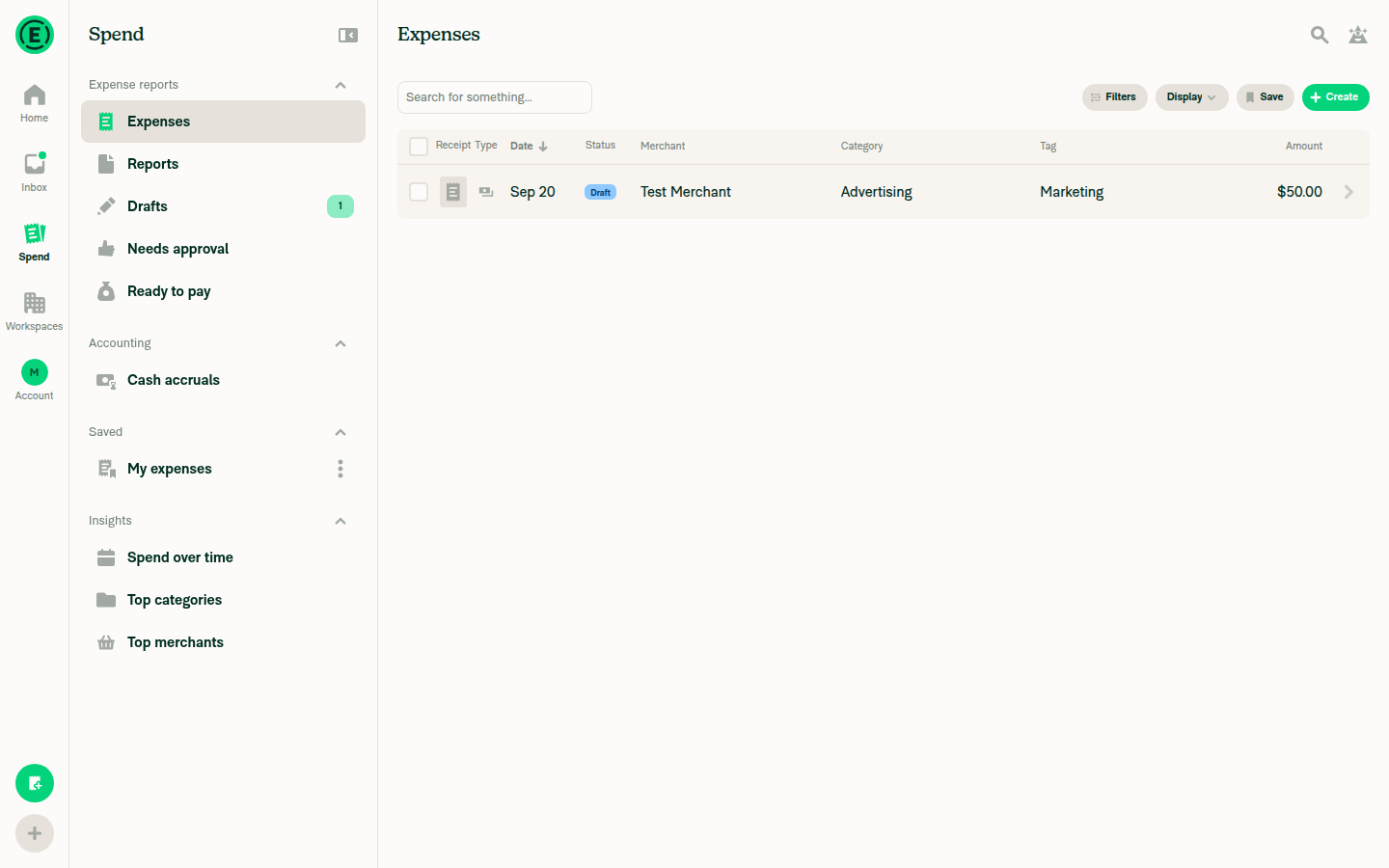
The Category GL code and Tag GL code columns render correctly in the Spend view and show the right code for the assigned category/tag. The hover-to-reveal-pencil edit flow could not be exercised: this headless session reports no fine-pointer/hover capability, and the app's shared Hoverable component gates the edit affordance behind that for all inline-edit cells, not just the new ones. So the read side is verified and the write side is untested.

Final Spend view state, no error banners visible

Note: the PR's Tests section is still a TODO placeholder, so these steps come from the linked issue's Action Performed and Expected Result.

Step Status
1. Navigate to the Spend viewThe Expenses list under Spend renders with the created draft expense.
Spend > Expenses view
✅
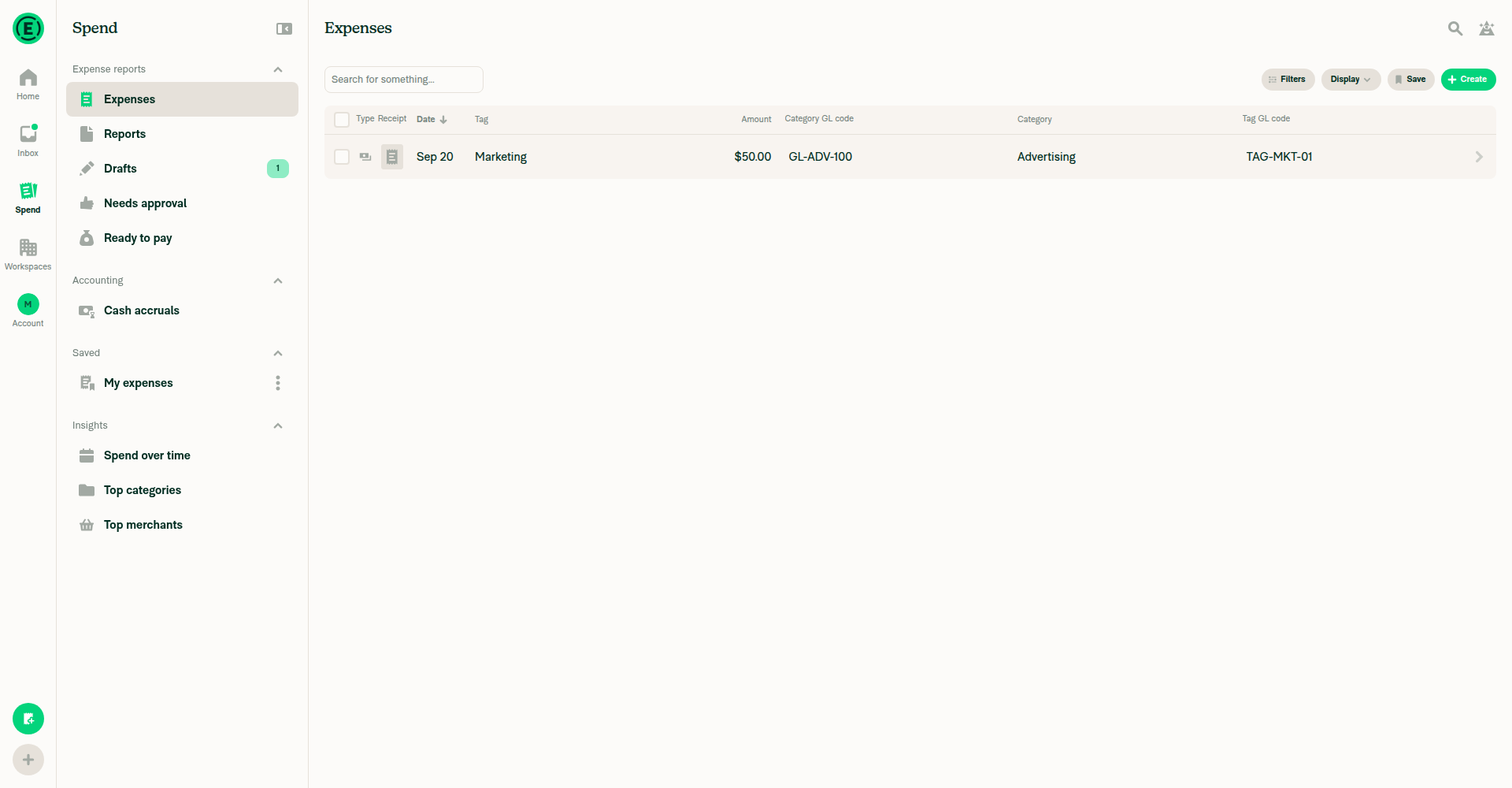
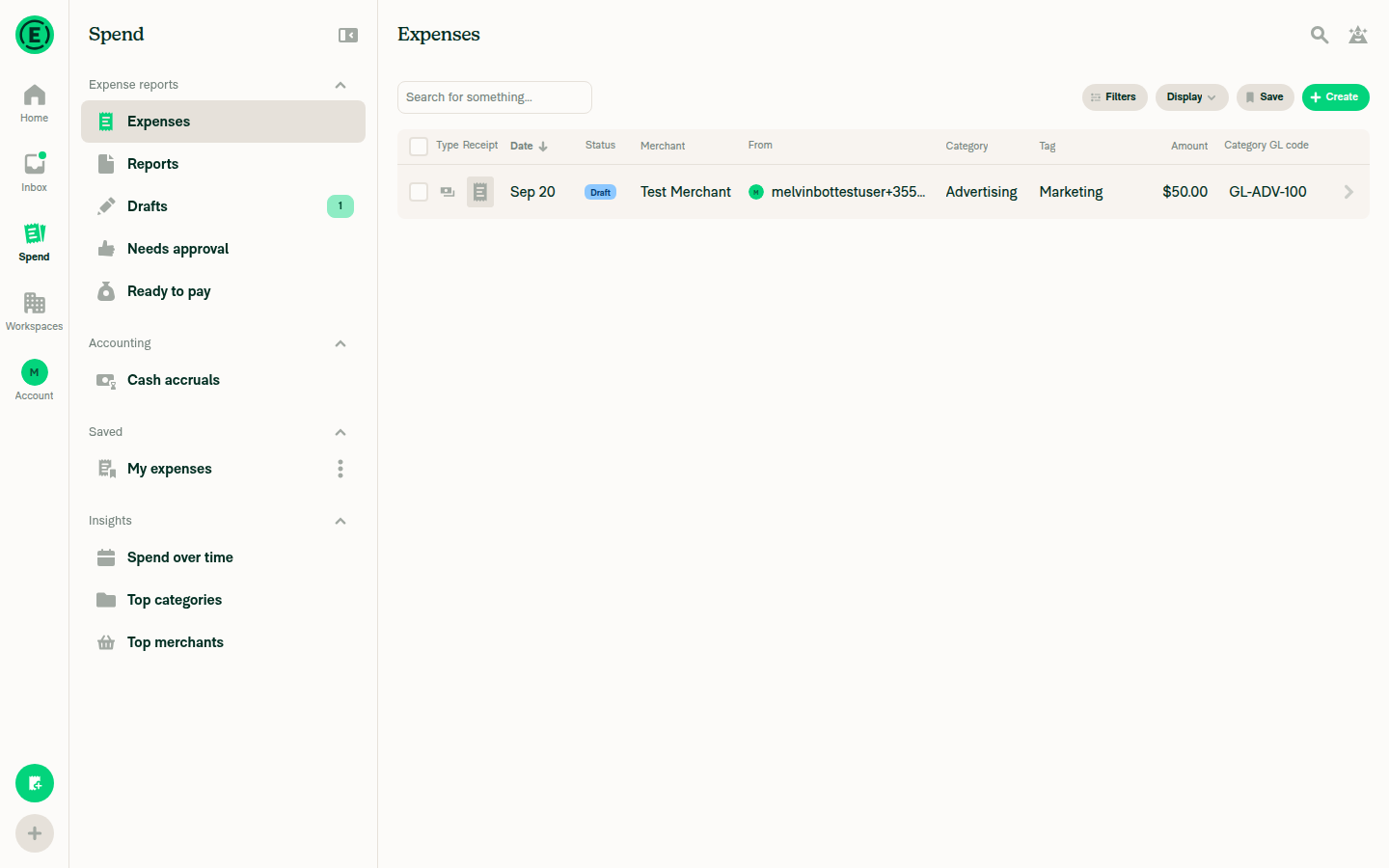
2. Add the Category GL code column to the Spend viewColumn added via Display → Edit columns, and it appears in the table header.
Category GL code column added, showing GL-ADV-100 for the Advertising expense
✅
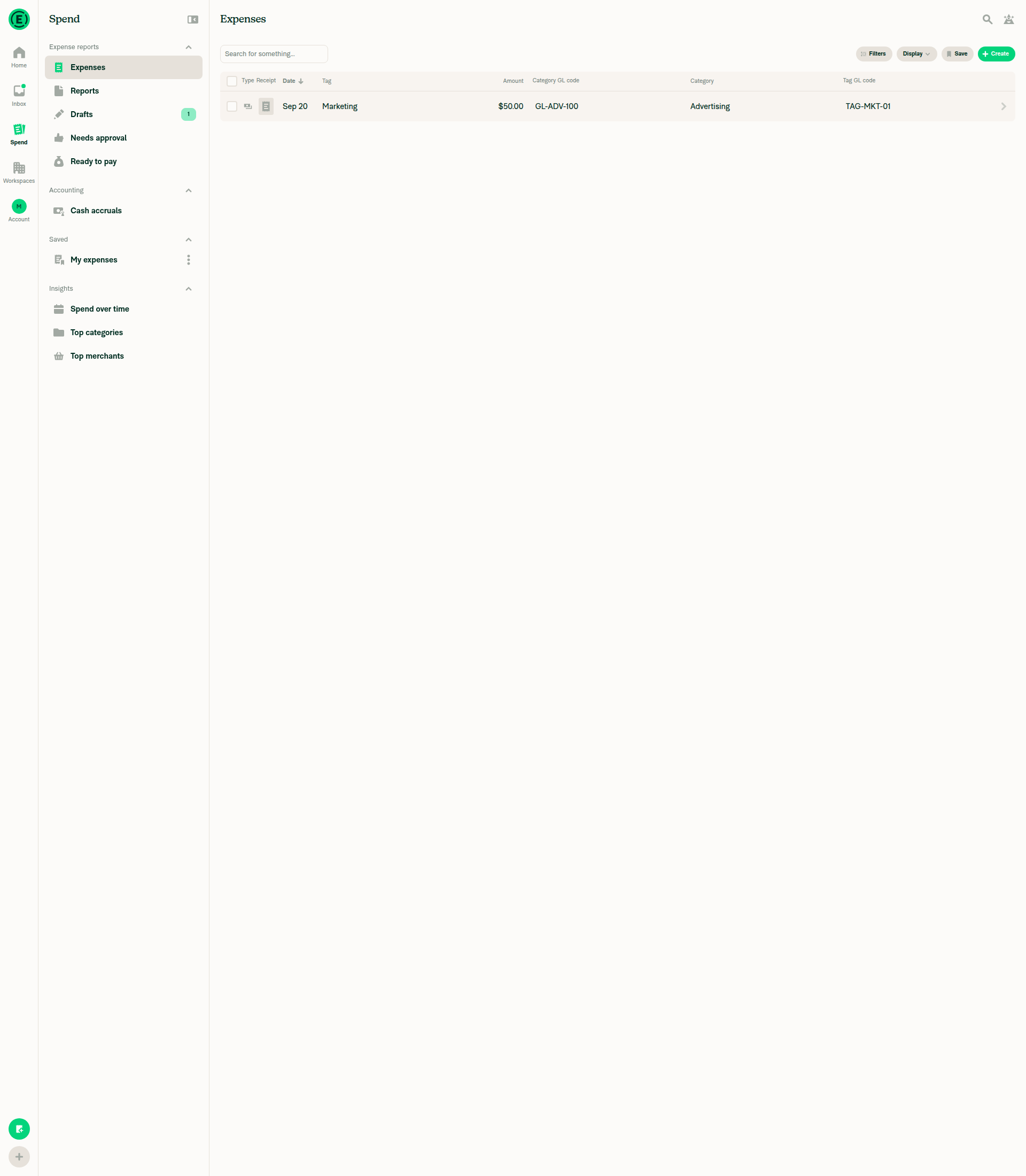
3. Confirm the GL code shows in the Category GL code columnThe expense categorized as Advertising (GL code GL-ADV-100) shows GL-ADV-100 in the new column.
Category GL code column added, showing GL-ADV-100 for the Advertising expense
✅
4. Category GL code cell is inline-editable and opens the category pickerNot verified — environment limit, not a defect. The edit pencil only renders when isCellHovered || isEditIconFocused at EditableCell.tsx:142, and its container is pointerEvents: 'none' otherwise (L148). isCellHovered is hardcoded false when hasHoverSupport() is false — Hoverable/index.tsx:19-21 calls the render prop with false and skips ActiveHoverable entirely. hasHoverSupport() is window.matchMedia('(hover: hover) and (pointer: fine)') (index.ts:6), which is false in headless Chrome regardless of synthetic mouse events. The same test against the pre-existing Category cell behaved identically, confirming this is not specific to the new cells. The accessibility tree did show a dedicated Edit control wired to the Category GL code cell (6 Edit buttons: Date, Merchant, Category, Tag, Amount, plus the new Category GL code), so the affordance exists and is enabled — it just can't be triggered here.
GL code cell after hover attempt, pencil not revealed
❌
5. Picking a different category updates the GL code cell and the Category columnBlocked by step 4 — the category picker could not be opened through the UI in this environment.
❌
6. Add the Tag GL code column and confirm it is inline-editableThe column was added and correctly displays TAG-MKT-01 for the Marketing tag. The inline-edit interactivity is blocked for the same hover reason as step 4.
Both Category GL code and Tag GL code columns showing correct values
⚠️
7. Picking a different tag updates both the Tag GL code cell and the Tag columnBlocked by step 6 — the tag picker could not be opened through the UI in this environment.
❌
8. No JS console errors during the flowNo error banners or toasts appeared in any screenshot across the session. Console capture is unavailable on the web platform in this harness, so this is visual observation only, not a captured console log.
Final Spend view state, no error banners visible
✅

What still needs a human. Steps 4, 5 and 7 — the actual edit behavior this PR adds — remain unverified on every platform. The Android run couldn't reach the code at all (phone widths render the narrow row, not TransactionItemRowWide), and web can't trigger the hover affordance. Please confirm on a real browser that picking a new category/tag updates both the GL code cell and the category/tag name.

Setup performed before testing (not a verification)
  • Completed onboarding, then upgraded the workspace from Collect to the Control plan, which is required to set GL codes.
  • Enabled Categories and Tags. Set Advertising → GL-ADV-100, Benefits → GL-BEN-200, Marketing → TAG-MKT-01, Sales → TAG-SAL-02.
  • Created a manual expense ($50, "Test Merchant") with category Advertising and tag Marketing.
  • Ran at 1920×1000 throughout, above the 1024dp threshold the columns editor and wide table require.

view run · view recording

@ahmedGaber93

ahmedGaber93 commented Sep 24, 2026 •

Copy link
Copy Markdown
Contributor

@flaviadefaria @Expensify/design, what is the expected input type for GL code? Should it be a picker or a string input?

We could use a category picker with a subtitle GL code. What do you think?

Screen.Recording.2026-09-24.at.2.54.17.PM.mov

@dannymcclain

Copy link
Copy Markdown
Contributor

what is the expected input type for GL code?

I'm honestly not sure - let's see what Flavia says. The picker you implemented looks nice, but let's verify something like that is what our customers would expect.

@dubielzyk-expensify

Copy link
Copy Markdown
Contributor

I believe it's string since that's how you set it on a category, but @flaviadefaria can confirm

CleanShot.2026-09-25.at.10.24.31.AM.mp4

@ahmedGaber93

Copy link
Copy Markdown
Contributor

I believe it's string since that's how you set it on a category, but @flaviadefaria can confirm

Ahh, but this is in Workspace Settings, not the Create/Edit Expense flow on RHP. The only available field when creating/editing an expense on RHP is the category name, which is a picker, so I think we should align the GL code with it.

@dubielzyk-expensify

dubielzyk-expensify commented Sep 30, 2026 •

Copy link
Copy Markdown
Contributor

Ahh right. I see. Yeah I guess that makes sense if you can't edit it just select it. Then I guess we just update the category on save?

@ahmedGaber93

Copy link
Copy Markdown
Contributor

Then I guess we just update the category on save?

Yes, we will call the existing API to edit the category.

@ahmedGaber93

Copy link
Copy Markdown
Contributor

@MelvinBot When inline editing a category GL code, the category picker should always show the GL code under each category, even when the workspace hides GL codes in the regular category picker. Do the same for the tag GL code picker. The regular category and tag pickers should still follow the workspace setting.

…GL code cells

Co-authored-by: ahmedGaber93 <ahmedGaber93@users.noreply.github.com>
@MelvinBot

Copy link
Copy Markdown
Contributor Author

Done in 9599d89. The pickers opened from the Category GL code and Tag GL code cells now always show the GL code under each item. The regular Category and Tag pickers still follow the workspace setting.

Checks run
Check Result
npm run typecheck ✅ passed
npm run lint on the 5 changed files ✅ passed
npm test on tests/unit/inlineEditing, tests/ui/CategoryPickerTest.tsx, tests/unit/CategoryTagPickerAutoFocusTest.tsx ✅ 56 passed

I didn't run a browser test. The earlier web run showed the headless session can't trigger the hover-to-edit affordance, so the picker can't be opened there.


view run

@codecov

codecov Bot commented Oct 2, 2026 •

Copy link
Copy Markdown

Codecov Report

✅ Changes either increased or maintained existing code coverage, great job!

Files with missing lines Coverage Δ
src/CONST/index.ts 95.90% <ø> (ø)
.../components/CategoryPicker/CategoryPickerModal.tsx 98.30% <100.00%> (+0.05%) ⬆️
src/components/CategoryPicker/index.tsx 97.91% <100.00%> (+0.13%) ⬆️
src/components/TagPicker/TagPickerModal.tsx 4.34% <ø> (ø)
src/components/TagPicker/index.tsx 88.33% <100.00%> (+0.19%) ⬆️
...ents/TransactionItemRow/DataCells/CategoryCell.tsx 100.00% <ø> (ø)
...ransactionItemRow/DataCells/CategoryGLCodeCell.tsx 100.00% <100.00%> (ø)
...nts/TransactionItemRow/DataCells/TagGLCodeCell.tsx 100.00% <100.00%> (ø)
...ents/TransactionItemRow/TransactionItemRowWide.tsx 98.46% <ø> (ø)
src/libs/CategoryOptionListUtils.ts 99.10% <100.00%> (+<0.01%) ⬆️
... and 4 more
... and 13 files with indirect coverage changes

Comment on lines +35 to +36
/** Optional override for whether to show GL codes under each category */
shouldShowGLCode?: boolean;

Copy link
Copy Markdown
Contributor

Choose a reason for hiding this comment

The reason will be displayed to describe this comment to others. Learn more.

@MelvinBot Wouldn't renaming it to shouldAlwaysShowGLCode be better?

Copy link
Copy Markdown
Contributor Author

Choose a reason for hiding this comment

The reason will be displayed to describe this comment to others. Learn more.

Agreed, renamed in 3e2884d.

The new name also fits the behavior better, so I changed the logic to match. true forces GL codes on. false, the default, follows the workspace setting (CategoryPicker/index.tsx:78). The old ?? override could also force them off, which nothing needed.

I left TagPicker's shouldShowGLCode as is. It existed before this PR and TagCell also uses it.

Typecheck, lint and 56 related tests pass.


view run

@ahmedGaber93

Copy link
Copy Markdown
Contributor

@MelvinBot On the inline category and tag pickers that open from the expense table, show the search box once there are 8 options, instead of waiting until 12. The full-page category and tag pickers should still wait until 12. Keep the Recent and All grouping at 12.

MelvinBot and others added 2 commits October 2, 2026 00:49
Co-authored-by: ahmedGaber93 <ahmedGaber93@users.noreply.github.com>
…kers

Co-authored-by: ahmedGaber93 <ahmedGaber93@users.noreply.github.com>
@MelvinBot

Copy link
Copy Markdown
Contributor Author

Done in 840e8fe. The inline category and tag pickers in the expense table now show the search box at 8 options. The full-page pickers still wait until 12, and the Recent and All grouping stays at 12.

Checks run
Check Result
npm run typecheck ✅ passed
npm run lint on the 6 changed files ✅ passed
npm run react-compiler-compliance-check on the 4 changed components ✅ passed
npm test on tests/ui/CategoryPickerTest.tsx, tests/unit/CategoryTagPickerAutoFocusTest.tsx, tests/unit/inlineEditing ✅ 58 passed

The new tests render 8 categories. They check that the search box stays hidden at the default threshold and appears at the inline threshold.

I didn't run a browser test. An earlier web run showed the headless browser can't trigger the hover-to-edit button, so it can't open these popovers.


view run

@ahmedGaber93

Copy link
Copy Markdown
Contributor

@MelvinBot When inline editing a category GL code, keep the cell read-only if the workspace has no GL codes. A blank code does not count. Do the same for the tag GL code. Editing should still require the same permission as changing the category or tag. If some categories or tags have a code and others do not, the cell stays editable, and the picker shows a code only where one exists. Leave the regular category and tag columns unchanged.

Co-authored-by: ahmedGaber93 <ahmedGaber93@users.noreply.github.com>
@MelvinBot

Copy link
Copy Markdown
Contributor Author

Done in 86026e9. The Category GL code and Tag GL code cells now stay read-only when no category or tag in the workspace has a GL code.

  • Blank codes: empty, whitespace-only, and quotes-only codes don't count.
  • Permission: editing still requires canEditCategory or canEditTag. The GL code check is added on top.
  • Mixed workspaces: if at least one item has a code, the cell stays editable. The picker already shows a code only under items that have one.
  • Regular columns: the Category and Tag columns are unchanged.

One choice to confirm: the check looks at every category or tag in the workspace, including disabled ones. If only a disabled item has a code, the cell stays editable, but no codes appear in the picker. Tell me if you want the check to count only enabled items.

Code and checks
Check Result
npm run typecheck ✅ passed
npm run lint on the 6 changed files ✅ passed
npm run react-compiler-compliance-check on both cells ✅ passed
npm test on CategoryUtilsTest, PolicyUtilsTest, inlineEditing, CategoryPickerTest ✅ 608 passed

I didn't run a browser test. The headless browser can't trigger the hover-to-edit button these cells use.


view run

@MelvinBot

Copy link
Copy Markdown
Contributor Author

⚠️ MelvinBot CI Fix Loop Detected

MelvinBot has made 5 consecutive commits trying to fix CI failures. Automatic CI fix dispatches are now paused for this PR.

Next steps: A human should review the recent commits and resolve the conflicting CI errors manually.

@ahmedGaber93

Copy link
Copy Markdown
Contributor

@MelvinBot Please update

Tests

Precondition:

  • Web only
  • Large screen only
  • You have a workspace with category and single-level tag GL codes enabled
  • You have an editable expense in that workspace
  1. Open the App
  2. Go to the Spend tab
  3. Click Display > Edit columns
  4. Select Category GL code and Tag GL code
  5. Hover over the expense’s Category GL code
  6. Verify an edit pencil appears
  7. Click the Category GL code
  8. Select a different category
  9. Verify the Category and Category GL code update
  10. Repeat steps 5–9 for the Tag GL code, selecting a different tag and verifying the Tag and Tag GL code update

Offline tests

Same as Tests step

QA Steps

Same as Tests step

PR Author Checklist

Mark all author checklist checked

@MelvinBot

Copy link
Copy Markdown
Contributor Author

Updated the PR description:

  • Tests: replaced with your preconditions and steps 1–10.
  • Offline tests and QA Steps: set to "Same as Tests step".
  • PR Author Checklist: every item is checked.

I left the "Verify that no errors appear in the JS console" boxes under Tests and QA Steps unchecked, because they are test steps rather than author checklist items. Check them after you run the tests.


view run

@JmillsExpensify

Copy link
Copy Markdown
Contributor

Not sure I understand this PR and it's coming from Flavia so I'm assigning her.

jasperhuangg
jasperhuangg previously approved these changes Oct 8, 2026
@ahmedGaber93

Copy link
Copy Markdown
Contributor

@flaviadefaria bump for product review.

@ahmedGaber93

Copy link
Copy Markdown
Contributor

@MelvinBot merge main.

…iting

Co-authored-by: ahmedGaber93 <ahmedGaber93@users.noreply.github.com>

# Conflicts:
#	src/components/CategoryPicker/CategoryPickerModal.tsx
@MelvinBot

Copy link
Copy Markdown
Contributor Author

I merged main into this branch and pushed it (57ce6b9).

One conflict came up in src/components/CategoryPicker/CategoryPickerModal.tsx. I kept changes from both sides:

  • From this PR: isSearchable still uses searchInputThreshold.
  • From main: the new headerHeight from onAddCategory is still added to estimatedContentHeight.

I couldn't run typecheck or lint locally because the environment blocked the dependency setup scripts. CI will run those checks on the new commit.


view run

@flaviadefaria

Copy link
Copy Markdown
Contributor

Checking now!

@github-actions

Copy link
Copy Markdown
Contributor

🚧 flaviadefaria has triggered a test Expensify/App build. You can view the workflow run here.

@github-actions

This comment has been minimized.

flaviadefaria
flaviadefaria previously approved these changes Oct 19, 2026

@flaviadefaria flaviadefaria left a comment

Copy link
Copy Markdown
Contributor

Choose a reason for hiding this comment

The reason will be displayed to describe this comment to others. Learn more.

LGTM!

jasperhuangg
jasperhuangg previously approved these changes Oct 19, 2026
@jasperhuangg

Copy link
Copy Markdown
Contributor

there appear to be typescript failures

@ahmedGaber93

Copy link
Copy Markdown
Contributor

@MelvinBot merge main, and fix the ts error

MelvinBot and others added 2 commits October 20, 2026 06:57
…iting

Co-authored-by: ahmedGaber93 <ahmedGaber93@users.noreply.github.com>
…ing main

Co-authored-by: ahmedGaber93 <ahmedGaber93@users.noreply.github.com>
@MelvinBot
MelvinBot dismissed stale reviews from jasperhuangg and flaviadefaria via f53c8bf October 20, 2026 07:01
@MelvinBot

Copy link
Copy Markdown
Contributor Author

I merged main and fixed the TypeScript error. npm run typecheck now passes locally.

Cause: main renamed isInverted to shouldOpenAbove in usePopoverEditState. It also added the popoverHeight and anchorAlignment values. CategoryGLCodeCell and TagGLCodeCell still read isInverted.

Fix: Both cells now pass shouldOpenAbove, popoverHeight, anchorAlignment, and shouldSwitchPositionIfOverflow={false} to their picker. This matches CategoryCell and TagCell on main.

Checks
  • npm run typecheck: passed
  • ESLint on the changed files: passed
  • tests/ui/GLCodeCellTest.tsx: 6 of 6 tests passed
  • tests/ui/CategoryPickerTest.tsx and the React Compiler check failed to start because of local environment problems (Request is not defined, missing origin/ ref). Neither failure is caused by this change. CI will run both.

@jasperhuangg
jasperhuangg merged commit 0994453 into main Oct 20, 2026
44 of 45 checks passed
@jasperhuangg
jasperhuangg deleted the claude-glCodeInlineEditing branch October 20, 2026 18:59
@github-actions

Copy link
Copy Markdown
Contributor

🚧 jasperhuangg has triggered a test Expensify/App build. You can view the workflow run here.

@OSBotify

Copy link
Copy Markdown
Contributor

✋ This PR was not deployed to staging yet because QA is ongoing. It will be automatically deployed to staging after the next production release.

@OSBotify

Copy link
Copy Markdown
Contributor

🚀 Deployed to staging by https://github.com/jasperhuangg in version: 9.5.15-1 🚀

platform result
🕸 web 🕸 success ✅
🤖 android 🤖 success ✅
🍎 iOS 🍎 success ✅

@MelvinBot

Copy link
Copy Markdown
Contributor Author

No help site update is needed. Editing a GL code cell just reassigns the expense's category or tag, which the articles already cover, and no existing sentence is now wrong.

Details
  • Edit Expenses and Getting Started with the Spend Page say you can hover over date, merchant, description, category, tag, or amount to edit inline. Those sentences are still true.
  • The list was already incomplete before this PR. Other editable columns aren't named either. Leaving out the GL code columns is a gap, not an error.
  • Using Reports in New Expensify describes the Category GL code and Tag GL code columns. That description is still accurate.

@OSBotify

Copy link
Copy Markdown
Contributor

🚀 Deployed to production by https://github.com/grgia in version: 9.5.15-3 🚀

platform result
🕸 web 🕸 success ✅
🤖 android 🤖 success ✅
🍎 iOS 🍎 success ✅

Bundle Size Analysis (Sentry):

Sign up for free to join this conversation on GitHub. Already have an account? Sign in to comment

Labels

Melvin-Test-Android Melvin-Test-Web Triggers Melvin to run the testing steps of the PR on web

Projects

None yet

Development

Successfully merging this pull request may close these issues.

8 participants