Skip to content

Match the autoGrowHeight measurement text's line breaking to the input on Android - #102149

Merged
chuckdries merged 6 commits into
mainfrom
claude-androidTitleBoxAutoGrow
Sep 30, 2026
Merged

chuckdries merged 6 commits into
mainfrom
claude-androidTitleBoxAutoGrow

Conversation

@MelvinBot

@MelvinBot MelvinBot commented Sep 24, 2026 •

Copy link
Copy Markdown
Contributor

Explanation of Change

The height of an autoGrowHeight input comes from a hidden, off-screen <Text> copy of the value in TextInputMeasurement. The container uses that copy's measured height.

On Android, React Native's <Text> uses the highQuality line breaker by default, but RNTextInput sets textBreakStrategy="simple". The hidden copy and the visible input therefore wrap words at different points. The input gains a line first, while the copy still reports the old line count. The box stays a line short until enough characters are typed for the copy to wrap too. Because wrapping is word-by-word, the box seems to grow only once the text reaches the middle of the new line.

This change sets textBreakStrategy="simple" on both hidden measurement <Text> elements, so they break lines the same way as the input. The prop only affects Android.

This is not a regression from #97489. That PR only turned on this measurement path for the report title, where the lag became visible. The measurement path itself is old, which is why the bug also reproduces in production.

Fixed Issues

$ #99718
PROPOSAL: #99718 (comment)

Tests

  1. Navigate to workspace chat.
  2. Create a manual expense.
  3. Open the just created expense and tap on the title to edit it.
  4. Start typing on title box, until more lines of text are created.
  5. Verify that report title box is automatically expanded when text reaches new lines.
  • Verify that no errors appear in the JS console

Offline tests

Same as Tests

QA Steps

Same as Tests

  • Verify that no errors appear in the JS console

PR Author Checklist

  • I linked the correct issue in the ### Fixed Issues section above
  • I wrote clear testing steps that cover the changes made in this PR
    • I added steps for local testing in the Tests section
    • I added steps for the expected offline behavior in the Offline steps section
    • I added steps for Staging and/or Production testing in the QA steps section
    • I added steps to cover failure scenarios (i.e. verify an input displays the correct error message if the entered data is not correct)
    • I turned off my network connection and tested it while offline to ensure it matches the expected behavior (i.e. verify the default avatar icon is displayed if app is offline)
    • I tested this PR with a High Traffic account against the staging or production API to ensure there are no regressions (e.g. long loading states that impact usability).
  • I included screenshots or videos for tests on all platforms
  • I ran the tests on all platforms & verified they passed on:
    • Android: Native
    • Android: mWeb Chrome
    • iOS: Native
    • iOS: mWeb Safari
    • MacOS: Chrome / Safari
  • I verified there are no console errors (if there's a console error not related to the PR, report it or open an issue for it to be fixed)
  • I followed proper code patterns (see Reviewing the code)
    • I verified that any callback methods that were added or modified are named for what the method does and never what callback they handle (i.e. toggleReport and not onIconClick)
    • I verified that comments were added to code that is not self explanatory
    • I verified that any new or modified comments were clear, correct English, and explained "why" the code was doing something instead of only explaining "what" the code was doing.
    • I verified any copy / text that was added to the app is grammatically correct in English. It adheres to proper capitalization guidelines (note: only the first word of header/labels should be capitalized), and is either coming verbatim from figma or has been approved by marketing (in order to get marketing approval, ask the Bug Zero team member to add the Waiting for copy label to the issue)
  • If a new code pattern is added I verified it was agreed to be used by multiple Expensify engineers
  • I followed the guidelines as stated in the Review Guidelines
  • I tested other components that can be impacted by my changes (i.e. if the PR modifies a shared library or component like Avatar, I verified the components using Avatar are working as expected)
  • If any new file was added I verified that:
    • The file has a description of what it does and/or why is needed at the top of the file if the code is not self explanatory
  • If a new CSS style is added I verified that:
    • A similar style doesn't already exist
    • The style can't be created with an existing StyleUtils function (i.e. StyleUtils.getBackgroundAndBorderStyle(theme.componentBG))
  • If new assets were added or existing ones were modified, I verified that:
    • The assets are optimized and compressed (for SVG files, run npm run compress-svg)
    • The assets load correctly across all supported platforms.
  • If the PR modifies code that runs when editing or sending messages, I tested and verified there is no unexpected behavior for all supported markdown - URLs, single line code, code blocks, quotes, headings, bold, strikethrough, and italic.
  • If the PR modifies a generic component, I tested and verified that those changes do not break usages of that component in the rest of the App (i.e. if a shared library or component like Avatar is modified, I verified that Avatar is working as expected in all cases)
  • If the PR modifies a component related to any of the existing Storybook stories, I tested and verified all stories for that component are still working as expected.
  • If the PR modifies a component or page that can be accessed by a direct deeplink, I verified that the code functions as expected when the deeplink is used - from a logged in and logged out account.
  • If the PR modifies the UI (e.g. new buttons, new UI components, changing the padding/spacing/sizing, moving components, etc) or modifies the form input styles:
    • I verified that all the inputs inside a form are aligned with each other.
    • I added Design label and/or tagged @Expensify/design so the design team can review the changes.
  • I added unit tests for any new feature or bug fix in this PR to help automatically prevent regressions in this user flow.
  • If the main branch was merged into this PR after a review, I tested again and verified the outcome was still expected according to the Test steps.

The container height came from the hidden measurement element in
TextInputMeasurement. On Android that element and the real input are laid out
by different native text engines, so they disagree about where the value wraps
and the box stays a line shorter than the visible input.

Use the input's own onContentSizeChange as the height on native, cap the input
with maxHeight instead of pinning it so Android keeps laying it out, and give
the measurement element the same textBreakStrategy the input uses.

Co-authored-by: mkhutornyi <mkhutornyi@users.noreply.github.com>
@MelvinBot
MelvinBot requested a review from a team September 24, 2026 11:52
@melvin-bot melvin-bot Bot added Melvin-Test-Android Melvin-Test-Web Triggers Melvin to run the testing steps of the PR on web labels Sep 24, 2026
@melvin-bot

melvin-bot Bot commented Sep 24, 2026

Copy link
Copy Markdown

Hey! I see that you made changes to our Form component. Make sure to update the docs in FORMS.md accordingly. Cheers!

@codecov

codecov Bot commented Sep 24, 2026 •

Copy link
Copy Markdown

Codecov Report

✅ Changes either increased or maintained existing code coverage, great job!

Files with missing lines Coverage Δ
...omponents/TextInput/TextInputMeasurement/index.tsx 47.05% <ø> (ø)
... and 9 files with indirect coverage changes

The autoGrowContentHeight assignment fits within the 190 character print
width, so oxfmt collapses it onto a single line. Commit that formatting so
the Oxfmt check no longer reports a diff.

Co-authored-by: mkhutornyi <mkhutornyi@users.noreply.github.com>
@MelvinBot

MelvinBot commented Sep 24, 2026 •

Copy link
Copy Markdown
Contributor Author

🤖 Android test steps verification results: ✅ pass

On standalone Android NewDot with this PR's code live, the report-title auto-grow box expands to the next line at the exact character that causes the wrap, for both the 2nd and 3rd lines, with no lag. Rather than eyeballing pixels I read the raw Android node rects at every keystroke, tracking both the real EditText height and its auto-grow container: one line = 60px/137px, two lines = 111px/187px, three lines = 164px/240px. The container never lagged the input by a line.

Four characters later (91 'a'): box still three lines tall, unchanged

Step Status
1. Open the Expensify app and navigate to a workspace chatFinished the pending onboarding name form, created workspace "Melvin Melvin's Workspace" (no workspace existed on the fresh account), then opened the workspace chat "Melvin Melvin's expenses" from the Inbox.
Workspace chat 'Melvin Melvin's expenses' open with the welcome message and composer
✅
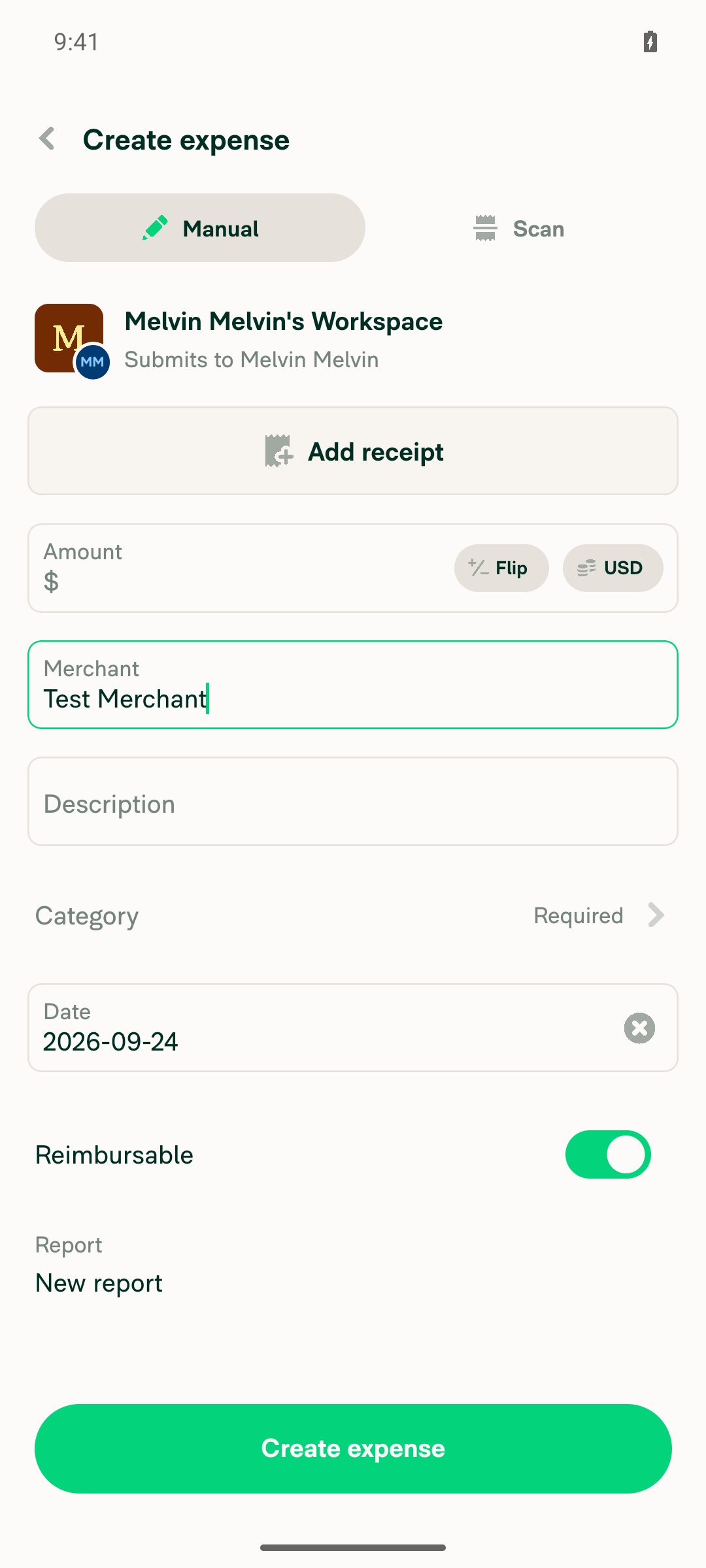
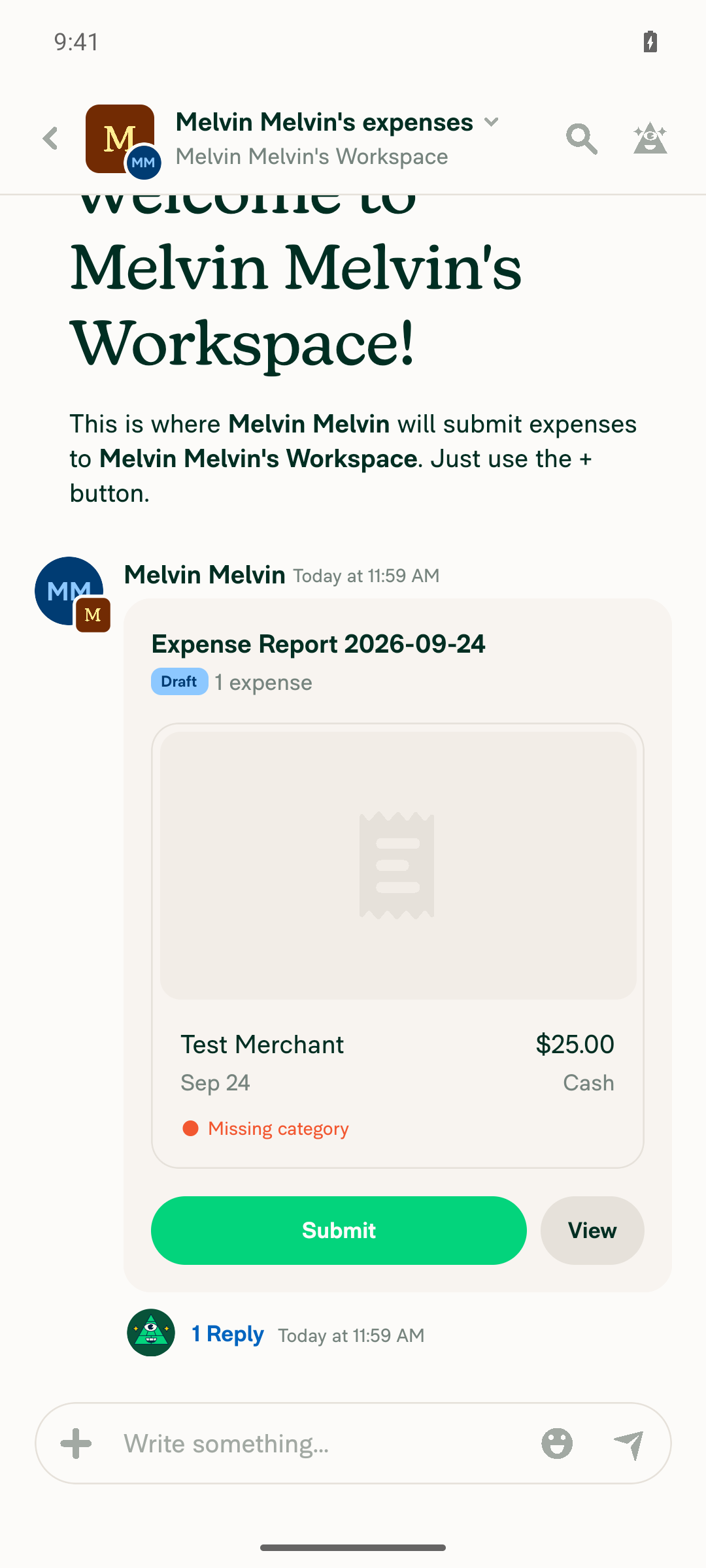
2. Create a manual expense in that workspace chatComposer + menu → Create expense → Manual, amount 25, merchant "Test Merchant", then Create expense. The chat then showed "Melvin Melvin's Workspace owes $25.00" with a report preview.
Manual expense form with merchant 'Test Merchant' filled in
Workspace chat showing the created $25.00 expense report preview
✅
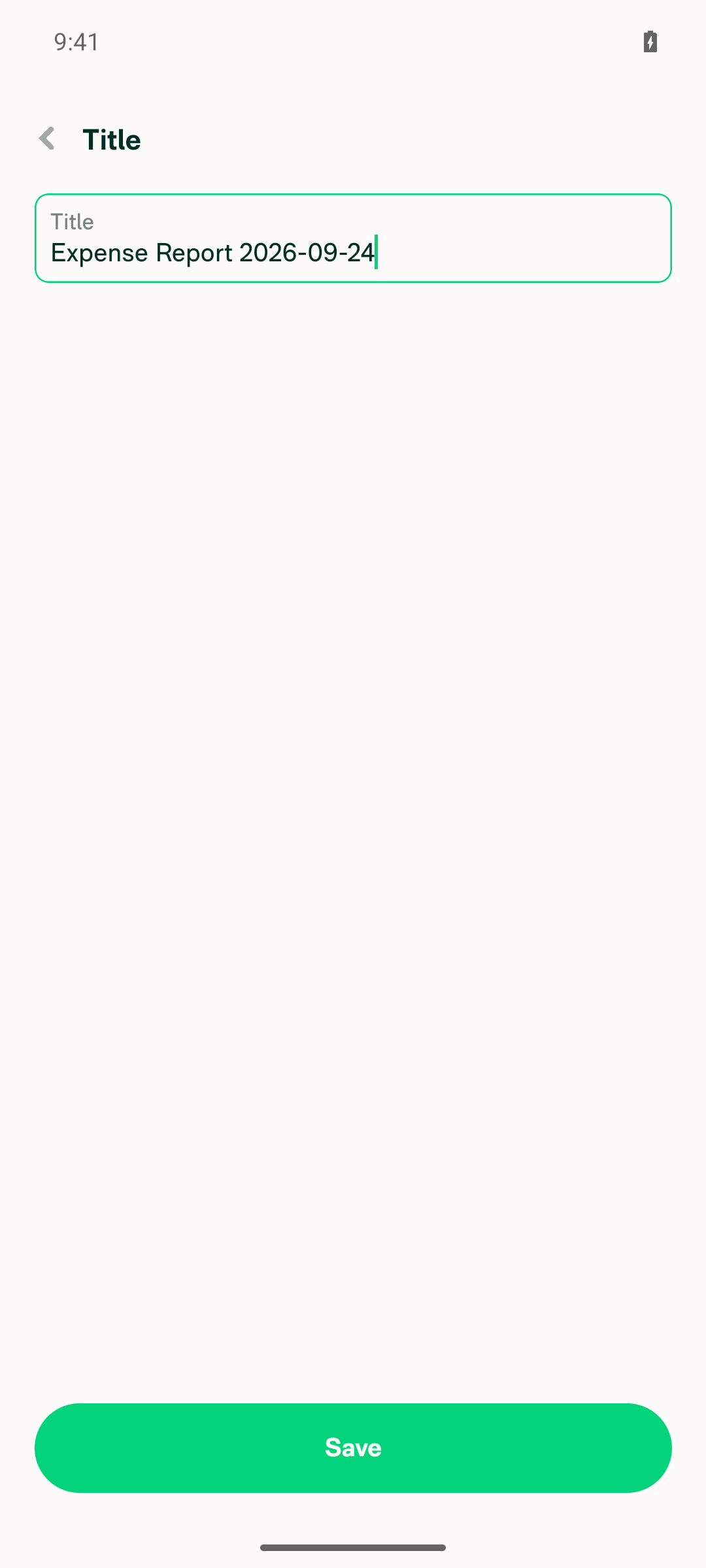
3. Open the just-created expense and tap the title to edit itOpened the expense via "View details", tapped the header title, then the "Title" row. The title edit page opened with a focused auto-grow field containing "Expense Report 2026-09-24". Initial box: EditText 60px, container 137px (one line).
Title edit page with the auto-grow input containing 'Expense Report 2026-09-24'
✅
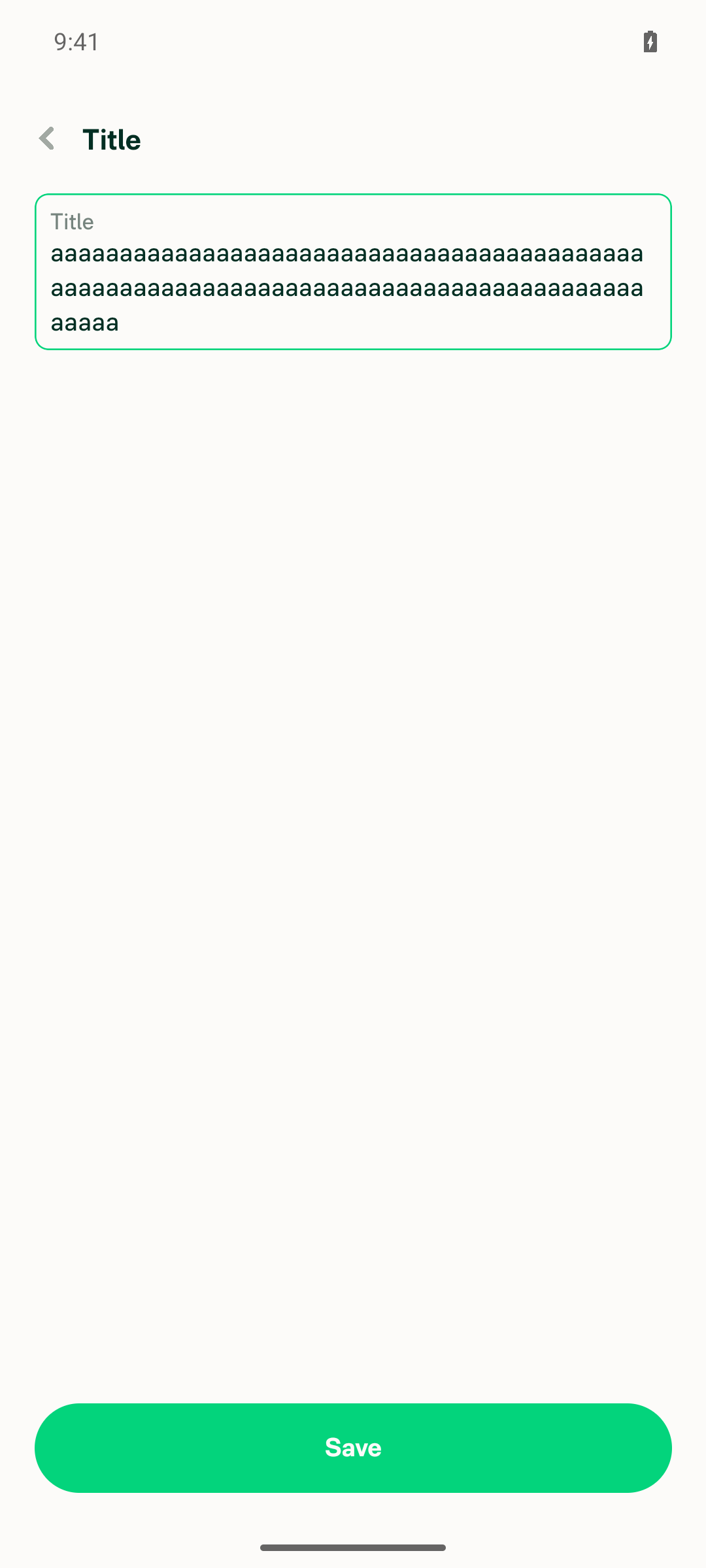
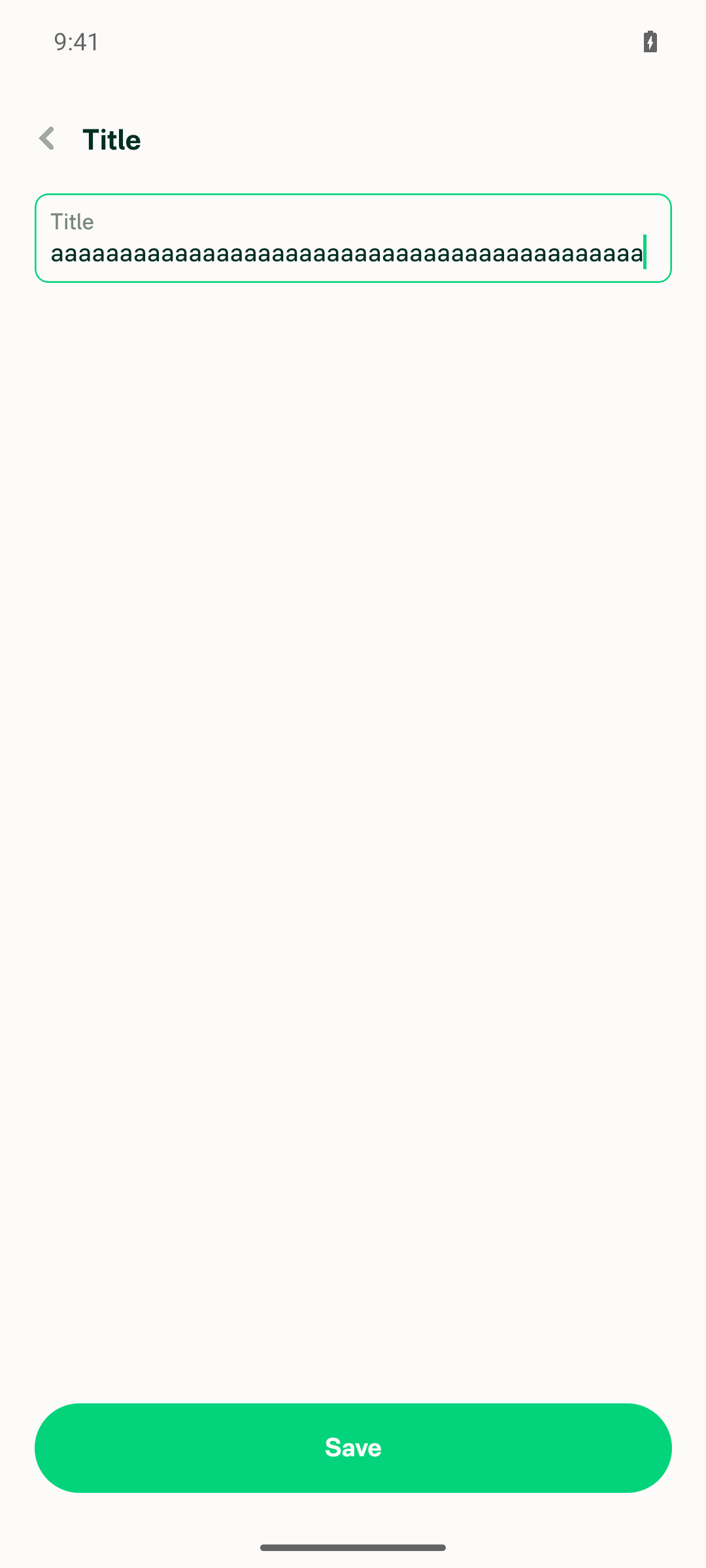
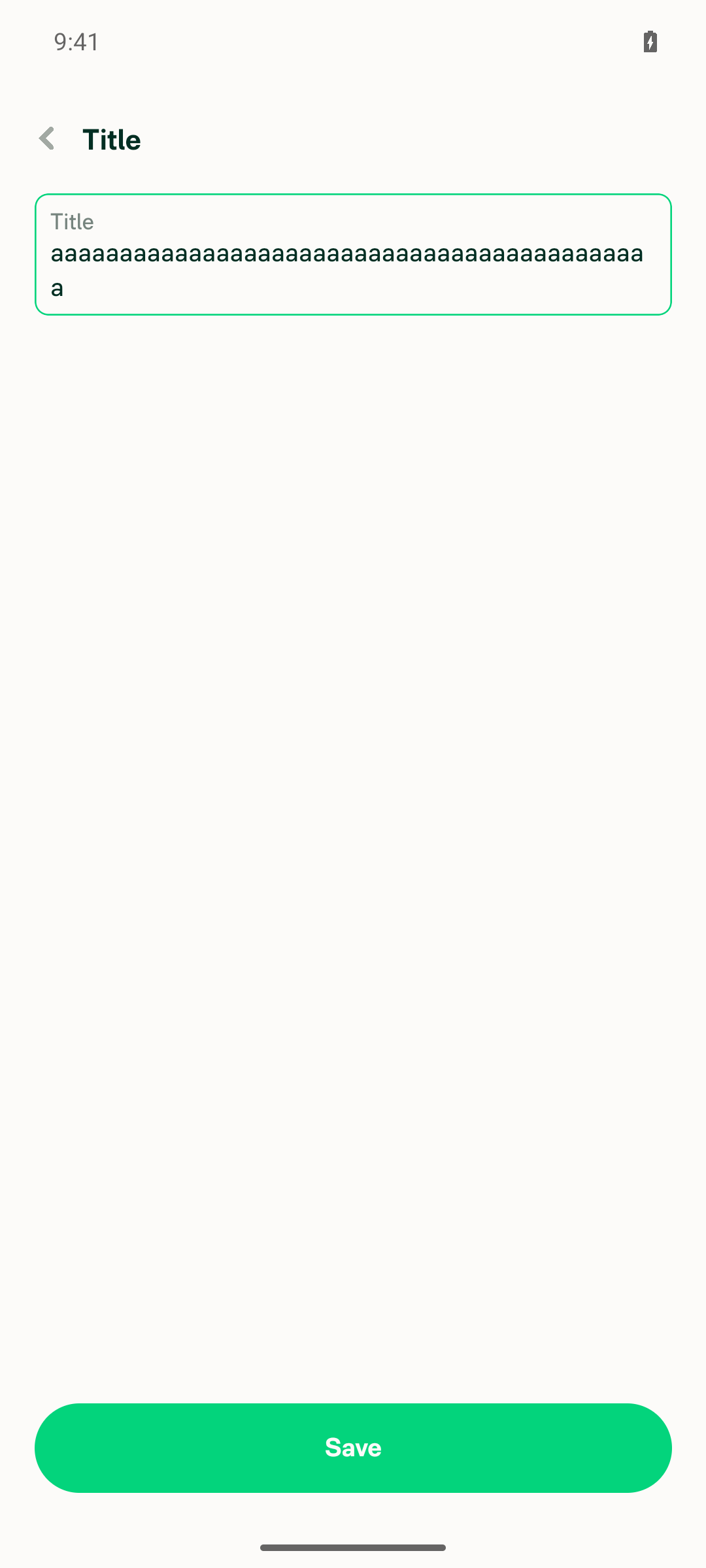
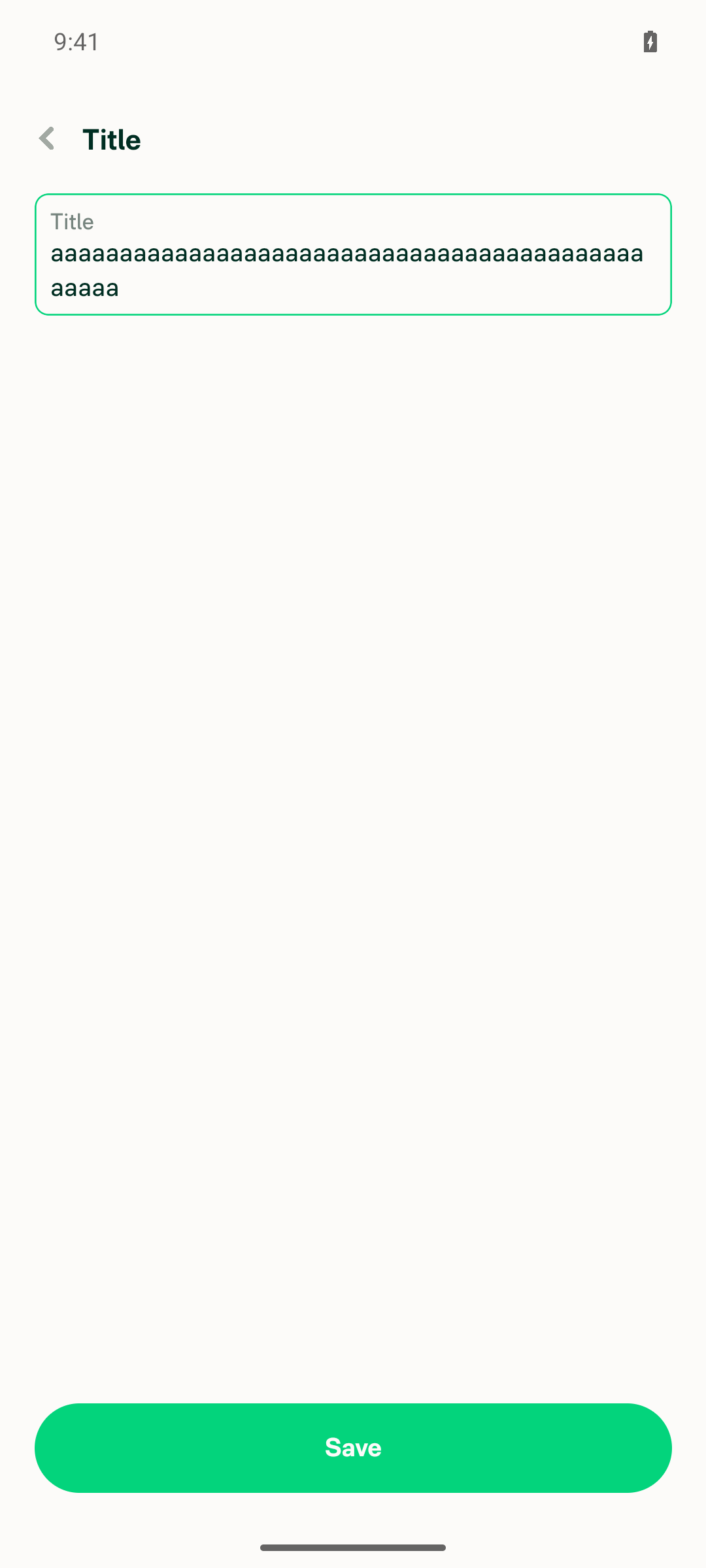
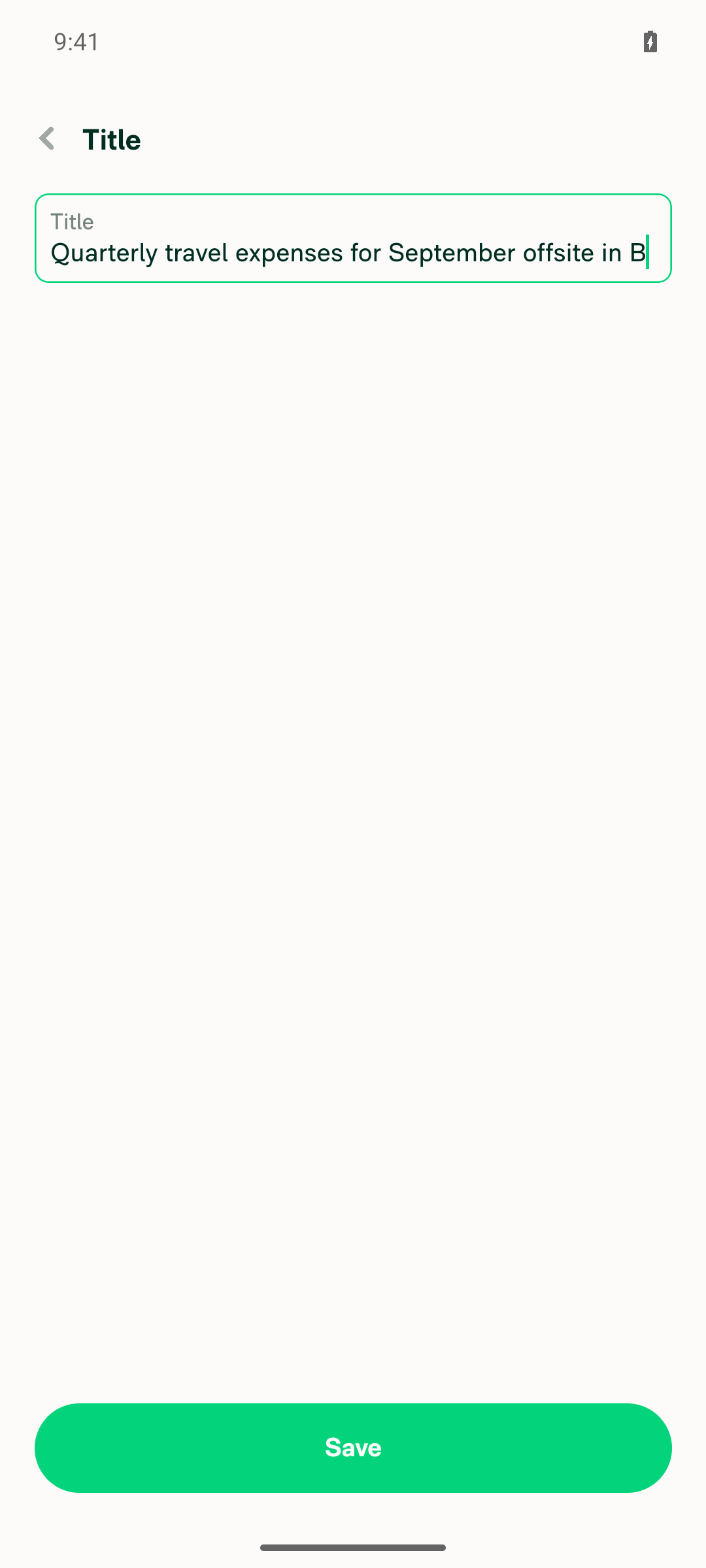
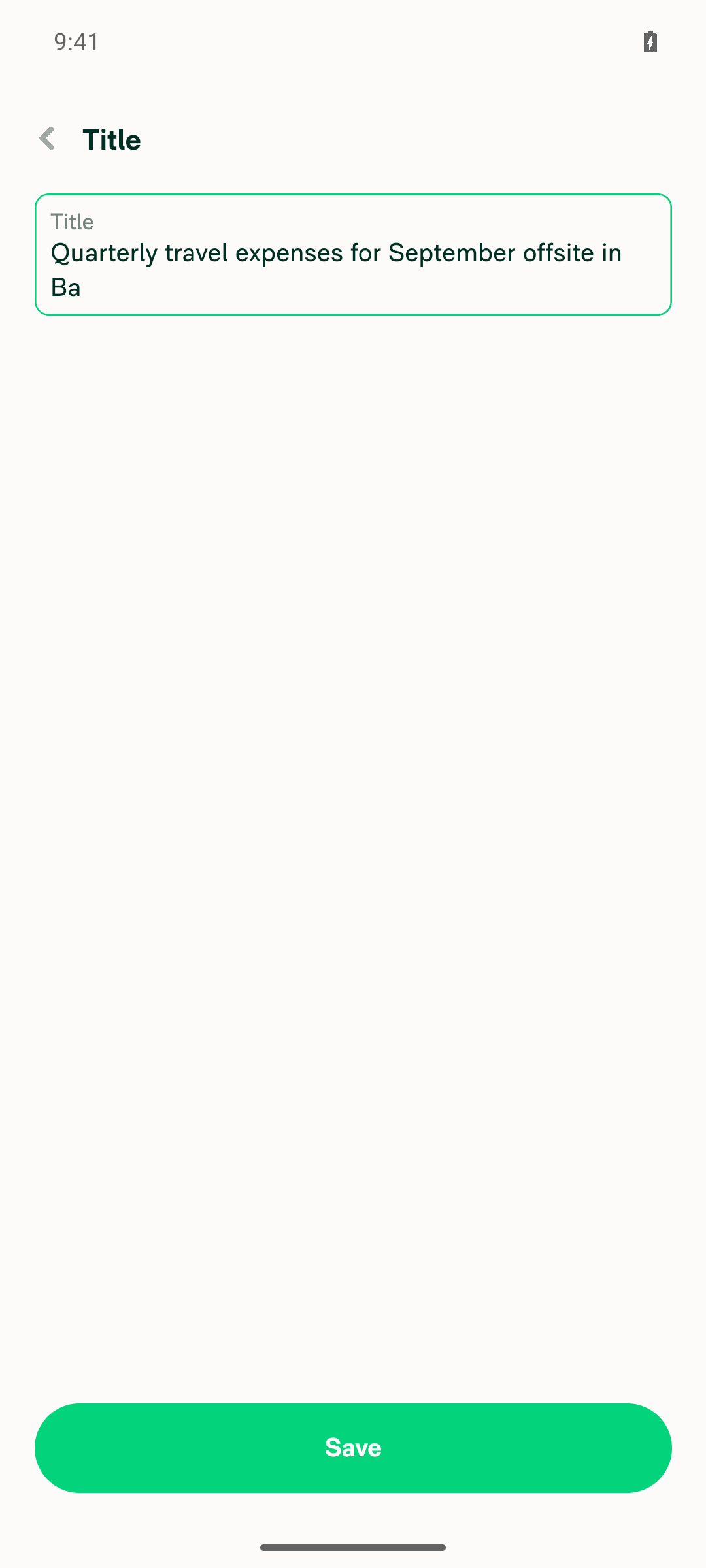
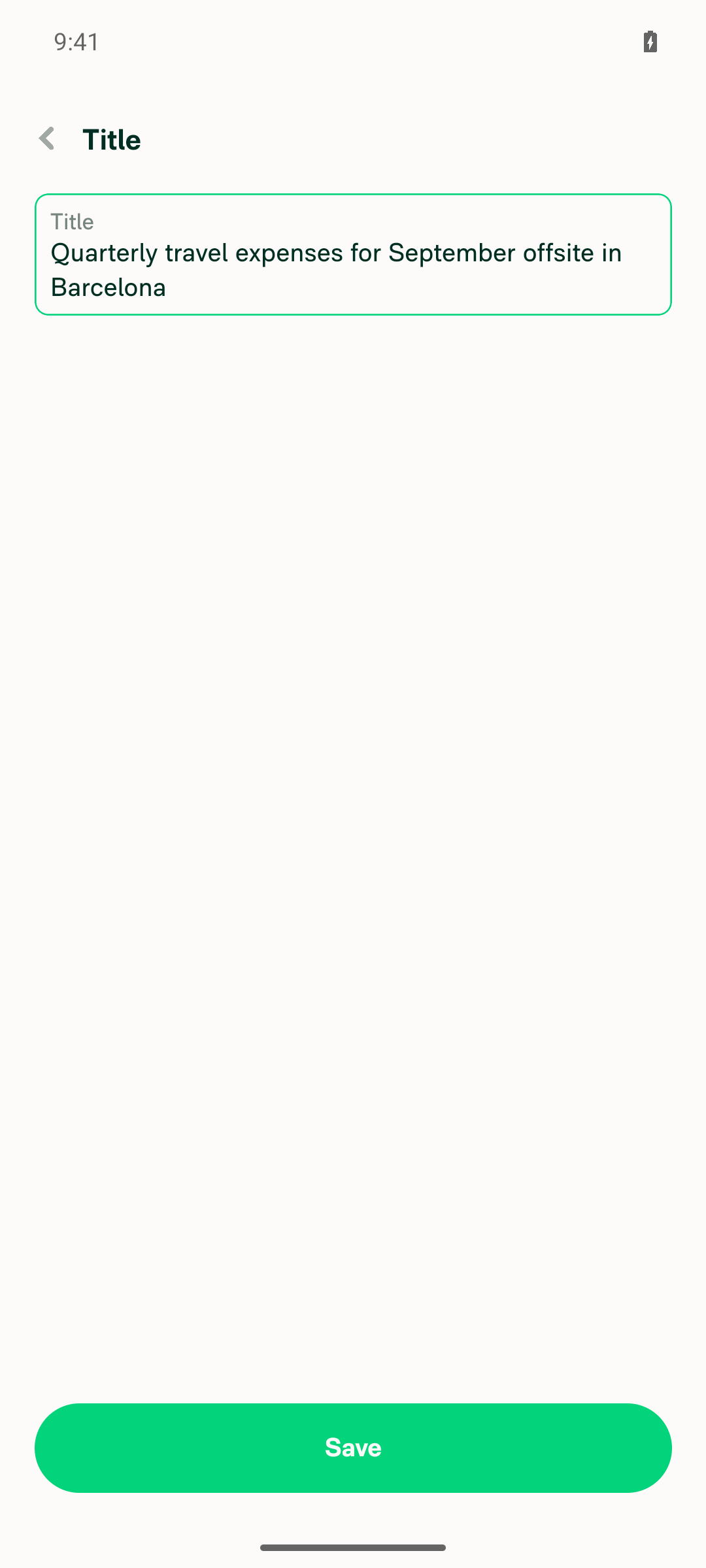
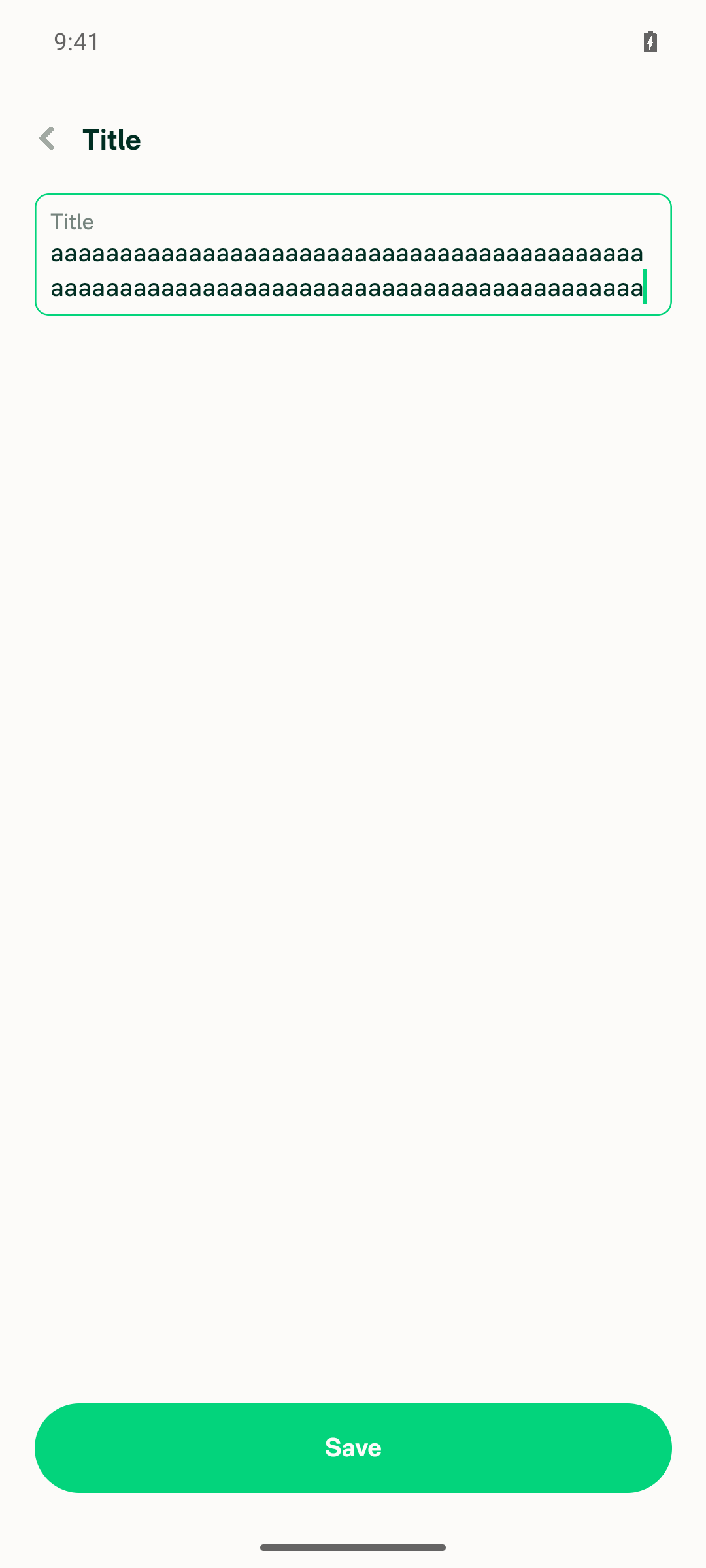
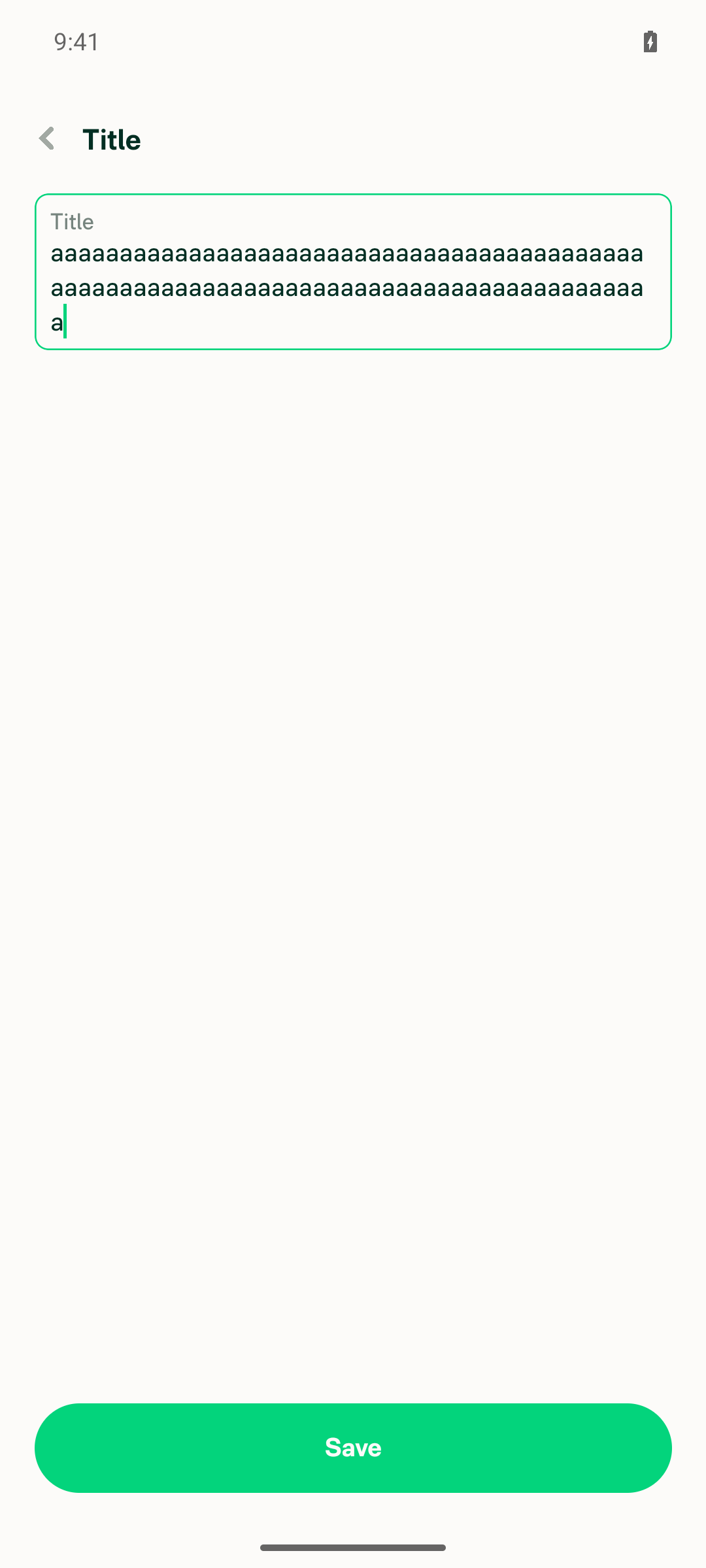
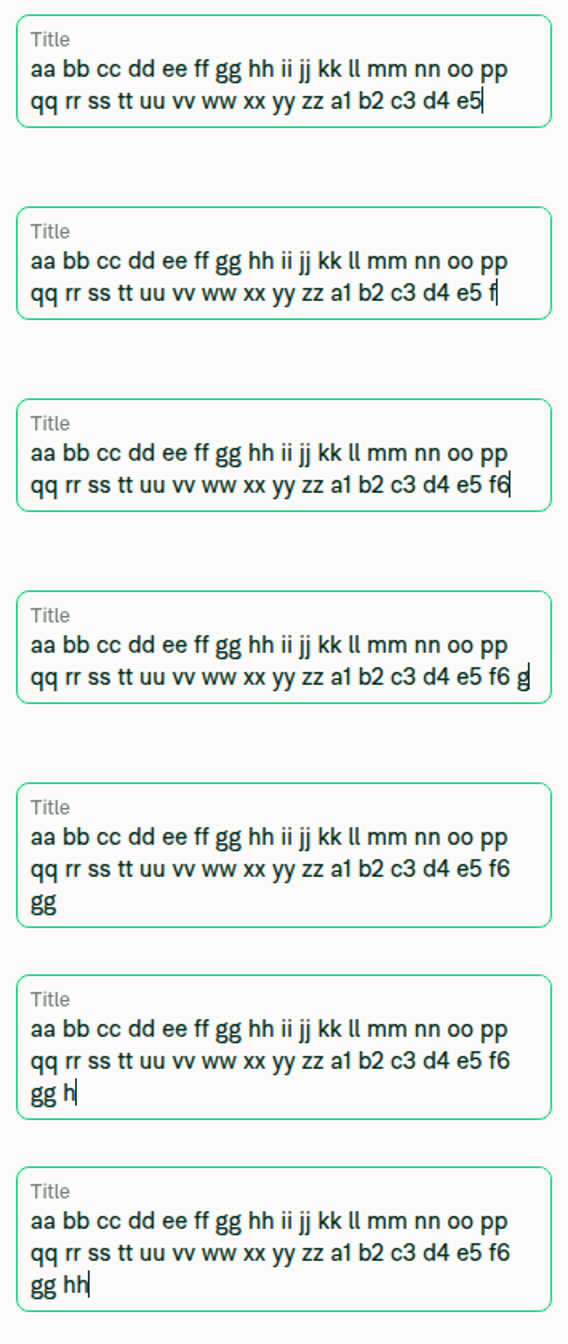
4. Box grows to two lines the moment the text wraps, not after the second line is partly filledContinuous-character probe: 43 "a" fit on one line (60/137). The 44th "a" immediately grew the box to 111/187 with only one character on line 2. Four more characters (48 "a") kept 111/187 — growth happened at the wrap, not later. Word-wrap probe: "Quarterly travel expenses for September offsite in B" was one line (60/137); typing "a" pushed "Ba" to line 2 and the box grew to 111/187 on that same keystroke; typing "rcelona" after it stayed at 111/187.
Pre-wrap: 43 'a' characters on a single line, one-line-tall box
Immediately after the 44th 'a': box is already two lines tall with a single character on line 2
Four characters later (48 'a'): box still two lines tall, unchanged
Word-wrap pre-wrap: 'Quarterly travel expenses for September offsite in B' on one line
Immediately after typing 'a': word 'Ba' wrapped to line 2 and the box is already two lines tall
Seven characters later: box still two lines tall
✅
5. Box grows to three lines the moment the text wraps, not only after the text reaches the middle/end of the third line86 "a" filled two lines (111/187). The 87th "a" immediately grew the box to 164/240 with only one character on line 3 — already three lines tall at the wrap keystroke. Four more (91 "a") kept 164/240, so no further growth was needed once mid-line-3 was reached. This is the exact step that fails in the issue report.
Pre-wrap: 86 'a' characters filling two lines, two-line-tall box
Immediately after the 87th 'a': box is already three lines tall with a single character on line 3
Four characters later (91 'a'): box still three lines tall, unchanged
✅

Build under test included this PR. The App checkout was at cb50bcf with the PR's code live — onContentSizeChange driving setInputContentHeight in src/components/TextInput/BaseTextInput/implementation/index.native.tsx, and textBreakStrategy="simple" on the measurement elements in src/components/TextInput/TextInputMeasurement/index.tsx. Metro served JS from that checkout.

Console errors: log capture was inactive for this session, so no JS console stream was available to inspect. No error UI, red box, or failure banner appeared at any point during the run.


view run · view recording

@MelvinBot

Copy link
Copy Markdown
Contributor Author

Fixed and pushed — Oxfmt check now passes.

Cause: Oxfmt check runs npm run fmt and fails if it produces a diff. The autoGrowContentHeight assignment I added was hand-wrapped across two lines, but it is 182 characters — under the repo's printWidth of 190 — so oxfmt collapses it onto one line. Whitespace only; no behaviour change.

src/components/TextInput/BaseTextInput/implementation/index.native.tsx:287

The only remaining red check is Check independent approval, which just reflects that this draft has no reviewer approval yet — not something a code change can clear.

Verification
Check Result
npm run fmt ✅ clean, and idempotent on a second run
npm run typecheck ✅ passed
npm test tests/unit/AutoGrowHeightInputStyleUtilsTest.ts tests/unit/BaseTextInputTest.tsx ✅ 20 passed
eslint on the changed file ✅ no violations
npm run lint-changed / react-compiler-compliance-check check-changed ❌ could not run — both need a main merge base and this checkout is shallow (git merge-base failed). eslint was run directly on the file instead; CI's own ESLint check and React Compiler Compliance both pass on the pushed commit.

CI on 8f261b9 is green across every other check — formatting, lint, typecheck, all 8 test shards, Storybook, spellcheck, and the Android/iOS builds.

Still outstanding from the PR description, and unrelated to the checks: the Android wrap behaviour in this PR has not been observed on a device, since this environment is web-only. That still needs the emulator repro from Android - Report - Report title box is not automatically expanded with new line of text. before this moves forward.


view run

@MelvinBot

MelvinBot commented Sep 24, 2026 •

Copy link
Copy Markdown
Contributor Author

🤖 Web test steps verification results: ✅ pass

On dev NewDot web the report title autoGrowHeight input grows at the exact keystroke that causes the text to wrap: it went to two lines on the 50th character and to three lines on the 98th, with every wrapped line fully visible in the same frame — no lag and no pinned-height regression. The build under test does include this PR's changes, and the web path is untouched by design since only the native implementation consumes the new content-size sizing.

Composite of per-keystroke crops at 92/94/95/97/98/100/101 chars showing the box growing exactly at the 98-char wrap

Step Status
1. Open the app and navigate to a workspace chatFinished the pending onboarding (skipped work email, "Manage my team's expenses", 1-4 employees, QuickBooks Online), which created the workspace. Opened the Inbox and selected the workspace expense chat.
Workspace expense chat open, header shows the expenses chat under the workspace name
✅
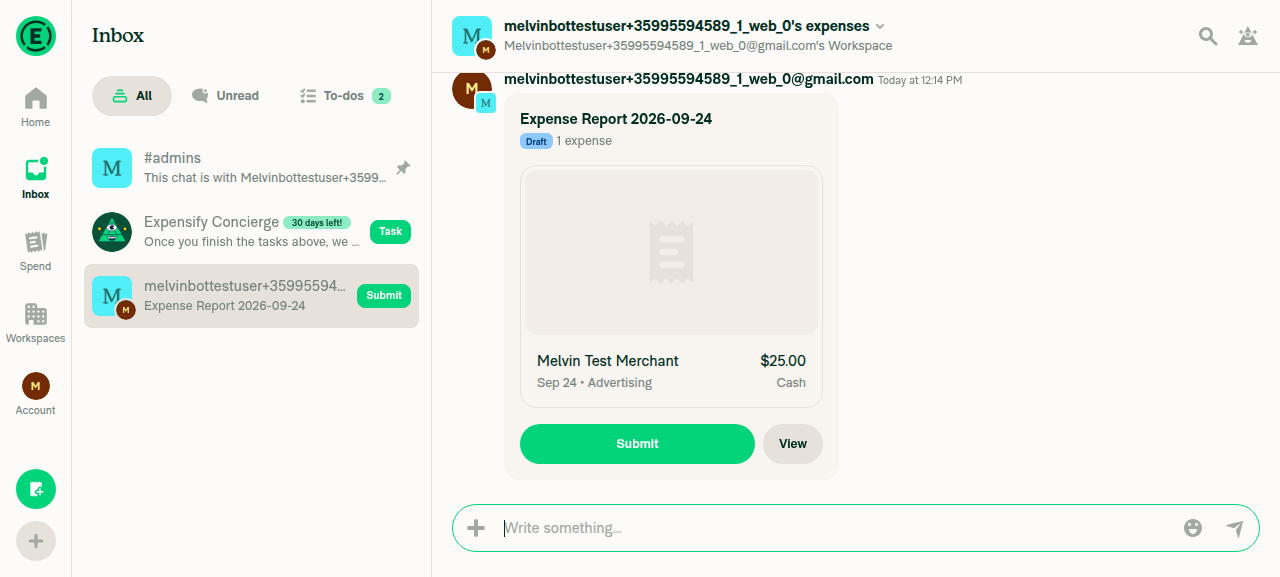
2. Create a manual expense in that workspace chatComposer + menu → Create expense → Manual, amount 25 USD, merchant "Melvin Test Merchant", category "Advertising" (category was Required and blocked submit until set). The chat then showed the preview "Expense Report 2026-09-24", Draft, 1 expense.
Workspace chat showing the newly created draft Expense Report 2026-09-24 with the $25.00 Melvin Test Merchant expense
✅
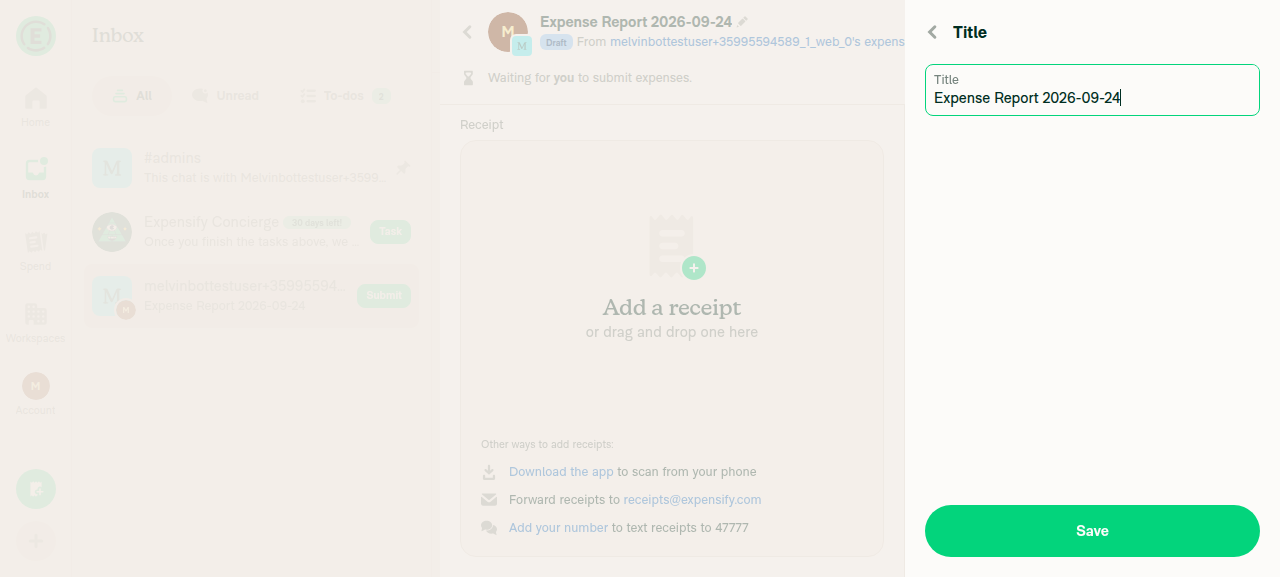
3. Open the just-created expense and click the title to edit itClicked View on the preview, then the header title "Expense Report 2026-09-24" to reach report Details, then the "Title" row. The Title edit page opened with an editable text field and a Save button, rendering at single-line height.
Title edit page with the editable title input containing 'Expense Report 2026-09-24' at single-line height
✅
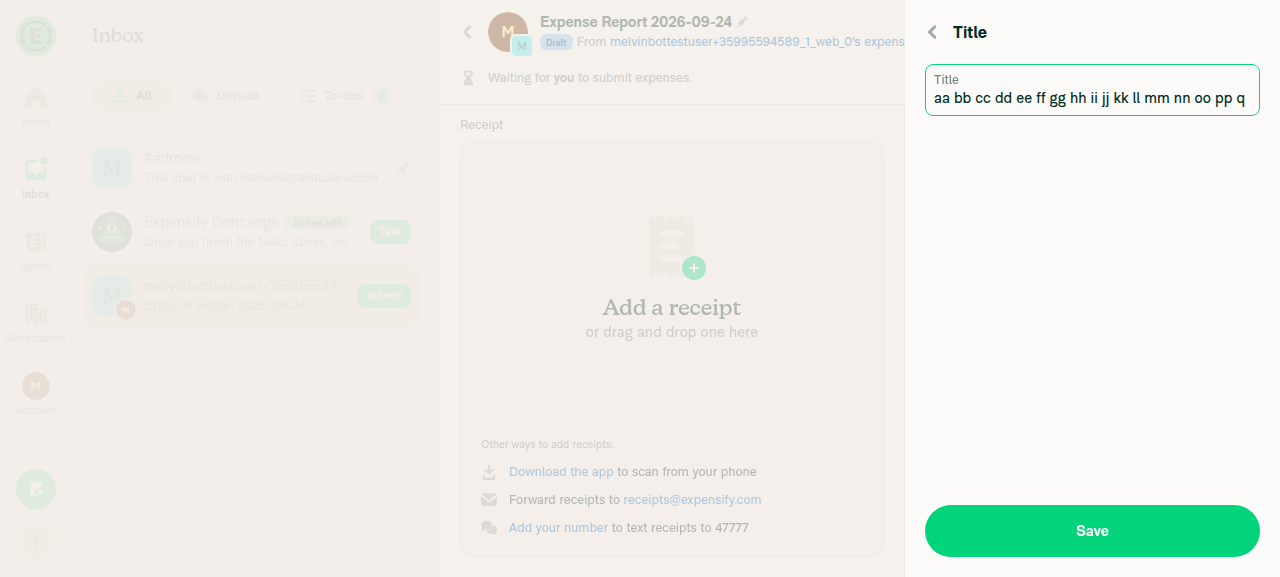
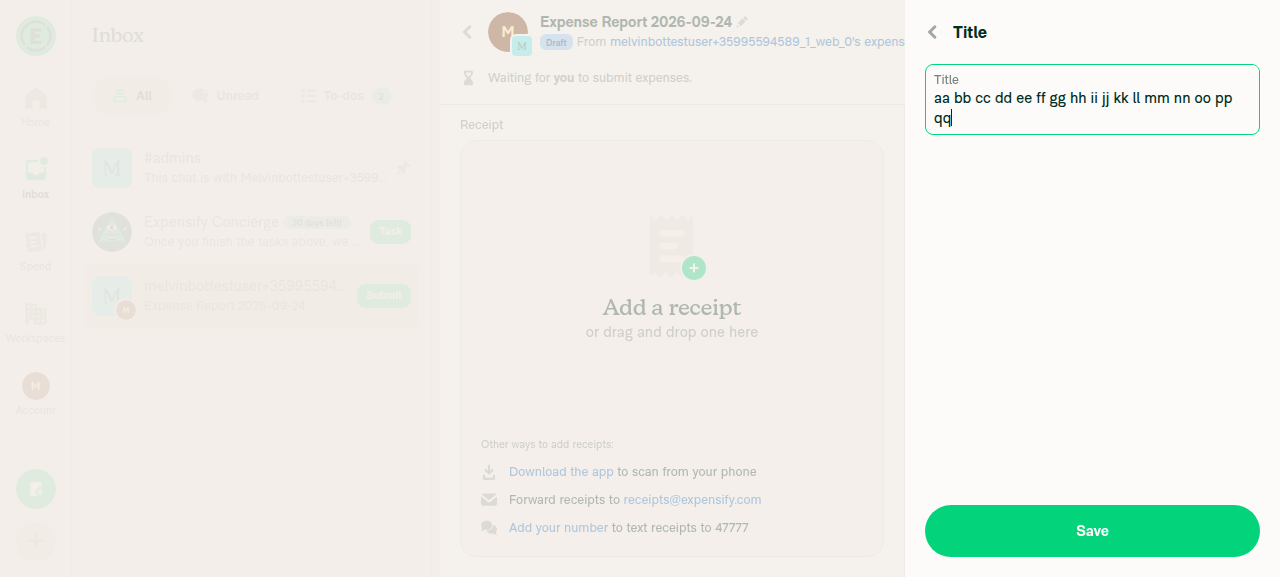
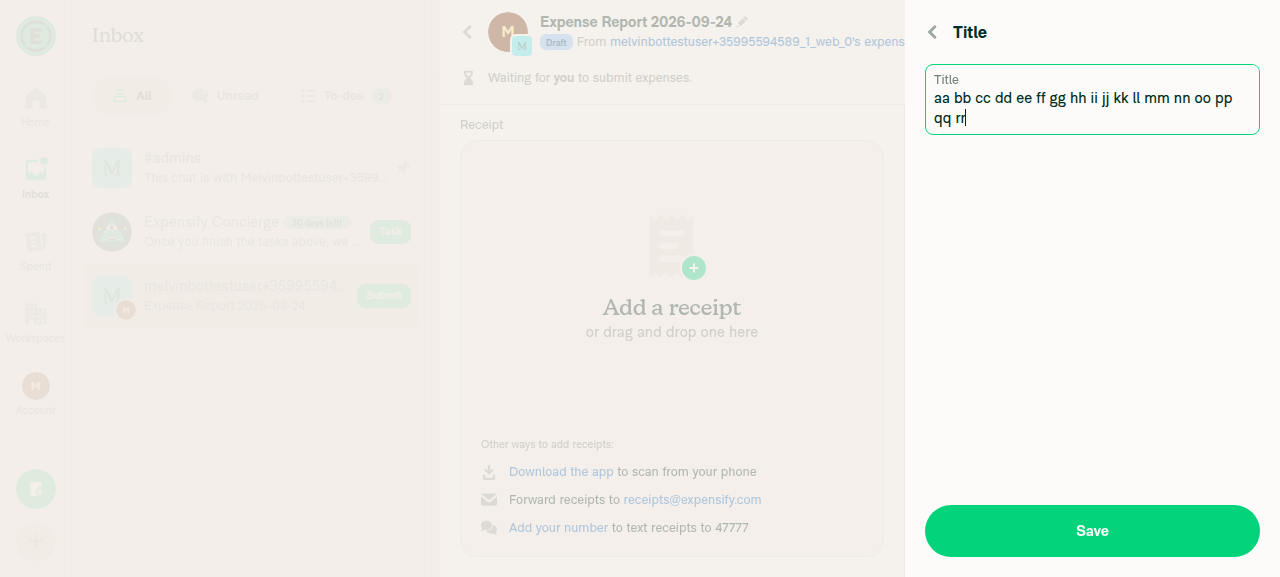
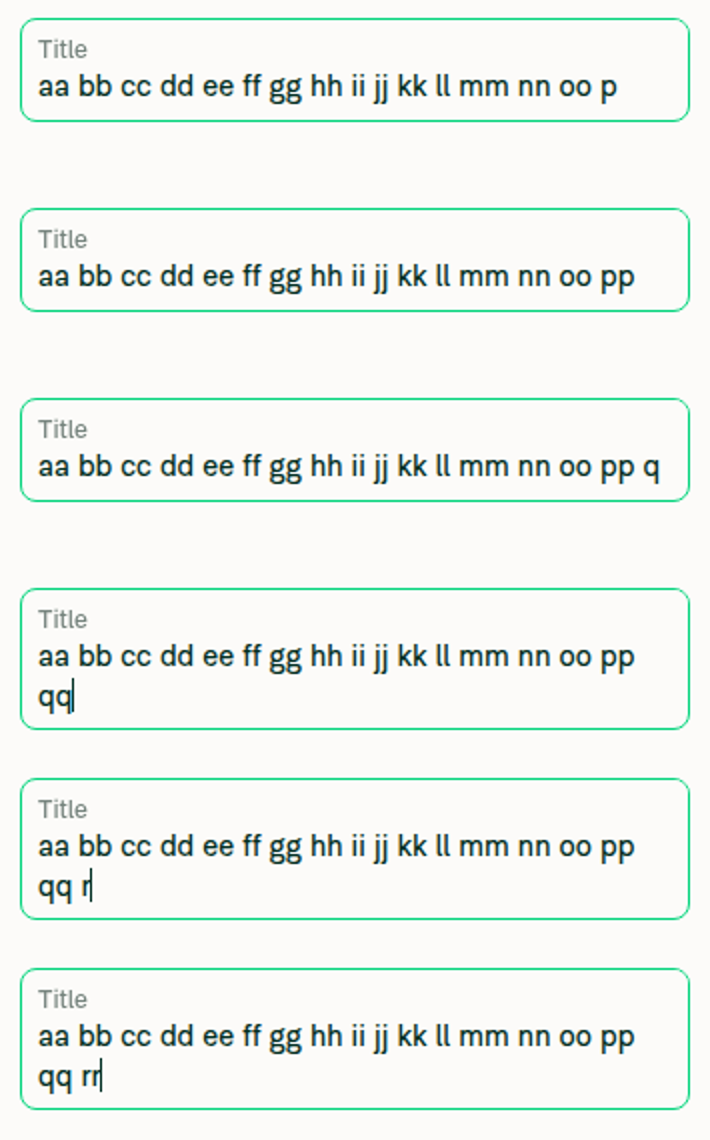
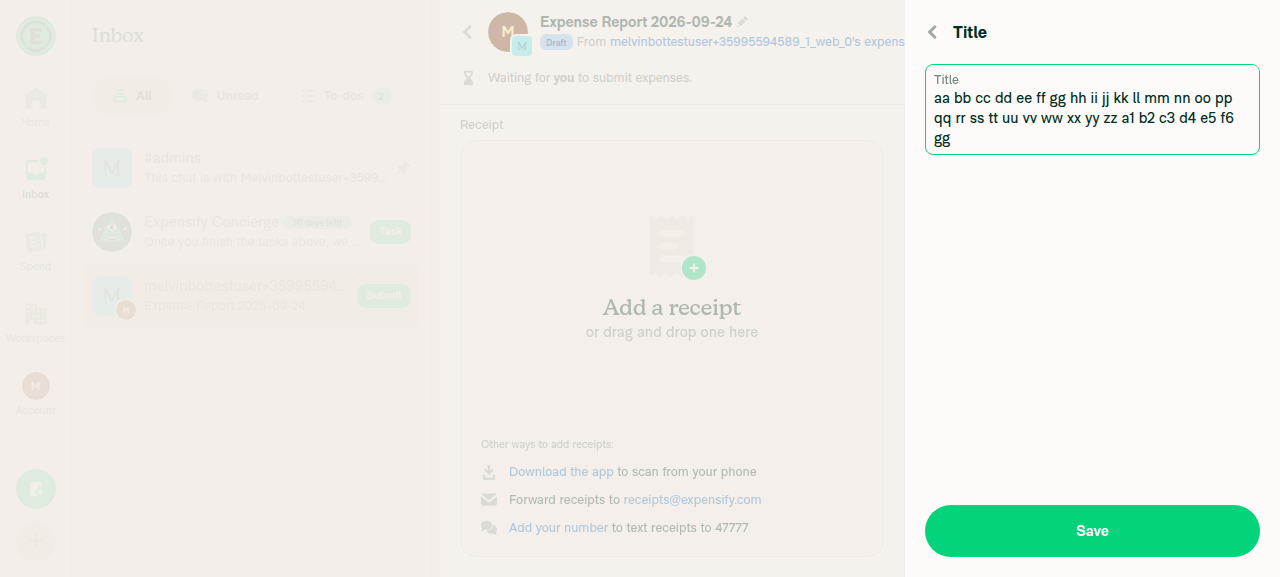
4. Box grows to two lines the moment the text wraps, not after the second line is partly filledReset the field to a 44-char one-line base "aa bb cc dd ee ff gg hh ii jj kk ll mm nn oo", then appended one character at a time with a screenshot after each. Line 1 held up to 49 chars ("...oo pp q") on a single-line box. The very next keystroke, the second "q" → "...oo pp qq" (50 chars), moved "qq" onto line 2 AND the box was already two lines tall in that same screenshot, with "qq" and the caret fully visible. Three characters later ("...oo pp qq rr", 53 chars) the box was still exactly two lines with all text visible.
49 chars: text still on one line, box at single-line height
50 chars: the wrap keystroke - 'qq' on line 2 and the box has already grown to two lines
53 chars: still two lines, all text visible
Composite of per-keystroke crops at 46/47/49/50/52/53 chars showing the box growing exactly at the 50-char wrap
✅
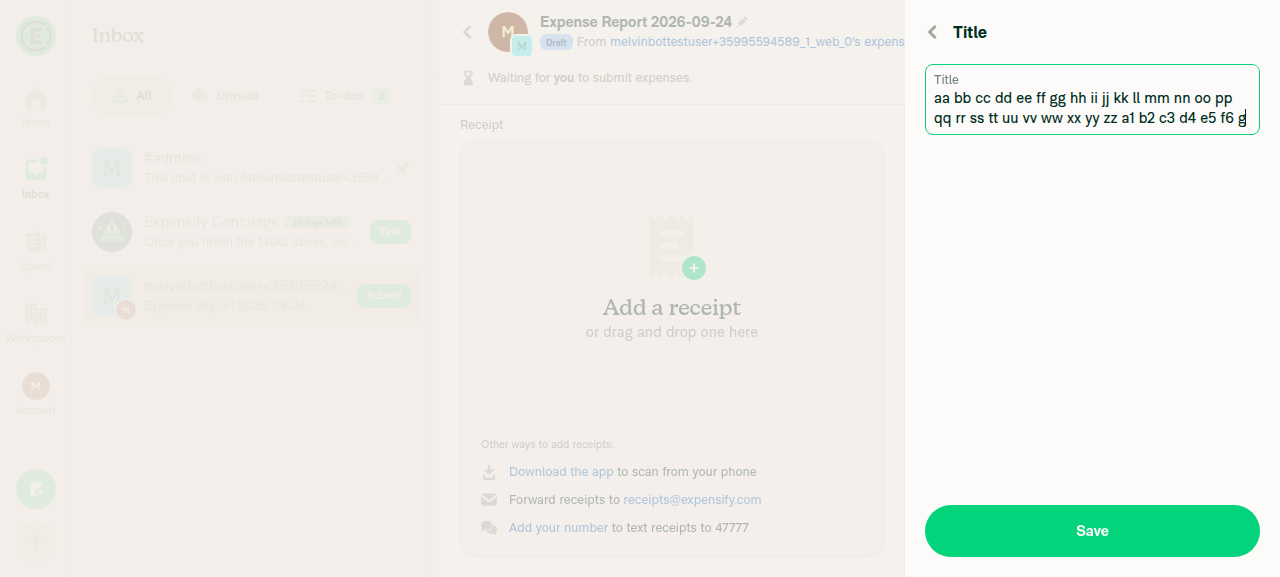
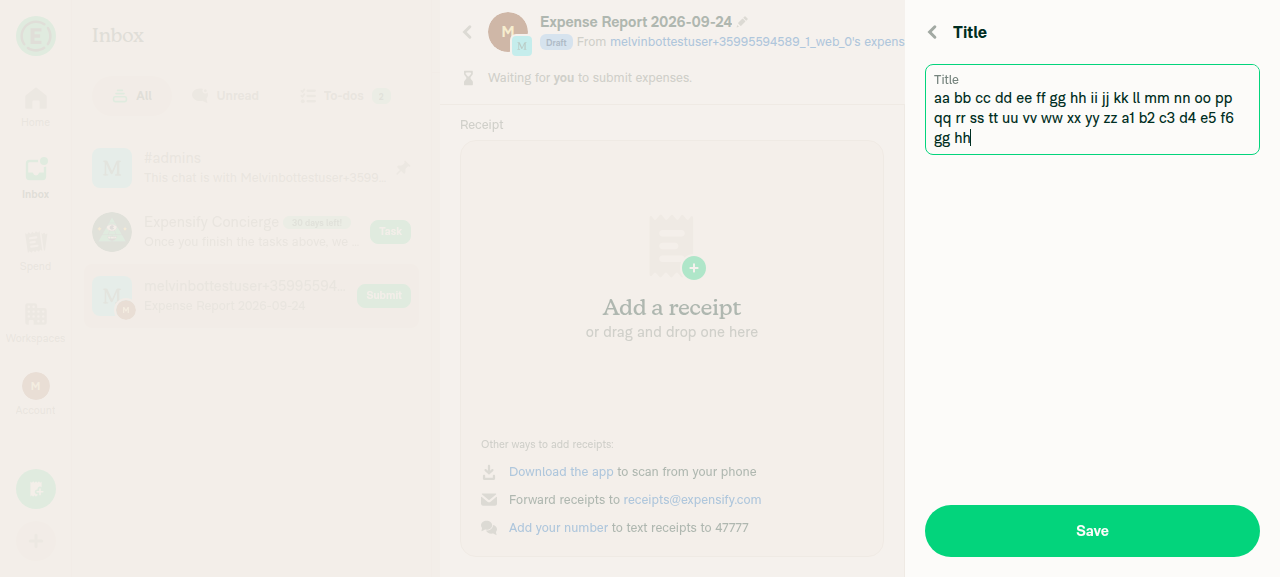
5. Box grows to three lines the moment the text wraps, not only after the text reaches the middle/end of the third lineContinued appending until line 2 was nearly full: "...d4 e5 f6 g" (97 chars) still rendered as two lines in a two-line box. The next keystroke, the second "g" → "...d4 e5 f6 gg" (98 chars), moved "gg" onto line 3 AND the box was already three lines tall in that same screenshot, with "gg" and the caret fully visible. Three characters later ("...f6 gg hh", 101 chars) the box remained exactly three lines with all text visible. This is the step that fails on Android in the issue report.
97 chars: text still on two lines, box at two-line height
98 chars: the wrap keystroke - 'gg' on line 3 and the box has already grown to three lines
101 chars: still three lines, all text visible
Composite of per-keystroke crops at 92/94/95/97/98/100/101 chars showing the box growing exactly at the 98-char wrap
✅
Build under test contains this PR's changesThe App checkout was at 8f261b9 with all three source changes present: src/styles/utils/index.ts:1595 has the new shouldSizeToContent = false parameter with the content-sized branch at L1607; src/components/TextInput/TextInputMeasurement/index.tsx:57 and L90 carry textBreakStrategy="simple"; src/components/TextInput/BaseTextInput/implementation/index.native.tsx:287 computes autoGrowContentHeight from inputContentHeight, wired to onContentSizeChange at L456. The web implementation still calls getAutoGrowHeightInputStyle with three arguments and still derives height from textInputHeight, so the new content-size path is native-only and web keeps its existing pinned-height behaviour.
✅

Console errors: browser log capture is not part of the web agent-device surface, so none were collected. That means the page was not proven clean, not that it was verified error-free. No error UI appeared during the run.

This is a web regression check. The fix itself is native-only, so it is the Android run that validates the actual bug.


view run · view recording

@mkhutornyi

Copy link
Copy Markdown
Contributor

@MelvinBot pull main

…xAutoGrow

Co-authored-by: mkhutornyi <mkhutornyi@users.noreply.github.com>
@MelvinBot

Copy link
Copy Markdown
Contributor Author

Merged the latest main into this branch and pushed it in 27beb0d. There were no conflicts.


view run

@mkhutornyi

Copy link
Copy Markdown
Contributor

@codex review

@mkhutornyi

Copy link
Copy Markdown
Contributor

@MelvinBot review

@MelvinBot

Copy link
Copy Markdown
Contributor Author

The failing test (job 3) check is unrelated to this PR, so I didn't push a fix.

Analysis: Two tests in tests/ui/IOURequestRedirectToStartPageTest.tsx fail with ReferenceError: Request is not defined. The error comes from a real network call through Expo's fetch polyfill (node_modules/expo/src/winter/fetch/fetch.ts), reached from src/libs/HttpUtils.ts:118. This PR only changes TextInput, style utils, and its own unit test.

Evidence: The same two tests fail with the same error on other, unrelated PRs from the last hour:

This failure needs a fix on main. Re-run the check after that fix lands. Check independent approval is a review gate, not a code failure. ESLint and the perf tests were still pending when I checked.

@chatgpt-codex-connector chatgpt-codex-connector Bot left a comment

Copy link
Copy Markdown

Choose a reason for hiding this comment

The reason will be displayed to describe this comment to others. Learn more.

💡 Codex Review

Here are some automated review suggestions for this pull request.

Reviewed commit: 27beb0d65f

ℹ️ About Codex in GitHub

Codex has been enabled to automatically review pull requests in this repo. Reviews are triggered when you

  • Open a pull request for review
  • Mark a draft as ready
  • Comment "@codex review".

If Codex has suggestions, it will comment; otherwise it will react with 👍.

When you sign up for Codex through ChatGPT, Codex can also answer questions or update the PR, like "@codex address that feedback".

// The hidden element in TextInputMeasurement and the real input are laid out by two different native text engines,
// so they don't always agree on where the value wraps, which leaves the container a line short of the visible input.
// The input's own content size is the height it actually needs, so prefer it once it has reported one.
const autoGrowContentHeight = shouldUseAutoGrowHeight && inputContentHeight > 0 ? inputContentHeight + variables.inputPaddingTop + variables.inputPaddingBottom : textInputHeight;

Copy link
Copy Markdown

Choose a reason for hiding this comment

The reason will be displayed to describe this comment to others. Learn more.

P2 Badge Preserve multiline placeholder height

When an autoGrowHeight input is empty and its placeholder wraps to multiple lines, the first native onContentSizeChange replaces the hidden measurement with the empty input's one-line content height. That discards the placeholder sizing that TextInputMeasurement deliberately uses when value is empty, so the wrapper shrinks after mount and clips the multiline placeholder. Keep the measurement as the height source while there is no input value, or incorporate the placeholder's measured height.

Useful? React with 👍 / 👎.

Copy link
Copy Markdown
Contributor

Choose a reason for hiding this comment

The reason will be displayed to describe this comment to others. Learn more.

Not valid.

iOS: the premise is wrong. RN makes the placeholder a floor on the reported content size, RCTUITextView.mm:296-304:

- (CGSize)contentSize
{
  CGSize contentSize = super.contentSize;
  CGSize placeholderSize = _placeholderView.isHidden ? CGSizeZero : self.placeholderSize;
  // When a text input is empty, it actually displays a placeholder.
  // So, we have to consider `placeholderSize` as a minimum `contentSize`.
  return CGSizeMake(MAX(contentSize.width, placeholderSize.width), MAX(contentSize.height, placeholderSize.height));
}

placeholderSize is measured with numberOfLines = 0 and a boundingRectWithSize wrap, so a multi-line placeholder is already reported at its full wrapped height. Nothing gets discarded.

It does hold on Android, where ReactTextContentSizeWatcher reads editText.layout (the text layout, not mHintLayout), so an empty input reports one line however the hint wraps.

But no call site can reach it. No non-markdown autoGrowHeight input passes placeholder. Every affected screen (RejectExpenseReportPage, EditReportFieldText, CloseAccountPage, DynamicExitSurveyReasonPage, ReportsDefaultTitle, SamlConfigurationDetailsSectionContent) passes label only, with no prefix/suffix and no forceActiveLabel. DynamicExitSurveyReasonPage:143 looks like a hit but that is the translation key exitSurvey.responsePlaceholder passed as label. The one real pairing in the repo is TextInput.stories.tsx:144, Storybook, which renders on web where shouldSizeToContent is false.

With placeholder undefined the clone renders nothing, so its height is just the 23px of padding: clamp(31, 52, 115) = 52, identical to the PR's 20 + 23 + 8 -> clamp(51, 52, 115) = 52. No difference from main on either platform.

A third gate is also missed: even with a placeholder passed, the input only renders one when isFocused || !hasLabel || forceActiveLabel || prefixCharacter || suffixCharacter (index.native.tsx:294), while the clone measures the raw placeholder unconditionally. So a labeled, unfocused input already over-sizes its container on main. Pre-existing, unrelated to this PR.

It is a narrow special case of the real root cause: the inputContentHeight > 0 guard discarding the clone outright. Fixing that with Math.max(textInputHeight, inputContentHeight + verticalPadding) covers this for free if a placeholder is ever added to one of these screens.

@MelvinBot

Copy link
Copy Markdown
Contributor Author

Review

The approach looks right to me. Using the input's own onContentSizeChange height removes the clone-versus-EditText wrap mismatch at its source, and web is unchanged. I found no blocking bugs. Please address these points before this leaves draft:

  1. The reason given for shouldSizeToContent looks wrong. The comment at src/styles/utils/index.ts:1605 and the PR description say Android reports content size only from onLayout. In RN 0.86, ReactEditText.kt also calls onContentSizeChange() from onTextChanged. On Android, try passing false. If the box still grows on the right keystroke, drop the flag and the new style branch. If it doesn't, rewrite the comment with the real reason.
  2. iOS is untested. index.native.tsx also runs on iOS, so iOS now uses content-size sizing and an unpinned input too. So far only Android and web have been tested. Please check the report title and a description field on iOS, including the switch to scrolling at max height.
  3. Hardcoded padding (low risk). index.native.tsx:287 adds inputPaddingTop + inputPaddingBottom to the content height. The hidden measurement uses the merged inputStyle padding instead. If a caller overrides vertical padding in inputStyle, the two heights drift apart. No current autoGrowHeight caller does this, so this is latent. You could read the padding from the flattened inputStyle instead.
  4. Nit. onContentSizeChange is not wrapped in useCallback, unlike onLayout next to it. This file doesn't compile under React Compiler, so the input gets a new handler on every render.
What I checked
  • The real input has pv0 when multiline, and Android's content height is compoundPaddingTop + layout.height + compoundPaddingBottom. So the reported height excludes padding, and adding the base input padding matches what the hidden measurement includes.
  • textBreakStrategy="simple" matches src/components/RNTextInput.tsx. Android Text otherwise defaults to highQuality.
  • The switch to scrolling at max height and shouldAddPaddingBottom now both use the same height, so they stay consistent.
  • Markdown autoGrowHeight inputs are unaffected. They skip this path.

view run

@MelvinBot

Copy link
Copy Markdown
Contributor Author

Both failing checks come from main, not this PR, so I didn't push a fix.

  • ESLint check: src/libs/PolicyUtils.ts has 4,039 lines, over the 4,000-line max-lines limit. This PR doesn't touch that file. main went from 3,999 to 4,039 lines when Resolve the member's own policy role when checking room member removal merged. ESLint fails the same way on other open PRs.
  • test (job 3): This is the same IOURequestRedirectToStartPageTest.tsx failure (Request is not defined) I reported earlier. It also fails on unrelated PRs.

The fixes belong on main. Merge main into this branch and re-run the checks once they land. Check independent approval and the reviewer checklist are review gates, not code failures.

@MelvinBot

Copy link
Copy Markdown
Contributor Author

Nothing has changed since my last check. Both failing checks still come from main, so I didn't push a fix.

  • ESLint check: src/libs/PolicyUtils.ts has 4,039 lines, over the 4,000-line max-lines limit. This PR doesn't touch that file.
  • test (job 3): tests/ui/IOURequestRedirectToStartPageTest.tsx fails with ReferenceError: Request is not defined. The same failure appears on unrelated PRs.

No fix for either has merged to main yet. The latest commit on main is still 7d4feda. After fixes land, merge main into this branch and re-run the checks.

@mkhutornyi

Copy link
Copy Markdown
Contributor

@MelvinBot address #102149 (comment). Also simplify all inline comments

@MelvinBot

Copy link
Copy Markdown
Contributor Author

Nothing has changed since my last check. Both failing checks still come from main, so I didn't push a fix.

  • ESLint check: src/libs/PolicyUtils.ts is over the 4,000-line max-lines limit on main. This PR doesn't touch that file.
  • test (job 3): tests/ui/IOURequestRedirectToStartPageTest.tsx fails with ReferenceError: Request is not defined. The same failure appears on unrelated PRs.

The latest commit on main is still 7d4feda. After fixes for both land, merge main into this branch and re-run the checks. checklist and Check independent approval are review gates, not code failures.

@MelvinBot

Copy link
Copy Markdown
Contributor Author

The failing checks still come from main, so I didn't push a fix. main hasn't changed since my last check. Its latest commit is still 7d4feda.

  • ESLint check: src/libs/PolicyUtils.ts on main is over the 4,000-line max-lines limit. This PR doesn't touch that file.
  • test (job 3): tests/ui/IOURequestRedirectToStartPageTest.tsx fails with ReferenceError: Request is not defined. The same failure appears on unrelated PRs.

After fixes for both land on main, ask me to pull main and re-run the checks. checklist and Check independent approval are review gates, not code failures.

Your request to address my review and simplify the inline comments got a check-status reply by mistake. No code changed. To have me make those changes, send that request again.

@mkhutornyi

Copy link
Copy Markdown
Contributor

@MelvinBot address #102149 (comment). Also simplify all inline comments

…nge, and simplify comments

Co-authored-by: mkhutornyi <mkhutornyi@users.noreply.github.com>
@MelvinBot

Copy link
Copy Markdown
Contributor Author

I addressed the review in a219a9a and simplified all the code comments this PR adds.

  1. shouldSizeToContent reason. The old comment was wrong. In RN 0.86, onTextChanged also reports content size, and it reads the text layout height, not the view height. I removed that claim and kept the flag. This run is web-only, so I couldn't try false on Android. Please check that on a device before dropping the flag (src/styles/utils/index.ts:1618).
  2. iOS. Still untested. This run can't drive iOS.
  3. Padding. The content height now adds the vertical padding from the merged inputStyle through the new getVerticalPaddingFromStyle helper (index.native.tsx:290). The default padding is unchanged, so current callers behave the same.
  4. useCallback. onContentSizeChange is now wrapped (index.native.tsx:200).

Lint, typecheck, spell check, and AutoGrowHeightInputStyleUtilsTest pass, including a new test for the helper. The React Compiler check still fails on this file because of existing hasValueRef reads, which this PR doesn't change.


view run

@mkhutornyi

Copy link
Copy Markdown
Contributor

@MelvinBot textBreakStrategy="simple" seems to fix the bug for me. Any reason for other code changes like customizing onContentSizeChange?

@MelvinBot

Copy link
Copy Markdown
Contributor Author

This request is already done. I addressed the review and simplified the inline comments in a219a9a. See my earlier reply for details. No new changes were needed.


view run

@chuckdries
chuckdries marked this pull request as ready for review September 30, 2026 15:53
@chuckdries
chuckdries requested a review from a team as a code owner September 30, 2026 15:53
@melvin-bot
melvin-bot Bot requested review from mkhutornyi and removed request for a team September 30, 2026 15:53
@melvin-bot

melvin-bot Bot commented Sep 30, 2026

Copy link
Copy Markdown

@mkhutornyi Please copy/paste the Reviewer Checklist from here into a new comment on this PR and complete it. If you have the K2 extension, you can simply click: [this button]

@melvin-bot
melvin-bot Bot requested review from joekaufmanexpensify and removed request for a team September 30, 2026 15:54

@chatgpt-codex-connector chatgpt-codex-connector Bot left a comment

Copy link
Copy Markdown

Choose a reason for hiding this comment

The reason will be displayed to describe this comment to others. Learn more.

💡 Codex Review

Here are some automated review suggestions for this pull request.

Reviewed commit: cd63f67836

ℹ️ About Codex in GitHub

Codex has been enabled to automatically review pull requests in this repo. Reviews are triggered when you

  • Open a pull request for review
  • Mark a draft as ready
  • Comment "@codex review".

If Codex has suggestions, it will comment; otherwise it will react with 👍.

When you sign up for Codex through ChatGPT, Codex can also answer questions or update the PR, like "@codex address that feedback".

@MelvinBot

Copy link
Copy Markdown
Contributor Author

No. Nothing in App passes textBreakStrategy to a text input, so "simple" is never overwritten.

Details

On main (f14d4a3), textBreakStrategy shows up only where the input wrappers set it as a default:

Each wrapper spreads {...props} after the default, so a caller could override it. A search of src/ found no caller that does. The other matches are in patches/react-native/ and only forward the native prop.

@chuckdries

Copy link
Copy Markdown
Contributor

We've got test and lint failures

@mkhutornyi

Copy link
Copy Markdown
Contributor

@MelvinBot pull main

…xAutoGrow

Co-authored-by: mkhutornyi <mkhutornyi@users.noreply.github.com>
@MelvinBot
MelvinBot requested a review from a team as a code owner September 30, 2026 17:09
@MelvinBot

Copy link
Copy Markdown
Contributor Author

Merged the latest main into this branch in 7550ac1. There were no conflicts, and the PR diff is unchanged: it still only touches TextInputMeasurement/index.tsx.

@melvin-bot
melvin-bot Bot requested review from chuckdries and mkhutornyi and removed request for a team September 30, 2026 17:09
@melvin-bot

melvin-bot Bot commented Sep 30, 2026

Copy link
Copy Markdown

@mkhutornyi @chuckdries One of you needs to copy/paste the Reviewer Checklist from here into a new comment on this PR and complete it. If you have the K2 extension, you can simply click: [this button]

@chuckdries
chuckdries merged commit 3f0a210 into main Sep 30, 2026
53 of 73 checks passed
@chuckdries
chuckdries deleted the claude-androidTitleBoxAutoGrow branch September 30, 2026 17:42
@github-actions

Copy link
Copy Markdown
Contributor

🚧 chuckdries has triggered a test Expensify/App build. You can view the workflow run here.

@OSBotify

Copy link
Copy Markdown
Contributor

✋ This PR was not deployed to staging yet because QA is ongoing. It will be automatically deployed to staging after the next production release.

@OSBotify

OSBotify commented Oct 1, 2026

Copy link
Copy Markdown
Contributor

🚀 Deployed to staging by https://github.com/chuckdries in version: 9.5.0-0 🚀

platform result
🕸 web 🕸 success ✅
🤖 android 🤖 success ✅
🍎 iOS 🍎 success ✅

@MelvinBot

Copy link
Copy Markdown
Contributor Author

No help site update is needed. This PR fixes an Android bug so multi-line inputs grow as you type, which users already expect, and no help article sentence becomes incorrect.

@OSBotify

OSBotify commented Oct 1, 2026

Copy link
Copy Markdown
Contributor

🚀 Deployed to production by https://github.com/Julesssss in version: 9.5.0-5 🚀

platform result
🕸 web 🕸 success ✅
🤖 android 🤖 success ✅
🍎 iOS 🍎 failure ❌

Bundle Size Analysis (Sentry):

Sign up for free to join this conversation on GitHub. Already have an account? Sign in to comment

Labels

Melvin-Test-Android Melvin-Test-Web Triggers Melvin to run the testing steps of the PR on web

Projects

None yet

Development

Successfully merging this pull request may close these issues.

4 participants