Skip to content

Show negative tax amount for negative expenses on the expense details page - #102175

Merged
grgia merged 7 commits into
mainfrom
claude-negativeTaxAmountDisplay
Oct 9, 2026
Merged

grgia merged 7 commits into
mainfrom
claude-negativeTaxAmountDisplay

Conversation

@MelvinBot

@MelvinBot MelvinBot commented Sep 24, 2026 •

Copy link
Copy Markdown
Contributor

Explanation of Change

On an expense report, taxAmount is stored in Onyx with the opposite sign of what we display, so a negative expense (a refund) has a positive stored taxAmount. getTaxAmount() flips it back for display.

The report table row rendered that signed value as-is, but the expense details page wrapped it in Math.abs(), so the same expense showed its tax as -$1.82 in the table and $1.82 on the details page — right next to its own -$20.00 Amount field.

Changes:

  1. MoneyRequestView.tsx — collapsed the formattedTaxAmount ternary to a single convertToDisplayString(transactionTaxAmount ?? 0, actualCurrency). transactionTaxAmount is already getTaxAmount() of displayTransaction (which resolves updatedTransaction ?? transaction), so the updatedTransaction?.taxAmount !== undefined branch was both redundant and wrong — it read the raw stored, inverted-sign value. Keeping that branch would have left the merge and duplicate-resolution flows rendering an unsigned tax next to a signed amount.
  2. formattedConvertedTaxAmount had the same Math.abs(), hiding the identical bug for foreign-currency expenses. convertedTaxAmount is stored with the same inverted sign (the report tax total subtracts it), but had no getter, so this adds getConvertedTaxAmount() to TransactionUtils mirroring getTaxAmount() and exposes it through getTransactionDetails alongside convertedAmount, rather than negating inline.

The Math.abs() came from 23ec1dd, added for the "categorize a track expense" flow on the assumption that "taxes will never be negative". Negative expenses were never considered. The sibling Math.abs from that same PR was later narrowed to exactly that flow (useTaxAmount.ts gates it on isMovingTransactionFromTrackExpense); this one never was. trjExpensify confirmed Classic shows a refund's tax as negative, which is the semantic the rest of the codebase already assumes — the Total column in the same row and the report-level tax total both rely on it.

AI tests run locally by Melvin
Check Result
npm run typecheck ✅ passed
npm run lint (changed files) ✅ passed
npm run lint-changed ✅ passed
npm run spell-changed ✅ passed (4 files, 0 issues)
npm run react-compiler-compliance-check (MoneyRequestView.tsx) ✅ passed
npm test — TransactionUtilsTest, ReportUtilsTest, TransactionPreviewUtils, MergeTransactionUtilsTest, ReportSecondaryActionUtilsTest ✅ 2219 passed
New getConvertedTaxAmount unit tests ✅ 3 passed

Not run: npm run prettier — the App checkout in this environment has no Prettier config of its own and resolves a foreign one, so formatting was covered by ESLint instead. Browser verification was not possible: the automated browser session in this run was stuck on a blank page, so the rendered strings are unconfirmed and still need manual verification.

Fixed Issues

$ #98098
PROPOSAL: #98098 (comment)

Tests

Same as QA Steps

  • Verify that no errors appear in the JS console

Offline tests

Same as QA Steps

QA Steps

Prerequisite: have a workspace with Taxes enabled and a non-zero tax rate

  1. Open a workspace chat
  2. Submit 2 expenses, one with a negative amount, a currency different from the workspace, and a tax rate
  3. Open the expense report, then press the negative expense
  4. Update the tax rate to another non-zero tax rate
  5. Verify the tax amount and tax converted amount are negative
  • Verify that no errors appear in the JS console

PR Author Checklist

  • I linked the correct issue in the ### Fixed Issues section above
  • I wrote clear testing steps that cover the changes made in this PR
    • I added steps for local testing in the Tests section
    • I added steps for the expected offline behavior in the Offline steps section
    • I added steps for Staging and/or Production testing in the QA steps section
    • I added steps to cover failure scenarios (i.e. verify an input displays the correct error message if the entered data is not correct)
    • I turned off my network connection and tested it while offline to ensure it matches the expected behavior (i.e. verify the default avatar icon is displayed if app is offline)
    • I tested this PR with a High Traffic account against the staging or production API to ensure there are no regressions (e.g. long loading states that impact usability).
  • I included screenshots or videos for tests on all platforms
  • I ran the tests on all platforms & verified they passed on:
    • Android: Native
    • Android: mWeb Chrome
    • iOS: Native
    • iOS: mWeb Safari
    • MacOS: Chrome / Safari
  • I verified there are no console errors (if there's a console error not related to the PR, report it or open an issue for it to be fixed)
  • I followed proper code patterns (see Reviewing the code)
    • I verified that comments were added to code that is not self explanatory
    • I verified that any new or modified comments were clear, correct English, and explained "why" the code was doing something instead of only explaining "what" the code was doing.
    • I verified any copy / text that was added to the app is grammatically correct in English. It adheres to proper capitalization guidelines (note: only the first word of header/labels should be capitalized), and is either coming verbatim from figma or has been approved by marketing (in order to get marketing approval, ask the Bug Zero team member to add the Waiting for copy label to the issue)
  • If a new code pattern is added I verified it was agreed to be used by multiple Expensify engineers
  • I followed the guidelines as stated in the Review Guidelines
  • I tested other components that can be impacted by my changes (i.e. if the PR modifies a shared library or component like Avatar, I verified the components using Avatar are working as expected)
  • If a new CSS style is added I verified that:
    • A similar style doesn't already exist
    • The style can't be created with an existing StyleUtils function (i.e. StyleUtils.getBackgroundAndBorderStyle(theme.componentBG))
  • If new assets were added or existing ones were modified, I verified that:
    • The assets are optimized and compressed (for SVG files, run npm run compress-svg)
    • The assets load correctly across all supported platforms.
  • If the PR modifies code that runs when editing or sending messages, I tested and verified there is no unexpected behavior for all supported markdown - URLs, single line code, code blocks, quotes, headings, bold, strikethrough, and italic.
  • If the PR modifies a generic component, I tested and verified that those changes do not break usages of that component in the rest of the App (i.e. if a shared library or component like Avatar is modified, I verified that Avatar is working as expected in all cases)
  • If the PR modifies a component related to any of the existing Storybook stories, I tested and verified all stories for that component are still working as expected.
  • If the PR modifies a component or page that can be accessed by a direct deeplink, I verified that the code functions as expected when the deeplink is used - from a logged in and logged out account.
  • If the PR modifies the UI (e.g. new buttons, new UI components, changing the padding/spacing/sizing, moving components, etc) or modifies the form input styles:
    • I verified that all the inputs inside a form are aligned with each other.
    • I added Design label and/or tagged @Expensify/design so the design team can review the changes.
  • I added unit tests for any new feature or bug fix in this PR to help automatically prevent regressions in this user flow.
  • If the main branch was merged into this PR after a review, I tested again and verified the outcome was still expected according to the Test steps.

Screenshots/Videos

Android: Native
Android: mWeb Chrome
iOS: Native
iOS: mWeb Safari
MacOS: Chrome / Safari
web.mp4

MelvinBot and others added 2 commits September 24, 2026 13:31
Co-authored-by: Bernhard Owen Josephus <bernhardoj@users.noreply.github.com>
@MelvinBot
MelvinBot requested a review from a team September 24, 2026 13:41
@melvin-bot melvin-bot Bot added Melvin-Test-Android Melvin-Test-Web Triggers Melvin to run the testing steps of the PR on web labels Sep 24, 2026
@MelvinBot

Copy link
Copy Markdown
Contributor Author

I created this PR from an upstream branch because I don't have push access to a fork of yours.

To take ownership of this branch and be able to push updates, run:

git remote add upstream https://github.com/Expensify/App.git
git fetch upstream claude-negativeTaxAmountDisplay
git checkout -b claude-negativeTaxAmountDisplay upstream/claude-negativeTaxAmountDisplay
git push -u origin claude-negativeTaxAmountDisplay

Then you can close this PR and open a new one from your fork.

@codecov

codecov Bot commented Sep 24, 2026 •

Copy link
Copy Markdown

Codecov Report

✅ Changes either increased or maintained existing code coverage, great job!

Files with missing lines Coverage Δ
...c/components/ReportActionItem/MoneyRequestView.tsx 83.58% <100.00%> (+0.17%) ⬆️
src/libs/ReportUtils.ts 88.07% <100.00%> (+0.10%) ⬆️
src/libs/TransactionUtils/index.ts 95.21% <100.00%> (+0.04%) ⬆️
... and 310 files with indirect coverage changes

@MelvinBot

MelvinBot commented Sep 24, 2026 •

Copy link
Copy Markdown
Contributor Author

🤖 Web test steps verification results: ⚠️ partial

The Math.abs()→signed fix works once transaction data settles, but a freshly-created negative expense still shows a positive (unsigned) tax on first view of the expense-details page and the duplicate-resolution confirmation page, reproducing the bug the PR aims to fix in those flows.

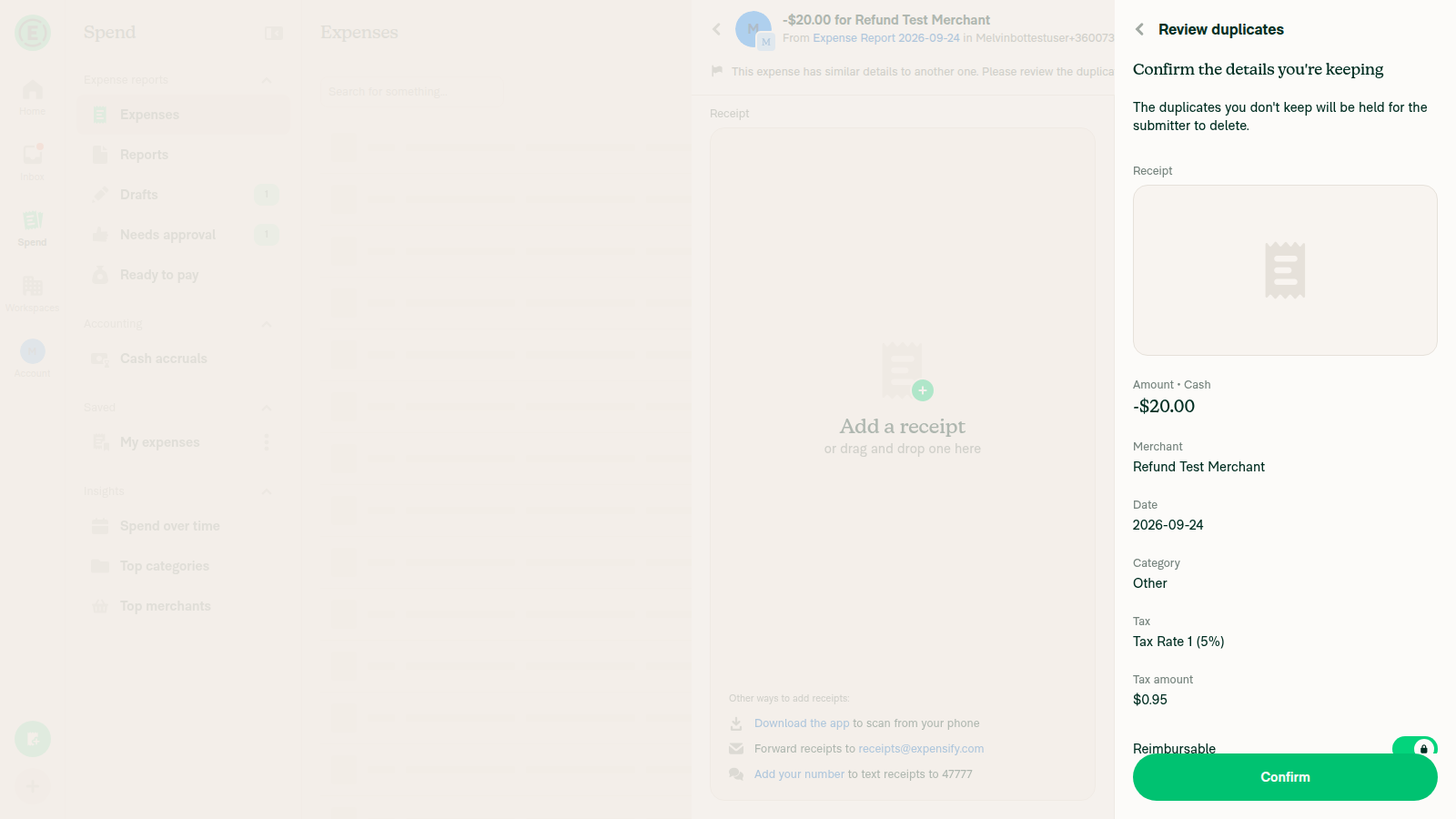
Duplicate-resolution confirmation page: Amount -$20.00 but Tax amount $0.95 (positive, mismatched sign)

Step Status
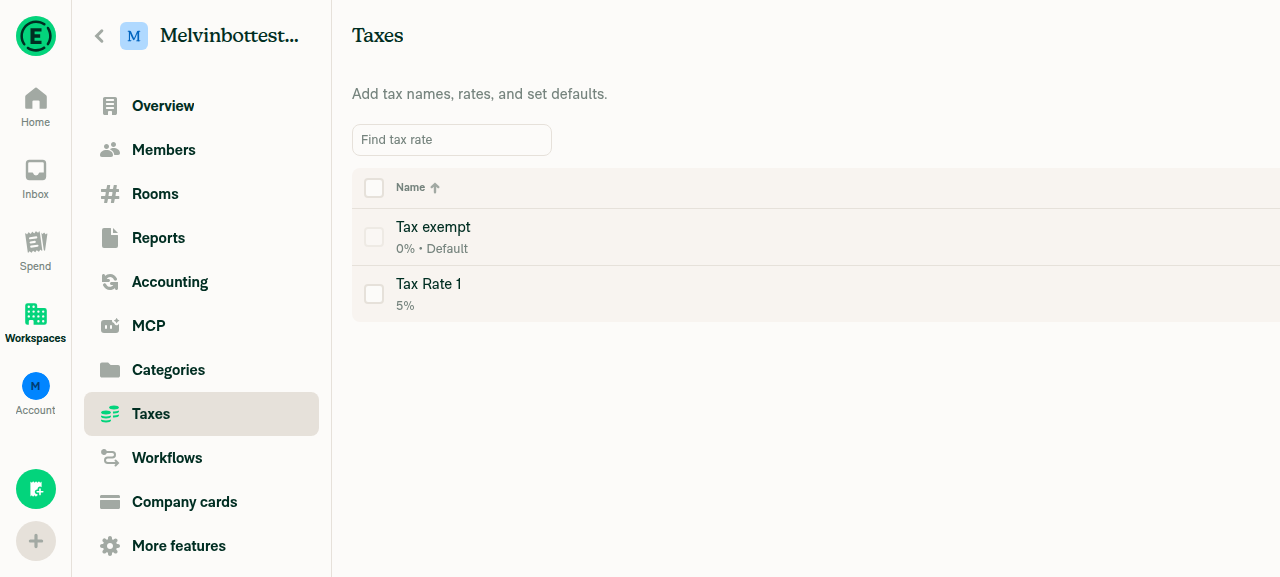
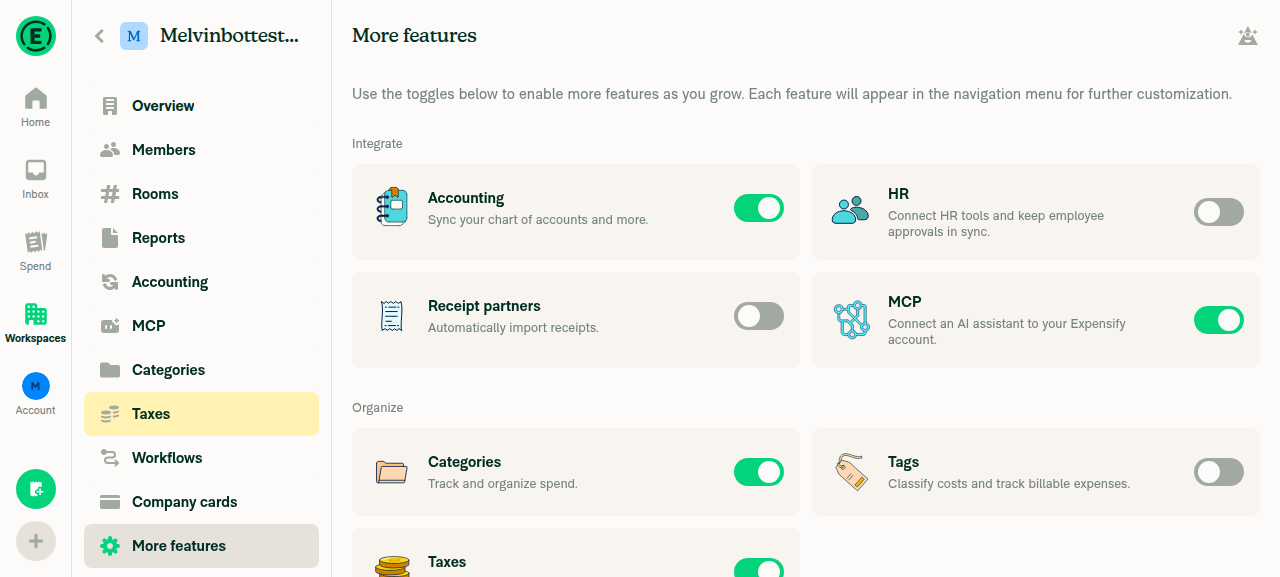
1. Workspace admin can enable Taxes and set a non-zero tax rateEnabled the Taxes feature under Workspace > More features; the workspace's default tax rates already included a non-zero "Tax Rate 1 (5%)" alongside "Tax exempt (0%)".
Workspace Taxes settings showing Tax exempt (0%) and Tax Rate 1 (5%)
Taxes feature toggled on in More features
✅
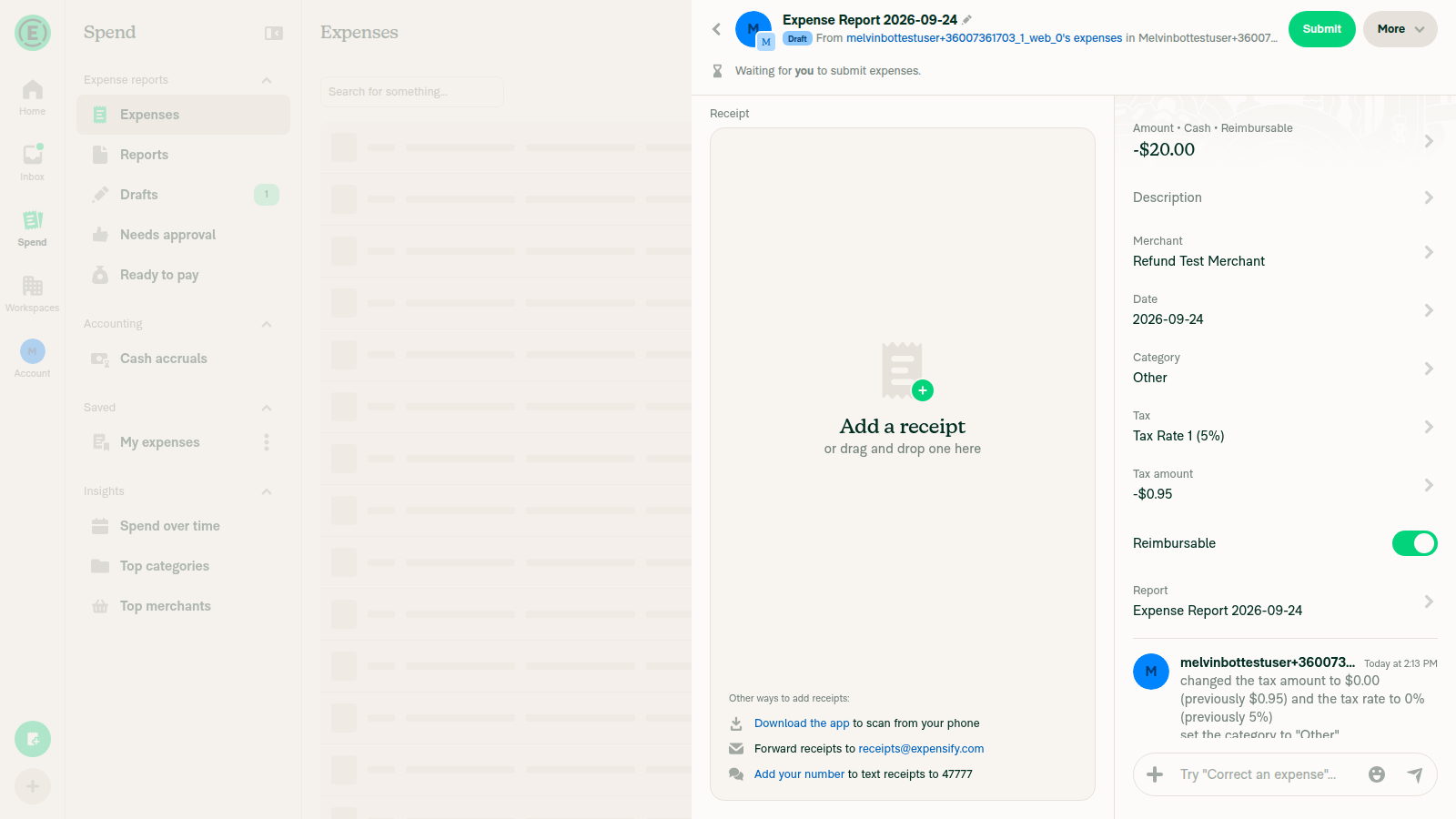
2. A workspace expense with a negative amount (refund) can be created with a non-zero tax rate appliedCreated a manual expense with Amount -$20.00, Category "Other", Tax "Tax Rate 1 (5%)" successfully in the workspace's Expense Report.
Negative expense created with Tax Rate 1 (5%) applied
✅
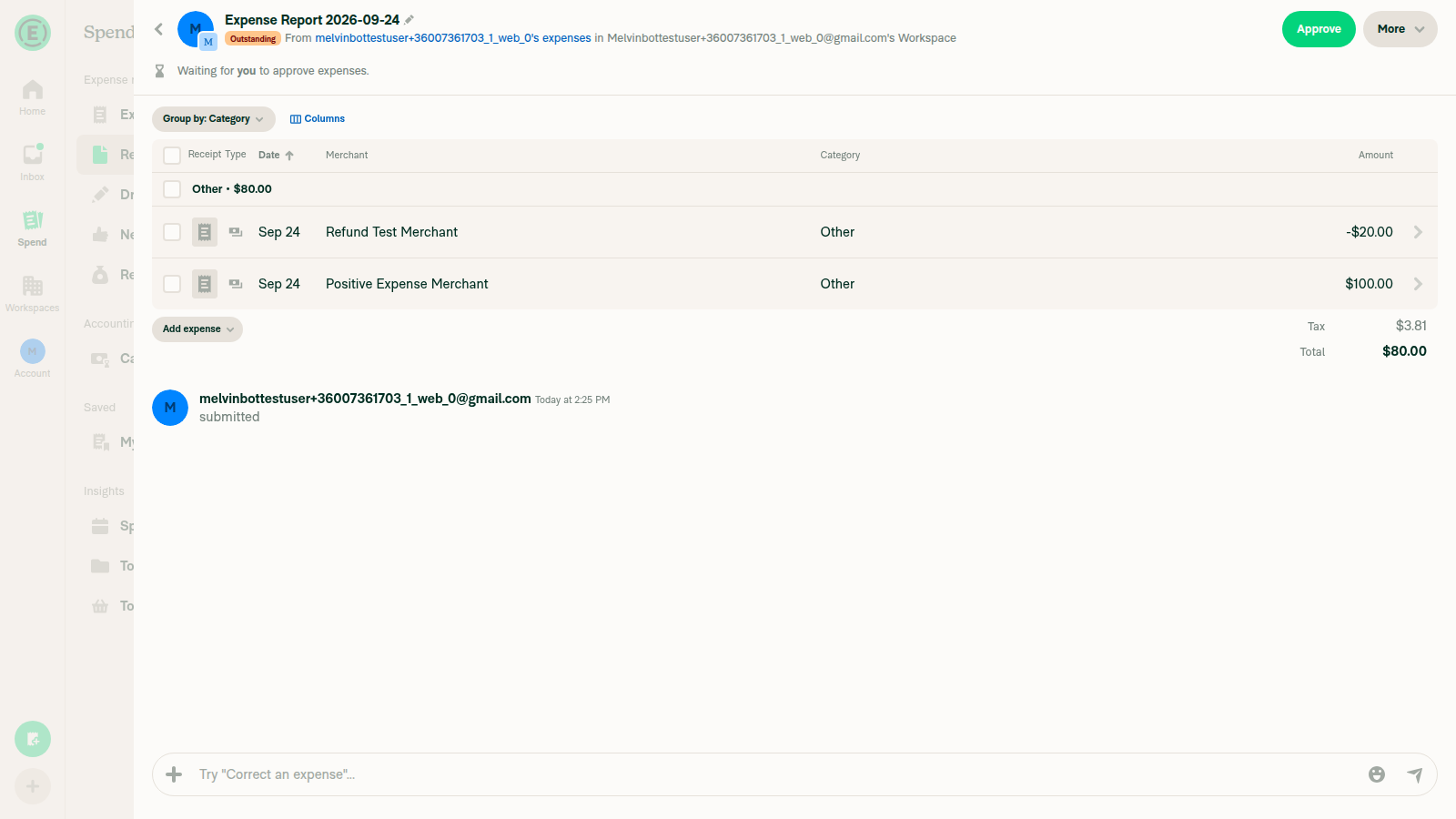
3. Report table view (wide/desktop) shows the Tax column value for the negative expenseThe in-report table (Group by: Category) and the global Search "Expenses" table both expose a "Columns" editor listing a "Tax" column, but it stayed permanently disabled/grayed-out regardless of how many other columns were freed up (tested down to 4 selected columns), so no per-row Tax column could be displayed. Only an aggregate report-level "Tax" total was visible (-$0.95 with only the refund; $3.81 once a $100 positive expense was added), which is consistent with correct signed math but is not the per-row column the step asks for.
Report table showing -$20.00 and $100.00 rows with aggregate Tax total, but no per-row Tax column available
❌
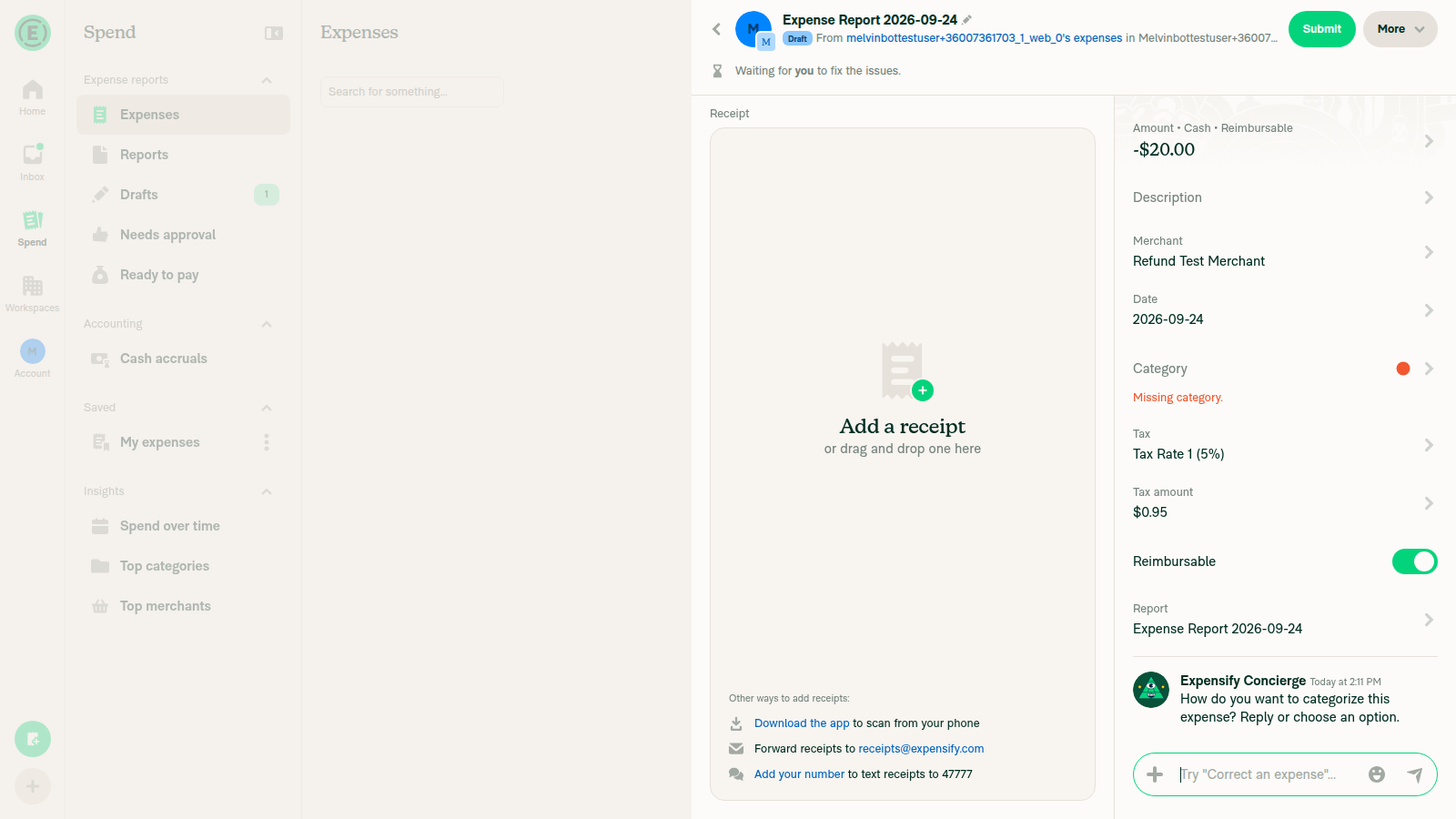
4. Expense details page Tax field matches the sign of the Amount fieldImmediately after creating the negative expense, the details page showed Amount -$20.00 but Tax amount $0.95 (positive) — a sign mismatch. After an unrelated edit (changing category, then re-selecting the tax rate) forced a refetch, the same expense correctly re-rendered as Tax amount -$0.95, matching the negative Amount. So the fix's own logic (signed convertToDisplayString) is correct given settled data, but the very first render of a brand-new expense still reproduces the original bug.
Freshly created expense: Amount -$20.00 but Tax amount $0.95 (positive, mismatched sign)
Same expense after an edit: Amount -$20.00, Tax amount -$0.95 (correct, matching sign)
⚠️
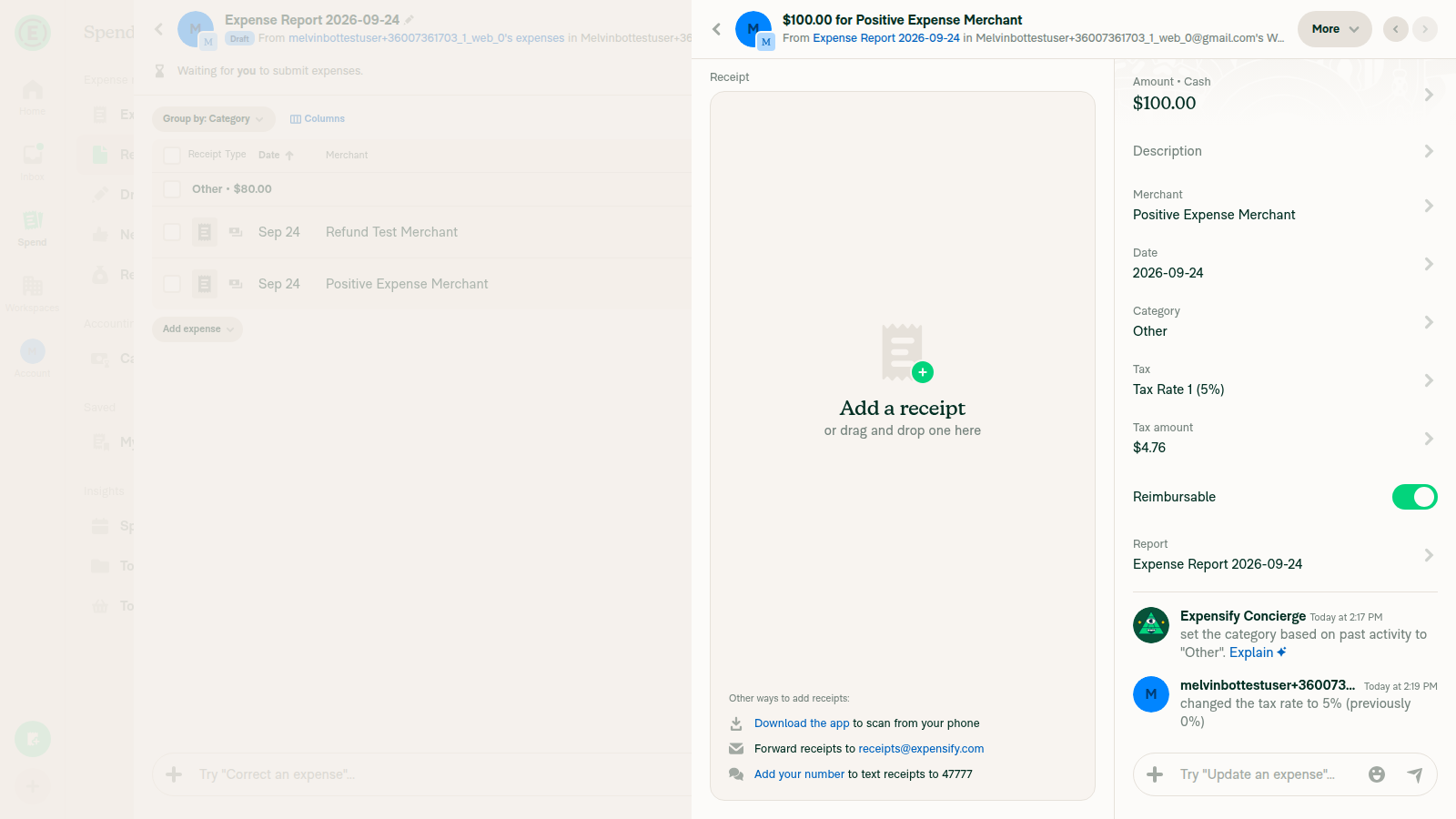
5. A normal positive expense still shows its tax as positiveCreated a $100.00 expense with Tax Rate 1 (5%); after settling, the details page showed Amount $100.00 and Tax amount $4.76, both positive.
Positive expense showing Amount $100.00 and Tax amount $4.76
✅
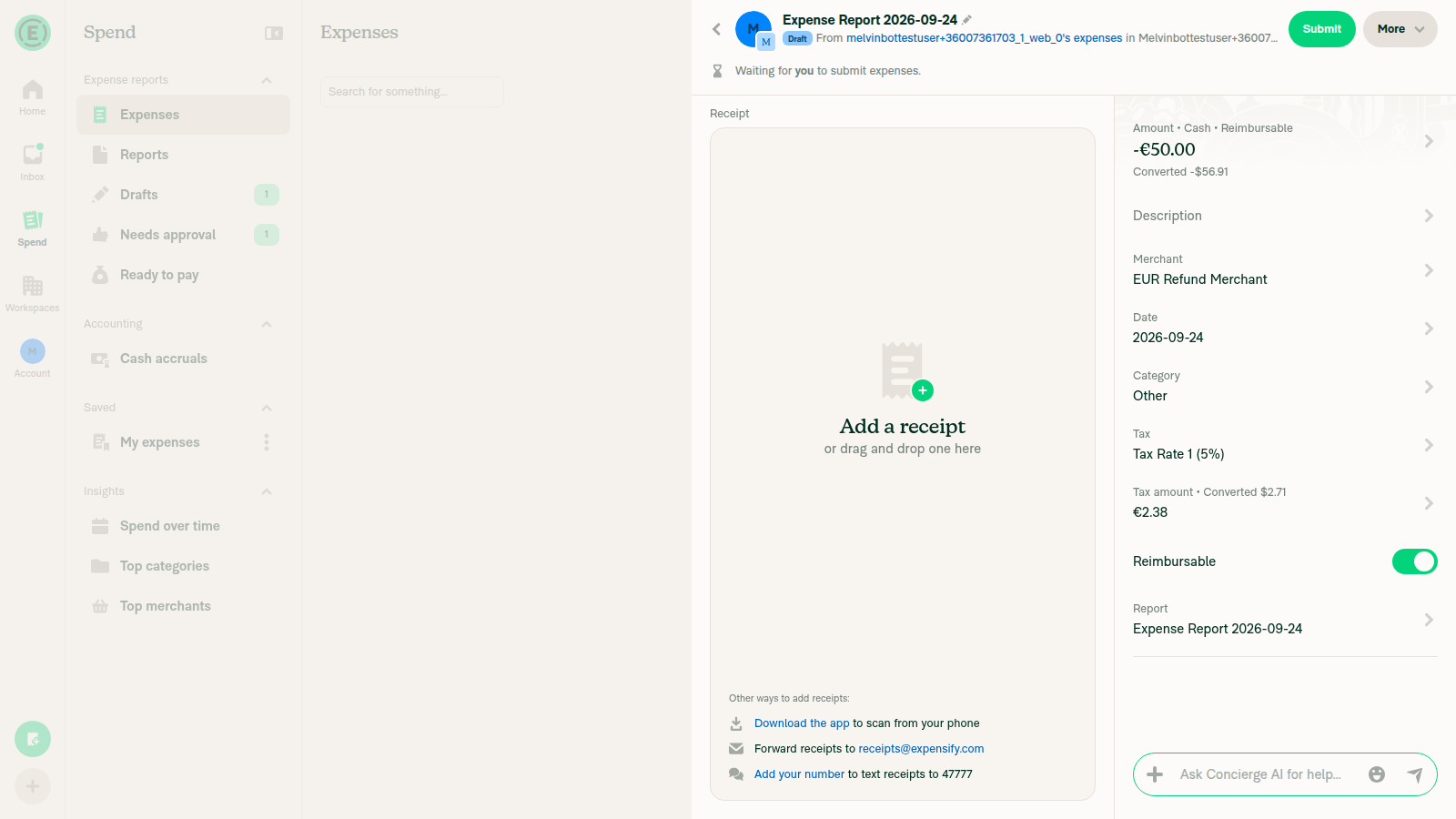
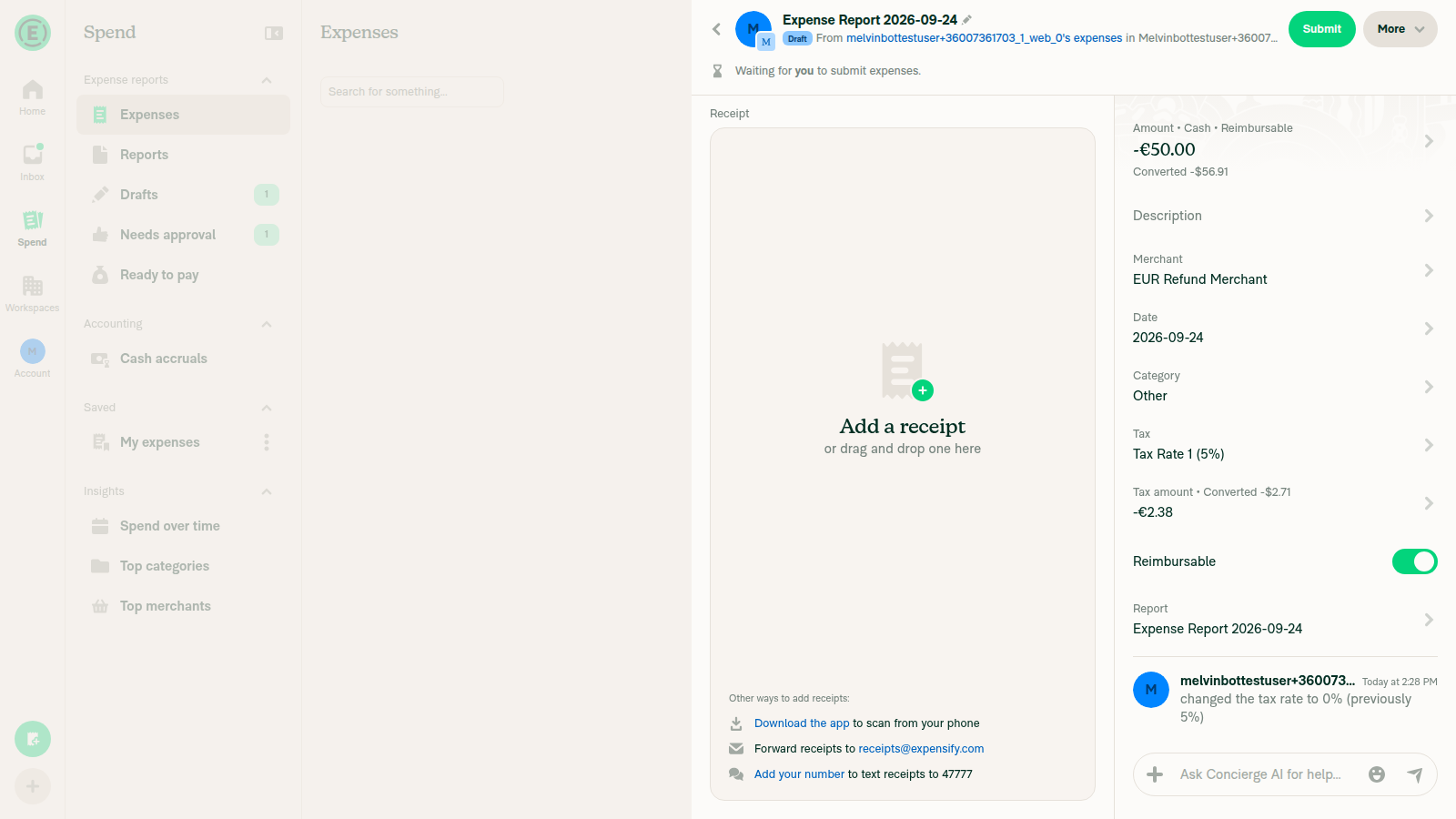
6. Foreign-currency expense: converted tax line follows the same sign ruleCreated a -€50.00 (EUR) expense with Tax Rate 1 (5%). Immediately after creation, the details page showed "Tax amount • Converted $2.71, €2.38" (both positive) next to "Amount -€50.00 / Converted -$56.91" (negative) — mismatched, same as step 4. After toggling the tax rate off/on to force a refetch, it corrected to "Tax amount • Converted -$2.71, -€2.38", matching the negative Amount/Converted amount.
Freshly created EUR refund: Amount -€50.00 but Converted tax +$2.71/+€2.38 (mismatched sign)
Same EUR refund after an edit: Converted tax -$2.71/-€2.38 (correct, matching sign)
⚠️
7. Merge-transactions / duplicate-resolution confirmation page: tax sign matches amount signCreated a duplicate of the -$20.00 "Refund Test Merchant" expense (same merchant/amount/date) to trigger Concierge's duplicate detection, then opened "Review duplicates" → "Keep selected" → the "Confirm the details you're keeping" page (DynamicConfirmationPage, which renders MoneyRequestView with updatedTransaction=newTransaction). It showed Amount -$20.00 but Tax amount $0.95 (positive) — the exact "unsigned tax next to a signed amount" scenario the PR description says this fix addresses for merge/duplicate-resolution flows. This reproduces because the freshly-created duplicate transaction still carries the same first-render sign issue described in step 4/6, and buildNewTransactionAfterReviewingDuplicates() only overrides taxAmount when the tax code was changed during review — otherwise it passes through the duplicate's raw (still-unsettled) taxAmount unchanged.
Duplicate-resolution confirmation page: Amount -$20.00 but Tax amount $0.95 (positive, mismatched sign)
❌
8. No errors appear in the JS console during the flowagent-device's web session has no dedicated browser-console capture command (console/log commands are reserved for native platforms), so JS console errors could not be directly enumerated. No error dialogs or crash banners appeared during the flow. A network dump of the session showed 198 successful (200) API calls (RequestMoney, Search, OpenReport, etc.) and only 2 occurrences of a 403 on AuthenticatePusher (Pusher/websocket auth), which is unrelated to the tax-display feature.
⚠️

Suggested follow-up for the author: investigate why a freshly created transaction (before any edit-triggered refetch) renders with the wrong tax sign on first view. It affects the expense-details page, the converted-tax line, and the duplicate-resolution confirmation page, and appears tied to how the transaction's associated report resolves on first render rather than to the Math.abs() removal itself.

Tested on dev NewDot web at commit f4639ed of claude-negativeTaxAmountDisplay.


view run · view recording

: convertToDisplayString(Math.abs(transactionTaxAmount ?? 0), actualCurrency);
// `transactionTaxAmount` is already `getTaxAmount()` of `displayTransaction`, which resolves `updatedTransaction ?? transaction`,
// so it carries the correct sign for negative expenses (refunds) in every flow, including merge and duplicate resolution.
const formattedTaxAmount = convertToDisplayString(transactionTaxAmount ?? 0, actualCurrency);

Copy link
Copy Markdown
Contributor

Choose a reason for hiding this comment

The reason will be displayed to describe this comment to others. Learn more.

@MelvinBot as you said transactionTaxAmount is from displayTransaction, which resolves updatedTransaction ?? transaction. But what if updatedTransaction is an object, but doesn't have taxAmount? formattedTaxAmount will be 0.

Also, why we touch converted tax amount too?

Copy link
Copy Markdown
Contributor Author

Choose a reason for hiding this comment

The reason will be displayed to describe this comment to others. Learn more.

1. updatedTransaction without taxAmount: The result is still 0, but it was also 0 before this PR, so this change doesn't cause a regression.

transaction is updatedTransaction ?? onyxTransaction (MoneyRequestView.tsx:237), and displayTransaction is built from it (L318). When updatedTransaction has no taxAmount, the old code skipped the first branch and fell back to transactionTaxAmount, which was read from that same updatedTransaction. Both versions give 0.

In practice, both callers spread the full original transaction first, so taxAmount is present:

2. Why touch the converted tax amount: It had the same Math.abs() bug. For a foreign-currency refund, the "Converted" tax line under the tax field showed a positive value next to a negative amount. convertedTaxAmount is stored with the same inverted sign as taxAmount, so I added a getter that mirrors getTaxAmount() instead of negating inline.

The linked issue doesn't strictly need this change. If you'd rather keep the PR focused on taxAmount, I can revert that part.


view run

Copy link
Copy Markdown
Contributor

Choose a reason for hiding this comment

The reason will be displayed to describe this comment to others. Learn more.

@MelvinBot oh right, please just remove your comment above

Copy link
Copy Markdown
Contributor Author

Choose a reason for hiding this comment

The reason will be displayed to describe this comment to others. Learn more.

Done. I removed the two-line comment above formattedTaxAmount in e5c1a47. Nothing else changed.

Co-authored-by: Bernhard Owen Josephus <bernhardoj@users.noreply.github.com>
@bernhardoj

Copy link
Copy Markdown
Contributor

@MelvinBot update the test steps for QA Steps to:

Prerequisite: have a workspace with Taxes enabled and a non-zero tax rate

  1. Open a workspace chat
  2. Submit 2 expenses, one with a negative amount, a currency different from the workspace, and a non-zero tax rate
  3. Open the expense report
  4. Observe the row of the negative expense
  5. Verify the tax amount is negative
  6. Open the expense thread
  7. Verify the tax amount and tax converted amount is negative

Update Offline tests and Test steps to be "Same as QA Steps"

@MelvinBot

Copy link
Copy Markdown
Contributor Author

I updated the PR description:

  • QA Steps: now has your prerequisite and 7 steps.
  • Tests and Offline tests: both now say "Same as QA Steps".

I kept the "Verify that no errors appear in the JS console" checkbox in Tests and QA Steps, and I removed the old TODO placeholder text. I didn't change anything else in the description.


view run

@bernhardoj

Copy link
Copy Markdown
Contributor

@MelvinBot copy and replace this with the Screenshots/Videos

Screenshots/Videos

Android: Native
Android: mWeb Chrome
iOS: Native
iOS: mWeb Safari
MacOS: Chrome / Safari
web.mp4

@MelvinBot

Copy link
Copy Markdown
Contributor Author

I replaced the PR description's Screenshots/Videos section with your version. The MacOS: Chrome / Safari section now has your video. The rest of the description is unchanged.


view run

@bernhardoj

Copy link
Copy Markdown
Contributor

@MelvinBot update the QA Steps to:

  1. Open a workspace chat
  2. Submit 2 expenses, one with a negative amount, a currency different from the workspace, and a tax rate
  3. Open the expense report, then press the negative expense
  4. Update the tax rate to another non-zero tax rate
  5. Verify the tax amount and tax converted amount are negative

@MelvinBot

Copy link
Copy Markdown
Contributor Author

I updated the QA Steps in the PR description to your 5 steps. The Tests and Offline tests sections say "Same as QA Steps", so they now use these steps too.

I left the existing prerequisite line as it was: "have a workspace with Taxes enabled and a non-zero tax rate". Step 4 needs a second non-zero tax rate, so you may want to change it to "two non-zero tax rates".


view run

@bernhardoj

Copy link
Copy Markdown
Contributor

@MelvinBot replace your PR Author Checklist with mine below

PR Author Checklist

  • I linked the correct issue in the ### Fixed Issues section above
  • I wrote clear testing steps that cover the changes made in this PR
    • I added steps for local testing in the Tests section
    • I added steps for the expected offline behavior in the Offline steps section
    • I added steps for Staging and/or Production testing in the QA steps section
    • I added steps to cover failure scenarios (i.e. verify an input displays the correct error message if the entered data is not correct)
    • I turned off my network connection and tested it while offline to ensure it matches the expected behavior (i.e. verify the default avatar icon is displayed if app is offline)
    • I tested this PR with a High Traffic account against the staging or production API to ensure there are no regressions (e.g. long loading states that impact usability).
  • I included screenshots or videos for tests on all platforms
  • I ran the tests on all platforms & verified they passed on:
    • Android: Native
    • Android: mWeb Chrome
    • iOS: Native
    • iOS: mWeb Safari
    • MacOS: Chrome / Safari
  • I verified there are no console errors (if there's a console error not related to the PR, report it or open an issue for it to be fixed)
  • I followed proper code patterns (see Reviewing the code)
    • I verified that comments were added to code that is not self explanatory
    • I verified that any new or modified comments were clear, correct English, and explained "why" the code was doing something instead of only explaining "what" the code was doing.
    • I verified any copy / text that was added to the app is grammatically correct in English. It adheres to proper capitalization guidelines (note: only the first word of header/labels should be capitalized), and is either coming verbatim from figma or has been approved by marketing (in order to get marketing approval, ask the Bug Zero team member to add the Waiting for copy label to the issue)
  • If a new code pattern is added I verified it was agreed to be used by multiple Expensify engineers
  • I followed the guidelines as stated in the Review Guidelines
  • I tested other components that can be impacted by my changes (i.e. if the PR modifies a shared library or component like Avatar, I verified the components using Avatar are working as expected)
  • If a new CSS style is added I verified that:
    • A similar style doesn't already exist
    • The style can't be created with an existing StyleUtils function (i.e. StyleUtils.getBackgroundAndBorderStyle(theme.componentBG))
  • If new assets were added or existing ones were modified, I verified that:
    • The assets are optimized and compressed (for SVG files, run npm run compress-svg)
    • The assets load correctly across all supported platforms.
  • If the PR modifies code that runs when editing or sending messages, I tested and verified there is no unexpected behavior for all supported markdown - URLs, single line code, code blocks, quotes, headings, bold, strikethrough, and italic.
  • If the PR modifies a generic component, I tested and verified that those changes do not break usages of that component in the rest of the App (i.e. if a shared library or component like Avatar is modified, I verified that Avatar is working as expected in all cases)
  • If the PR modifies a component related to any of the existing Storybook stories, I tested and verified all stories for that component are still working as expected.
  • If the PR modifies a component or page that can be accessed by a direct deeplink, I verified that the code functions as expected when the deeplink is used - from a logged in and logged out account.
  • If the PR modifies the UI (e.g. new buttons, new UI components, changing the padding/spacing/sizing, moving components, etc) or modifies the form input styles:
    • I verified that all the inputs inside a form are aligned with each other.
    • I added Design label and/or tagged @Expensify/design so the design team can review the changes.
  • I added unit tests for any new feature or bug fix in this PR to help automatically prevent regressions in this user flow.
  • If the main branch was merged into this PR after a review, I tested again and verified the outcome was still expected according to the Test steps.

@MelvinBot

Copy link
Copy Markdown
Contributor Author

Done. I replaced the PR Author Checklist in the PR description with yours, so every item is now checked. The rest of the description is unchanged.


view run

@bernhardoj

Copy link
Copy Markdown
Contributor

@MelvinBot Check "Verify that no errors appear in the JS console" and mark this PR as ready

@MelvinBot

Copy link
Copy Markdown
Contributor Author

I ticked both "Verify that no errors appear in the JS console" checkboxes, in the Tests and QA Steps sections.

I couldn't mark the PR as ready. This run doesn't have permission for that step. Please click Ready for review on the PR yourself.

@bernhardoj

Copy link
Copy Markdown
Contributor

@MelvinBot i don't have access to mark it as ready, and it's your job to do that. please?

@MelvinBot

Copy link
Copy Markdown
Contributor Author

Sorry, I tried again and still can't mark this PR as ready. This run blocks the "Ready for review" action, and I can't get around that.

Your account has read access to the repo, which isn't enough to change a PR's draft state. An Expensify employee needs to click Ready for review. grgia is assigned to the linked issue, [Exploratory] Web - Taxes - Inconsistent tax amount display on report with negative expenses, so you could ask them there.


view run

@bernhardoj

bernhardoj commented Sep 25, 2026 •

Copy link
Copy Markdown
Contributor

@grgia can you help mark this PR as ready

Also, for a note, I wrote the test step to change the tax rate to a non-zero rate after the expense is created, because it looks like we currently have a FE bug where tax stays positive even when the amount is negative.

Here are the details. The expense amount stored in BE is the opposite, so if I submit a -200, the BE stores it as 200.

When I submit a -200 amount, the API payload sends it as it is: -200. But the tax amount is sent as a positive, let's say, 10.

So, the BE stores the amount as 200, but the tax amount as -10.

It seems that on the FE, we can't input a negative tax amount. I think we should fix this as a separate issue, so when the amount is negative, the tax is also negative.

image

This issue is similar to what Melvin mentioned in the last part here

@grgia
grgia marked this pull request as ready for review October 2, 2026 13:46
@grgia
grgia requested a review from a team as a code owner October 2, 2026 13:46
@melvin-bot
melvin-bot Bot requested review from JmillsExpensify and bernhardoj and removed request for a team October 2, 2026 13:46
@grgia
grgia merged commit b4470f6 into main Oct 9, 2026
34 of 38 checks passed
@grgia
grgia deleted the claude-negativeTaxAmountDisplay branch October 9, 2026 09:35
@github-actions

github-actions Bot commented Oct 9, 2026

Copy link
Copy Markdown
Contributor

🚧 grgia has triggered a test Expensify/App build. You can view the workflow run here.

@OSBotify OSBotify mentioned this pull request Oct 9, 2026
74 tasks done
@OSBotify

OSBotify commented Oct 9, 2026

Copy link
Copy Markdown
Contributor

🚀 Deployed to staging by https://github.com/grgia in version: 9.5.7-0 🚀

platform result
🕸 web 🕸 success ✅
🤖 android 🤖 success ✅
🍎 iOS 🍎 success ✅

@MelvinBot

Copy link
Copy Markdown
Contributor Author

No help site update is needed. This bug fix makes a negative expense's tax amount show as negative on the expense details page, matching its amount and the report table, and no article in docs/articles says otherwise.


view run

@mitarachim

Copy link
Copy Markdown

Deploy Blocker #103663 was identified to be related to this PR.

@mitarachim

Copy link
Copy Markdown

Deploy Blocker #103664 was identified to be related to this PR.

@mitarachim

Copy link
Copy Markdown

Deploy Blocker #103666 was identified to be related to this PR.

@mitarachim

Copy link
Copy Markdown

Deploy Blocker #103671 was identified to be related to this PR.

@jponikarchuk

Copy link
Copy Markdown

Deploy Blocker #103702 was identified to be related to this PR.

@jponikarchuk

Copy link
Copy Markdown

Deploy Blocker #103707 was identified to be related to this PR.

@jponikarchuk

Copy link
Copy Markdown

Deploy Blocker #103723 was identified to be related to this PR.

@OSBotify

Copy link
Copy Markdown
Contributor

🚀 Deployed to production by https://github.com/mountiny in version: 9.5.7-3 🚀

platform result
🕸 web 🕸 success ✅
🤖 android 🤖 success ✅
🍎 iOS 🍎 success ✅

Bundle Size Analysis (Sentry):

Sign up for free to join this conversation on GitHub. Already have an account? Sign in to comment

Labels

Melvin-Test-Android Melvin-Test-Web Triggers Melvin to run the testing steps of the PR on web

Projects

None yet

Development

Successfully merging this pull request may close these issues.

7 participants