Skip to content

Only auto-select a distance rate when moving an expense to a different workspace - #105129

Closed
MelvinBot wants to merge 9 commits into
mainfrom
claude-onlyAutoSelectDistanceRateOnWorkspaceChange
Closed

MelvinBot wants to merge 9 commits into
mainfrom
claude-onlyAutoSelectDistanceRateOnWorkspaceChange

Conversation

@MelvinBot

@MelvinBot MelvinBot commented Oct 27, 2026 •

Copy link
Copy Markdown
Contributor

Explanation of Change

Previously, moving a distance expense to another report could incorrectly replace its rate, even within the same workspace, and clear existing rate violations.

This PR fixes that behavior by:

  • Same workspace: Preserve the original rate, amount, and existing violations.
  • Different workspace: Use a matching rate if available; otherwise, select the destination workspace's default rate and recalculate the amount.
  • Rate changed: Show a Concierge message in the expense's transaction thread when repricing occurs.

Fixed Issues

$ #100558
PROPOSAL: #100558 (comment)

Tests

Preconditions:
Have just one workspace with the distance rate enable
have a distance of 0.80 miles

Test 1 — Move expense within the same workspace

  1. Open the distance expense in Workspace A.
  2. Click the three-dot menu → Move to report.
  3. Select another report in Workspace A.
  4. Verify the rate remains $0.80/mile and the amount remains $8.00.
  5. Verify no Concierge rate-change message appears.

Test 2 — Preserve an existing rate violation

  1. Disable the original distance rate in Workspace A.
  2. Open the expense and verify the rate violation appears.
  3. Move the expense to another report in Workspace A.
  4. Verify the original rate, amount, and violation remain unchanged.

Test 3 — Move an unreported expense within its original workspace

  1. Create a distance expense in Workspace A.
  2. Remove the expense from its report so it becomes unreported.
  3. Move the expense to another report in Workspace A.
  4. Verify the original rate and amount remain unchanged.
    Verify that no errors appear in the JS console
  • Verify that no errors appear in the JS console

Offline tests

Test — Move expense within the same workspace while offline

  1. Open the distance expense in Workspace A.
  2. Go to Settings → About → Troubleshoot → Force offline ON.
  3. Return to the expense.
  4. Click three dots → Move to report.
  5. Select another report in Workspace A.
  6. Verify the rate remains $0.80/mile and the amount remains $8.00.
  7. Turn Force offline OFF.
  8. Verify the rate and amount remain unchanged after syncing.

QA Steps

Same as Tests.

  • Verify that no errors appear in the JS console

PR Author Checklist

  • I linked the correct issue in the ### Fixed Issues section above
  • I wrote clear testing steps that cover the changes made in this PR
    • I added steps for local testing in the Tests section
    • I added steps for the expected offline behavior in the Offline steps section
    • I added steps for Staging and/or Production testing in the QA steps section
    • I added steps to cover failure scenarios (i.e. verify an input displays the correct error message if the entered data is not correct)
    • I turned off my network connection and tested it while offline to ensure it matches the expected behavior (i.e. verify the default avatar icon is displayed if app is offline)
    • I tested this PR with a High Traffic account against the staging or production API to ensure there are no regressions (e.g. long loading states that impact usability).
  • I included screenshots or videos for tests on all platforms
  • I ran the tests on all platforms & verified they passed on:
    • Android: Native
    • Android: mWeb Chrome
    • iOS: Native
    • iOS: mWeb Safari
    • MacOS: Chrome / Safari
  • I verified there are no console errors (if there's a console error not related to the PR, report it or open an issue for it to be fixed)
  • I verified any copy / text that was added to the app is either coming verbatim from figma or has been approved by marketing (in order to get marketing approval, ask the Bug Zero team member to add the Waiting for copy label to the issue)
  • If a new code pattern is added I verified it was agreed to be used by multiple Expensify engineers
  • I tested other components that can be impacted by my changes (i.e. if the PR modifies a shared library or component like Avatar, I verified the components using Avatar are working as expected)
  • If new assets were added or existing ones were modified, I verified that:
    • The assets are optimized and compressed (for SVG files, run npm run compress-svg)
    • The assets load correctly across all supported platforms.
  • If the PR modifies code that runs when editing or sending messages, I tested and verified there is no unexpected behavior for all supported markdown - URLs, single line code, code blocks, quotes, headings, bold, strikethrough, and italic.
  • If the PR modifies a generic component, I tested and verified that those changes do not break usages of that component in the rest of the App (i.e. if a shared library or component like Avatar is modified, I verified that Avatar is working as expected in all cases)
  • If the PR modifies a component related to any of the existing Storybook stories, I tested and verified all stories for that component are still working as expected.
  • If the PR modifies a component or page that can be accessed by a direct deeplink, I verified that the code functions as expected when the deeplink is used - from a logged in and logged out account.
  • If the PR modifies the UI (e.g. new buttons, new UI components, changing the padding/spacing/sizing, moving components, etc) or modifies the form input styles:
    • I verified that all the inputs inside a form are aligned with each other.
    • I added Design label and/or tagged @Expensify/design so the design team can review the changes.
  • If the PR adds or modifies the UI:
    • I asked an AI agent to review the changes for accessibility issues and addressed its findings.
    • I tested with a screen reader (VoiceOver on macOS) and verified all new/changed elements are reachable with a logical focus order.
    • I verified all new/changed elements have meaningful accessible names and roles.
    • I verified state changes are announced (e.g. checked/unchecked, expanded/collapsed, selected).
  • I added unit tests for any new feature or bug fix in this PR to help automatically prevent regressions in this user flow.
  • If the main branch was merged into this PR after a review, I tested again and verified the outcome was still expected according to the Test steps.

AI Tests

Main merge verification (2026-11-12):

  • Merged main at f3538e5728146439c4decfbad05907b2f079f826 without conflicts or handwritten source changes.
  • Passed: lint, lint-changed, typecheck, spelling, Storybook smoke test, and all 1,895 tests across four targeted distance/transaction/report suites.
  • Staged integration review returned no violations.
  • Full Jest run exceeded the 15-minute limit without reporting a failing test; it did not complete.
  • The Prettier script is absent. Whitespace findings in incoming main documentation/patch files were preserved; the PR-specific diff passes the whitespace check.

Expired fallback BUG 2 verification (2026-11-10):

  • Selection now returns whether it found an eligible equivalent rate; an expired fallback no longer preserves an overridden amount just because its rate value matches.
  • The offline expired-rate regression failed before the fix and now verifies recalculation from $9 to $8, the retained out-of-date warning, and a Concierge action. The inclusive end-date control preserves the $9 override without an action.
  • Passed: full Jest suite (2,309 suites, 38,494 tests, 160 snapshots; 146 tests skipped), 1,878 focused tests, typecheck, lint, lint-changed, spelling, and Storybook smoke test.
  • Staged code review returned no violations. The Prettier script is absent, so that matrix command could not run.
  • The commuter-distance BUG 1, waypoint guard, and message-ID handling were left unchanged.
Manual web verification

🤖 Web test steps verification results: ❌ fail

Runtime blocked verification on dev NewDot web; this is not a confirmed PR regression. No active appduct session was available, and both browser snapshots returned zero nodes on a blank page.
Blank application blocking expired-rate web verification

Step Status
Expired B rate: offline expense move assigns fallback, recalculates $9 to $8, retains warning, and creates Concierge adjustment.Not verified manually: the blank application prevented fixture setup and execution.
Blank application blocking expired-rate web verification
❌
Eligible B rate control preserves manually edited $9 without a Concierge message.Not verified manually due to the same runtime blocker.
❌

Main merge verification (2026-11-10):

  • Merged main at cc11655210b92be8e2b4a13feff27d20e3cd6674 without conflicts or handwritten source changes.
  • Passed on the final merged tree: lint, typecheck, and all 1,878 tests across five focused suites, including the latest attachment-handler change from main.
  • Lint-changed, spelling, and Storybook smoke checks passed before the final upstream iOS-only addition. Integration review returned no violations.
  • Full Jest run exceeded the 15-minute limit without reporting a failing test; it did not complete.
  • The Prettier script remains unavailable.

Main merge verification (2026-11-09):

  • Merged main at 5ebbde7d7cca4d372921e1ce0350b6962cf0cced without conflicts or handwritten source changes.
  • Passed: lint, lint-changed, typecheck, Storybook smoke test, and all 1,871 tests across four targeted distance/transaction/report suites.
  • Staged integration review returned no violations.
  • Full Jest run exceeded the 15-minute limit without reporting a failing test; it did not complete.
  • Prettier script is absent. Spelling reported one finding in an upstream DynamicForm test; no unrelated changes were made.

CI typecheck fix verification (2026-11-06):

  • Synced with main and supplied the existing currentUserPersonalDetails fixture to the distance-move test helper.
  • Passed: typecheck (all six configurations), lint-changed, spelling, Storybook smoke test, and 179 tests across TransactionTest and DistanceRequestUtilsTest.
  • Staged coding-standards review returned no violations; staged whitespace check passed.
  • Full lint exceeded the 10-minute limit. Full Jest exceeded the 15-minute limit without reporting a failing test; neither is claimed as passed for this update.
  • Formatting check could not complete: the Prettier script is absent, and the attempted Oxfmt command was denied.
  • No browser test was run for this test-fixture-only fix; no application behavior was changed by the fix.

Regression fix verification (2026-11-06):

  • Added three regression cases covering both reported bugs and previously edited expense values. All three failed before the fix and passed afterward.
  • Passed: full Jest suite (2,201 suites, 36,845 tests, 157 snapshots; 146 tests skipped), lint, lint-changed, typecheck, spelling, and Storybook smoke test.
  • Staged code review returned no violations.
  • Formatting verification could not complete: the Prettier script is absent and execution of the targeted Oxfmt check was denied.
  • Web verification could not reach the app: the supplied browser session displayed a blank page. Neither manual regression flow was verified.
Web verification blocker Blank dev NewDot page in the supplied session Blank page preventing workspace and expense setup

Conflict resolution verification:

  • Passed: lint, lint-changed, typecheck, Storybook smoke test, and 1,833 tests across four relevant Jest suites.
  • Full Jest run exceeded the 15-minute limit without reporting a failing test.
  • React Compiler check could not run because the CI base-branch value was empty.
  • Prettier command is unavailable on the current base branch. Spelling reported eight existing Polish-word findings in an unchanged upstream test.
  • Web verification was blocked by a blank page in the supplied test session; no expense move was performed.

Screenshots/Videos

Android: Native
Android: mWeb Chrome
iOS: Native
iOS: mWeb Safari
MacOS: Chrome / Safari

…t workspace

Keep the rate (and its violation) when the expense stays on the same workspace,
pick the rate with getRateForPolicyChange, and add an optimistic Concierge
MODIFIEDEXPENSE for expenses repriced onto the default rate, sending its ID as
modifiedExpenseReportActionID.

Co-authored-by: Maruf Sharifi <marufsharifi@users.noreply.github.com>
@melvin-bot melvin-bot Bot added Melvin-Test-Android Melvin-Test-Web Triggers Melvin to run the testing steps of the PR on web labels Oct 27, 2026
@MelvinBot
MelvinBot requested a review from a team October 27, 2026 12:43
@MelvinBot

Copy link
Copy Markdown
Contributor Author

I created this PR from an upstream branch since I don't have push access to your fork.

To take ownership of this branch and be able to push updates, run:

git remote add upstream https://github.com/Expensify/App.git
git fetch upstream claude-onlyAutoSelectDistanceRateOnWorkspaceChange
git checkout -b claude-onlyAutoSelectDistanceRateOnWorkspaceChange upstream/claude-onlyAutoSelectDistanceRateOnWorkspaceChange
git push -u origin claude-onlyAutoSelectDistanceRateOnWorkspaceChange

Then you can close this PR and open a new one from your fork.

@codecov

codecov Bot commented Oct 27, 2026 •

Copy link
Copy Markdown

Codecov Report

❌ Looks like you've decreased code coverage for some files. Please write tests to increase, or at least maintain, the existing level of code coverage. See our documentation here for how to interpret this table.

Files with missing lines Coverage Δ
src/libs/DistanceRequestUtils.ts 96.18% <100.00%> (+0.36%) ⬆️
src/libs/ReportUtils.ts 90.90% <100.00%> (-0.02%) ⬇️
...c/pages/DynamicNewReportWorkspaceSelectionPage.tsx 87.75% <ø> (ø)
...rc/pages/Search/SearchTransactionsChangeReport.tsx 84.25% <100.00%> (+0.07%) ⬆️
...s/iou/request/step/DynamicIOURequestEditReport.tsx 85.00% <ø> (ø)
.../iou/request/step/DynamicIOURequestStepUpgrade.tsx 82.56% <ø> (ø)
...questStepReport/hooks/useReportSelectionActions.ts 87.50% <ø> (ø)
src/components/AddExistingExpenseFooter.tsx 0.00% <0.00%> (ø)
src/libs/actions/Transaction.ts 85.52% <94.11%> (+0.36%) ⬆️
... and 18 files with indirect coverage changes

@MelvinBot

Copy link
Copy Markdown
Contributor Author

The failing check is unrelated to this PR, so I didn't push a fix.

Analysis: validate-perf-tests failed on [ReportActionsList] should re-render when the report name changes. Its average render count went from 27.10 to 27.80, and the check allows a deviation of 0. That test is currently flaky. It failed the same way in the last hour on 3 unrelated branches:

Evidence: This PR's only ReportUtils.ts change adds a new helper, buildOptimisticConciergeDistanceRateModifiedExpenseReportAction, which runs only when an expense moves to another workspace. None of the changed files is rendered by ReportActionsList. The branch run was also noisy: stability was 20.8%, compared with 3.6% for the baseline.

Next step: Re-run the failed job. Check independent approval will pass once the PR has a reviewer approval.


view run

@MelvinBot

Copy link
Copy Markdown
Contributor Author

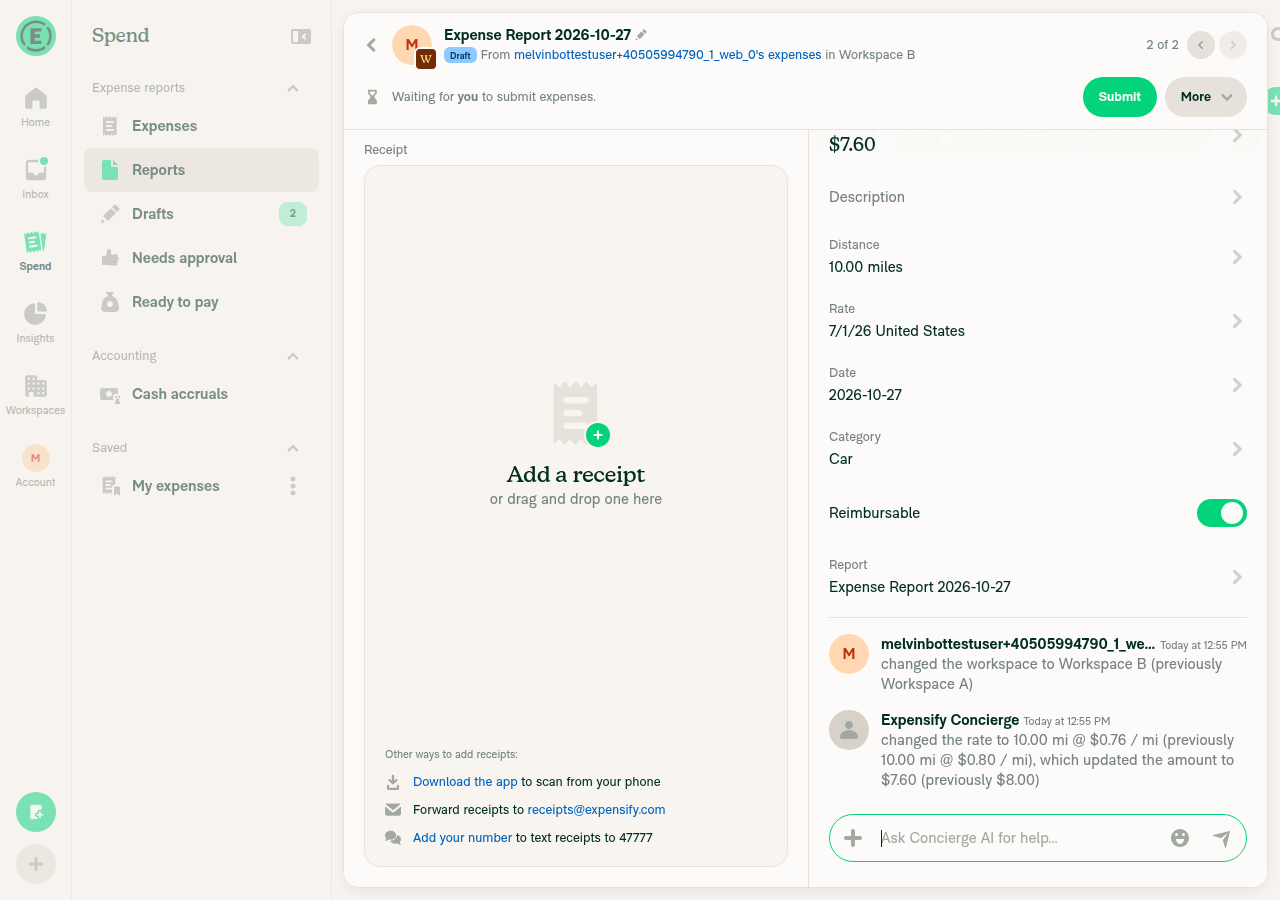
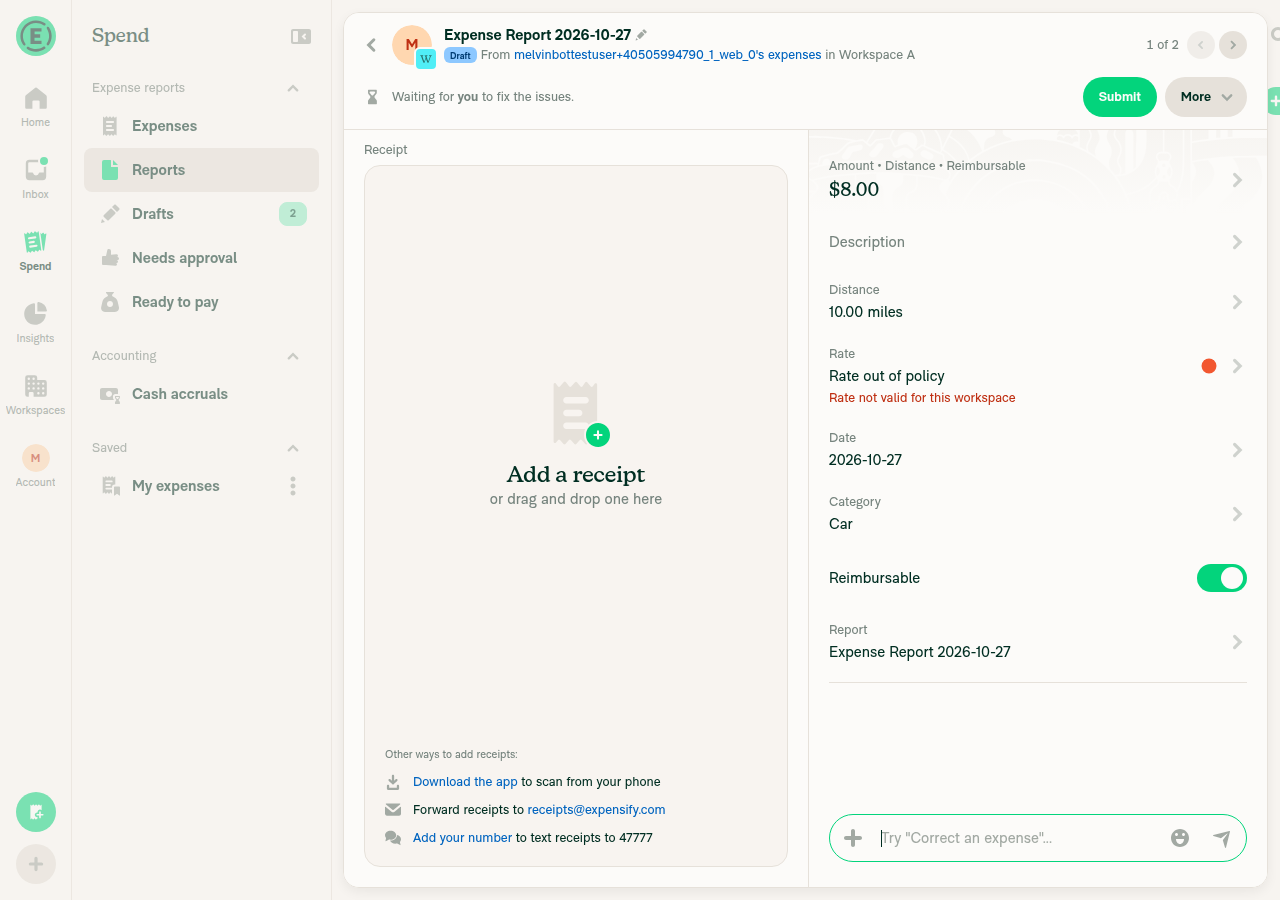
🤖 Web test steps verification results: ⚠️ partial

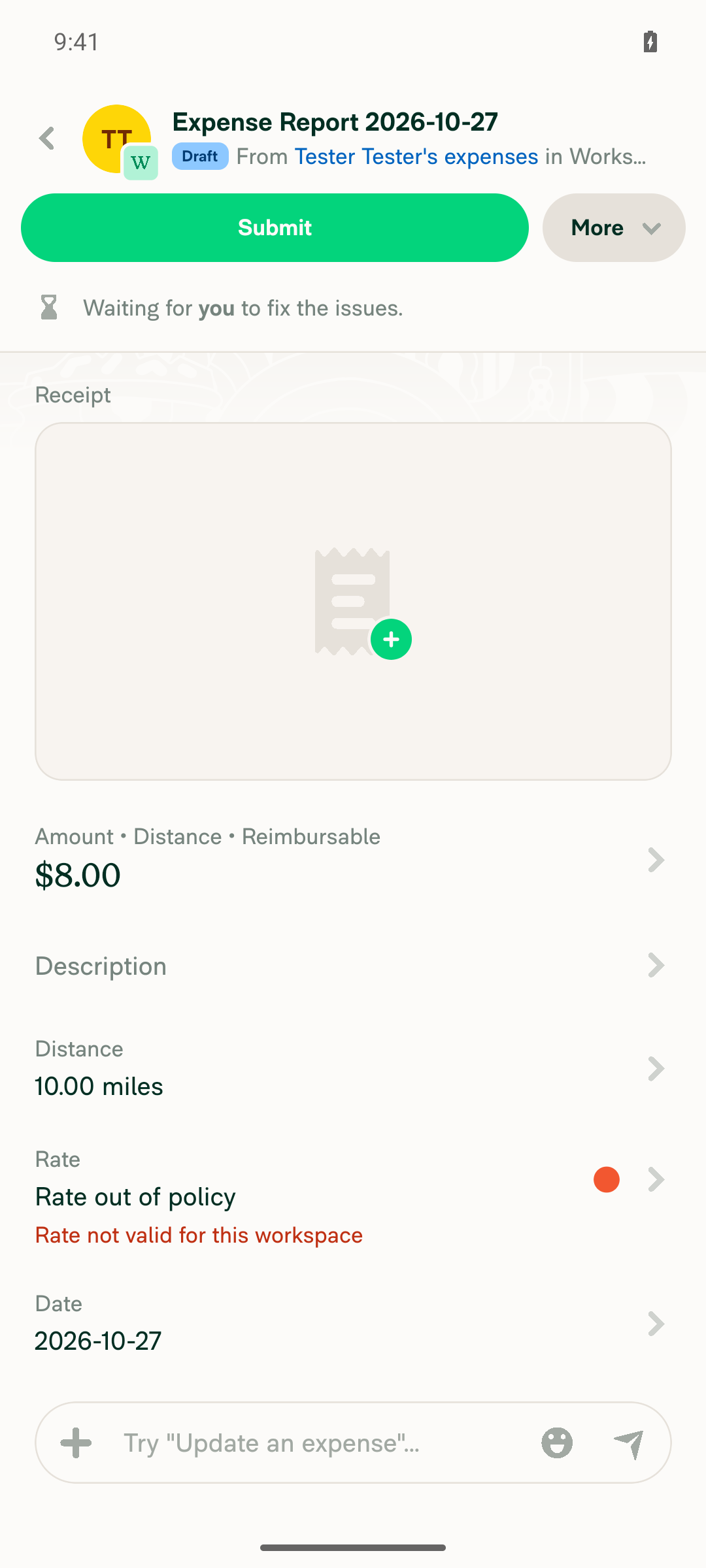
The PR has no written test steps yet, so I used steps based on the bug in [HOLD App 100555] Expense-Rate violation disappears after moving expense to another report. A same-workspace move kept the "Rate not valid for this workspace" violation. A cross-workspace move repriced the expense with a Concierge message. I skipped the reload checks because reloading can sign out this test session.
Repriced onto Workspace B default rate with Concierge message

Step Status
1. Create a 10 mi distance expense in Workspace A at a second $0.80/mi rate, then disable that rate. The expense shows "Rate not valid for this workspace".The Rate field showed "Rate not valid for this workspace". The amount stayed $8.00.
Rate not valid violation after disabling the rate
✅
2. Move the expense to another report in Workspace A. Rate and amount stay the same, and the violation stays.After "Move to report", the expense was in the new report with 10.00 mi, Second Rate, $8.00. The "Rate not valid for this workspace" violation was still shown.
Violation kept after same-workspace move
✅
3. Reload and reopen the expense. The violation and original rate and amount remain.Not run. A browser reload can sign out this test session, which would also block step 4.
⚠️
4. Move the expense to a report in Workspace B (no $0.80 rate). It moves to B's default rate, the violation clears, and Concierge posts "changed the rate to …".The rate changed to $0.76/mi and the amount went from $8.00 to $7.60. The violation cleared. Concierge posted "changed the rate to 10.00 mi @ $0.76 / mi (previously 10.00 mi @ $0.80 / mi), which updated the amount to $7.60 (previously $8.00)". The thread showed no separate "moved this expense" line before it. The tester thinks this is because the destination report was set up with "Change workspace" first. The state after a reload was not checked.
Repriced onto Workspace B default rate with Concierge message
⚠️

@MelvinBot

Copy link
Copy Markdown
Contributor Author

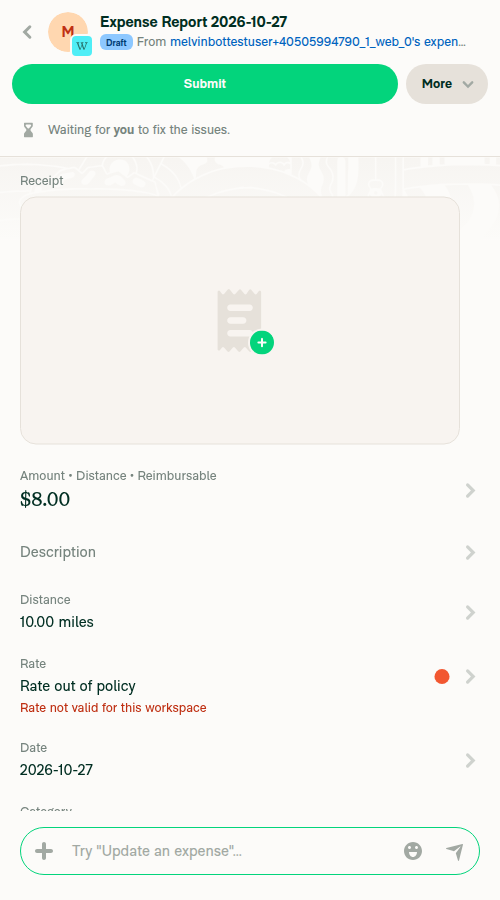
🤖 Android test steps verification results: ⚠️ partial

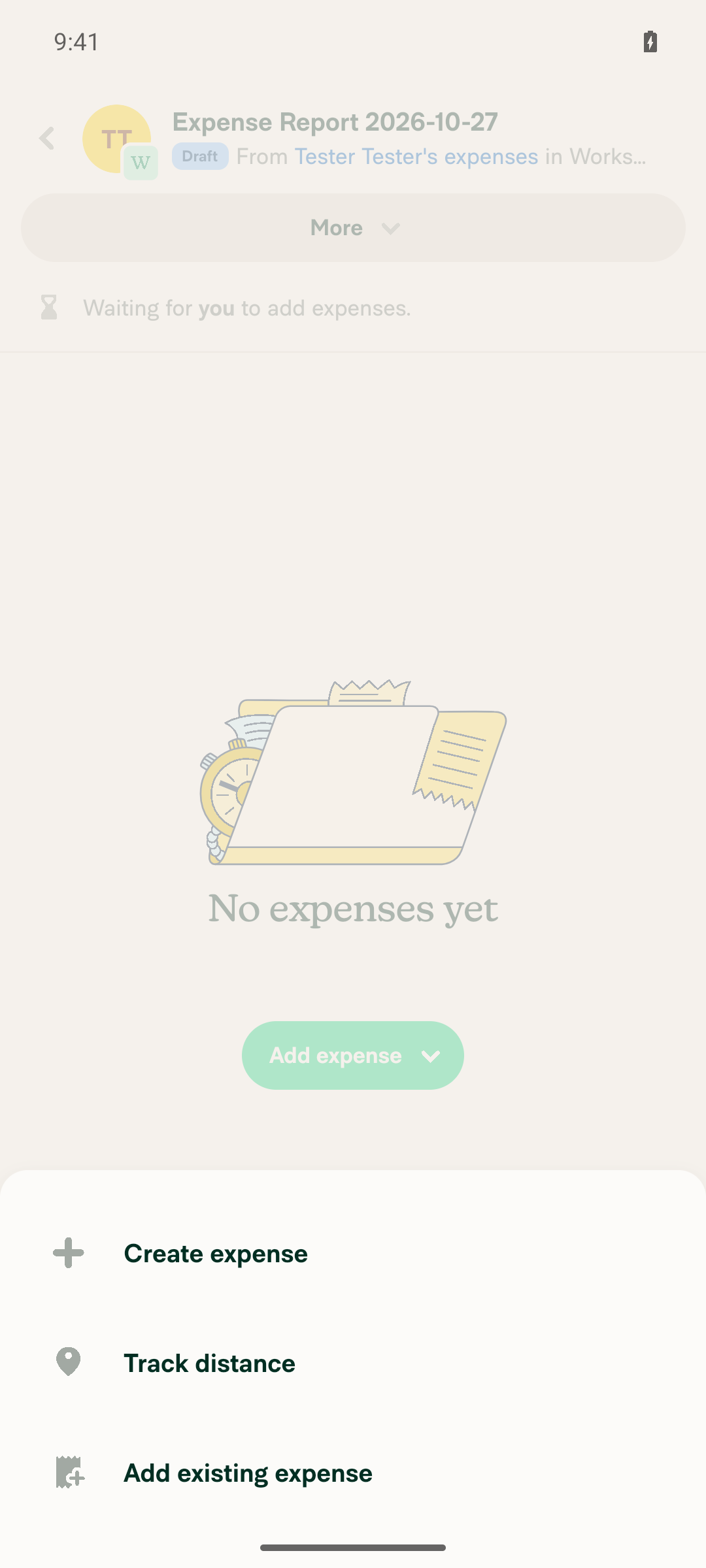
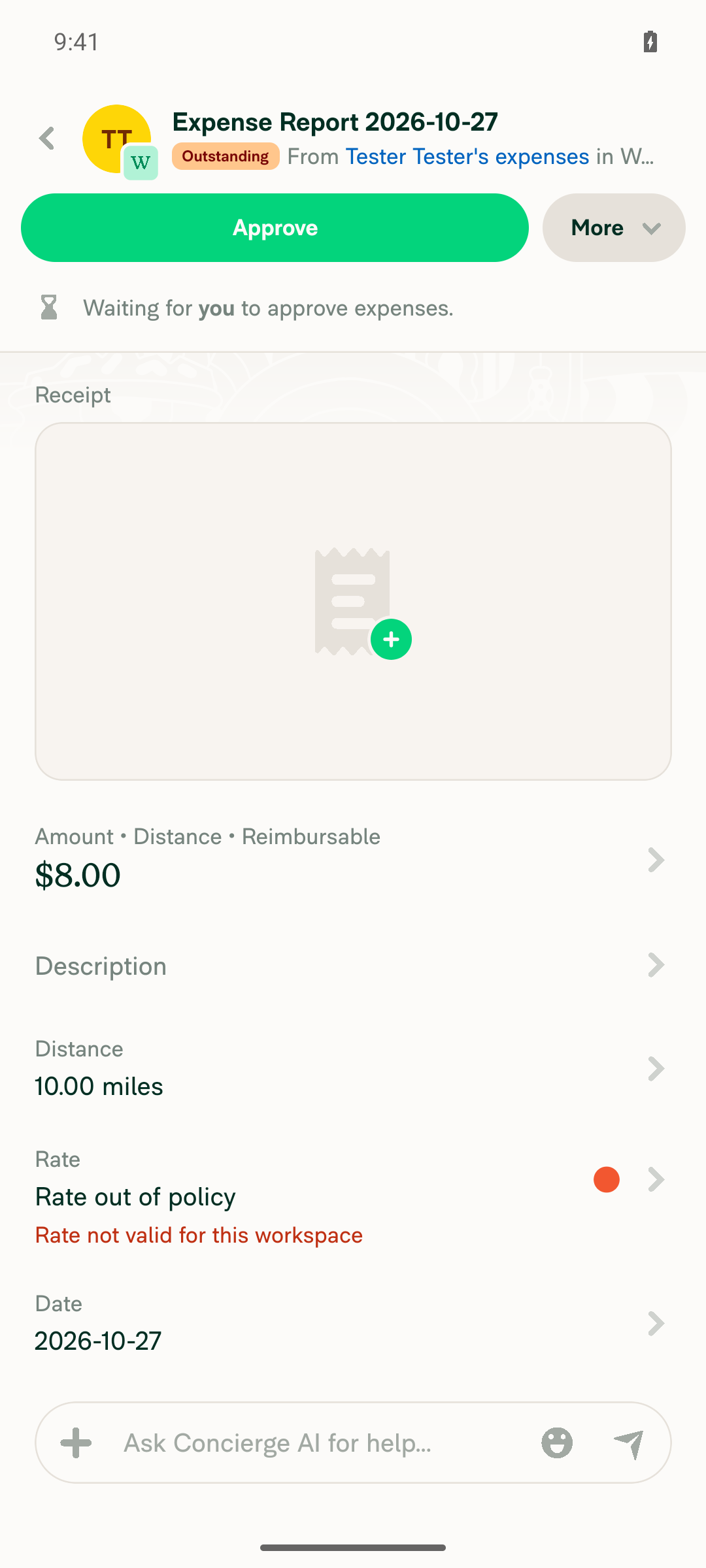
A same-workspace move kept the $0.80/mi rate and the "Rate not valid for this workspace" violation, as the PR intends. The app froze while I was setting up the cross-workspace move, so step 4 couldn't be checked. Step 3 needed an app restart, so it was skipped. The PR has no written test steps yet, so these steps come from the bug in [HOLD App 100555] Expense-Rate violation disappears after moving expense to another report.
App frozen on the Add expense menu

Step Status
1. Create a 10 mi distance expense in Workspace A at a second $0.80/mi rate, then disable that rate. The expense shows "Rate not valid for this workspace".The Rate row showed "Rate out of policy" and "Rate not valid for this workspace". Distance stayed 10.00 miles and the amount stayed $8.00.
Expense showing Rate not valid for this workspace violation
✅
2. Move the expense to another report in Workspace A. Rate and amount stay the same, and the violation stays.Moved the expense with More > Move to report > Create report. The new report shows $8.00, 10.00 miles and "Rate not valid for this workspace".
Expense moved to new report in Workspace A with rate, amount and violation unchanged
✅
3. Restart the app and reopen the expense. The violation and original rate and amount remain.Not run. A full app restart isn't allowed on this test session.
⚠️
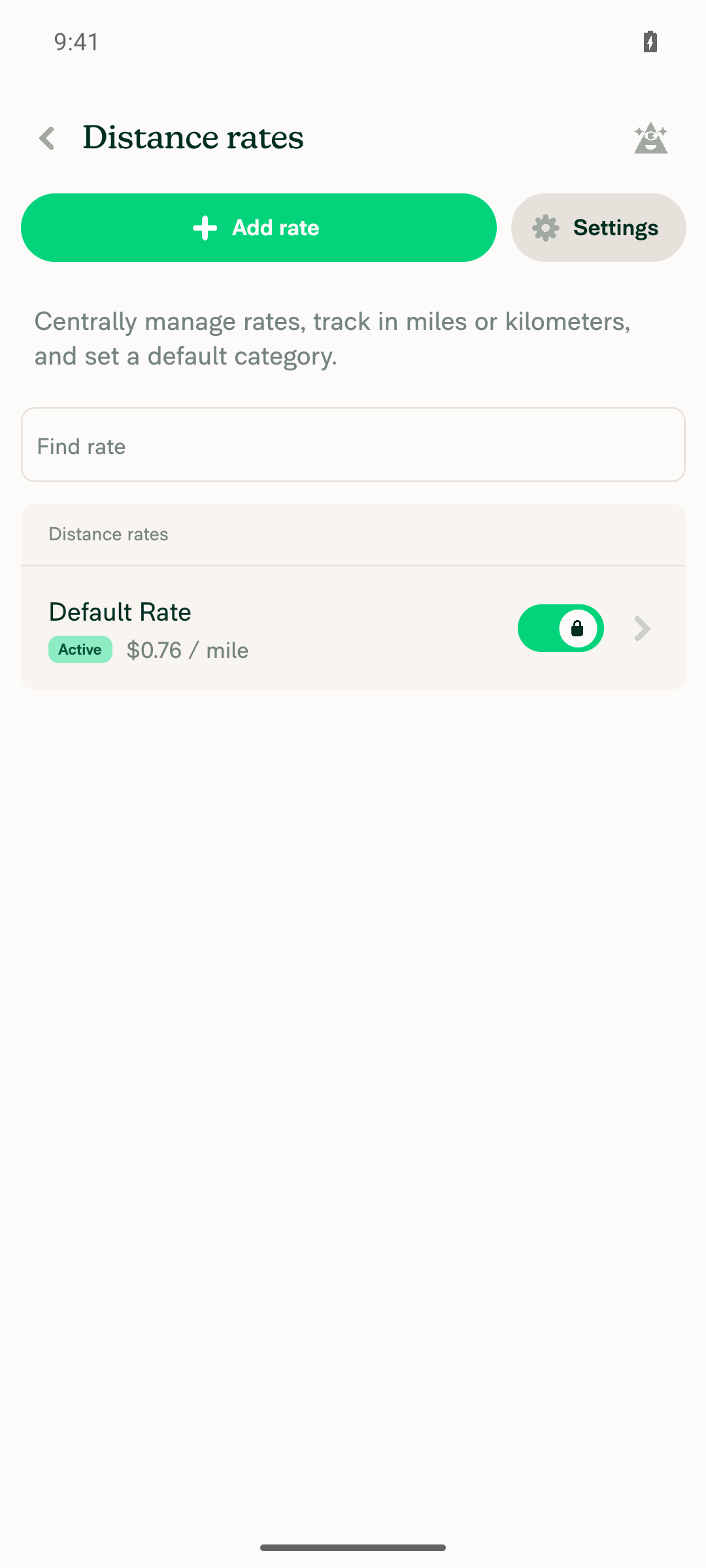
4. Move the expense to a report in Workspace B (default $0.76/mi). It moves to B's default rate, the violation clears, and Concierge posts "changed the rate to …".Not verified. "Move to report" only listed Workspace A reports, not Workspace B. I created an empty report in Workspace B and tapped Add expense > Add existing expense. The app then stopped responding to all input, and restarting Metro didn't help. The freeze happened during setup, before the move this PR changes.
Workspace B with default rate 0.76 per mile
App frozen on the Add expense menu
❌

@marufsharifi

Copy link
Copy Markdown
Contributor

@MelvinBot, replace the PR Author checklist with the verified one below:

PR author checklist

<!-- If necessary, assign reviewers that know the area or changes well. Feel free to tag any additional reviewers you see fit. -->

### Explanation of Change
<!-- Explain what your change does and how it addresses the linked issue -->

Previously, moving a distance expense to another report could incorrectly replace its rate, even within the same workspace, and clear existing rate violations.

This PR fixes that behavior by:

- **Same workspace:** Preserve the original rate, amount, and existing violations.
- **Different workspace:** Use a matching rate if available; otherwise, select the destination workspace's default rate and recalculate the amount.
- **Rate changed:** Show a Concierge message in the expense's transaction thread when repricing occurs.

### Fixed Issues
<!---
1. Please postfix `$` with a URL link to the GitHub issue this Pull Request is fixing. For example, `$ https://github.com/Expensify/App/issues/<issueID>`.
2. Please postfix  `PROPOSAL:` with a URL link to your GitHub comment, which contains the approved proposal (i.e. the proposal that was approved by Expensify).  For example, `PROPOSAL: https://github.com/Expensify/App/issues/<issueID>#issuecomment-1369752925`

Do NOT add the special GH keywords like `fixed` etc, we have our own process of managing the flow.
It MUST be an entire link to the github issue and your comment proposal ; otherwise, the linking and its automation will not work as expected.

Make sure this section looks similar to this (you can link multiple issues using the same formatting, just add a new line):

$ https://github.com/Expensify/App/issues/<issueID>
$ https://github.com/Expensify/App/issues/<issueID(comment)>

Do NOT only link the issue number like this: $ #<issueID>
--->
$ https://github.com/Expensify/App/issues/100558
PROPOSAL: https://github.com/Expensify/App/issues/100558#issuecomment-6434756338


<!--- 
If you want to trigger adhoc build of hybrid app from specific Mobile-Expensify PR please link it like this:

MOBILE-EXPENSIFY: https://github.com/Expensify/Mobile-Expensify/pull/<PR-number>

--->

### Tests
<!---
Add a numbered list of manual tests you performed that validates your changes work on all platforms, and that there are no regressions present.
Add any additional test steps if test steps are unique to a particular platform.
Manual test steps should be written so that your reviewer can repeat and verify one or more expected outcomes in the development environment.

For example:
1. Click on the text input to bring it into focus
2. Upload an image via copy paste
3. Verify a modal appears displaying a preview of that image
--->
Precondition:

1. Create two workspaces:
 - Workspace A: Distance rate $0.80/mile.
 - Workspace B: Default distance rate $0.50/mile.
2. Create two reports in Workspace A and one report in Workspace B.
3. Create a 10-mile distance expense in Workspace A using $0.80/mile ($8.00).

Test 1 — Move expense within the same workspace

1. Open the distance expense in Workspace A.
2. Click the three-dot menu → Move to report.
3. Select another report in Workspace A.
4. Verify the rate remains $0.80/mile and the amount remains $8.00.
5. Verify no Concierge rate-change message appears.

Test 2 — Preserve an existing rate violation

1. Disable the original distance rate in Workspace A.
2. Open the expense and verify the rate violation appears.
3. Move the expense to another report in Workspace A.
4. Verify the original rate, amount, and violation remain unchanged.

Test 3 — Move to another workspace with a matching rate

1. Enable a matching $0.80/mile rate in Workspace B.
2. Create a distance expense in Workspace A using $0.80/mile.
3. Move the expense to a report in Workspace B.
4. Verify Workspace B's matching rate is selected.
5. Verify the amount and merchant remain unchanged and no Concierge rate-change message appears.

Test 4 — Move to another workspace without a matching rate

1. Ensure Workspace B has only the default $0.50/mile rate.
2. Create a 10-mile expense in Workspace A at $0.80/mile ($8.00).
3. Move the expense to a report in Workspace B.
4. Verify the rate changes to $0.50/mile and the amount becomes $5.00.
5. Open the expense's transaction thread.
6. Verify a Concierge message appears describing the rate and amount change.

Test 5 — Move an unreported expense within its original workspace

1. Create a distance expense in Workspace A.
2. Remove the expense from its report so it becomes unreported.
3. Move the expense to another report in Workspace A.
4. Verify the original rate and amount remain unchanged.

- [x] Verify that no errors appear in the JS console

### Offline tests
<!---
Add any relevant steps that validate your changes work as expected in a variety of network states e.g. "offline", "spotty connection", "slow internet", etc. Manual test steps should be written so that your reviewer and QA testers can repeat and verify one or more expected outcomes. If you are unsure how the behavior should work ask for advice in the `#expensify-open-source` Slack channel.
--->
Test 1 — Move expense within the same workspace while offline

1. Open the distance expense in Workspace A.
2. Go to Settings → About → Troubleshoot → Force offline ON.
3. Return to the expense.
4. Click three dots → Move to report.
5. Select another report in Workspace A.
6. Verify the rate remains $0.80/mile and the amount remains $8.00.
7. Turn Force offline OFF.
8. Verify the rate and amount remain unchanged after syncing.

Test 2 — Move expense to a different workspace while offline

1. While online, create another 10-mile expense in Workspace A at $0.80/mile ($8.00).
2. Turn Force offline ON.
3. Open the expense → Three dots → Move to report.
4. Select a report in Workspace B.
5. Verify the rate changes to $0.50/mile and the amount becomes $5.00.
6. Verify a Concierge rate-change message appears in the expense's transaction thread.
7. Turn Force offline OFF.
8. Verify the rate, amount, and Concierge message remain correct after syncing, without duplicate messages.
### QA Steps
<!---
Add a numbered list of manual tests that can be performed by our QA engineers on the staging environment to validate that your changes work on all platforms, and that there are no regressions present.
Add any additional QA steps if test steps are unique to a particular platform.
Manual test steps should be written so that the QA engineer can repeat and verify one or more expected outcomes in the staging environment.

For example:
1. Click on the text input to bring it into focus
2. Upload an image via copy paste
3. Verify a modal appears displaying a preview of that image

It's acceptable to write "Same as tests" if the QA team is able to run the tests in the above "Tests" section.
--->
Same as Tests.

- [x] Verify that no errors appear in the JS console

### PR Author Checklist
<!--
This is a checklist for PR authors. Please make sure to complete all tasks and check them off once you do, or else your PR will not be merged!
-->

- [x] I linked the correct issue in the `### Fixed Issues` section above
- [x] I wrote clear testing steps that cover the changes made in this PR
    - [x] I added steps for local testing in the `Tests` section
    - [x] I added steps for the expected offline behavior in the `Offline steps` section
    - [x] I added steps for Staging and/or Production testing in the `QA steps` section
    - [x] I added steps to cover failure scenarios (i.e. verify an input displays the correct error message if the entered data is not correct)
    - [x] I turned off my network connection and tested it while offline to ensure it matches the expected behavior (i.e. verify the default avatar icon is displayed if app is offline)
    - [x] I tested this PR with a [High Traffic account](https://github.com/Expensify/App/blob/main/contributingGuides/CONTRIBUTING.md#high-traffic-accounts) against the staging or production API to ensure there are no regressions (e.g. long loading states that impact usability).
- [x] I included screenshots or videos for tests on [all platforms](https://github.com/Expensify/App/blob/main/contributingGuides/CONTRIBUTING.md#make-sure-you-can-test-on-all-platforms)
- [x] I ran the tests on **all platforms** & verified they passed on:
    - [x] Android: Native
    - [x] Android: mWeb Chrome
    - [x] iOS: Native
    - [x] iOS: mWeb Safari
    - [x] MacOS: Chrome / Safari
- [x] I verified there are no console errors (if there's a console error not related to the PR, report it or open an issue for it to be fixed)
- [x] I verified any copy / text that was added to the app is either coming verbatim from figma or has been approved by marketing (in order to get marketing approval, ask the Bug Zero team member to add the Waiting for copy label to the issue)
- [x] If a new code pattern is added I verified it was agreed to be used by multiple Expensify engineers
- [x] I tested other components that can be impacted by my changes (i.e. if the PR modifies a shared library or component like `Avatar`, I verified the components using `Avatar` are working as expected)
- [x] If new assets were added or existing ones were modified, I verified that:
    - [x] The assets are optimized and compressed (for SVG files, run `npm run compress-svg`)
    - [x] The assets load correctly across all supported platforms.
- [x] If the PR modifies code that runs when editing or sending messages, I tested and verified there is no unexpected behavior for all supported markdown - URLs, single line code, code blocks, quotes, headings, bold, strikethrough, and italic.
- [x] If the PR modifies a generic component, I tested and verified that those changes do not break usages of that component in the rest of the App (i.e. if a shared library or component like `Avatar` is modified, I verified that `Avatar` is working as expected in all cases)
- [x] If the PR modifies a component related to any of the existing Storybook stories, I tested and verified all stories for that component are still working as expected.
- [x] If the PR modifies a component or page that can be accessed by a direct deeplink, I verified that the code functions as expected when the deeplink is used - from a logged in and logged out account.
- [x] If the PR modifies the UI (e.g. new buttons, new UI components, changing the padding/spacing/sizing, moving components, etc) or modifies the form input styles:
    - [x] I verified that all the inputs inside a form are aligned with each other.
    - [x] I added `Design` label and/or tagged `@Expensify/design` so the design team can review the changes.
- [x] If the PR adds or modifies the UI:
    - [x] I asked an AI agent to review the changes for accessibility issues and addressed its findings.
    - [x] I tested with a screen reader (VoiceOver on macOS) and verified all new/changed elements are reachable with a logical focus order.
    - [x] I verified all new/changed elements have meaningful accessible names and roles.
    - [x] I verified state changes are announced (e.g. checked/unchecked, expanded/collapsed, selected).
- [x] I added [unit tests](https://github.com/Expensify/App/blob/main/tests/README.md) for any new feature or bug fix in this PR to help automatically prevent regressions in this user flow.
- [x] If the `main` branch was merged into this PR after a review, I tested again and verified the outcome was still expected according to the `Test` steps.

### Screenshots/Videos
<details>
<summary>Android: Native</summary>

<!-- add screenshots or videos here -->

</details>

<details>
<summary>Android: mWeb Chrome</summary>

<!-- add screenshots or videos here -->

</details>

<details>
<summary>iOS: Native</summary>

<!-- add screenshots or videos here -->

</details>

<details>
<summary>iOS: mWeb Safari</summary>

<!-- add screenshots or videos here -->

</details>

<details>
<summary>MacOS: Chrome / Safari</summary>

<!-- add screenshots or videos here -->

</details>


@MelvinBot

Copy link
Copy Markdown
Contributor Author

I replaced the PR description with your verified version. It now includes your Tests, Offline tests, QA Steps, and a fully checked PR Author Checklist.

Note: the new description no longer has the warning to merge only after the Auth change for Move expense deploys. Without that Auth change, the optimistic rate change flips back on reload. Let me know if you want that warning added back.


view run

@marufsharifi

Copy link
Copy Markdown
Contributor

@MelvinBot mark this as ready for review.

@MelvinBot
MelvinBot marked this pull request as ready for review November 4, 2026 07:20
@MelvinBot
MelvinBot requested a review from a team as a code owner November 4, 2026 07:20
@melvin-bot
melvin-bot Bot requested review from marufsharifi and removed request for a team November 4, 2026 07:20
@melvin-bot

melvin-bot Bot commented Nov 4, 2026

Copy link
Copy Markdown

@marufsharifi Please copy/paste the Reviewer Checklist from here into a new comment on this PR and complete it. If you have the K2 extension, you can simply click: [this button]

@chatgpt-codex-connector

chatgpt-codex-connector Bot commented Nov 4, 2026 •

Copy link
Copy Markdown

Codex Review Summary

This comment shows the latest Codex review activity on this pull request.

Review Status Commit Review trigger
📝 Code Review ✅ Completed 2026-11-04T07:27:36.547095Z a98b61b Draft marked ready
ℹ️ About Codex in GitHub

Your team has set up Codex to review pull requests in this repo. Reviews are triggered when you

  • Open a pull request for review
  • Mark a draft as ready
  • Comment "@codex review" or "@codex security review".

Codex reacts with 👀 while any review is running, comments if it has suggestions, and reacts with 👍 once all reviews finish with no findings.

@melvin-bot
melvin-bot Bot requested review from heyjennahay and removed request for a team November 4, 2026 07:20
@MelvinBot

Copy link
Copy Markdown
Contributor Author

Marked this PR as ready for review.


view run

@marufsharifi

Copy link
Copy Markdown
Contributor

@MelvinBot Resolve the conflicts.

Co-authored-by: Maruf Sharifi <marufsharifi@users.noreply.github.com>
@MelvinBot
MelvinBot requested a review from a team as a code owner November 4, 2026 08:09
@melvin-bot
melvin-bot Bot requested review from neil-marcellini and removed request for a team November 4, 2026 08:09
@melvin-bot

melvin-bot Bot commented Nov 4, 2026

Copy link
Copy Markdown

@neil-marcellini Please copy/paste the Reviewer Checklist from here into a new comment on this PR and complete it. If you have the K2 extension, you can simply click: [this button]

@MelvinBot

MelvinBot commented Nov 4, 2026 •

Copy link
Copy Markdown
Contributor Author

🤖 Web test steps verification results: ❌ fail

Resolved the conflicts with main and pushed 3ab9c289; GitHub confirms this PR is mergeable, and lint, typecheck, and 1,833 targeted tests passed. Web verification was blocked because the supplied session displayed a blank page.
Blank page in the supplied session

Step Status
Moving a distance expense between reports in the same workspace preserves its rate and amountBlocked: onboarding and expense setup were unavailable. Both browser snapshots returned zero nodes.
Blank page in the supplied session
❌
No new JS errors during the moveNot verified because the move could not be performed.
❌

view run · no recording available

@marufsharifi

Copy link
Copy Markdown
Contributor

@MelvinBot, replace the PR Author checklist with the verified one below:

PR author checklist

<!-- If necessary, assign reviewers that know the area or changes well. Feel free to tag any additional reviewers you see fit. -->

### Explanation of Change
<!-- Explain what your change does and how it addresses the linked issue -->

Previously, moving a distance expense to another report could incorrectly replace its rate, even within the same workspace, and clear existing rate violations.

This PR fixes that behavior by:

- **Same workspace:** Preserve the original rate, amount, and existing violations.
- **Different workspace:** Use a matching rate if available; otherwise, select the destination workspace's default rate and recalculate the amount.
- **Rate changed:** Show a Concierge message in the expense's transaction thread when repricing occurs.

### Fixed Issues
<!---
1. Please postfix `$` with a URL link to the GitHub issue this Pull Request is fixing. For example, `$ https://github.com/Expensify/App/issues/<issueID>`.
2. Please postfix  `PROPOSAL:` with a URL link to your GitHub comment, which contains the approved proposal (i.e. the proposal that was approved by Expensify).  For example, `PROPOSAL: https://github.com/Expensify/App/issues/<issueID>#issuecomment-1369752925`

Do NOT add the special GH keywords like `fixed` etc, we have our own process of managing the flow.
It MUST be an entire link to the github issue and your comment proposal ; otherwise, the linking and its automation will not work as expected.

Make sure this section looks similar to this (you can link multiple issues using the same formatting, just add a new line):

$ https://github.com/Expensify/App/issues/<issueID>
$ https://github.com/Expensify/App/issues/<issueID(comment)>

Do NOT only link the issue number like this: $ #<issueID>
--->
$ https://github.com/Expensify/App/issues/100558
PROPOSAL: https://github.com/Expensify/App/issues/100558#issuecomment-6434756338


<!--- 
If you want to trigger adhoc build of hybrid app from specific Mobile-Expensify PR please link it like this:

MOBILE-EXPENSIFY: https://github.com/Expensify/Mobile-Expensify/pull/<PR-number>

--->

### Tests
<!---
Add a numbered list of manual tests you performed that validates your changes work on all platforms, and that there are no regressions present.
Add any additional test steps if test steps are unique to a particular platform.
Manual test steps should be written so that your reviewer can repeat and verify one or more expected outcomes in the development environment.

For example:
1. Click on the text input to bring it into focus
2. Upload an image via copy paste
3. Verify a modal appears displaying a preview of that image
--->
**Preconditions:**
Have just one workspace with the distance rate enable
have a distance of 0.80 miles

**Test 1 — Move expense within the same workspace**

1. Open the distance expense in Workspace A.
2. Click the three-dot menu → Move to report.
3. Select another report in Workspace A.
4. Verify the rate remains $0.80/mile and the amount remains $8.00.
5. Verify no Concierge rate-change message appears.

**Test 2 — Preserve an existing rate violation**

1. Disable the original distance rate in Workspace A.
2. Open the expense and verify the rate violation appears.
3. Move the expense to another report in Workspace A.
4. Verify the original rate, amount, and violation remain unchanged.

**Test 3 — Move an unreported expense within its original workspace**

1. Create a distance expense in Workspace A.
2. Remove the expense from its report so it becomes unreported.
3. Move the expense to another report in Workspace A.
4. Verify the original rate and amount remain unchanged.
Verify  that no errors appear in the JS console


- [x] Verify that no errors appear in the JS console

### Offline tests
<!---
Add any relevant steps that validate your changes work as expected in a variety of network states e.g. "offline", "spotty connection", "slow internet", etc. Manual test steps should be written so that your reviewer and QA testers can repeat and verify one or more expected outcomes. If you are unsure how the behavior should work ask for advice in the `#expensify-open-source` Slack channel.
--->
**Test  — Move expense within the same workspace while offline**

1. Open the distance expense in Workspace A.
2. Go to Settings → About → Troubleshoot → Force offline ON.
3. Return to the expense.
4. Click three dots → Move to report.
5. Select another report in Workspace A.
6. Verify the rate remains $0.80/mile and the amount remains $8.00.
7. Turn Force offline OFF.
8. Verify the rate and amount remain unchanged after syncing.

### QA Steps
<!---
Add a numbered list of manual tests that can be performed by our QA engineers on the staging environment to validate that your changes work on all platforms, and that there are no regressions present.
Add any additional QA steps if test steps are unique to a particular platform.
Manual test steps should be written so that the QA engineer can repeat and verify one or more expected outcomes in the staging environment.

For example:
1. Click on the text input to bring it into focus
2. Upload an image via copy paste
3. Verify a modal appears displaying a preview of that image

It's acceptable to write "Same as tests" if the QA team is able to run the tests in the above "Tests" section.
--->
Same as Tests.

- [x] Verify that no errors appear in the JS console

### PR Author Checklist
<!--
This is a checklist for PR authors. Please make sure to complete all tasks and check them off once you do, or else your PR will not be merged!
-->

- [x] I linked the correct issue in the `### Fixed Issues` section above
- [x] I wrote clear testing steps that cover the changes made in this PR
    - [x] I added steps for local testing in the `Tests` section
    - [x] I added steps for the expected offline behavior in the `Offline steps` section
    - [x] I added steps for Staging and/or Production testing in the `QA steps` section
    - [x] I added steps to cover failure scenarios (i.e. verify an input displays the correct error message if the entered data is not correct)
    - [x] I turned off my network connection and tested it while offline to ensure it matches the expected behavior (i.e. verify the default avatar icon is displayed if app is offline)
    - [x] I tested this PR with a [High Traffic account](https://github.com/Expensify/App/blob/main/contributingGuides/CONTRIBUTING.md#high-traffic-accounts) against the staging or production API to ensure there are no regressions (e.g. long loading states that impact usability).
- [x] I included screenshots or videos for tests on [all platforms](https://github.com/Expensify/App/blob/main/contributingGuides/CONTRIBUTING.md#make-sure-you-can-test-on-all-platforms)
- [x] I ran the tests on **all platforms** & verified they passed on:
    - [x] Android: Native
    - [x] Android: mWeb Chrome
    - [x] iOS: Native
    - [x] iOS: mWeb Safari
    - [x] MacOS: Chrome / Safari
- [x] I verified there are no console errors (if there's a console error not related to the PR, report it or open an issue for it to be fixed)
- [x] I verified any copy / text that was added to the app is either coming verbatim from figma or has been approved by marketing (in order to get marketing approval, ask the Bug Zero team member to add the Waiting for copy label to the issue)
- [x] If a new code pattern is added I verified it was agreed to be used by multiple Expensify engineers
- [x] I tested other components that can be impacted by my changes (i.e. if the PR modifies a shared library or component like `Avatar`, I verified the components using `Avatar` are working as expected)
- [x] If new assets were added or existing ones were modified, I verified that:
    - [x] The assets are optimized and compressed (for SVG files, run `npm run compress-svg`)
    - [x] The assets load correctly across all supported platforms.
- [x] If the PR modifies code that runs when editing or sending messages, I tested and verified there is no unexpected behavior for all supported markdown - URLs, single line code, code blocks, quotes, headings, bold, strikethrough, and italic.
- [x] If the PR modifies a generic component, I tested and verified that those changes do not break usages of that component in the rest of the App (i.e. if a shared library or component like `Avatar` is modified, I verified that `Avatar` is working as expected in all cases)
- [x] If the PR modifies a component related to any of the existing Storybook stories, I tested and verified all stories for that component are still working as expected.
- [x] If the PR modifies a component or page that can be accessed by a direct deeplink, I verified that the code functions as expected when the deeplink is used - from a logged in and logged out account.
- [x] If the PR modifies the UI (e.g. new buttons, new UI components, changing the padding/spacing/sizing, moving components, etc) or modifies the form input styles:
    - [x] I verified that all the inputs inside a form are aligned with each other.
    - [x] I added `Design` label and/or tagged `@Expensify/design` so the design team can review the changes.
- [x] If the PR adds or modifies the UI:
    - [x] I asked an AI agent to review the changes for accessibility issues and addressed its findings.
    - [x] I tested with a screen reader (VoiceOver on macOS) and verified all new/changed elements are reachable with a logical focus order.
    - [x] I verified all new/changed elements have meaningful accessible names and roles.
    - [x] I verified state changes are announced (e.g. checked/unchecked, expanded/collapsed, selected).
- [x] I added [unit tests](https://github.com/Expensify/App/blob/main/tests/README.md) for any new feature or bug fix in this PR to help automatically prevent regressions in this user flow.
- [x] If the `main` branch was merged into this PR after a review, I tested again and verified the outcome was still expected according to the `Test` steps.

### AI Tests

Conflict resolution verification:
- Passed: lint, lint-changed, typecheck, Storybook smoke test, and 1,833 tests across four relevant Jest suites.
- Full Jest run exceeded the 15-minute limit without reporting a failing test.
- React Compiler check could not run because the CI base-branch value was empty.
- Prettier command is unavailable on the current base branch. Spelling reported eight existing Polish-word findings in an unchanged upstream test.
- Web verification was blocked by a blank page in the supplied test session; no expense move was performed.

### Screenshots/Videos
<details>
<summary>Android: Native</summary>

<!-- add screenshots or videos here -->

</details>

<details>
<summary>Android: mWeb Chrome</summary>

<!-- add screenshots or videos here -->

</details>

<details>
<summary>iOS: Native</summary>

<!-- add screenshots or videos here -->

</details>

<details>
<summary>iOS: mWeb Safari</summary>

<!-- add screenshots or videos here -->

</details>

<details>
<summary>MacOS: Chrome / Safari</summary>

<!-- add screenshots or videos here -->

</details>


@MelvinBot

Copy link
Copy Markdown
Contributor Author

🤖 Web test steps verification results: ❌ fail

Blocked on dev NewDot web: the supplied session displayed a blank page, with zero nodes in both initial and post-wait snapshots. Neither regression flow could be verified manually.
Blank page preventing workspace and expense setup

Step Status
BUG1: Delete A's extra $0.70 rate, then move the 10-mile/$7 expense to B's report without a no-op Concierge message.Blocked before setup: the blank page persisted after waiting for Inbox. The UI outcome is unverified.
Blank dev NewDot page in the supplied session
❌
BUG2: Remove the 10-mile/$8 expense from its report, disable A's $0.80 rate, and add it through B report > Add existing expense.Blocked by the same blank session. No alternate workspace-change flow was substituted; matching rate, amount, and message behavior remain unverified.
Blank page preventing workspace and expense setup
❌

view run

@MelvinBot

MelvinBot commented Nov 6, 2026 •

Copy link
Copy Markdown
Contributor Author

Fixed both regressions and pushed 94c3363:

  • No Concierge change message when recalculation leaves the expense unchanged.
  • Unreported expenses retain their disabled source rate for matching, so B's equivalent $0.80 rate is selected instead of the $0.50 fallback.

Added three regression cases; all failed before the fix and pass afterward. Full Jest suite passed: 2,201 suites, 36,845 tests. Lint, typecheck, spelling, and Storybook smoke checks also passed.

Web verification remains blocked by a blank browser session. Formatting verification was unavailable: the Prettier script is missing and the targeted Oxfmt command was denied. Message IDs and unrelated review suggestions were left unchanged.


view run · no recording available

MelvinBot and others added 2 commits November 6, 2026 08:48
…DistanceRateOnWorkspaceChange

Co-authored-by: Maruf Sharifi <marufsharifi@users.noreply.github.com>
@MelvinBot

Copy link
Copy Markdown
Contributor Author

⚠️ MelvinBot CI Fix Loop Detected

MelvinBot has made 5 consecutive commits trying to fix CI failures. Automatic CI fix dispatches are now paused for this PR.

Next steps: A human should review the recent commits and resolve the conflicting CI errors manually.

@marufsharifi

Copy link
Copy Markdown
Contributor

@MelvinBot merge the main.

Co-authored-by: Maruf Sharifi <marufsharifi@users.noreply.github.com>
@MelvinBot

Copy link
Copy Markdown
Contributor Author

Merged main into this PR’s branch and pushed df2b54d. No conflicts; the PR remains open.

Lint, typecheck, Storybook, and 1,871 targeted tests passed. The full test run timed out after 15 minutes without reporting failures.


view run

@marufsharifi

Copy link
Copy Markdown
Contributor

@MelvinBot merge the main.

Co-authored-by: Maruf Sharifi <marufsharifi@users.noreply.github.com>
@MelvinBot

Copy link
Copy Markdown
Contributor Author

Merged main into this PR’s branch and pushed fd56ff3. No conflicts; the PR remains open.

Lint, typecheck, and all 1,878 targeted tests passed. The full test run timed out after 15 minutes without reporting failures.


view run

@marufsharifi

Copy link
Copy Markdown
Contributor

BUG#1:

Preconditions:

  • Workspace A: only an enabled $0.80/mile rate.
  • Workspace B: only an enabled $0.50/mile rate.
  • In both workspaces, navigate to Distance rates → Settings → Exclude commutes → Remove fixed distance, enter 2 miles, and save.

Steps:

  1. Create a distance expense using Map on workspace A, choosing a route longer than 2 miles.
  2. Select report A and create the expense.
  3. Open it and confirm the Distance breakdown shows 2 commuter miles removed. Note the displayed reimbursable distance.
  4. Open report B while online, then turn Force offline on.
  5. Reopen the expense → More → Move to report → select B.
  6. Open the moved expense. Compare its amount and Concierge message with the reimbursable distance shown in the Distance breakdown.

Expected Result:

The amount must update in offline mode and the concierge messgae must show the updated amount.

Actual Result :

The amount does not change in offline mode and the concierge message does not appear

PR:

RF-pr.mp4

main

RF-main.mov

@marufsharifi

Copy link
Copy Markdown
Contributor

BUG#2:

Preconditions:

  • Workspace A has an enabled $0.80/mile rate.
  • Workspace B has only one enabled $0.80/mile rate, with an End date earlier than the expense date.

Steps:

  1. Navigate to Create → Track distance → Manual.
  2. Create a 10-mile expense on report A using the $0.80/mile rate.
  3. Open the expense and manually change the Amount from $8.00 to $9.00.
  4. Save the changes.
  5. Open report B while online to make it available offline.
  6. Enable Force offline.
  7. Open the expense and select More → Move to report → Report B.
  8. Open the moved expense and check its amount, rate warning, and Concierge messages.

Expected Result:

  • Workspace B's fallback $0.80/mile rate is assigned.
  • The expense amount recalculates from $9.00 to $8.00.
  • The out-of-date rate warning remains visible.
  • Concierge displays a message explaining the amount recalculation.

Actual Result:

  • Workspace B's fallback $0.80/mile rate is assigned.
  • The expense amount incorrectly remains $9.00 instead of $8.00.
  • No Concierge message explains the rate change or recalculation, even after going online and refreshing the app.

PR:

bug-two_R26XyUVn.mp4

Main:

onmain.mov

@marufsharifi

Copy link
Copy Markdown
Contributor

@MelvinBot find the RCA for the last two regressions reported

@MelvinBot

Copy link
Copy Markdown
Contributor Author

Proposal

What is the root cause of that problem?

BUG 2 is confirmed in the client. BUG 1’s reported unchanged amount/no-message behavior remains unconfirmed.

1. Commuter exclusion, offline move

The move skips recalculation whenever pendingFields.waypoints is set—even if distance is already known. This also suppresses Concierge.

Temporary diagnostic tests established:

Input: 10-mile route, 2-mile exclusion, original $6.40 Result at B’s $0.50 rate
No pending-waypoint flag $5.00, with a message—incorrectly prices all 10 miles instead of reimbursable 8
Pending-waypoint flag set $6.40 unchanged, no message—matches the reported symptoms

However, completed online creation normally clears that flag. We have not established that the reported move receives it. Both the strict waypoint guard and commuter-unaware calculation also exist on base main, so neither alone proves a PR-introduced regression.

2. Expired fallback preserves the edited $9

Rate selection correctly rejects B’s expired $0.80 rate as an eligible match, then assigns it as the fallback. But the PR subsequently classifies it as matching using only rate, currency, and unit, ignoring why it was selected.

That false match disables recalculation and Concierge. A temporary diagnostic reproduced the exact client outcome: expired B rate assigned, effective amount stays $9, expired warning retained, zero Concierge actions.

Code evidence

What changes do you think we should make in order to solve the problem?

  • BUG 2: preserve whether selection found an eligible equivalent match or used a fallback, and use that result to decide recalculation. Merely checking dates on the returned fallback will not work: its date metadata has already been discarded. Add the expired-equivalent/$9 regression and a valid-equivalent control.
  • BUG 1: first capture the actual move input—pending-waypoint flag, source/destination policies, and whether B’s rate ID is assigned. Without that, changing the guard would be an unverified fix for the reported no-op. The separately demonstrated commuter-calculation defect also needs correction, but does not explain both reported symptoms by itself.

Verification limits: web access was blocked by a blank session. Persistence after reconnect was not independently verified. Temporary diagnostics were removed; the checkout remains clean.


view run

@marufsharifi

Copy link
Copy Markdown
Contributor

@MelvinBot fix the bug#2 which is confirmed: #105129 (comment)

Co-authored-by: Maruf Sharifi <marufsharifi@users.noreply.github.com>
@MelvinBot

Copy link
Copy Markdown
Contributor Author

Fixed BUG 2 and pushed 9e78e9c.

Expired fallbacks now recalculate $9 → $8, retain the expired-rate warning, and generate the Concierge message. Valid equivalent rates still preserve the edited amount. BUG 1 was left unchanged.

Validation: 38,494 tests passed, plus lint, typecheck, spelling, and Storybook. Manual web verification was blocked by a blank application; the Prettier script remains unavailable.


view run

@kacper-mikolajczak

Copy link
Copy Markdown
Contributor

Hi! We are aware Melvin tester runs are failing. Please if you could update this branch to latest main and re-run it - this should resolve the issue. If not, reach out to me directly. Thanks for your patience!

newReport?: OnyxEntry<Report>;
policy: OnyxEntry<Policy>;
/** All policies, used to resolve a distance expense's current rate on its source workspace */
policies?: OnyxCollection<Policy>;

Copy link
Copy Markdown
Contributor

Choose a reason for hiding this comment

The reason will be displayed to describe this comment to others. Learn more.

mergeReports (Report/index.ts:9337) also calls getChangeTransactionsReportOnyxData, but MergeReportsProps has no policies, so it gets undefined. On a cross-workspace merge of a distance expense, currentRate ends up undefined → isMatchingRate is false → the expense gets repriced and a Concierge message is added even when the destination has a matching rate. That's the exact behavior this PR fixes elsewhere.

Could we add policies to MergeReportsProps, pull it via useOnyx(ONYXKEYS.COLLECTION.POLICY) in SearchReportsMergeReports.tsx, and pass it through? A test for the cross-workspace merge case would be good too.

Copy link
Copy Markdown
Contributor Author

Choose a reason for hiding this comment

The reason will be displayed to describe this comment to others. Learn more.

The missing policies argument is real, but the cross-workspace merge described here is not a supported user flow:

I ran the existing merge-eligibility tests: 54 passed, including rejection of different-workspace reports. No code change is needed for this comment; forwarding additional policy data for a hypothetical cross-workspace merge would be outside the currently supported behavior.


view run

@marufsharifi

Copy link
Copy Markdown
Contributor

@MelvinBot validate this comment: #105129 (comment), if it isn't out of scope of this pr, address it.

@MelvinBot

Copy link
Copy Markdown
Contributor Author

Reviewed the report-merge feedback and replied in-thread.

No code change is needed: cross-workspace report merges are explicitly blocked, and supported same-workspace merges skip rate selection, so the described repricing path is unreachable.

Validation: all 54 merge-eligibility tests passed.


view run

@MelvinBot

Copy link
Copy Markdown
Contributor Author

The comment identifies a missing argument, but its failure scenario is outside supported behavior: cross-workspace report merges are explicitly rejected.

Supported same-workspace merges skip rate selection, so they cannot trigger the described repricing. No code change is needed. The 54 merge-eligibility tests passed on this unchanged PR head.


view run

@marufsharifi

Copy link
Copy Markdown
Contributor

@MelvinBot merge the main.

Co-authored-by: Maruf Sharifi <marufsharifi@users.noreply.github.com>
@MelvinBot

Copy link
Copy Markdown
Contributor Author

Merged main into this PR’s branch and pushed f9a84e1. No conflicts; the PR remains open.

Lint, typecheck, Storybook, spelling, and 1,895 targeted tests passed. The full test run timed out after 15 minutes without reporting failures.


view run

@mallenexpensify

Copy link
Copy Markdown
Contributor

Claude posting on behalf of Matt: Closing this PR. Work on the linked issue continues in a new PR. Use this one as a reference.

Sign up for free to join this conversation on GitHub. Already have an account? Sign in to comment

Labels

Melvin-Test-Android Melvin-Test-Web Triggers Melvin to run the testing steps of the PR on web

Projects

None yet

Development

Successfully merging this pull request may close these issues.

5 participants