Skip to content

Compose workspace name and expense rule menu rows - #107613

Open
MelvinBot wants to merge 1 commit into
mainfrom
claude-composeWorkspaceRuleRows
Open

MelvinBot wants to merge 1 commit into
mainfrom
claude-composeWorkspaceRuleRows

Conversation

@MelvinBot

Copy link
Copy Markdown
Contributor

Explanation of Change

Migrate the workspace-name row, individual expense rule rows and expense-default rule fields to composable MenuItem. Preserve the workspace name's header accessibility role and unlimited wrapping, authenticated edit handlers, read-only presentation, HTML values, validation and existing navigation/upgrade flows.

Primary text now forwards an optional accessibilityRole, and Row accepts a layout style so callers can preserve their existing spacing. Narrow icon leaves, explicit icon margins and the existing section insets retain the legacy layout. Row renderers are extracted into small local components. This is a partial Phase 6 migration.

AI Tests

  • Full Jest run passed: 2,534 suites, 42,076 tests and 161 snapshots; the existing configuration skipped one suite and 146 tests. This run preceded the final review-driven layout/component-extraction corrections.
  • All 31 focused tests passed after the component-extraction corrections, covering heading semantics, workspace-name navigation, individual-rule read-only/upgrade behavior, primary-text rendering and merchant-editor guards. Final typecheck and changed-file lint passed after adding the zero-gap utility.
  • Full lint, Storybook smoke test and spelling passed before the final layout corrections. Direct React Compiler checks passed for all changed components after extraction. Commit-hook oxfmt passed.
  • Tooling limitations: the prescribed Prettier script is absent; oxfmt ran instead. Compiler check-changed failed because its CI base ref resolved to origin/; direct file checks passed.
  • Web verification blocked: the browser displayed a blank page and both snapshots returned zero nodes. No requested UI behavior was verified; this is not a confirmed product regression.

Blank web page preventing all requested verification

Contributor branch ownership

This PR uses an upstream branch because MelvinBot cannot push to Pujan92's fork. To copy it to your fork:

git remote add upstream https://github.com/Expensify/App.git
git fetch upstream claude-composeWorkspaceRuleRows
git checkout -b claude-composeWorkspaceRuleRows upstream/claude-composeWorkspaceRuleRows
git push -u origin claude-composeWorkspaceRuleRows

You can then close this PR and open a replacement from your fork if desired.

Fixed Issues

#105531
PROPOSAL: #105531 (comment)

Tests

// TODO: The human co-author must record manual testing performed. AI validation and its limitations are listed above.

  • Verify that no errors appear in the JS console

Offline tests

// TODO: The human co-author must record offline testing performed. Expected offline behavior is included below.

QA Steps

These instructions have not been completed manually. Repeat relevant checks on narrow/wide web and supported native platforms.

  1. As a workspace admin, open Workspace settings → Overview. Verify the workspace name keeps its heading semantics, large typography and readable wrapping with a long name. Press the row, rename the workspace and return; confirm the new name and pending feedback. Verify a read-only member sees the name without an edit action or chevron.
  2. Open Rules → General. Verify individual-expense rows retain their icons, regular-weight titles, one-line summaries, muted empty summaries and spacing. Open each row and verify its existing editor. In a Collect workspace, verify Control-only rows open the upgrade flow with the intended editor as the return destination. Read-only rows must remain readable and undimmed but non-actionable.
  3. Create and edit an expense-default rule. Verify all field labels, empty placeholders, selected values and icons. Change merchant/category/tag defaults and a rich-text description; verify values and HTML display correctly after returning from each picker. Locked category and read-only fields must have no edit action or chevron.
  4. Where a required-field fixture applies, verify Required appears only while the field is editable and empty without an error. Trigger validation, verify the error replaces the Required marker, and populate the field to clear feedback. Preview and save a valid rule and verify its saved values persist.
  5. Repeat layout checks with long workspace/rule values at narrow and wide widths. Verify icon slots, trailing chevrons, line wrapping and section insets match the existing presentation. Check keyboard activation and screen-reader names/heading semantics.
  6. Go offline and repeat local rename/rule editing where supported. Verify pending feedback is retained, read-only restrictions remain, and reconnecting syncs changes without losing values. Verify no console errors.
  • Verify that no errors appear in the JS console

PR Author Checklist

  • I linked the correct issue in the ### Fixed Issues section above
  • I wrote clear testing steps that cover the changes made in this PR
    • I added steps for local testing in the Tests section
    • I added steps for the expected offline behavior in the Offline steps section
    • I added steps for Staging and/or Production testing in the QA steps section
    • I added steps to cover failure scenarios (i.e. verify an input displays the correct error message if the entered data is not correct)
    • I turned off my network connection and tested it while offline to ensure it matches the expected behavior (i.e. verify the default avatar icon is displayed if app is offline)
    • I tested this PR with a High Traffic account against the staging or production API to ensure there are no regressions (e.g. long loading states that impact usability).
  • I included screenshots or videos for tests on all platforms
  • I ran the tests on all platforms & verified they passed on:
    • Android: Native
    • Android: mWeb Chrome
    • iOS: Native
    • iOS: mWeb Safari
    • MacOS: Chrome / Safari
  • I verified there are no console errors (if there's a console error not related to the PR, report it or open an issue for it to be fixed)
  • I verified any copy / text that was added to the app is either coming verbatim from figma or has been approved by marketing (in order to get marketing approval, ask the Bug Zero team member to add the Waiting for copy label to the issue)
  • If a new code pattern is added I verified it was agreed to be used by multiple Expensify engineers
  • I tested other components that can be impacted by my changes (i.e. if the PR modifies a shared library or component like Avatar, I verified the components using Avatar are working as expected)
  • If new assets were added or existing ones were modified, I verified that:
    • The assets are optimized and compressed (for SVG files, run npm run compress-svg)
    • The assets load correctly across all supported platforms.
  • If the PR modifies code that runs when editing or sending messages, I tested and verified there is no unexpected behavior for all supported markdown - URLs, single line code, code blocks, quotes, headings, bold, strikethrough, and italic.
  • If the PR modifies a generic component, I tested and verified that those changes do not break usages of that component in the rest of the App (i.e. if a shared library or component like Avatar is modified, I verified that Avatar is working as expected in all cases)
  • If the PR modifies a component related to any of the existing Storybook stories, I tested and verified all stories for that component are still working as expected.
  • If the PR modifies a component or page that can be accessed by a direct deeplink, I verified that the code functions as expected when the deeplink is used - from a logged in and logged out account.
  • If the PR modifies the UI (e.g. new buttons, new UI components, changing the padding/spacing/sizing, moving components, etc) or modifies the form input styles:
    • I verified that all the inputs inside a form are aligned with each other.
    • I added Design label and/or tagged @Expensify/design so the design team can review the changes.
  • If the PR adds or modifies the UI:
    • I asked an AI agent to review the changes for accessibility issues and addressed its findings.
    • I tested with a screen reader (VoiceOver on macOS) and verified all new/changed elements are reachable with a logical focus order.
    • I verified all new/changed elements have meaningful accessible names and roles.
    • I verified state changes are announced (e.g. checked/unchecked, expanded/collapsed, selected).
  • I added unit tests for any new feature or bug fix in this PR to help automatically prevent regressions in this user flow.
  • If the main branch was merged into this PR after a review, I tested again and verified the outcome was still expected according to the Test steps.

Screenshots/Videos

Android: Native
Android: mWeb Chrome
iOS: Native
iOS: mWeb Safari
MacOS: Chrome / Safari

Co-authored-by: Pujan Shah <Pujan92@users.noreply.github.com>
@MelvinBot
MelvinBot requested review from a team as code owners November 20, 2026 18:09
@melvin-bot melvin-bot Bot added Melvin-Test-Android Melvin-Test-Web Triggers Melvin to run the testing steps of the PR on web labels Nov 20, 2026
@chatgpt-codex-connector

chatgpt-codex-connector Bot commented Nov 20, 2026 •

Copy link
Copy Markdown
Codex Review Summary: ✅ Completed

This comment shows the latest Codex review activity on this pull request.

Review Status Commit Review trigger
📝 Code Review ✅ Completed 2026-11-20T18:13:04.875686Z 4f27886 PR opened
ℹ️ About Codex in GitHub

Your team has set up Codex to review pull requests in this repo. Reviews are triggered when you

  • Open a pull request for review
  • Mark a draft as ready
  • Comment "@codex review" or "@codex security review".

Codex reacts with 👀 while any review is running, comments if it has suggestions, and reacts with 👍 once all reviews finish with no findings.

@expensify-chore-bot
expensify-chore-bot Bot removed the request for review from a team November 20, 2026 18:09
@expensify-chore-bot
expensify-chore-bot Bot requested review from MariaHCD and removed request for a team November 20, 2026 18:09
@expensify-chore-bot

Copy link
Copy Markdown

@MariaHCD Please copy/paste the Reviewer Checklist from here into a new comment on this PR and complete it. If you have the K2 extension, you can simply click: [this button]

@chatgpt-codex-connector chatgpt-codex-connector Bot left a comment

Copy link
Copy Markdown

Choose a reason for hiding this comment

The reason will be displayed to describe this comment to others. Learn more.

💡 Codex Review

Here are some automated review suggestions for this pull request.

Reviewed commit: 4f27886e43

ℹ️ About Codex in GitHub

Codex has been enabled to automatically review pull requests in this repo. Reviews are triggered when you

  • Open a pull request for review
  • Mark a draft as ready
  • Comment "@codex review".

If Codex has suggestions, it will comment; otherwise it will react with 👍.

When you sign up for Codex through ChatGPT, Codex can also answer questions or update the PR, like "@codex address that feedback".

Comment on lines 279 to +284
const renderMenuItems = (items: BasicRuleMenuItem[]) =>
items.map((item) => (
<OfflineWithFeedback
pendingAction={item.pendingAction}
<IndividualExpenseRuleRow
key={item.key}
>
<MenuItem
title={item.title}
description={item.description}
icon={item.icon}
iconWidth={variables.iconSizeNormal}
iconHeight={variables.iconSizeNormal}
shouldIconUseAutoWidthStyle
shouldShowBasicTitle
innerContainerStyle={styles.gap5}
titleStyle={[styles.ml0, !item.description && styles.colorMuted]}
descriptionTextStyle={[styles.ml0, styles.breakWord]}
shouldShowRightIcon={canWriteRules}
onPress={() => handleMenuItemPress(item)}
interactive={canWriteRules}
wrapperStyle={[styles.sectionMenuItemTopDescription]}
sentryLabel={CONST.SENTRY_LABEL.WORKSPACE.RULES.INDIVIDUAL_EXPENSES_MENU_ITEM}
numberOfLinesDescription={1}
/>
</OfflineWithFeedback>
item={item}
onPress={canWriteRules ? callIfAuthenticated(() => handleMenuItemPress(item), session) : undefined}

Copy link
Copy Markdown

Choose a reason for hiding this comment

The reason will be displayed to describe this comment to others. Learn more.

P1 Badge Compose fixed rule rows without a configuration-driven renderer

The newly extracted IndividualExpenseRuleRow still interprets the fixed policyControlItems and productDefaultItems configuration arrays, so adding or changing a rule continues to require updating a configuration schema and its generic renderer rather than composing a dedicated row. AGENTS.md requires the app coding standards; CLEAN-REACT-PATTERNS-1 explicitly covers refactorings that create configuration-driven components and states that compound components inside a static-array mapping do not resolve the violation. Declare these finite rule rows as JSX or dedicated components instead. The new ExpenseDefaultRuleField extraction has the same issue for the statically defined fields; the runtime-generated tag rows can remain mapped.

AGENTS.md reference: AGENTS.md:L7-L9

Useful? React with 👍 / 👎.

@codecov

codecov Bot commented Nov 20, 2026 •

Copy link
Copy Markdown

Codecov Report

✅ Changes either increased or maintained existing code coverage, great job!

Files with missing lines Coverage Δ
src/components/MenuItem/layout/MenuItemRow.tsx 100.00% <100.00%> (ø)
...em/leaves/content/base/BaseMenuItemPrimaryText.tsx 100.00% <100.00%> (ø)
src/pages/workspace/WorkspaceOverviewPage.tsx 75.65% <100.00%> (+0.32%) ⬆️
...pace/rules/IndividualExpenseRulesSectionRevamp.tsx 96.03% <100.00%> (+2.11%) ⬆️
src/styles/index.ts 64.13% <ø> (ø)
...rules/MerchantRules/ExpenseDefaultRulePageBase.tsx 73.10% <96.15%> (+1.28%) ⬆️
... and 9 files with indirect coverage changes

@MelvinBot

MelvinBot commented Nov 20, 2026 •

Copy link
Copy Markdown
Contributor Author

🤖 Android test steps verification results: ⚠️ partial

Limited Android coverage verified: workspace rename succeeded, but Control-gated Rules and unavailable fixtures prevented full verification. Recording capture could not be confirmed.

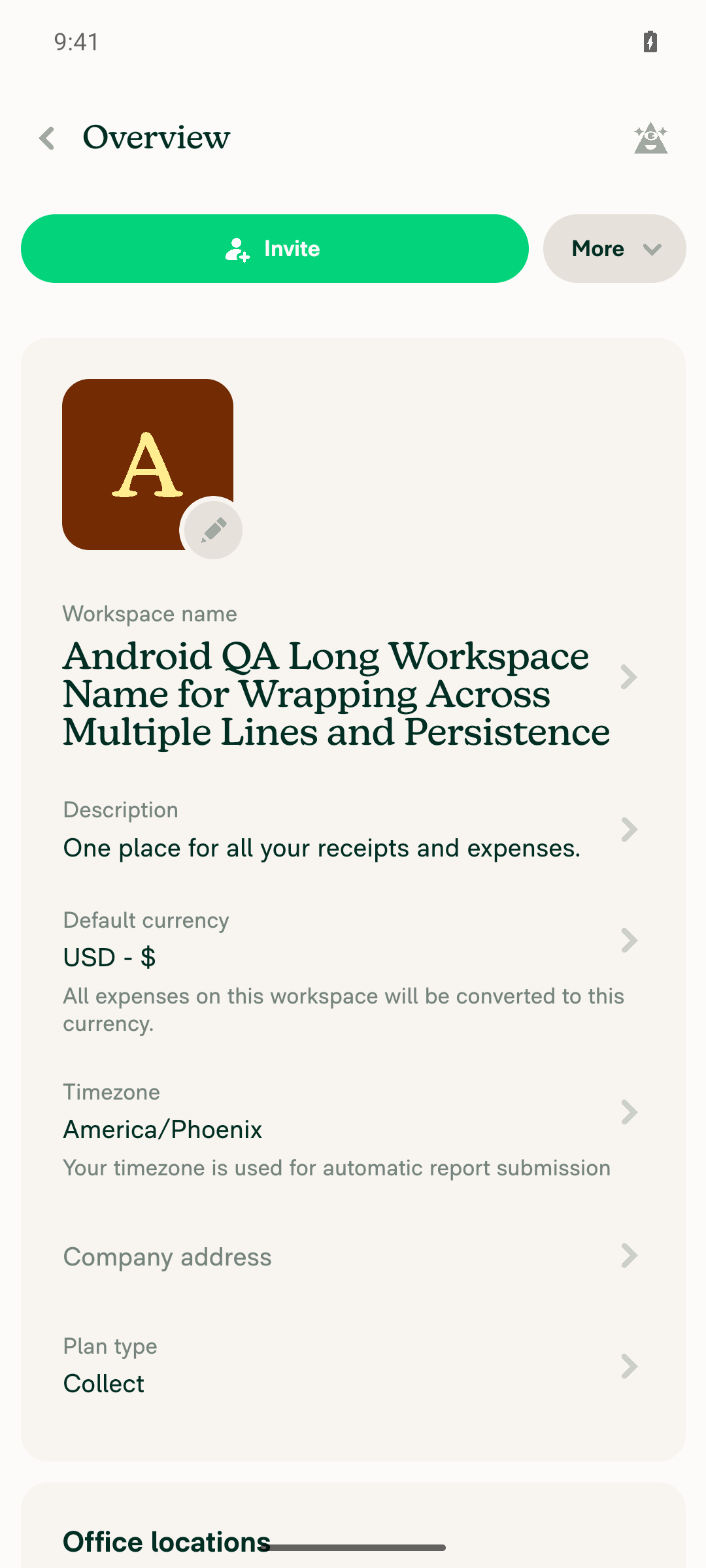
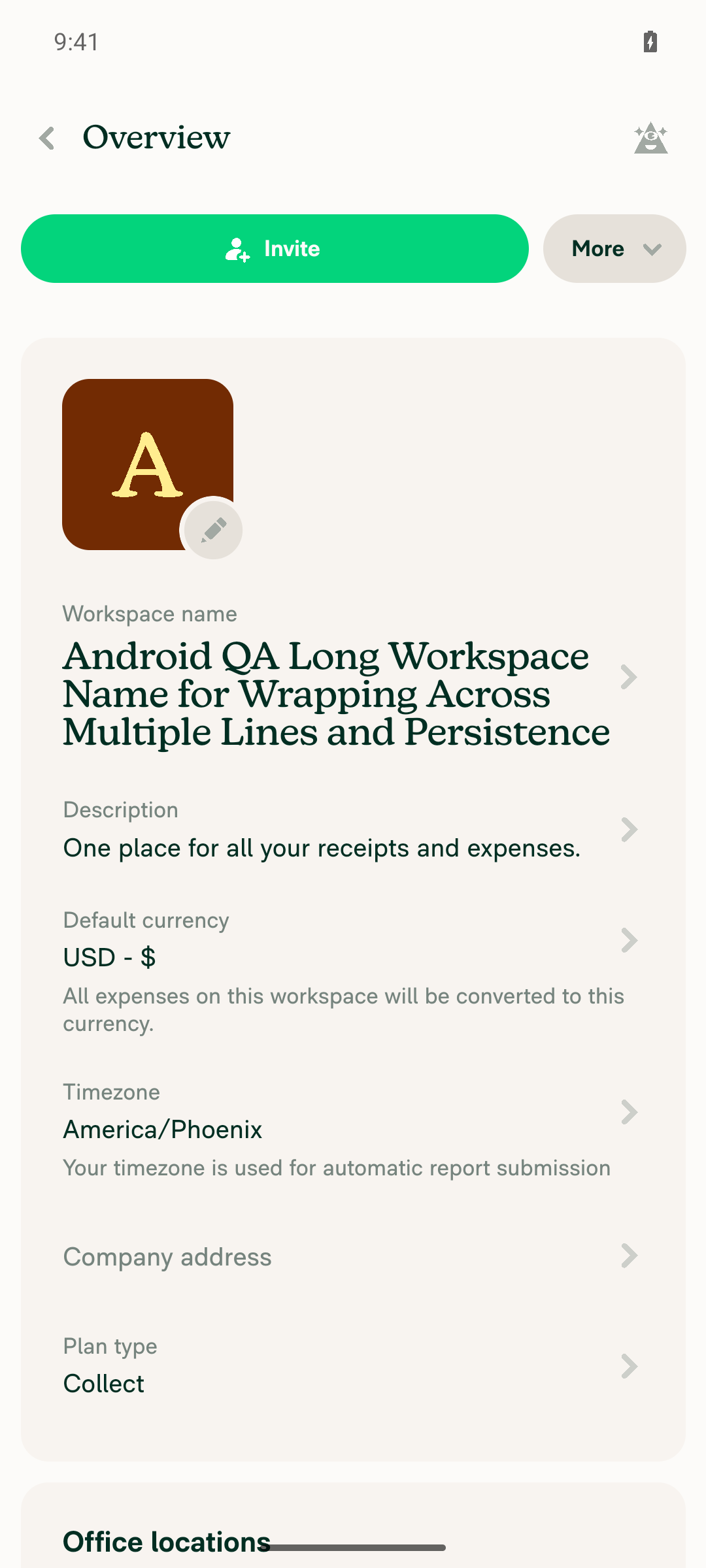
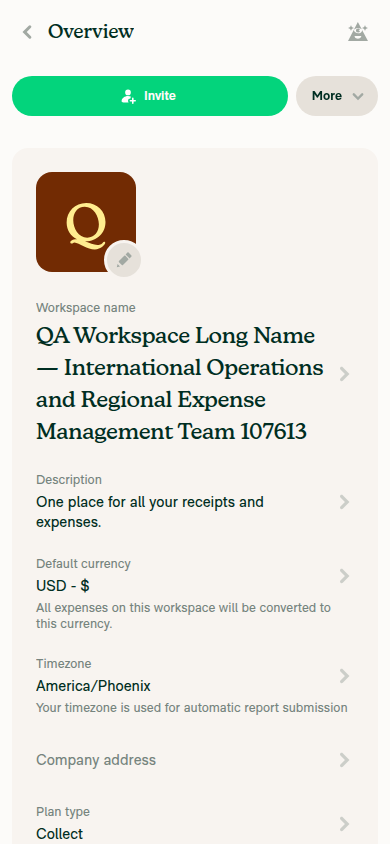
Long workspace value and chevron on Android portrait layout

Step Status
1. Workspace OverviewSaved an 81-character workspace name and confirmed its exact value after returning. Large text and multiline wrapping were visible. Pending feedback, heading semantics, and read-only behavior remain unverified.
Overview showing saved long workspace name wrapping across three lines
⚠️
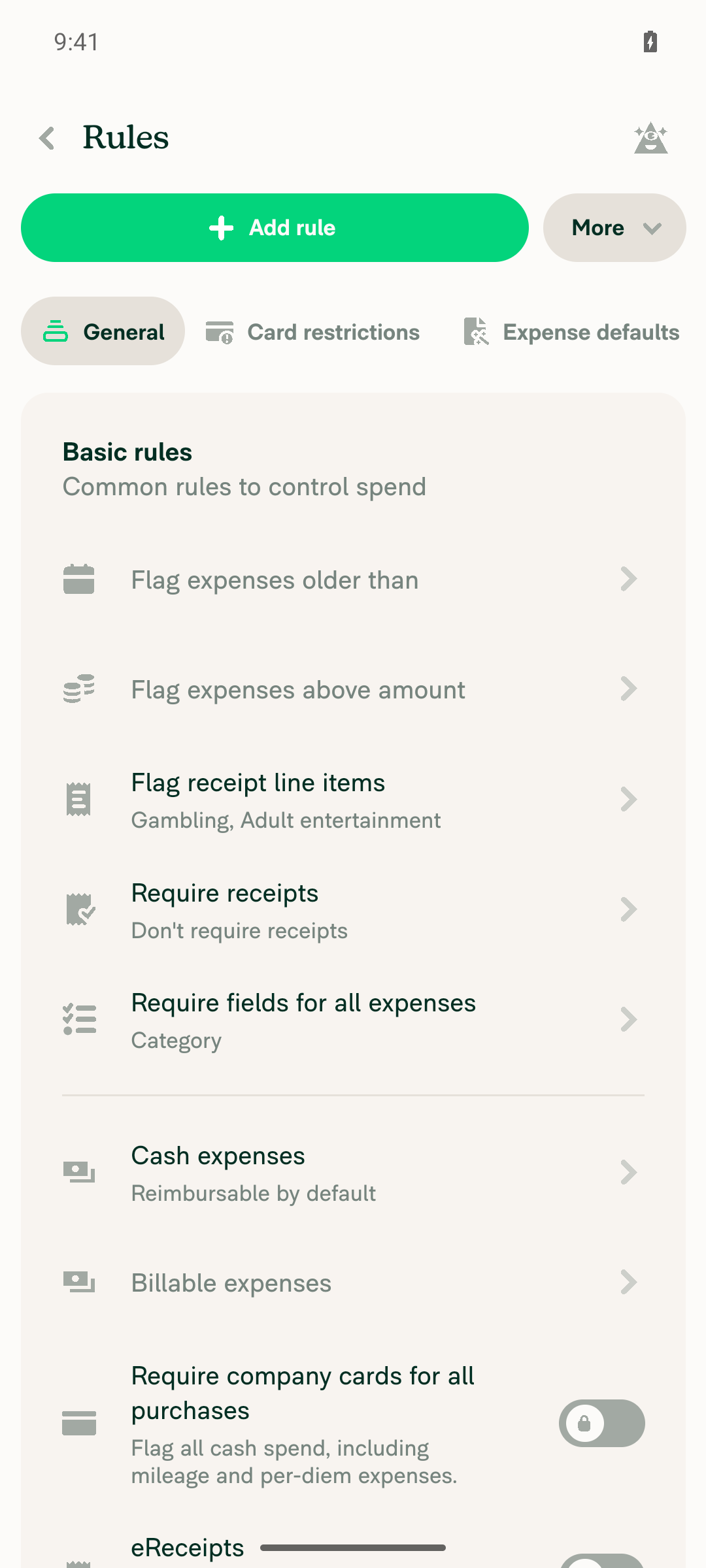
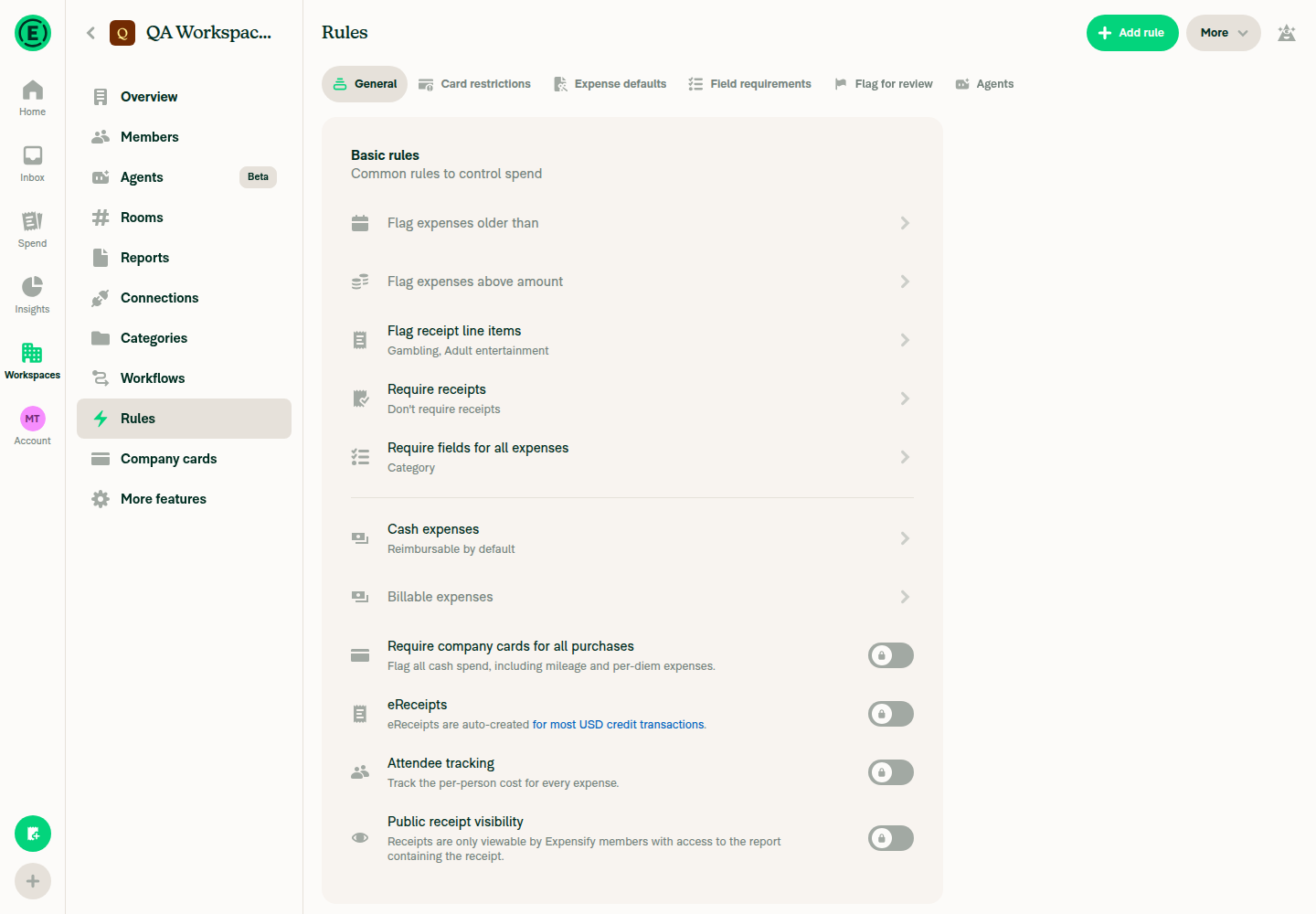
2. Rules → GeneralVerified rows, summaries, icons, titles, spacing, and chevrons. “Flag expenses older than” opened the Control upgrade screen; Back returned to General. Other editors, intended return destinations, and read-only behavior remain unverified.
Collect workspace Rules General rows
⚠️
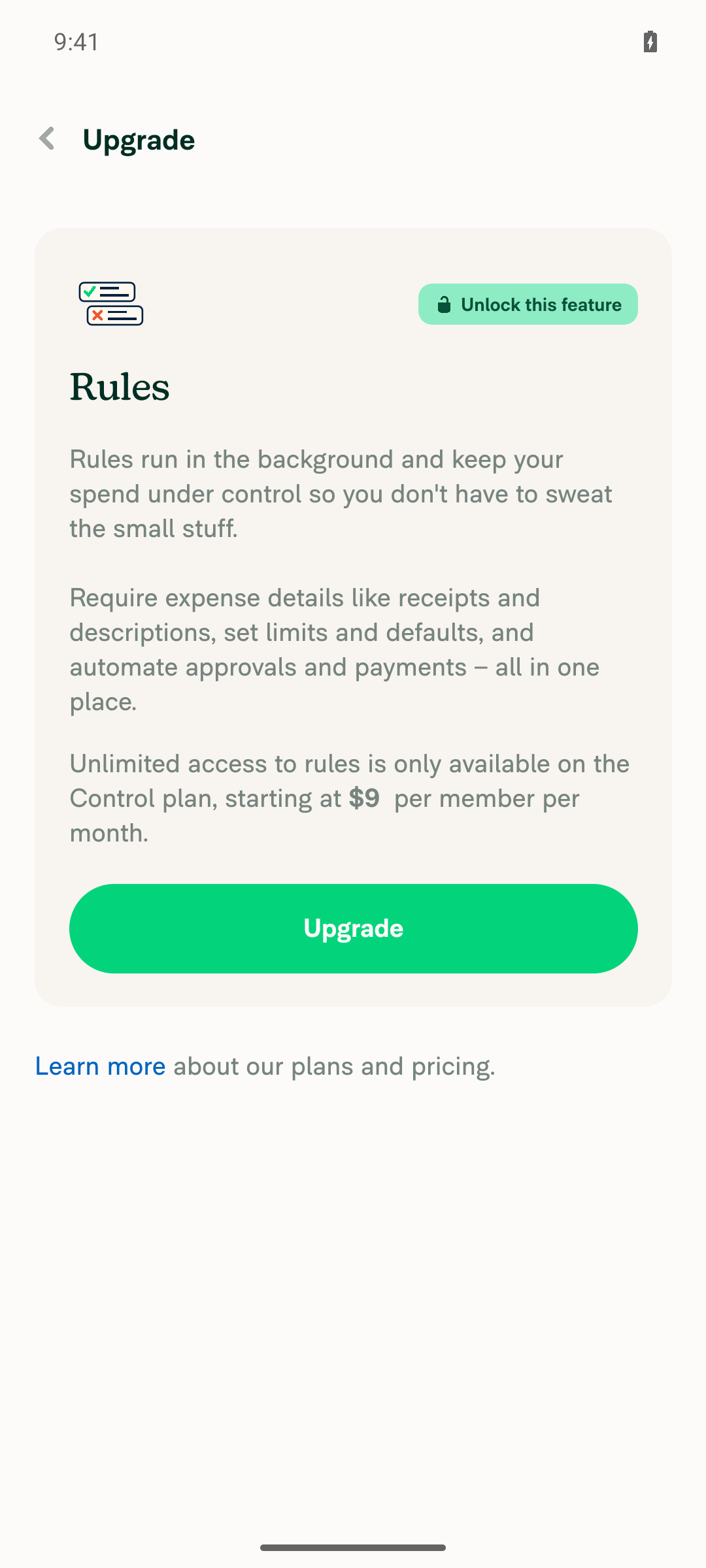
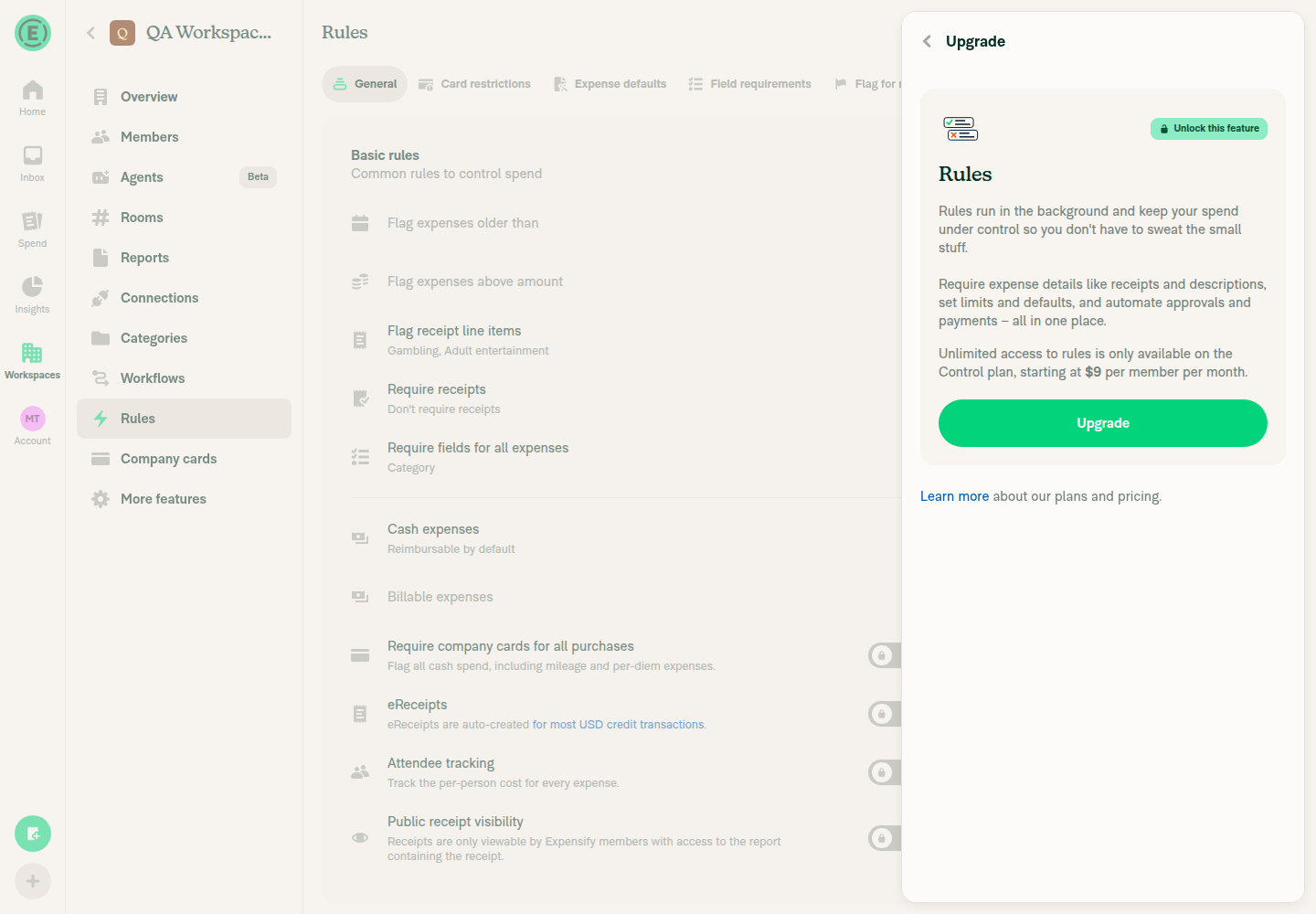
3. Expense-default rule editingExpense defaults opened “Unlock this feature.” Merchant/category/tag editing, rich-text rendering, and locked-field behavior were blocked by the Collect workspace fixture.
Rules upgrade screen requiring Control
⚠️
4. Required-field validation and persistenceNot verified: no applicable required-field fixture was available, and expense-default editing required Control.
⚠️
5. Layout and accessibilityLong workspace name remained readable in portrait with a separate chevron; accessibility read-back exposed its full button label. Wide layout, long rule values, keyboard activation, and screen-reader heading semantics remain unverified.
Long workspace value and chevron on Android portrait layout
⚠️
6. Offline edits and reconnectNot run. Offline rename, pending feedback, restrictions, and reconnect synchronization remain unverified.
⚠️
7. JavaScript console errorsCould not verify: diagnostic access was blocked. No clean-console claim is made.
⚠️

view run · view recording

@MelvinBot

MelvinBot commented Nov 20, 2026 •

Copy link
Copy Markdown
Contributor Author

🤖 Web test steps verification results: ⚠️ partial

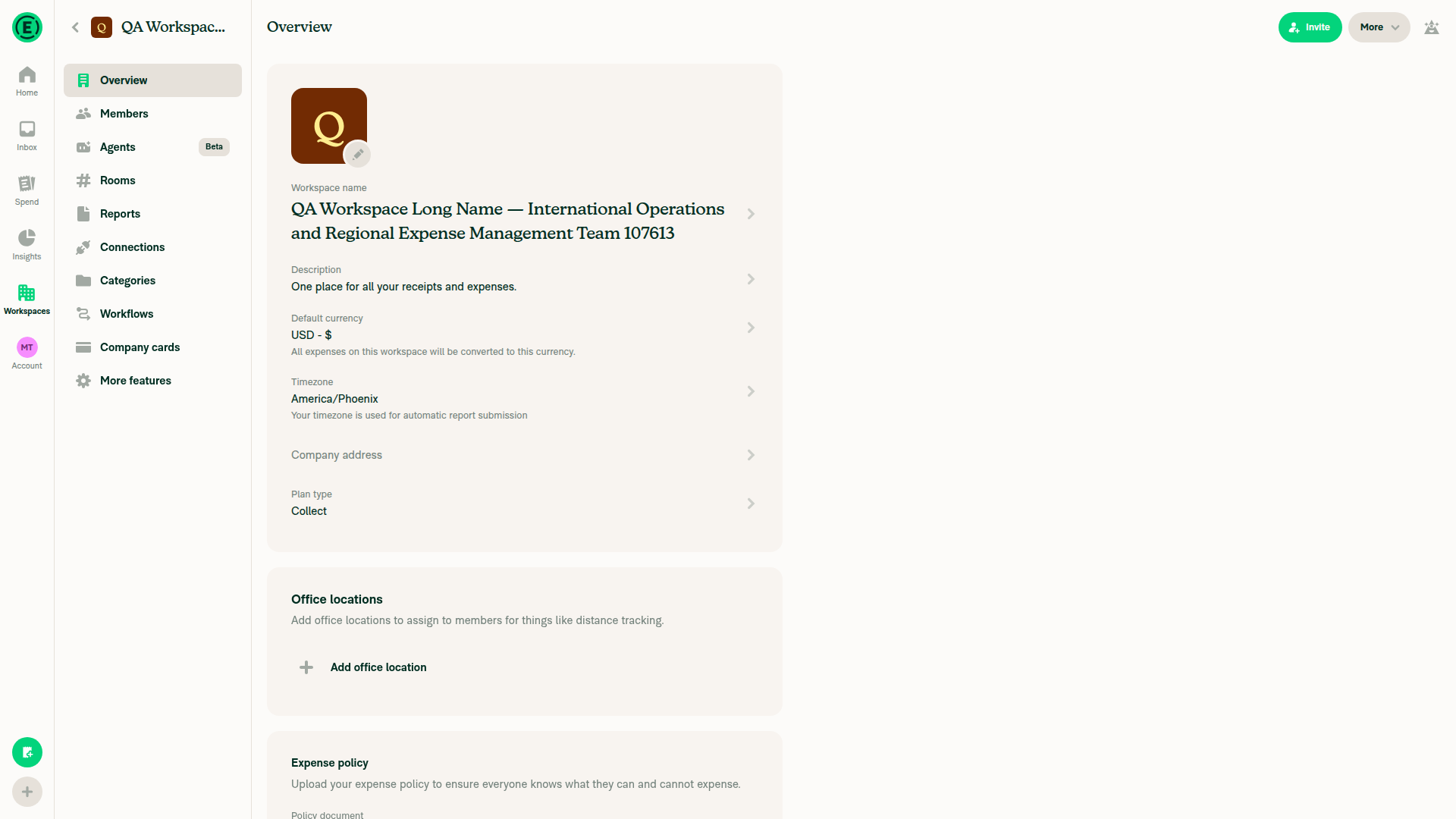
Admin workspace rename and General rule navigation worked on dev NewDot web, but Control-plan gating and unavailable fixtures/capabilities blocked full QA. ❌ below means incomplete verification, not a confirmed regression.

Long workspace name wrapping at 390px width

Step Status
1. Workspace OverviewRenamed the workspace to a 93-character name and confirmed it on returning, including heading semantics and the row’s accessible name. Large typography and wrapping were visible. Pending feedback and read-only restrictions remain unverified.
Renamed workspace heading wrapping at wide width
❌
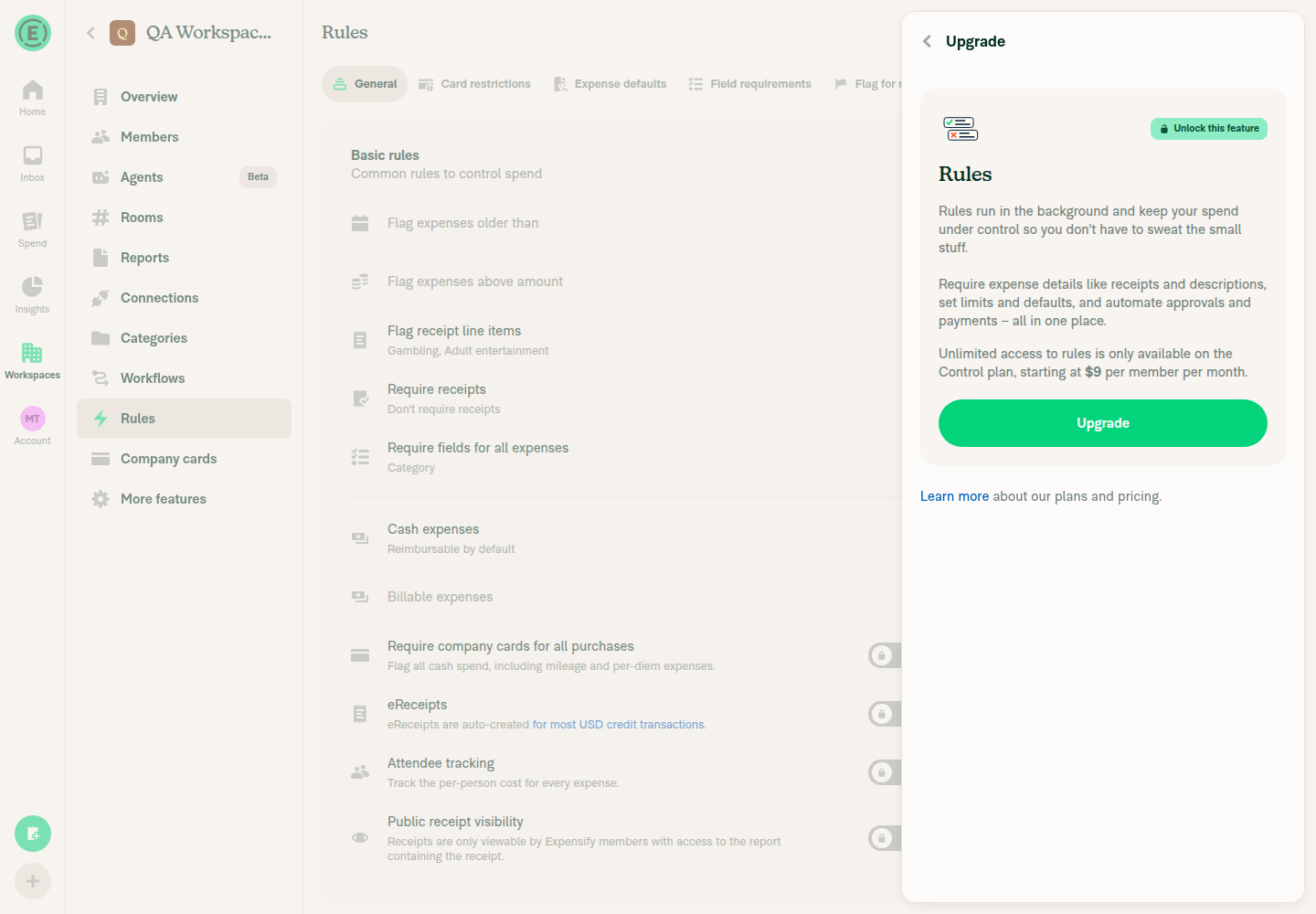
2. Rules → GeneralActivated all seven rows: five opened Upgrade; required-fields and billable-expenses opened their editors. Inspected icons, regular titles, summaries, muted empty rows, and spacing. Post-upgrade destinations and read-only behavior remain unverified.
General rules with icons, summaries and empty-row styling
Control upgrade gate opened from a General rule
❌
3. Expense-default rule editorExpense defaults opened the Control upgrade dialog. Fields, pickers, rich-text retention, and locked-field behavior remain unverified.
Expense defaults blocked by Control upgrade
❌
4. Required feedback and persistenceBlocked by the upgrade gate. Required/error transitions, preview, saving, and persisted values remain unverified.
❌
5. Responsive layout and accessibilityConfirmed the long workspace name at 1920px and 390px widths, with heading semantics and an accessible edit-row name. Inspected wrapping, insets, and chevron placement. Long rule values, keyboard activation, and comprehensive icon-slot checks remain unverified.
Long workspace name wrapping at 390px width
❌
6. Offline editing and synchronizationUnverified: available web tooling did not support offline simulation; read-only and editable-rule fixtures were unavailable.
❌
7. JavaScript console errorsUnverified: console inspection was unavailable through permitted testing tools. No clean-console claim is made.
❌

view run · no recording available

This branch has not been deployed

No deployments
Sign up for free to join this conversation on GitHub. Already have an account? Sign in to comment

Labels

Melvin-Test-Android Melvin-Test-Web Triggers Melvin to run the testing steps of the PR on web

Projects

None yet

Development

Successfully merging this pull request may close these issues.

2 participants