Repository navigation
Handle agent deleted on approval workflow in offline mode - #92286
Conversation


|
🚧 @NicolasBonet has triggered a test Expensify/App build. You can view the workflow run here. |

35ae306 to
e7e3bd8
Compare


|
@mkhutornyi Please copy/paste the Reviewer Checklist from here into a new comment on this PR and complete it. If you have the K2 extension, you can simply click: [this button] |
This comment has been minimized.
This comment has been minimized.


There was a problem hiding this comment.
💡 Codex Review
Here are some automated review suggestions for this pull request.
Reviewed commit: e7e3bd8ab8
ℹ️ About Codex in GitHub
Your team has set up Codex to review pull requests in this repo. Reviews are triggered when you
- Open a pull request for review
- Mark a draft as ready
- Comment "@codex review".
If Codex has suggestions, it will comment; otherwise it will react with 👍.
Codex can also answer questions or update the PR. Try commenting "@codex address that feedback".

Reviewer Checklist
Screenshots/VideosAndroid: HybridAppandroid.movAndroid: mWeb ChromeiOS: HybridAppios.moviOS: mWeb SafariMacOS: Chrome / Safariweb.mov |

|
@mkhutornyi any news? |

Looks like QA Steps describe the bug, not the fix |
|
Can you please add my account to |
Added
Adjusted |
|
@mkhutornyi waiting for you review 🙏 |
|
Please merge main to fix failing check |
aca2a6a to
9a70999
Compare
@mkhutornyi done, but let's not hold reviews for that reason in the future please |
This is failing. I don't see agent anymore in Approvers list 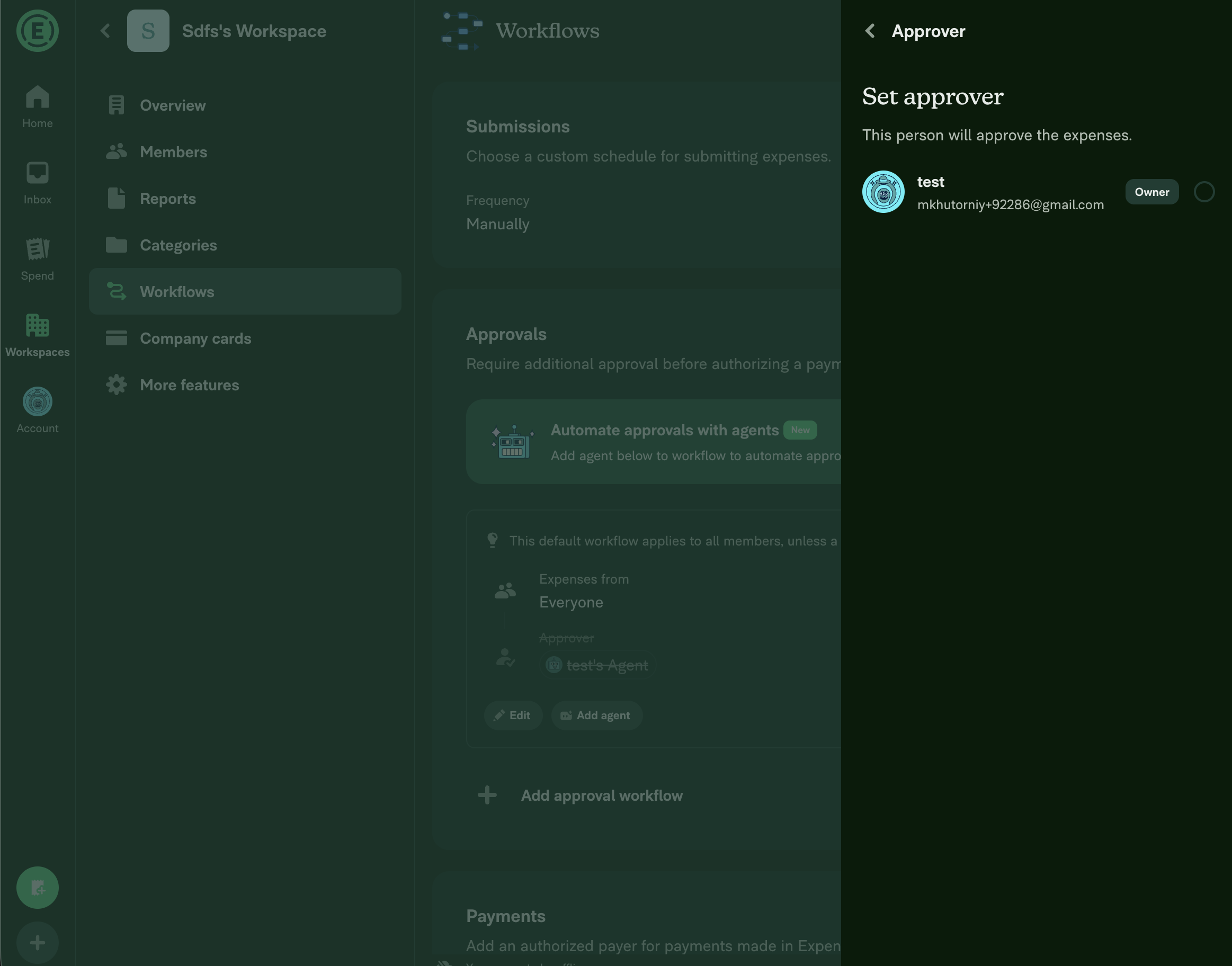
|
 mkhutornyi
left a comment
mkhutornyi
left a comment
There was a problem hiding this comment.
- Tap on approver to open "Edit Approval" RHP.
- Click on "Approver" field where agent is an approver two times to reach "Set Approver".
- Click on agent to remove it as approver.
- Reopen approver field.
- Click on agent again.
- Note that agent is the approver, but with its name crossed-out.
Should we remove these QA steps as failing here?
Otherwise looks good.
|
@neil-marcellini Please copy/paste the Reviewer Checklist from here into a new comment on this PR and complete it. If you have the K2 extension, you can simply click: [this button] |
On that was the error man, I just changed that. |

 neil-marcellini
left a comment
neil-marcellini
left a comment
There was a problem hiding this comment.
Looks good, except for one AI review concern that I think it legitimate, and a naming thing.
Also, it looks like the test steps you wrote don't match up with the video for mac Chrome at least. The steps should include going back online. The tests instruct checking the set approver page but the video doesn't show that. Although I do see you have a video of it below, and I agree on the expected result.
Please address the AI review, test it, clean up the test steps and video once more, and then I think it's good to go.


- Propagate employee.errors onto Approver so failed DELETE_AGENT surfaces an RBR on the approver row instead of hiding it.
- Rename deleteAgent's agentEmail param to agentLogin (login may be a phone number, not always an email).
- Build deleteAgent test policies with createRandomPolicy so we assert Policy at build time instead of `as never`.

Co-Authored-By: Claude Opus 4.7 (1M context) <noreply@anthropic.com>
@neil-marcellini adjusted your comments and I also changed the video to reflect my steps one by one. |

Co-authored-by: Nicolás Bonet <NicolasBonet@users.noreply.github.com>

|
Fixed the failing ESLint check. Cause: Fix: Updated the baseline count for this file from Verified locally with |
neil-marcellini
left a comment
neil-marcellini
left a comment
There was a problem hiding this comment.
Thanks for the updates


|
✋ This PR was not deployed to staging yet because QA is ongoing. It will be automatically deployed to staging after the next production release. |
|
🚧 @neil-marcellini has triggered a test Expensify/App build. You can view the workflow run here. |
|
🧪🧪 Use the links below to test this adhoc build on Android, iOS, and Web. Happy testing! 🧪🧪
|


|
🚀 Deployed to staging by https://github.com/neil-marcellini in version: 9.4.5-0 🚀
Bundle Size Analysis (Sentry): |
|
🤖 Help site review: no changes required. I reviewed the changes in this PR against the help articles under What this PR does: It's a purely technical offline-mode rendering fix. When an agent who is an approver is deleted while offline, the approval workflow card now keeps rendering that approver's row with a strikethrough / red-brick-road indicator while the Why no docs update is needed:
No draft PR was created since no help site changes are required. If you believe a specific article should describe this behavior, let me know which one and I'll draft the update. |

|
Deploy Blocker #93260 was identified to be related to this PR. |

|
🚀 Deployed to production by https://github.com/Julesssss in version: 9.4.5-6 🚀
|


Explanation of Change
Shows the agents with their names crossed-out if they are removed in offline mode.
Fixed Issues
$ #92262
PROPOSAL: #92262
Tests
Offline tests
Same as tests
QA Steps
Same as tests
PR Author Checklist
### Fixed Issuessection aboveTestssectionOffline stepssectionQA stepssectiontoggleReportand notonIconClick)src/languages/*files and using the translation methodSTYLE.md) were followedAvatar, I verified the components usingAvatarare working as expected)StyleUtils.getBackgroundAndBorderStyle(theme.componentBG))npm run compress-svg)Avataris modified, I verified thatAvataris working as expected in all cases)Designlabel and/or tagged@Expensify/designso the design team can review the changes.ScrollViewcomponent to make it scrollable when more elements are added to the page.mainbranch was merged into this PR after a review, I tested again and verified the outcome was still expected according to theTeststeps.Screenshots/Videos
Android: Native
Android: mWeb Chrome
iOS: Native
iOS: mWeb Safari
MacOS: Chrome / Safari
Screen.Recording.2026-06-09.at.10.16.56.AM.mov