Repository navigation
Fix device back from Submit to my employer confirmation landing on the workspace chat - #97512
Conversation


Codecov Report✅ Changes either increased or maintained existing code coverage, great job!
|

9c8baac to
21cdb27
Compare
…r a visible report

Submitting, sharing or categorizing a tracked expense rebinds the draft to its
destination chat before the confirmation screen opens, so the destination is a
report the user has never been on while they are still looking at the one they
started from. Both are reports, so the pre-insert has no tab to switch to and
overwrites the visible report in place. Cancelling then has to rebuild it from a
navigation-state snapshot - a restore that runs through the root router's guards
and can be silently swallowed.

Skip the pre-insert for that case so cancelling is a true no-op with nothing
speculative to undo. Submitting falls through to the existing dismiss-and-navigate
path, which already handles this destination transition whenever pre-insert is not
eligible for other reasons. Flows that create an expense in place keep the
pre-mount. Per Expensify#97437.
21cdb27 to
93ea88f
Compare
|
@MelvinBot review the PR |

|
@mananjadhav Please copy/paste the Reviewer Checklist from here into a new comment on this PR and complete it. If you have the K2 extension, you can simply click: [this button] |

|
This is finally read ... it was not easy to fix .. please have a look @hungvu193 |

PR ReviewVerdict: Looks correct and well-scoped. The fix targets the real root cause, follows an idiom already established in this file, and ships focused regression tests. A couple of minor, non-blocking notes below. What the fix does: On the dismissed-RHP cleanup path, Why I'm confident it's sound
Minor notes (non-blocking):
Testing note: The reported bug is narrow-layout + Android device (hardware) back button, which this run can only test on web. I verified on a 375px-wide web viewport that the general flow is healthy — create expense → open the confirmation RHP → back out (discard) returns cleanly to the report list with no blank/stuck screen, and the happy-path submit lands the expense in the self-DM correctly. The exact "single workspace / device-back-before-cleanup" scenario is Android-specific and is covered by the new unit tests, which model it directly (I couldn't execute the Jest suite in this environment — worth confirming CI is green on 🤖 Generated with MelvinBot |

PR ReviewVerdict: ✅ Looks correct and well-scoped. The fix targets the real root cause, reuses gating logic already established in this builder, and ships focused regression tests. CI is green (the only failing check,
What the fix does: For the single-workspace "Submit it to my employer" flow, the source (self DM) and destination (workspace chat) are both reports in the same tab, so there's no tab to switch to — pre-mounting the destination overwrites the visible report in place, and device-back pops the RHP to reveal that overwritten screen (#97437). The PR adds an Why I'm confident it's sound
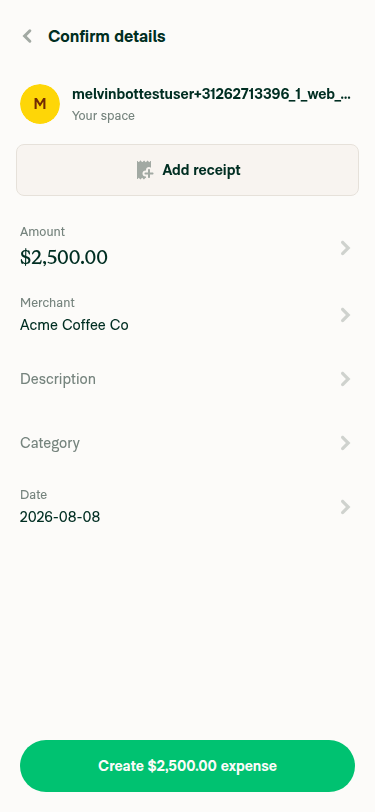
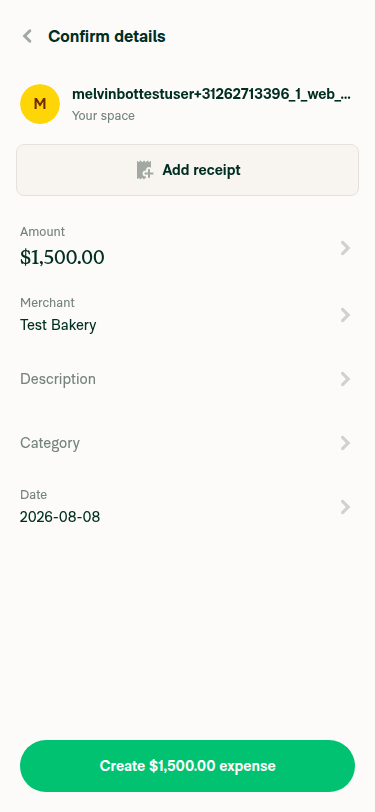
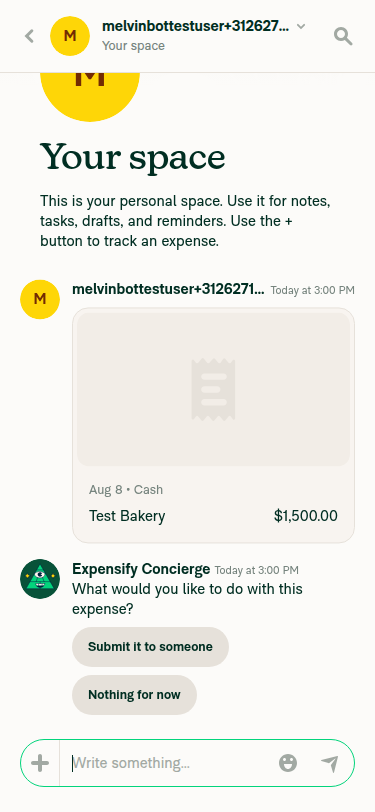
Testing note: The reported bug is narrow-layout + Android hardware back button, which this run can only exercise on web. I ran the PR's own in-place regression check (#6) on a 375px web viewport: create a manual expense in the self DM → open the Confirm-details RHP → back out (discard) returns cleanly to the self DM with no blank/stuck/skeleton screen and no wrong-chat flash; and Submit lands the expense on the correct report. The exact "single paid workspace + 🤖 Generated with MelvinBot EvidenceConfirm details page for first manual expense in narrow layoutConfirm details page for second manual expense before submitSelf DM after submitting the expense showing the expense card and Concierge whisper |

|
Damnn, Melvin can actually take the screenshot now 🤯 That's mind blowing |
Reviewer Checklist
Screenshots/VideosAndroid: HybridAppScreen.Recording.2026-08-17.at.11.57.11.movAndroid: mWeb ChromeScreen.Recording.2026-08-17.at.11.57.11.moviOS: HybridAppScreen.Recording.2026-08-17.at.12.07.47.moviOS: mWeb SafariScreen.Recording.2026-08-17.at.12.09.29.movMacOS: Chrome / SafariScreen.Recording.2026-08-17.at.12.02.41.mov |

| const isReplacingVisibleReport = | ||
| !hasPreInsertedFullscreen && isMovingTransactionFromTrackExpense && isReportTopmostSplitNavigator() && Navigation.getTopmostReportId() !== destinationReportID; |

|
I reviewed the change and verified it at the code + unit-test level. It looks correct. Live end-to-end verification was not possible this run (details below). Verdict: ✅ change is soundThe fix adds a narrow, well-scoped guard ( What I checked1. The guard fires on exactly the reported case. In 2. It's scoped to the relocation flows only. 3. No self-teardown. The 4. Unit tests pass and cover the branches. The new cases in 5. CI is green. Every functional check passes. The only red check is
|


|
🚧 carlosmiceli has triggered a test Expensify/App build. You can view the workflow run here. |

|
🧪🧪 Use the links below to test this adhoc build on Android, iOS, and Web. Happy testing! 🧪🧪
|


|
🚀 Deployed to staging by https://github.com/carlosmiceli in version: 9.4.56-0 🚀
|
|
🤖 I reviewed the changes in this PR against the help site content under Why: This is a navigation-only bug fix. It changes internal pre-mount/routing logic so that pressing the device back button on the "Submit it to my employer" confirmation page returns you to the self DM instead of flashing the workspace chat. The three changed files are all logic/tests:
There are no new features, settings, buttons, tab names, or user-facing copy introduced (no Since no changes are needed, I did not create a draft help site PR. |

|
Hi @abzokhattab. No “Submit it to my employer” whisper appears on our side. We tried both Gmail and Expensifail accounts. 
|
|
🚀 Deployed to production by https://github.com/Beamanator in version: 9.4.56-3 🚀
Bundle Size Analysis (Sentry): |


Explanation of Change
Problem: pressing the device back button on the "Submit it to my employer" confirmation page leaves you on the workspace chat instead of the self DM you started from.
Cause: the confirmation RHP pre-mounts its destination report underneath itself, so submitting reveals an already-rendered screen. This flow rebinds the draft to the workspace chat before the confirmation opens, so the destination is a chat the user has never visited while they are still looking at their self DM. Both are reports, so there is no tab to switch to and the pre-mount overwrites the visible report in place. Back pops the RHP and reveals that overwritten screen.
Cleaning it up afterwards doesn't work. The pop happens before the cleanup runs, so the workspace chat is already on screen for the whole dismiss animation, and any restore that follows shows the wrong screen first and then jumps.
Fix: don't pre-mount in this case. Skip it when a tracked expense is being relocated (submit/share/categorize) to a report other than the one currently on screen. Backing out is then a true no-op, and submitting falls through to the existing dismiss-and-navigate path already used whenever the pre-mount isn't eligible.
Unaffected: in-place expense creation, Search pre-mounts, cross-tab pre-mounts, and skip-confirmation flows.
Fixed Issues
$ #97437
PROPOSAL:
Tests
With the
submit2026beta enabled, on an account with a self DM and exactly one paid workspace, on Android (or any narrow layout):Regression checks for flows that keep the pre-mount:
Offline tests
Same as Tests while offline — the flow is navigation-only, so behavior is identical.
QA Steps
submit2026beta, a self DM and exactly one paid workspace, create a manual expense in the self DM on Android.PR Author Checklist
### Fixed Issuessection aboveTestssectionOffline stepssectionQA stepssectionAvatar, I verified the components usingAvatarare working as expected)StyleUtils.getBackgroundAndBorderStyle(theme.componentBG))npm run compress-svg)Avataris modified, I verified thatAvataris working as expected in all cases)Designlabel and/or tagged@Expensify/designso the design team can review the changes.mainbranch was merged into this PR after a review, I tested again and verified the outcome was still expected according to theTeststeps.Screenshots/Videos
Android: Native
Screen.Recording.2026-08-08.at.16.15.54.mov
Android: mWeb Chrome
Screen.Recording.2026-08-04.at.22.53.03.mov
iOS: Native
Screen.Recording.2026-08-04.at.23.07.47.mov
iOS: mWeb Safari
Screen.Recording.2026-08-04.at.23.09.31.mov
MacOS: Chrome / Safari
Screen.Recording.2026-08-04.at.22.49.47.mov