Skip to content

Fix missing participant email after failed chat creation - #97557

Merged
deetergp merged 2 commits into
Expensify:mainfrom
nabi-ebrahimi:fix/preserve-email-after-failed-chat-creation
Aug 4, 2026
Merged

deetergp merged 2 commits into
Expensify:mainfrom
nabi-ebrahimi:fix/preserve-email-after-failed-chat-creation

Conversation

@nabi-ebrahimi

@nabi-ebrahimi nabi-ebrahimi commented Jul 31, 2026 •

Copy link
Copy Markdown
Contributor

Explanation of Change

When a new direct chat creation fails, openReport() rolls back the optimistic personal-detail record before the failed chat is dismissed. The LHN and RHP use that record to display the participant email, so the failed chat appears without an identity.

This change retains the optimistic participant detail for failed new direct chats and removes it when the user dismisses the failed optimistic chat. Threads, transaction reports, and existing chats continue to use the existing rollback behavior.

Fixed Issues

$ #95864
PROPOSAL: #95864 (comment)

Tests

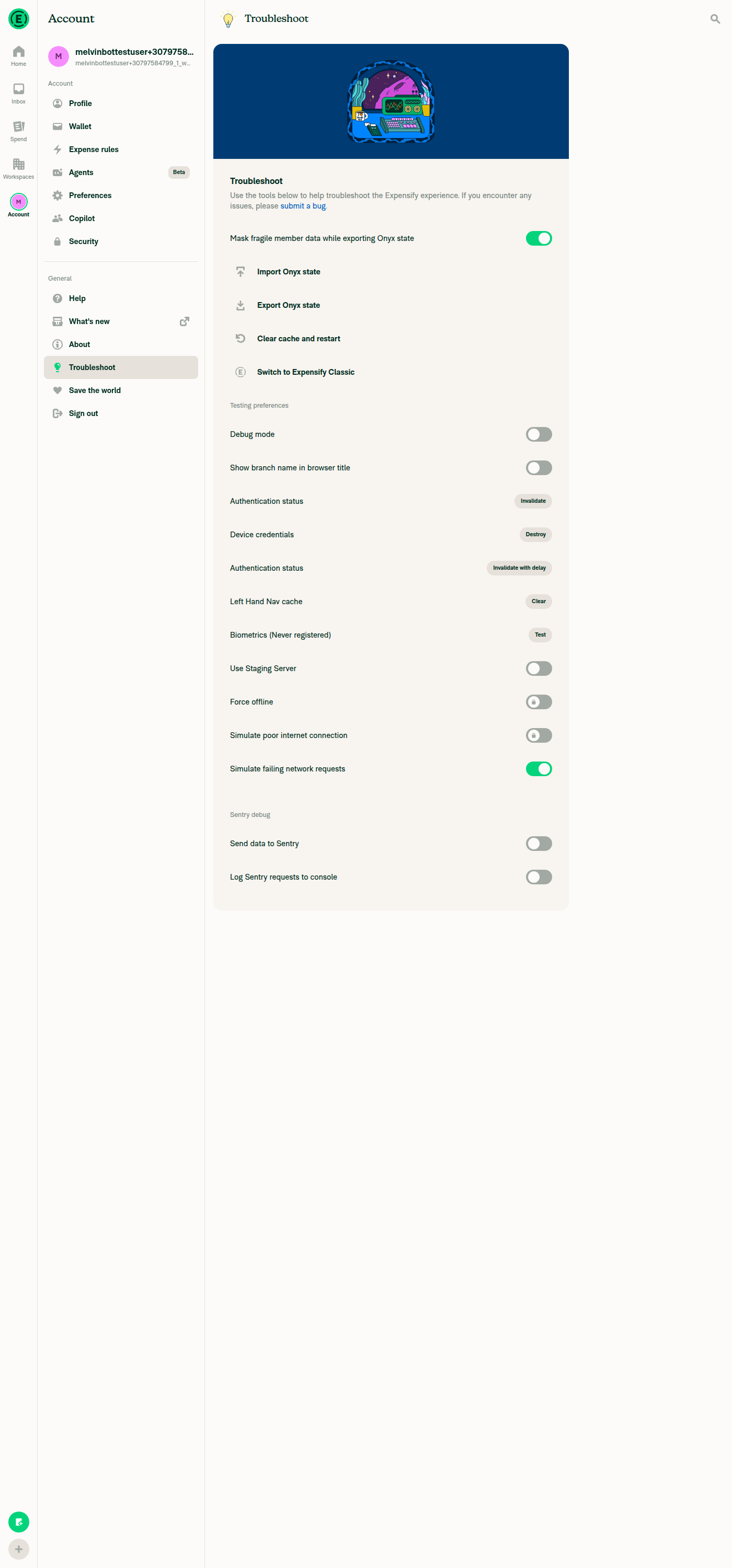
  1. Enable Simulate failing network requests.
  2. Go to Inbox, select the global create button, then select Start chat.
  3. Start a chat with a user with whom you have never chatted.
  4. Verify that the chat creation fails and an error is shown
  5. Verify that the participant email remains visible in the LHN and the chat details/RHP.
  • Verify that no errors appear in the JS console

Offline tests

  1. Disable Simulate failing network requests.
  2. Disconnect the device from the network.
  3. Start a new direct chat.
  4. Verify that the chat remains pending while offline.
  5. Restore the network connection.
  6. Verify that the pending chat request completes normally.

QA Steps

Same as Tests.

// TODO: These must be filled out, or the issue title must include "[No QA]."

  • Verify that no errors appear in the JS console

PR Author Checklist

  • I linked the correct issue in the ### Fixed Issues section above
  • I wrote clear testing steps that cover the changes made in this PR
    • I added steps for local testing in the Tests section
    • I added steps for the expected offline behavior in the Offline steps section
    • I added steps for Staging and/or Production testing in the QA steps section
    • I added steps to cover failure scenarios (i.e. verify an input displays the correct error message if the entered data is not correct)
    • I turned off my network connection and tested it while offline to ensure it matches the expected behavior (i.e. verify the default avatar icon is displayed if app is offline)
    • I tested this PR with a High Traffic account against the staging or production API to ensure there are no regressions (e.g. long loading states that impact usability).
  • I included screenshots or videos for tests on all platforms
  • I ran the tests on all platforms & verified they passed on:
    • Android: Native
    • Android: mWeb Chrome
    • iOS: Native
    • iOS: mWeb Safari
    • MacOS: Chrome / Safari
  • I verified there are no console errors (if there's a console error not related to the PR, report it or open an issue for it to be fixed)
  • I followed proper code patterns (see Reviewing the code)
    • I verified that comments were added to code that is not self explanatory
    • I verified that any new or modified comments were clear, correct English, and explained "why" the code was doing something instead of only explaining "what" the code was doing.
    • I verified any copy / text that was added to the app is grammatically correct in English. It adheres to proper capitalization guidelines (note: only the first word of header/labels should be capitalized), and is either coming verbatim from figma or has been approved by marketing (in order to get marketing approval, ask the Bug Zero team member to add the Waiting for copy label to the issue)
  • If a new code pattern is added I verified it was agreed to be used by multiple Expensify engineers
  • I followed the guidelines as stated in the Review Guidelines
  • I tested other components that can be impacted by my changes (i.e. if the PR modifies a shared library or component like Avatar, I verified the components using Avatar are working as expected)
  • If a new CSS style is added I verified that:
    • A similar style doesn't already exist
    • The style can't be created with an existing StyleUtils function (i.e. StyleUtils.getBackgroundAndBorderStyle(theme.componentBG))
  • If new assets were added or existing ones were modified, I verified that:
    • The assets are optimized and compressed (for SVG files, run npm run compress-svg)
    • The assets load correctly across all supported platforms.
  • If the PR modifies code that runs when editing or sending messages, I tested and verified there is no unexpected behavior for all supported markdown - URLs, single line code, code blocks, quotes, headings, bold, strikethrough, and italic.
  • If the PR modifies a generic component, I tested and verified that those changes do not break usages of that component in the rest of the App (i.e. if a shared library or component like Avatar is modified, I verified that Avatar is working as expected in all cases)
  • If the PR modifies a component related to any of the existing Storybook stories, I tested and verified all stories for that component are still working as expected.
  • If the PR modifies a component or page that can be accessed by a direct deeplink, I verified that the code functions as expected when the deeplink is used - from a logged in and logged out account.
  • If the PR modifies the UI (e.g. new buttons, new UI components, changing the padding/spacing/sizing, moving components, etc) or modifies the form input styles:
    • I verified that all the inputs inside a form are aligned with each other.
    • I added Design label and/or tagged @Expensify/design so the design team can review the changes.
  • I added unit tests for any new feature or bug fix in this PR to help automatically prevent regressions in this user flow.
  • If the main branch was merged into this PR after a review, I tested again and verified the outcome was still expected according to the Test steps.

Screenshots/Videos

Android: Native
Android: mWeb Chrome
iOS: Native
iOS: mWeb Safari
MacOS: Chrome / Safari
Screencast.From.2026-07-31.14-34-02.mp4

@codecov

codecov Bot commented Jul 31, 2026 •

Copy link
Copy Markdown

Codecov Report

✅ Changes either increased or maintained existing code coverage, great job!

Files with missing lines Coverage Δ
src/libs/actions/Report/index.ts 72.05% <71.42%> (+0.07%) ⬆️
... and 50 files with indirect coverage changes

@melvin-bot
melvin-bot Bot requested review from JmillsExpensify and dmkt9 and removed request for a team July 31, 2026 10:13
@melvin-bot

melvin-bot Bot commented Jul 31, 2026

Copy link
Copy Markdown

@dmkt9 Please copy/paste the Reviewer Checklist from here into a new comment on this PR and complete it. If you have the K2 extension, you can simply click: [this button]

@melvin-bot
melvin-bot Bot removed the request for review from a team July 31, 2026 10:13

@chatgpt-codex-connector chatgpt-codex-connector Bot left a comment

Copy link
Copy Markdown

Choose a reason for hiding this comment

The reason will be displayed to describe this comment to others. Learn more.

💡 Codex Review

Here are some automated review suggestions for this pull request.

Reviewed commit: 2b07d499bf

ℹ️ About Codex in GitHub

Codex has been enabled to automatically review pull requests in this repo. Reviews are triggered when you

  • Open a pull request for review
  • Mark a draft as ready
  • Comment "@codex review".

If Codex has suggestions, it will comment; otherwise it will react with 👍.

When you sign up for Codex through ChatGPT, Codex can also answer questions or update the PR, like "@codex address that feedback".

Comment thread src/libs/actions/Report/index.ts Outdated
key: `${ONYXKEYS.COLLECTION.REPORT_ACTIONS}${reportID}`,
value: {[optimisticCreatedAction.reportActionID]: {pendingAction: null}},
});
if (shouldKeepPersonalDetailsOnFailure) {

Copy link
Copy Markdown

Choose a reason for hiding this comment

The reason will be displayed to describe this comment to others. Learn more.

P2 Badge Keep failure rollback outside the personal-detail guard

When shouldKeepPersonalDetailsOnFailure is false (for example, toggleSubscribeToChildReport() creates a child report with newReportObject.parentReportID but does not set isNewThread), the failure path no longer adds errorFields.createChat or clears the optimistic created report action’s pendingAction; the guarded block below is now the only place those updates are pushed. If OpenReport fails for that flow, the optimistic chat/thread stays pending and does not show the generic create-chat error/dismiss affordance that existed before this change. Please keep only the personal-detail rollback conditional and still apply the report/report-action failure updates for all created reports.

Useful? React with 👍 / 👎.

Copy link
Copy Markdown
Contributor Author

Choose a reason for hiding this comment

The reason will be displayed to describe this comment to others. Learn more.

I've addressed it.

@JmillsExpensify JmillsExpensify left a comment

Copy link
Copy Markdown
Contributor

Choose a reason for hiding this comment

The reason will be displayed to describe this comment to others. Learn more.

LGTM

@dmkt9

dmkt9 commented Aug 3, 2026

Copy link
Copy Markdown
Contributor

@codex review

@chatgpt-codex-connector chatgpt-codex-connector Bot left a comment

Copy link
Copy Markdown

Choose a reason for hiding this comment

The reason will be displayed to describe this comment to others. Learn more.

💡 Codex Review

Here are some automated review suggestions for this pull request.

Reviewed commit: 97e5f43ad9

ℹ️ About Codex in GitHub

Codex has been enabled to automatically review pull requests in this repo. Reviews are triggered when you

  • Open a pull request for review
  • Mark a draft as ready
  • Comment "@codex review".

If Codex has suggestions, it will comment; otherwise it will react with 👍.

When you sign up for Codex through ChatGPT, Codex can also answer questions or update the PR, like "@codex address that feedback".

const personalDetailsToRemove: PersonalDetailsList = {};

for (const accountID of Object.keys(report?.participants ?? {}).map(Number)) {
if (accountID === currentUserAccountID || !allPersonalDetails?.[accountID]?.isOptimisticPersonalDetail) {

Copy link
Copy Markdown

Choose a reason for hiding this comment

The reason will be displayed to describe this comment to others. Learn more.

P2 Badge Restrict cleanup to details created by this chat

When the failed chat reuses an optimistic personal-detail record that was already in Onyx, such as the same unknown email already present in a pending group chat, openReport() never owned that record or added it to settledPersonalDetails; however this cleanup deletes any optimistic participant in the failed report. Dismissing the failed direct chat can therefore remove the shared personal detail and make the other pending chat/invite lose the participant email again. Track and remove only the account IDs created for this failed report instead of all optimistic participants.

Useful? React with 👍 / 👎.

@dmkt9

dmkt9 commented Aug 3, 2026

Copy link
Copy Markdown
Contributor

@MelvinBot review

@MelvinBot

Copy link
Copy Markdown
Contributor

Review — looks good, verified working ✅

The change is well-scoped and does what it says: for a failed new direct chat, it skips the optimistic personal-details rollback (Report/index.ts:1904-1910) so the participant identity survives the failure, then removes it when the user dismisses the error via cleanUpOptimisticPersonalDetailsForFailedChat hooked into clearCreateChatError. Threads / transaction reports keep the old rollback via the shouldKeepPersonalDetailsOnFailure guard. CI is green (the only failing check is the reviewer checklist, which is unrelated to the code).

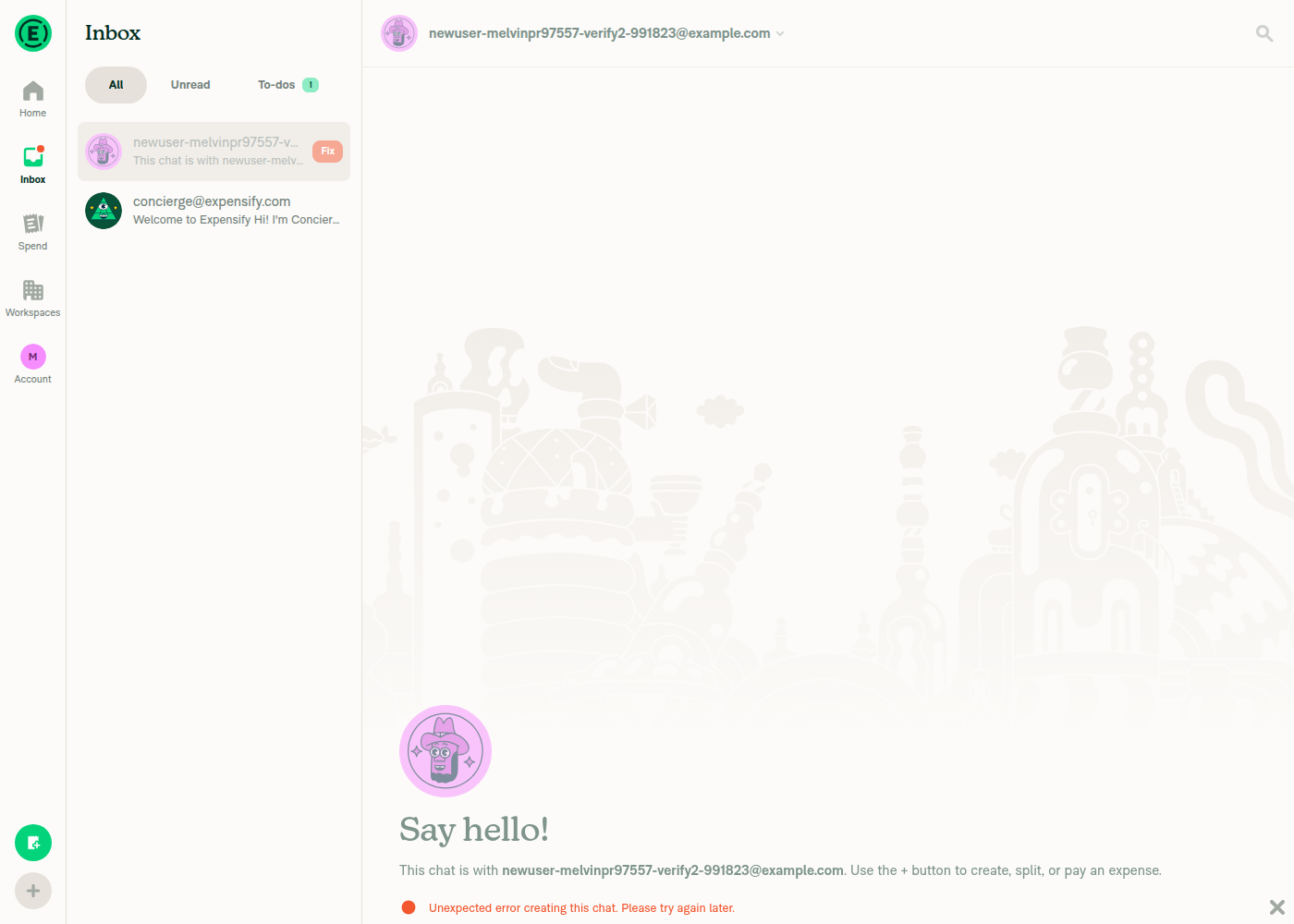
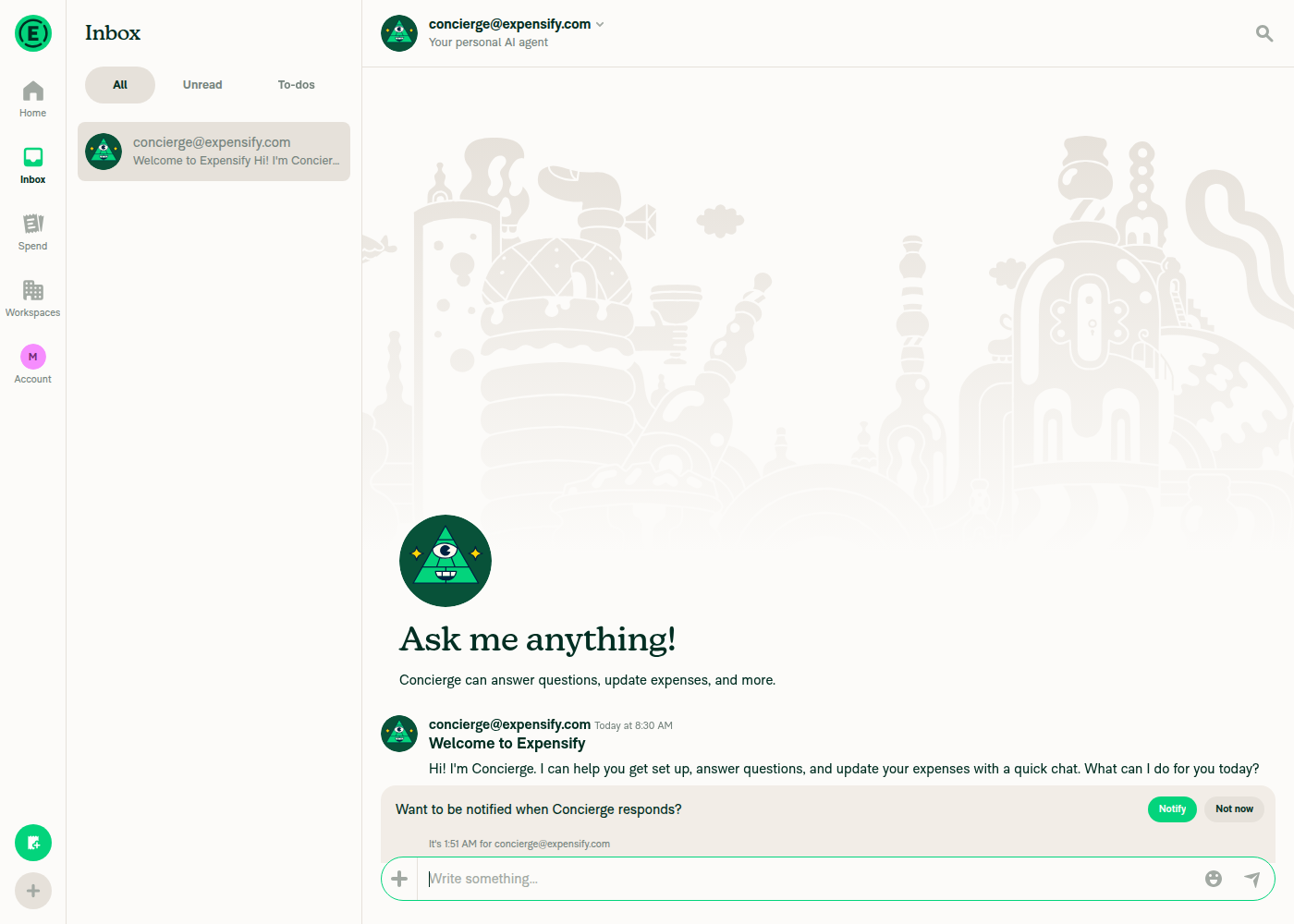
I verified the flow on web: with Simulate failing network requests on, starting a chat with a brand-new email fails with the red error and the participant email stays visible in both the LHN and the chat header — it no longer goes blank. Dismissing the error removes the failed chat and navigates to Concierge.

A few things worth a look before merge (non-blocking)
  1. PD now lingers if the failed chat is dismissed by any path other than the error “X”. Cleanup only runs inside clearCreateChatError. Previously the optimistic personal detail was rolled back immediately on failure; now it persists in PERSONAL_DETAILS_LIST until the user explicitly dismisses. If the user just navigates away, the optimistic record stays (and could surface the phantom user in search/contact suggestions). Is there any other teardown path, or is “only cleaned on dismiss” the intended contract?

  2. The retention guard and the error-render guard aren’t gated on the same condition. shouldKeepPersonalDetailsOnFailure requires shouldAddPendingFields, but the errorFields.createChat failure push is gated only on !isNewThread (Report/index.ts:1912-1922). If any caller passes shouldAddPendingFields: false for a plain new DM, the error would still render but the PD would be rolled back — i.e. the original missing-email bug returns for that path. I don’t think a caller does this today, but the two conditions should probably stay in sync.

  3. cleanUpOptimisticPersonalDetailsForFailedChat deletes the PD globally by accountID. If the same optimistic account is a participant in another still-pending/failed report, dismissing one failed chat also strips the identity from the other. Low-probability edge case, but worth a mental note.

  4. No unit test in the diff — the PR only touches src/libs/actions/Report/index.ts, yet the author checklist has “I added unit tests” checked. This retain-on-failure / cleanup-on-dismiss optimistic logic is exactly the kind of thing that regresses silently; a small test asserting (a) PD retained in failureData for a new DM and (b) removed on clearCreateChatError would be worthwhile. Either add one or uncheck the box.

Simulate failing network requests toggle ON

Simulate failing network requests toggle ON

Failed chat keeps participant email visible in LHN and header

Failed chat keeps participant email visible in LHN and header with red error

After dismissing the error, failed chat removed → Concierge

After dismissing error, failed chat removed and navigated to Concierge

@dmkt9

dmkt9 commented Aug 3, 2026

Copy link
Copy Markdown
Contributor

Reviewer Checklist

  • I have verified the author checklist is complete (all boxes are checked off).
  • I verified the correct issue is linked in the ### Fixed Issues section above
  • I verified testing steps are clear and they cover the changes made in this PR
    • I verified the steps for local testing are in the Tests section
    • I verified the steps for Staging and/or Production testing are in the QA steps section
    • I verified the steps cover any possible failure scenarios (i.e. verify an input displays the correct error message if the entered data is not correct)
    • I turned off my network connection and tested it while offline to ensure it matches the expected behavior (i.e. verify the default avatar icon is displayed if app is offline)
  • I checked that screenshots or videos are included for tests on all platforms
  • I included screenshots or videos for tests on all platforms
  • I verified that the composer does not automatically focus or open the keyboard on mobile unless explicitly intended. This includes checking that returning the app from the background does not unexpectedly open the keyboard.
  • I verified tests pass on all platforms & I tested again on:
    • Android: HybridApp
    • Android: mWeb Chrome
    • iOS: HybridApp
    • iOS: mWeb Safari
    • MacOS: Chrome / Safari
  • If there are any errors in the console that are unrelated to this PR, I either fixed them (preferred) or linked to where I reported them in Slack
  • I verified proper code patterns were followed (see Reviewing the code)
    • I verified that comments were added to code that is not self explanatory
    • I verified that any new or modified comments were clear, correct English, and explained "why" the code was doing something instead of only explaining "what" the code was doing.
    • I verified any copy / text that was added to the app is grammatically correct in English. It adheres to proper capitalization guidelines (note: only the first word of header/labels should be capitalized), and is either coming verbatim from figma or has been approved by marketing (in order to get marketing approval, ask the Bug Zero team member to add the Waiting for copy label to the issue)
  • If a new code pattern is added I verified it was agreed to be used by multiple Expensify engineers
  • I verified that this PR follows the guidelines as stated in the Review Guidelines
  • I verified other components that can be impacted by these changes have been tested, and I retested again (i.e. if the PR modifies a shared library or component like Avatar, I verified the components using Avatar have been tested & I retested again)
  • If a new component is created I verified that:
    • A similar component doesn't exist in the codebase
    • All props are defined accurately
    • The component has a clear name that is non-ambiguous and the purpose of the component can be inferred from the name alone
    • The only data being stored in the state is data necessary for rendering and nothing else
    • The component has the minimum amount of code necessary for its purpose, and it is broken down into smaller components in order to separate concerns and functions
  • If a new CSS style is added I verified that:
    • A similar style doesn't already exist
    • The style can't be created with an existing StyleUtils function (i.e. StyleUtils.getBackgroundAndBorderStyle(theme.componentBG)
  • If the PR modifies code that runs when editing or sending messages, I tested and verified there is no unexpected behavior for all supported markdown - URLs, single line code, code blocks, quotes, headings, bold, strikethrough, and italic.
  • If the PR modifies a generic component, I tested and verified that those changes do not break usages of that component in the rest of the App (i.e. if a shared library or component like Avatar is modified, I verified that Avatar is working as expected in all cases)
  • If the PR modifies a component related to any of the existing Storybook stories, I tested and verified all stories for that component are still working as expected.
  • If the PR modifies a component or page that can be accessed by a direct deeplink, I verified that the code functions as expected when the deeplink is used - from a logged in and logged out account.
  • If the PR modifies the UI (e.g. new buttons, new UI components, changing the padding/spacing/sizing, moving components, etc) or modifies the form input styles:
    • I verified that all the inputs inside a form are aligned with each other.
    • I added Design label and/or tagged @Expensify/design so the design team can review the changes.
  • For any bug fix or new feature in this PR, I verified that sufficient unit tests are included to prevent regressions in this flow.
  • If the main branch was merged into this PR after a review, I tested again and verified the outcome was still expected according to the Test steps.
  • I have checked off every checkbox in the PR reviewer checklist, including those that don't apply to this PR.

Screenshots/Videos

Android: HybridApp
Android: mWeb Chrome
iOS: HybridApp
iOS: mWeb Safari
MacOS: Chrome / Safari
chrome.mp4

@dmkt9 dmkt9 left a comment

Copy link
Copy Markdown
Contributor

Choose a reason for hiding this comment

The reason will be displayed to describe this comment to others. Learn more.

LGTM

@melvin-bot
melvin-bot Bot requested a review from deetergp August 3, 2026 08:56
@deetergp
deetergp merged commit 8816773 into Expensify:main Aug 4, 2026
34 of 37 checks passed
@github-actions

github-actions Bot commented Aug 4, 2026

Copy link
Copy Markdown
Contributor

🚧 deetergp has triggered a test Expensify/App build. You can view the workflow run here.

@OSBotify

OSBotify commented Aug 4, 2026

Copy link
Copy Markdown
Contributor

✋ This PR was not deployed to staging yet because QA is ongoing. It will be automatically deployed to staging after the next production release.

@OSBotify OSBotify mentioned this pull request Aug 4, 2026
52 tasks done
@OSBotify

OSBotify commented Aug 4, 2026

Copy link
Copy Markdown
Contributor

🚀 Deployed to staging by https://github.com/deetergp in version: 9.4.50-0 🚀

platform result
🕸 web 🕸 success ✅
🤖 android 🤖 success ✅
🍎 iOS 🍎 success ✅

@MelvinBot

Copy link
Copy Markdown
Contributor

🤖 Help site review — no changes required.

I reviewed the changes in this PR against the help site content under docs/articles.

This is a bug fix for internal state-handling: when a new direct chat fails to create, openReport() no longer rolls back the optimistic participant personal-detail record, so the failed chat keeps showing the participant's email in the LHN and RHP until the user dismisses it. The change is entirely in optimistic/failure Onyx data and cleanup logic (src/libs/actions/Report/index.ts) — no user-facing feature, workflow, setting name, tab, or button label was added or changed.

The only related help article, Create a New Chat, documents the happy-path steps for starting private/group/room chats and does not describe failure-state behavior. Nothing in it becomes inaccurate as a result of this PR.

Because no documented behavior changed, I did not create a draft help site PR.

@nabi-ebrahimi, if you believe a help article should document the failed-chat behavior (or if I've misjudged the scope), reply with @MelvinBot and the details and I'll draft the docs PR.

@OSBotify

OSBotify commented Aug 5, 2026

Copy link
Copy Markdown
Contributor

🚀 Deployed to production by https://github.com/arosiclair in version: 9.4.50-3 🚀

platform result
🕸 web 🕸 success ✅
🤖 android 🤖 success ✅
🍎 iOS 🍎 success ✅

Bundle Size Analysis (Sentry):

Sign up for free to join this conversation on GitHub. Already have an account? Sign in to comment

Labels

None yet

Projects

None yet

Development

Successfully merging this pull request may close these issues.

6 participants