Skip to content

Use narrow layout in landscape mode mWeb - #97880

Merged
mjasikowski merged 27 commits into
Expensify:mainfrom
software-mansion-labs:@GCyganek/landscape-mweb/use-narrow-layout-for-mweb-landscape
Sep 4, 2026
Merged

mjasikowski merged 27 commits into
Expensify:mainfrom
software-mansion-labs:@GCyganek/landscape-mweb/use-narrow-layout-for-mweb-landscape

Conversation

@GCyganek

@GCyganek GCyganek commented Aug 5, 2026 •

Copy link
Copy Markdown
Contributor

Explanation of Change

Enables landscape-aware narrow layout on mWeb, previously native-only. isInLandscapeMode on web now detects mobile phone browsers (excluding tablets) and derives orientation from viewport width vs. screen dimensions. useResponsiveLayout feeds it into shouldUseNarrowLayout/isSmallScreenWidth, and navigator card styles apply env(safe-area-inset-*) so content does not overlap landscape notch.

useViewportOffsetTop changes were needed to fix Maximum updates depth exceeded caused by useSyncExternalStore getSnapshot value not stable during portrait -> landscape change with open keyboard on mWeb Safari iOS

Fixed Issues

$ #94042
PROPOSAL: N/A

Tests

Portrait <-> Landscape transitions:

  1. Open the app on a mobile phone browser (iOS Safari, iOS Chrome, Android Chrome)
  2. In portrait orientation, verify the app renders the usual narrow (single-column) layout.
  3. Rotate the device to landscape.
  4. Verify that the app still uses the narrow layout
  5. Rotate back to portrait and then to landscape a few times in a row.
  6. Verify that there is no layout flicker or intermediate wide-layout frame during the rotation.

Portrait <-> Landscape transitions on Sign In page:

  1. Open the web app using iOS Safari on an iPhone on the Sign In page
  2. Refresh the page and focus the email input in the portrait mode so that the keyboard opens
  3. Rotate to landscape
  4. Verify that the app does not crash

Safe area:

  1. Open mWeb on a device with a notch (e.g. iPhone with Dynamic Island, Pixel 8)
  2. Check different pages, modals, etc. and verify that content is not clipped by the notch — there is safe-area padding on the left and right sides.

Narrow layout:

  1. Open the app on a mobile phone browser (iOS Safari, iOS Chrome, Android Chrome)
  2. Rotate to landscape mode
  3. Check different pages, modals, etc. and verify that content is displayed using the narrow layout, same as in the portrait mode

Tablets:

  1. Open mWeb on a tablet
  2. Verify that layout is unaffected by the changes on this PR - when screen width >= 800 px we should keep showing split screen, on with < 800 px - narrow layout

When in the landscape mode, focus only on the narrow layout, safe area padding and makes sure it does not crash, as I'm already aware that there are pages that need fixing because they are not scrollable, etc. and it will be fixed in follow-up PRs

Make sure there are no regressions regarding desktop web version of the app.

  • Verify that no errors appear in the JS console

Offline tests

N/A

QA Steps

Same as tests

  • Verify that no errors appear in the JS console

PR Author Checklist

  • I linked the correct issue in the ### Fixed Issues section above
  • I wrote clear testing steps that cover the changes made in this PR
    • I added steps for local testing in the Tests section
    • I added steps for the expected offline behavior in the Offline steps section
    • I added steps for Staging and/or Production testing in the QA steps section
    • I added steps to cover failure scenarios (i.e. verify an input displays the correct error message if the entered data is not correct)
    • I turned off my network connection and tested it while offline to ensure it matches the expected behavior (i.e. verify the default avatar icon is displayed if app is offline)
    • I tested this PR with a High Traffic account against the staging or production API to ensure there are no regressions (e.g. long loading states that impact usability).
  • I included screenshots or videos for tests on all platforms
  • I ran the tests on all platforms & verified they passed on:
    • Android: Native
    • Android: mWeb Chrome
    • iOS: Native
    • iOS: mWeb Safari
    • MacOS: Chrome / Safari
  • I verified there are no console errors (if there's a console error not related to the PR, report it or open an issue for it to be fixed)
  • I followed proper code patterns (see Reviewing the code)
    • I verified that comments were added to code that is not self explanatory
    • I verified that any new or modified comments were clear, correct English, and explained "why" the code was doing something instead of only explaining "what" the code was doing.
    • I verified any copy / text that was added to the app is grammatically correct in English. It adheres to proper capitalization guidelines (note: only the first word of header/labels should be capitalized), and is either coming verbatim from figma or has been approved by marketing (in order to get marketing approval, ask the Bug Zero team member to add the Waiting for copy label to the issue)
  • If a new code pattern is added I verified it was agreed to be used by multiple Expensify engineers
  • I followed the guidelines as stated in the Review Guidelines
  • I tested other components that can be impacted by my changes (i.e. if the PR modifies a shared library or component like Avatar, I verified the components using Avatar are working as expected)
  • If a new CSS style is added I verified that:
    • A similar style doesn't already exist
    • The style can't be created with an existing StyleUtils function (i.e. StyleUtils.getBackgroundAndBorderStyle(theme.componentBG))
  • If new assets were added or existing ones were modified, I verified that:
    • The assets are optimized and compressed (for SVG files, run npm run compress-svg)
    • The assets load correctly across all supported platforms.
  • If the PR modifies code that runs when editing or sending messages, I tested and verified there is no unexpected behavior for all supported markdown - URLs, single line code, code blocks, quotes, headings, bold, strikethrough, and italic.
  • If the PR modifies a generic component, I tested and verified that those changes do not break usages of that component in the rest of the App (i.e. if a shared library or component like Avatar is modified, I verified that Avatar is working as expected in all cases)
  • If the PR modifies a component related to any of the existing Storybook stories, I tested and verified all stories for that component are still working as expected.
  • If the PR modifies a component or page that can be accessed by a direct deeplink, I verified that the code functions as expected when the deeplink is used - from a logged in and logged out account.
  • If the PR modifies the UI (e.g. new buttons, new UI components, changing the padding/spacing/sizing, moving components, etc) or modifies the form input styles:
    • I verified that all the inputs inside a form are aligned with each other.
    • I added Design label and/or tagged @Expensify/design so the design team can review the changes.
  • I added unit tests for any new feature or bug fix in this PR to help automatically prevent regressions in this user flow.
  • If the main branch was merged into this PR after a review, I tested again and verified the outcome was still expected according to the Test steps.

Screenshots/Videos

Android: mWeb Chrome
Screen.Recording.2026-08-25.at.16.47.37.mov
screen-20260824-152404-1787577736754.mp4
iOS: mWeb Safari
Screen.Recording.2026-08-25.at.16.47.15.mov
ios-sign-in-safari-mweb.mp4
ios-safari.mp4
ios-chrome.mp4
MacOS: Chrome / Safari
Screen.Recording.2026-08-25.at.16.49.24.mov

@codecov

codecov Bot commented Aug 5, 2026 •

Copy link
Copy Markdown

Codecov Report

❌ Looks like you've decreased code coverage for some files. Please write tests to increase, or at least maintain, the existing level of code coverage. See our documentation here for how to interpret this table.

Files with missing lines Coverage Δ
src/components/CenteredModalLayout/index.tsx 100.00% <100.00%> (ø)
...ents/FeatureTraining/hooks/useScrollableWrapper.ts 100.00% <100.00%> (ø)
...onents/FeatureTraining/primitives/Illustration.tsx 88.09% <100.00%> (-0.28%) ⬇️
src/components/FeatureTrainingModal.tsx 90.32% <100.00%> (-0.31%) ⬇️
src/hooks/useIsInLandscapeMode/index.ts 100.00% <100.00%> (+100.00%) ⬆️
src/hooks/useSafeAreaPaddings.ts 100.00% <100.00%> (ø)
...on/AppNavigator/Navigators/RightModalNavigator.tsx 4.05% <ø> (ø)
...tion/AppNavigator/useRootNavigatorScreenOptions.ts 93.33% <100.00%> (ø)
...ion/AppNavigator/useSplitNavigatorScreenOptions.ts 100.00% <100.00%> (ø)
src/libs/isInLandscapeMode/index.native.ts 100.00% <100.00%> (ø)
... and 8 more
... and 307 files with indirect coverage changes

@GCyganek

GCyganek commented Aug 6, 2026

Copy link
Copy Markdown
Contributor Author

@codex please review

@chatgpt-codex-connector chatgpt-codex-connector Bot left a comment

Copy link
Copy Markdown

Choose a reason for hiding this comment

The reason will be displayed to describe this comment to others. Learn more.

💡 Codex Review

Here are some automated review suggestions for this pull request.

Reviewed commit: ab5dd54579

ℹ️ About Codex in GitHub

Codex has been enabled to automatically review pull requests in this repo. Reviews are triggered when you

  • Open a pull request for review
  • Mark a draft as ready
  • Comment "@codex review".

If Codex has suggestions, it will comment; otherwise it will react with 👍.

When you sign up for Codex through ChatGPT, Codex can also answer questions or update the PR, like "@codex address that feedback".

Comment thread src/libs/isInLandscapeMode/index.ts Resolved
@GCyganek GCyganek closed this Aug 6, 2026
@GCyganek GCyganek reopened this Aug 6, 2026
@GCyganek

GCyganek commented Aug 6, 2026

Copy link
Copy Markdown
Contributor Author

@codex please review

@chatgpt-codex-connector chatgpt-codex-connector Bot left a comment

Copy link
Copy Markdown

Choose a reason for hiding this comment

The reason will be displayed to describe this comment to others. Learn more.

💡 Codex Review

Here are some automated review suggestions for this pull request.

Reviewed commit: 23ce776bd9

ℹ️ About Codex in GitHub

Codex has been enabled to automatically review pull requests in this repo. Reviews are triggered when you

  • Open a pull request for review
  • Mark a draft as ready
  • Comment "@codex review".

If Codex has suggestions, it will comment; otherwise it will react with 👍.

When you sign up for Codex through ChatGPT, Codex can also answer questions or update the PR, like "@codex address that feedback".

Comment thread src/hooks/useResponsiveLayout/index.ts Resolved
Comment thread src/libs/isInLandscapeMode/index.ts Resolved
@GCyganek

Copy link
Copy Markdown
Contributor Author

@codex please review

@GCyganek

Copy link
Copy Markdown
Contributor Author

@MelvinBot review, are there any risks of regressions on web or mWeb in portrait mode? This PR should only change layout of mWeb in landscape mode (should use narrow layout now), apart from tablet devices

@chatgpt-codex-connector chatgpt-codex-connector Bot left a comment

Copy link
Copy Markdown

Choose a reason for hiding this comment

The reason will be displayed to describe this comment to others. Learn more.

💡 Codex Review

Here are some automated review suggestions for this pull request.

Reviewed commit: 3bb74c245a

ℹ️ About Codex in GitHub

Codex has been enabled to automatically review pull requests in this repo. Reviews are triggered when you

  • Open a pull request for review
  • Mark a draft as ready
  • Comment "@codex review".

If Codex has suggestions, it will comment; otherwise it will react with 👍.

When you sign up for Codex through ChatGPT, Codex can also answer questions or update the PR, like "@codex address that feedback".

Comment thread src/hooks/useIsInLandscapeMode/index.ts Resolved
@MelvinBot

Copy link
Copy Markdown
Contributor

Low regression risk on desktop web and mWeb portrait. The layout switch is correctly gated so that neither desktop web nor mWeb portrait ever sees the new narrow-in-landscape behavior. I did find a few changes that are not gated by orientation and do execute in portrait/desktop — but they resolve to no-ops there. Details and one thing worth a second look below.

Why desktop web and portrait are safe

Everything hinges on isInLandscapeMode(), which returns isMobilePhoneWeb && getIsLandscapeOrientation(), where isMobilePhoneWeb = isMobile() && !isTabletScreen():

  • Desktop web → isMobile() is UA-based and returns false, so isInLandscapeMode() is always false. useResponsiveLayout, getIsNarrowLayout, and the orientation listener all behave exactly as before.
  • mWeb portrait → getIsLandscapeOrientation() returns false, so isInLandscapeMode() is false. Same layout decisions as main.
  • Tablets → isTabletScreen() (min screen dimension ≥ 600px) is true, so they're excluded, matching the PR's stated caveat.

So all the many useResponsiveLayout/getIsNarrowLayout consumers return identical values on desktop web and mWeb portrait — the new code path only activates for landscape phone web.

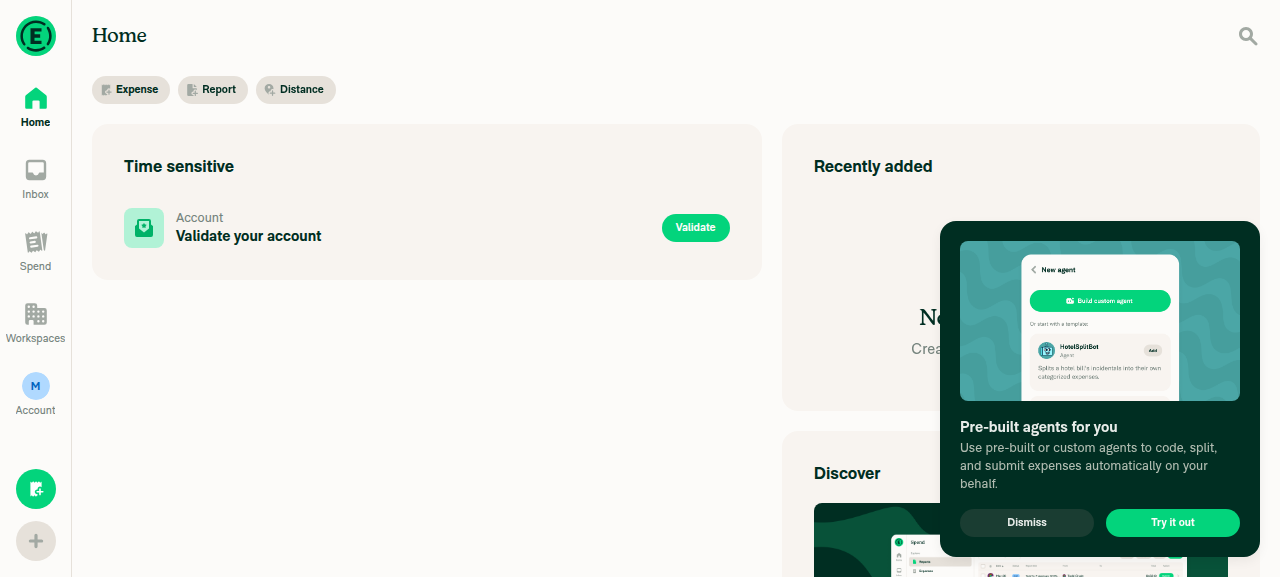
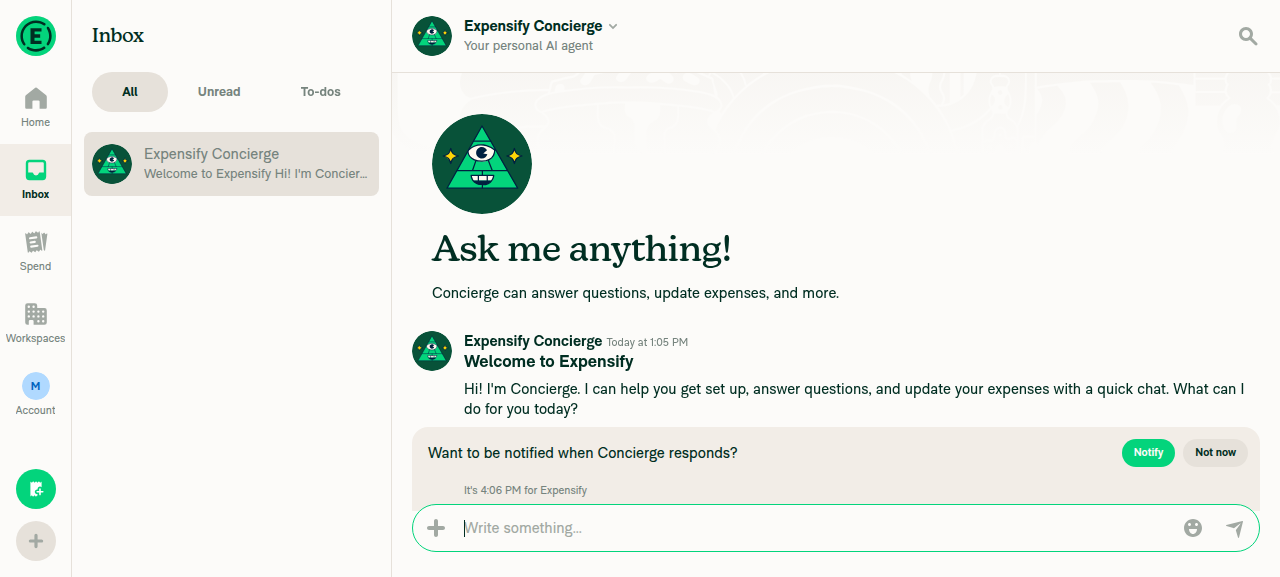
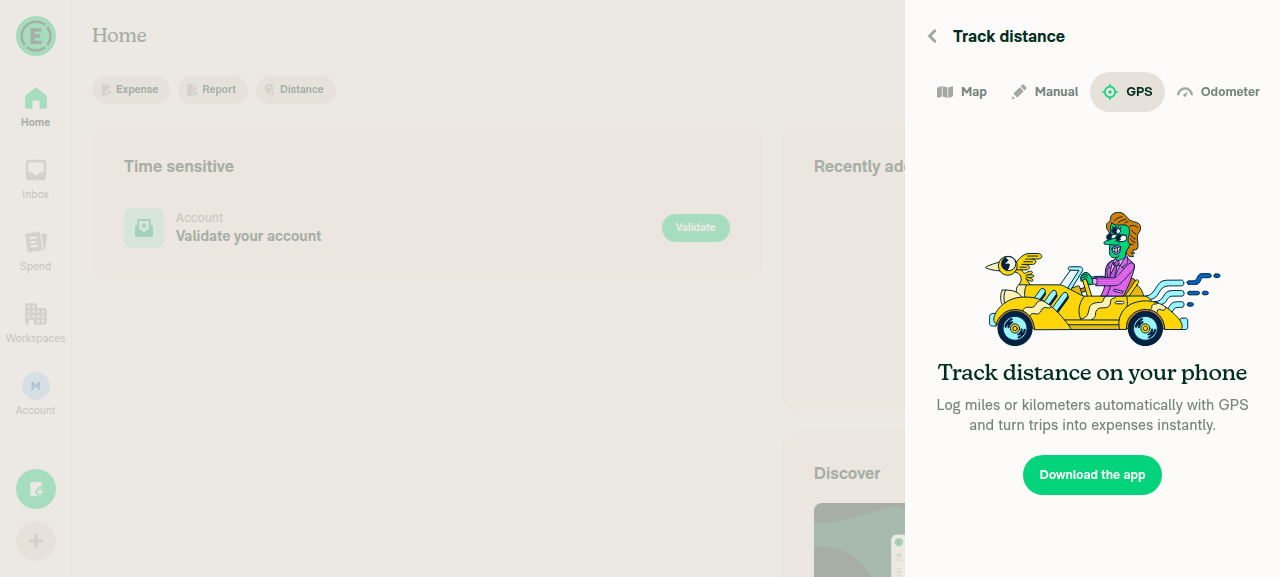
I drove desktop web on this branch and confirmed no regression: Home, an open report, the FAB menu, Settings, and the ScrollView-wrapped Distance/GPS step all render the normal wide layout with no clipping/overlap and no visible errors (screenshots below).

Non-gated changes that also run in portrait/desktop (verified no-ops there)

These are applied outside the landscape gate, so they do execute in portrait/desktop — but each resolves to no visual change because env(safe-area-inset-left/right) and the corresponding insets are 0 when the notch isn't on the sides:

  • useModalStackScreenOptions.ts: adds paddingLeft/Right: env(safe-area-inset-*) on all small-screen (mWeb) — portrait included. env() = 0 in portrait → no change.
  • useRootNavigatorScreenOptions.ts: the narrow branch previously forced paddingLeft: 0 and now uses env(safe-area-inset-*) = 0 in portrait → equivalent. The onboarding modal also always gets the env padding (0 off-notch).
  • useSplitNavigatorScreenOptions.ts: narrow central card width becomes calc(100% - env(...) - env(...)). getNavigationModalCardStyle() already returns width: '100%', so in portrait this is calc(100% - 0 - 0) = 100% → equivalent.
  • SidePanelModal/index.tsx + useSafeAreaPaddings.ts: now also apply paddingLeft/paddingRight from safe-area insets. On desktop/portrait these insets are 0 → no change.

The one change that genuinely affects desktop web + all orientations: IOURequestStepDistanceGPS/index.tsx wraps the GPS screen in a ScrollView (contentContainerStyle={[styles.flexGrow1]} around the existing h100 centered View). This is the index.tsx (web/desktop) file, so it runs everywhere, not just landscape. It's low risk — content stays centered when it fits and just becomes scrollable when it doesn't — and I verified it renders correctly on desktop web. Worth a quick manual glance on desktop and mWeb portrait to confirm the centering is unchanged (the added flexGrow1 container + h100 inner view should preserve it).

Screenshots (desktop web, this branch)

Home screen, wide desktop layout

Home screen, wide desktop layout

Inbox with report open, three-pane layout

Inbox with report open, three-pane layout

Track distance GPS step (ScrollView-wrapped), centered and unclipped

Track distance GPS step, ScrollView-wrapped content centered and unclipped

Bottom line: The narrow-layout switch is safely scoped to landscape phone web. The remaining portrait/desktop-facing changes are the safe-area env() additions (no-ops off-notch) and the GPS ScrollView wrap — the latter is the only one I'd sanity-check manually in mWeb portrait, though it's low risk.


view run

@GCyganek

Copy link
Copy Markdown
Contributor Author

@codex please review

@chatgpt-codex-connector chatgpt-codex-connector Bot left a comment

Copy link
Copy Markdown

Choose a reason for hiding this comment

The reason will be displayed to describe this comment to others. Learn more.

💡 Codex Review

Here are some automated review suggestions for this pull request.

Reviewed commit: 0ab7037dea

ℹ️ About Codex in GitHub

Codex has been enabled to automatically review pull requests in this repo. Reviews are triggered when you

  • Open a pull request for review
  • Mark a draft as ready
  • Comment "@codex review".

If Codex has suggestions, it will comment; otherwise it will react with 👍.

When you sign up for Codex through ChatGPT, Codex can also answer questions or update the PR, like "@codex address that feedback".

@truph01

truph01 commented Sep 1, 2026

Copy link
Copy Markdown
Contributor

@codex review

@chatgpt-codex-connector chatgpt-codex-connector Bot left a comment

Copy link
Copy Markdown

Choose a reason for hiding this comment

The reason will be displayed to describe this comment to others. Learn more.

💡 Codex Review

Here are some automated review suggestions for this pull request.

Reviewed commit: acf498d7b2

ℹ️ About Codex in GitHub

Codex has been enabled to automatically review pull requests in this repo. Reviews are triggered when you

  • Open a pull request for review
  • Mark a draft as ready
  • Comment "@codex review".

If Codex has suggestions, it will comment; otherwise it will react with 👍.

When you sign up for Codex through ChatGPT, Codex can also answer questions or update the PR, like "@codex address that feedback".

@truph01

truph01 commented Sep 1, 2026

Copy link
Copy Markdown
Contributor

Reviewer Checklist

  • I have verified the author checklist is complete (all boxes are checked off).
  • I verified the correct issue is linked in the ### Fixed Issues section above
  • I verified testing steps are clear and they cover the changes made in this PR
    • I verified the steps for local testing are in the Tests section
    • I verified the steps for Staging and/or Production testing are in the QA steps section
    • I verified the steps cover any possible failure scenarios (i.e. verify an input displays the correct error message if the entered data is not correct)
    • I turned off my network connection and tested it while offline to ensure it matches the expected behavior (i.e. verify the default avatar icon is displayed if app is offline)
  • I checked that screenshots or videos are included for tests on all platforms
  • I included screenshots or videos for tests on all platforms
  • I verified that the composer does not automatically focus or open the keyboard on mobile unless explicitly intended. This includes checking that returning the app from the background does not unexpectedly open the keyboard.
  • I verified tests pass on all platforms & I tested again on:
    • Android: HybridApp
    • Android: mWeb Chrome
    • iOS: HybridApp
    • iOS: mWeb Safari
    • MacOS: Chrome / Safari
  • If there are any errors in the console that are unrelated to this PR, I either fixed them (preferred) or linked to where I reported them in Slack
  • I verified proper code patterns were followed (see Reviewing the code)
    • I verified that any callback methods that were added or modified are named for what the method does and never what callback they handle (i.e. toggleReport and not onIconClick).
    • I verified that comments were added to code that is not self explanatory
    • I verified that any new or modified comments were clear, correct English, and explained """"why"""" the code was doing something instead of only explaining """"what"""" the code was doing.
    • I verified any copy / text that was added to the app is grammatically correct in English. It adheres to proper capitalization guidelines (note: only the first word of header/labels should be capitalized), and is either coming verbatim from figma or has been approved by marketing (in order to get marketing approval, ask the Bug Zero team member to add the Waiting for copy label to the issue)
  • If a new code pattern is added I verified it was agreed to be used by multiple Expensify engineers
  • I verified that this PR follows the guidelines as stated in the Review Guidelines
  • I verified other components that can be impacted by these changes have been tested, and I retested again (i.e. if the PR modifies a shared library or component like Avatar, I verified the components using Avatar have been tested & I retested again)
  • If a new component is created I verified that:
    • A similar component doesn't exist in the codebase
    • All props are defined accurately and each prop has a /** comment above it */
    • The file is named correctly
    • The component has a clear name that is non-ambiguous and the purpose of the component can be inferred from the name alone
    • The only data being stored in the state is data necessary for rendering and nothing else
    • For Class Components, any internal methods passed to components event handlers are bound to this properly so there are no scoping issues (i.e. for onClick={this.submit} the method this.submit should be bound to this in the constructor)
    • Any internal methods bound to this are necessary to be bound (i.e. avoid this.submit = this.submit.bind(this); if this.submit is never passed to a component event handler like onClick)
    • All JSX used for rendering exists in the render method
    • The component has the minimum amount of code necessary for its purpose, and it is broken down into smaller components in order to separate concerns and functions
  • If any new file was added I verified that:
    • The file has a description of what it does and/or why is needed at the top of the file if the code is not self explanatory
  • If a new CSS style is added I verified that:
    • A similar style doesn't already exist
    • The style can't be created with an existing StyleUtils function (i.e. StyleUtils.getBackgroundAndBorderStyle(theme.componentBG)
  • If the PR modifies code that runs when editing or sending messages, I tested and verified there is no unexpected behavior for all supported markdown - URLs, single line code, code blocks, quotes, headings, bold, strikethrough, and italic.
  • If the PR modifies a generic component, I tested and verified that those changes do not break usages of that component in the rest of the App (i.e. if a shared library or component like Avatar is modified, I verified that Avatar is working as expected in all cases)
  • If the PR modifies a component related to any of the existing Storybook stories, I tested and verified all stories for that component are still working as expected.
  • If the PR modifies a component or page that can be accessed by a direct deeplink, I verified that the code functions as expected when the deeplink is used - from a logged in and logged out account.
  • If the PR modifies the UI (e.g. new buttons, new UI components, changing the padding/spacing/sizing, moving components, etc) or modifies the form input styles:
    • I verified that all the inputs inside a form are aligned with each other.
    • I added Design label and/or tagged @Expensify/design so the design team can review the changes.
  • For any bug fix or new feature in this PR, I verified that sufficient unit tests are included to prevent regressions in this flow.
  • If the main branch was merged into this PR after a review, I tested again and verified the outcome was still expected according to the Test steps.
  • I have checked off every checkbox in the PR reviewer checklist, including those that don't apply to this PR.

Screenshots/Videos

Android: HybridApp
Android: mWeb Chrome
Screen.Recording.2026-09-01.at.16.56.48.mov
iOS: HybridApp
iOS: mWeb Safari
Screen.Recording.2026-09-01.at.16.49.42.mov
MacOS: Chrome / Safari
Screen.Recording.2026-09-01.at.16.57.30.mov

@GCyganek
GCyganek requested a review from a team as a code owner September 1, 2026 10:13
@GCyganek

GCyganek commented Sep 1, 2026

Copy link
Copy Markdown
Contributor Author

@truph01 replied to all your comments, tested on safari mweb and chrome mweb again to check if anything broke

@melvin-bot
melvin-bot Bot requested review from mjasikowski and mountiny September 2, 2026 11:35
@mjasikowski

Copy link
Copy Markdown
Contributor

@Expensify/design I have created an ad-hoc build for you, please grill this PR

@github-actions

github-actions Bot commented Sep 2, 2026

Copy link
Copy Markdown
Contributor

🚧 mjasikowski has triggered a test Expensify/App build. You can view the workflow run here.

@github-actions

This comment has been minimized.

@shawnborton

Copy link
Copy Markdown
Contributor

Feels pretty good to me, I don't really have any notes!

@shawnborton

Copy link
Copy Markdown
Contributor

I mean, this experience is generally rough on mWeb but technically it works. Lots we can do to make it better, like making the top headers scroll with content, etc. But we might want to do that everywhere, not just landscape.

@GCyganek

GCyganek commented Sep 3, 2026

Copy link
Copy Markdown
Contributor Author

I mean, this experience is generally rough on mWeb but technically it works. Lots we can do to make it better, like making the top headers scroll with content, etc. But we might want to do that everywhere, not just landscape.

Yeah this is just the first PR to force narrow layout in mweb landscape, I'll work on follow-ups with improvements for the landscape mode using the ideas you shared in the linked issue

@GCyganek

GCyganek commented Sep 3, 2026

Copy link
Copy Markdown
Contributor Author

btw @shawnborton

like making the top headers scroll with content, etc. But we might want to do that everywhere, not just landscape.

I was trying to do this where headers scroll with content, but only on the main screens (Spend, Workspace, Home) and in the landscape mode for mWeb, is it being worked on globally somewhere?

@shawnborton

Copy link
Copy Markdown
Contributor

I don't think anyone is working on it. It's mostly an idea that the @Expensify/design has talked about in passing, but something I think we're all a little interested in - for all mobile devices regardless of orientation.

@dubielzyk-expensify

Copy link
Copy Markdown
Contributor

Yeah this tests well on my end too 👍

@mjasikowski
mjasikowski merged commit 5eef30c into Expensify:main Sep 4, 2026
35 of 37 checks passed
@github-actions

github-actions Bot commented Sep 4, 2026

Copy link
Copy Markdown
Contributor

🚧 mjasikowski has triggered a test Expensify/App build. You can view the workflow run here.

@OSBotify

OSBotify commented Sep 4, 2026

Copy link
Copy Markdown
Contributor

✋ This PR was not deployed to staging yet because QA is ongoing. It will be automatically deployed to staging after the next production release.

@OSBotify

OSBotify commented Sep 7, 2026

Copy link
Copy Markdown
Contributor

🚀 Deployed to staging by https://github.com/mjasikowski in version: 9.4.73-0 🚀

platform result
🕸 web 🕸 success ✅
🤖 android 🤖 success ✅
🍎 iOS 🍎 failure ❌

@MelvinBot

MelvinBot commented Sep 7, 2026 •

Copy link
Copy Markdown
Contributor

🤖 No help site changes are required for this PR. I did not create a docs PR.

Why: every change here is internal layout plumbing, not user-facing product behavior:

  • isInLandscapeMode on web now detects mobile phone browsers and derives orientation (src/libs/isInLandscapeMode/index.ts)
  • useResponsiveLayout feeds that into shouldUseNarrowLayout / isSmallScreenWidth
  • Navigator card styles and useSafeAreaPaddings add left/right env(safe-area-inset-*) padding
  • useViewportOffsetTop gets a stable getSnapshot to stop a "Maximum update depth exceeded" crash

No feature name, tab name, settings label, button, workflow, or permission changes. The app simply renders its existing narrow layout when a phone browser is rotated, instead of a wide layout.

Docs I checked

I searched all of docs/articles for anything that describes layout, screen orientation, split/narrow views, or safe-area rendering. Nothing there documents those:

The help site documents features, settings, and workflows. It never describes how the app arranges columns at a given viewport size, so there is no article to update or add. Adding one would document implementation detail that Expensify's help site deliberately leaves out.

@GCyganek — since no docs changes are needed, there is no help site PR to review and no HelpDot label to apply. If you disagree and want an article created or amended anyway, reply with the article and the behavior you want documented, and I'll draft the PR.


view run · view recording

@OSBotify

OSBotify commented Sep 8, 2026

Copy link
Copy Markdown
Contributor

🚀 Deployed to production by https://github.com/mountiny in version: 9.4.73-3 🚀

platform result
🕸 web 🕸 success ✅
🤖 android 🤖 success ✅
🍎 iOS 🍎 success ✅

Bundle Size Analysis (Sentry):

Sign up for free to join this conversation on GitHub. Already have an account? Sign in to comment

Labels

None yet

Projects

None yet

Development

Successfully merging this pull request may close these issues.

8 participants