Skip to content

TabControl - TabItem Header text is not visible #2602

Description

@viktorspacil

Hi,
I tried to use TabControl in my project (using nuget, version 4.4.0-ci94) so I basically copied following example from the demo project:

<TabControl 
            materialDesign:ColorZoneAssist.Mode="PrimaryMid"
            Style="{StaticResource MaterialDesignFilledTabControl}">
    <TabItem Header="TAB 1">
        <TextBlock Margin="8"
                   Text="PrimaryMid Tab 1" />
    </TabItem>
    <TabItem Header="TAB 2">
        <TextBlock Margin="8"
                   Text="PrimaryMid Tab 2" />
    </TabItem>
</TabControl>

But the result is that header text (TAB 1, TAB 2) is not visible and also the bottom border of the TabItem is not visible when the tab is selected. There is some problem with the foreground (screenshot from my project):
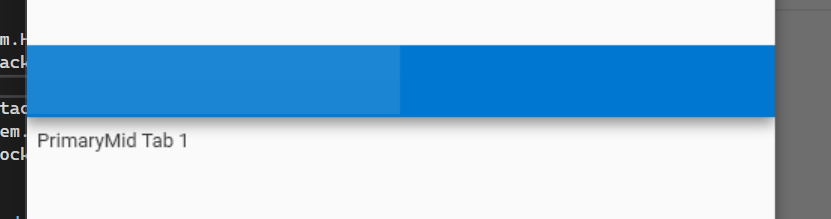
image

It should look like this (screenshot from demo project):
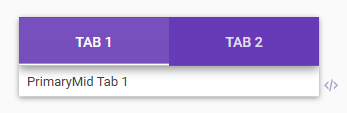
image

I am able to set the TabItem header text only like this:

<TabItem>
    <TabItem.Header>
        <StackPanel Orientation="Horizontal">
            <TextBlock Foreground="{DynamicResource PrimaryHueMidForegroundBrush}">Tab 1</TextBlock>
        </StackPanel>
    </TabItem.Header>
    <TextBlock Margin="8"
               Text="PrimaryMid Tab 1" />
</TabItem>

but this does not solve the problem with the missing (not visible) bottom border of the selected TabItem. Is it a bug or did I miss something? Thank you for any advice.

Activity

  1. shaggygi commented on Mar 19, 2022

    @shaggygi

    @viktorspacil This is a side question, but related to TabControl and styling. I've been trying to use and not able to style like shown in the MaterialDesignTheme examples or what you've done above.

    Seems like my app can't find the resource. Style="{StaticResource MaterialDesignFilledTabControl}"

    Is there something extra that needs to be added in App.xaml or elsewhere?

    Any help is appreciated.

  2. ahmed-abdelrazek commented on Mar 19, 2022

    @ahmed-abdelrazek
    Contributor

    @shaggygi you need to use the pre-release nuget or compile the latest yourself from github

  3. shaggygi commented on Mar 19, 2022

    @shaggygi

    @ahmed-abdelrazek yup, that did the trick. thank you. any idea when the nuget version will be final release?

  4. ahmed-abdelrazek commented on Mar 19, 2022

    @ahmed-abdelrazek
    Contributor

    no, i guess when it's ready
    we can ask @Keboo but i don't think we will get a better answer

  5. Keboo commented on Mar 19, 2022

    @Keboo
    Member

    Hopefully the next release will be soon, I need to fix some of the deployment stuff (didn't realize I had broken it).

  6. viktorspacil commented on Mar 22, 2022

    @viktorspacil
    Author

    The original problem still persists on released version 4.4.0 and even on 4.5.0-ci120. I have found out that when the application is running in the debug mode and I change the xaml on the fly (for example encapsulate TabControl to Grid) then the TabItem header text and bottom border pop out. When I stop and start the application again then problem is back.
    I have also found out that the style "MaterialDesignTabItem" (version 4.4.0) looks like this:

    <Style x:Key="MaterialDesignTabItem" TargetType="{x:Type TabItem}">
            <Setter Property="FocusVisualStyle" Value="{StaticResource FocusVisual}" />
            <Setter Property="Foreground" Value="{Binding RelativeSource={RelativeSource AncestorType={x:Type FrameworkElement}}, Path=(TextElement.Foreground)}" />
            <Setter Property="Padding" Value="16,12" />
            <Setter Property="Height" Value="48" />
            <Setter Property="MinWidth" Value="90" />
            <Setter Property="MaxWidth" Value="360" />
            <Setter Property="Feedback" Value="{DynamicResource MaterialDesignFlatButtonRipple}" />
            <Setter Property="Mode" Value="{Binding RelativeSource={RelativeSource AncestorType={x:Type FrameworkElement}}, Path=(wpf:ColorZoneAssist.Mode)}" />
            <Setter Property="Background" Value="{Binding RelativeSource={RelativeSource AncestorType={x:Type FrameworkElement}}, Path=(wpf:ColorZoneAssist.Background)}" />
            <Setter Property="Foreground" Value="{Binding RelativeSource={RelativeSource AncestorType={x:Type FrameworkElement}}, Path=(wpf:ColorZoneAssist.Foreground)}" />
            <Setter Property="Template">
    

    But when I am debugging the demo application the style "MaterialDesignTabItem" looks like this:

    <Style x:Key="MaterialDesignTabItem" TargetType="{x:Type TabItem}">
            <Setter Property="FocusVisualStyle" Value="{StaticResource FocusVisual}" />
            <Setter Property="Foreground" Value="{Binding RelativeSource={RelativeSource AncestorType={x:Type FrameworkElement}}, Path=(TextElement.Foreground)}" />
            <Setter Property="Padding" Value="16,12" />
            <Setter Property="Height" Value="48" />
            <Setter Property="MinWidth" Value="90" />
            <Setter Property="MaxWidth" Value="360" />
            <Setter Property="wpf:RippleAssist.Feedback" Value="{DynamicResource MaterialDesignFlatButtonRipple}" />
            <Setter Property="wpf:ColorZoneAssist.Mode" Value="{Binding RelativeSource={RelativeSource AncestorType={x:Type FrameworkElement}}, Path=(wpf:ColorZoneAssist.Mode)}" />
            <Setter Property="wpf:ColorZoneAssist.Background" Value="{Binding RelativeSource={RelativeSource AncestorType={x:Type FrameworkElement}}, Path=(wpf:ColorZoneAssist.Background)}" />
            <Setter Property="wpf:ColorZoneAssist.Foreground" Value="{Binding RelativeSource={RelativeSource AncestorType={x:Type FrameworkElement}}, Path=(wpf:ColorZoneAssist.Foreground)}" />
            <Setter Property="Template">
    

    There is a difference in the setting of background/foreground instead of wpf:ColorZoneAssist.Background/wpf:ColorZoneAssist.Foreground".

  7. ElieTaillard commented on Mar 24, 2022

    @ElieTaillard
    Collaborator

    The original problem still persists on released version 4.4.0 and even on 4.5.0-ci120. I have found out that when the application is running in the debug mode and I change the xaml on the fly (for example encapsulate TabControl to Grid) then the TabItem header text and bottom border pop out. When I stop and start the application again then problem is back. I have also found out that the style "MaterialDesignTabItem" (version 4.4.0) looks like this:

    <Style x:Key="MaterialDesignTabItem" TargetType="{x:Type TabItem}">
            <Setter Property="FocusVisualStyle" Value="{StaticResource FocusVisual}" />
            <Setter Property="Foreground" Value="{Binding RelativeSource={RelativeSource AncestorType={x:Type FrameworkElement}}, Path=(TextElement.Foreground)}" />
            <Setter Property="Padding" Value="16,12" />
            <Setter Property="Height" Value="48" />
            <Setter Property="MinWidth" Value="90" />
            <Setter Property="MaxWidth" Value="360" />
            <Setter Property="Feedback" Value="{DynamicResource MaterialDesignFlatButtonRipple}" />
            <Setter Property="Mode" Value="{Binding RelativeSource={RelativeSource AncestorType={x:Type FrameworkElement}}, Path=(wpf:ColorZoneAssist.Mode)}" />
            <Setter Property="Background" Value="{Binding RelativeSource={RelativeSource AncestorType={x:Type FrameworkElement}}, Path=(wpf:ColorZoneAssist.Background)}" />
            <Setter Property="Foreground" Value="{Binding RelativeSource={RelativeSource AncestorType={x:Type FrameworkElement}}, Path=(wpf:ColorZoneAssist.Foreground)}" />
            <Setter Property="Template">
    

    But when I am debugging the demo application the style "MaterialDesignTabItem" looks like this:

    <Style x:Key="MaterialDesignTabItem" TargetType="{x:Type TabItem}">
            <Setter Property="FocusVisualStyle" Value="{StaticResource FocusVisual}" />
            <Setter Property="Foreground" Value="{Binding RelativeSource={RelativeSource AncestorType={x:Type FrameworkElement}}, Path=(TextElement.Foreground)}" />
            <Setter Property="Padding" Value="16,12" />
            <Setter Property="Height" Value="48" />
            <Setter Property="MinWidth" Value="90" />
            <Setter Property="MaxWidth" Value="360" />
            <Setter Property="wpf:RippleAssist.Feedback" Value="{DynamicResource MaterialDesignFlatButtonRipple}" />
            <Setter Property="wpf:ColorZoneAssist.Mode" Value="{Binding RelativeSource={RelativeSource AncestorType={x:Type FrameworkElement}}, Path=(wpf:ColorZoneAssist.Mode)}" />
            <Setter Property="wpf:ColorZoneAssist.Background" Value="{Binding RelativeSource={RelativeSource AncestorType={x:Type FrameworkElement}}, Path=(wpf:ColorZoneAssist.Background)}" />
            <Setter Property="wpf:ColorZoneAssist.Foreground" Value="{Binding RelativeSource={RelativeSource AncestorType={x:Type FrameworkElement}}, Path=(wpf:ColorZoneAssist.Foreground)}" />
            <Setter Property="Template">
    

    There is a difference in the setting of background/foreground instead of wpf:ColorZoneAssist.Background/wpf:ColorZoneAssist.Foreground".

    Also wpf:ColorZoneAssist.Mode and wpf:RippleAssist.Feedback

  8. Keboo commented on Mar 25, 2022

    @Keboo
    Member

    FWIW, the issue appears to be the foreground color not making to the content. I started work on a branch to fix it (mostly just a test for the moment). https://github.com/Keboo/MaterialDesignInXamlToolkit/tree/fix2602

  9. viktorspacil commented on Apr 4, 2022

    @viktorspacil
    Author

    Hi,
    I took todays master and tried the fix. Text foreground problem (TabItem Header) is gone but the bottom border (current tab highlight) still persists, bottom border is still missing.

  10. reopened this on Apr 4, 2022
  11. GoranVDB commented on Apr 7, 2022

    @GoranVDB

    Hi,

    I encountered the same problem as viktorspacil when using the default style (not filled) where the header text and the highlight of the selected item wasn't being shown. After updating to the latest pre-release the header text is now being shown but the background of the tabitems has changed to the PrimaryMid color and the highlight is indeed still missing.

  12. NeilMacMullen commented on Apr 7, 2022

    @NeilMacMullen

    I've also noticed that the ContextMenu background appears to be missing.

  13. ElieTaillard commented on Apr 7, 2022

    @ElieTaillard
    Collaborator

    @NeilMacMullen this is fixed in the latest 4.5.0 preview NuGet package #2606

  14. NeilMacMullen commented on Apr 7, 2022

    @NeilMacMullen

    Super - thanks @Xaalek

  15. self-assigned this
    on Apr 15, 2022
  16. added this to the 4.5.0 milestone on Apr 15, 2022
Sign up for free to join this conversation on GitHub. Already have an account? Sign in to comment

Metadata

Metadata

Assignees

Labels

No labels
No labels

Type

No type

Projects

No projects

    Milestone

    Relationships

    None yet

    Development

    No branches or pull requests

    Issue actions