Repository navigation
Bug Background color of Menu Items in the Demo App #2649
Description

The background of the nested menu of the toolbar has become white in the demo. The background should be the same color as the parent container or it should be transparent.

I also checked with the dark theme and as you can see, there is something wrong
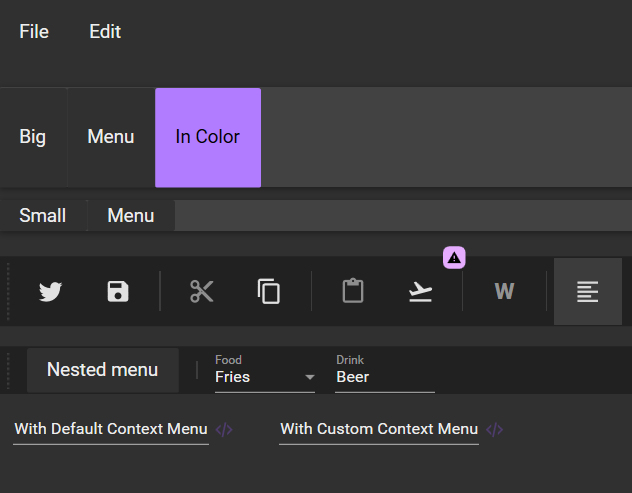
I think this bug appeard with this PR : #2644
Activity
ElieTaillard commentedon Apr 20, 2022
I made a temporary fix here : https://github.com/Xaalek/MaterialDesignInXamlToolkit/tree/Fix-MenuItem-Background
For the background color of the pop up I don't know what is better.
Either we keep the Paper color, or we match the background color with the header color.
In case we decide to match the color, we can't just do this 1317db4#diff-fd12eb1f1fae6617ce2e8d03c219b772139250243fea685188868b656fd8069aR254
Because in some cases the header color will be transparent. We will have to use a converter or a data trigger to avoid a transparent pop up.
So what do you think is the best choice? Keep the Paper background color or match the background color with the menu header? @krmr @Keboo
krmr commentedon Apr 20, 2022
@Xaalek first of all thanks for catching this and actually I am currently looking into this as well. I have also come across the two options you mention but found downsides with either one.
In general I would rather lean towards using the header color but I fully agree with the complexity caused if the header is transparent.
ElieTaillard commentedon Apr 20, 2022
I think the problem can be solved by using a Converter
Background="{TemplateBinding Background, Converter={StaticResource ExampleConverter}}"And in the converter, if the value is Transparent we return the paper color else we return the value that we receive as a parameter
Maybe something like this could do the job
krmr commentedon Apr 20, 2022
Another approach could be along these lines: https://github.com/krmr/MaterialDesignInXamlToolkit/tree/fixMenuBackground
But this currently has issues with the corners of the colored popup menu not being rounded.
ElieTaillard commentedon Apr 20, 2022
Yeah I thought of something like that too. Have two borders with one underneath that has PaperColor as the background color and another on top that has the header color. But I find that it complicates the structure of the xaml code. I think using a converter is not a bad idea. The converter plays the role of a default value in a way.
At least if a new person arrives on the project, he will understand more easily the behavior by seeing the if
krmr commentedon Apr 20, 2022
Regarding the XAML structure I am actually not sure myself that I understand the role of the Canvas and Rectangle elements within SubMenuScrollViewer…
ElieTaillard commentedon Apr 21, 2022
@krmr Do you want to do the modification or do you want me to do it?
krmr commentedon Apr 21, 2022
@Xaalek I can take care of it. After all I was my change that caused the issue. 😉
krmr commentedon Apr 21, 2022
@Xaalek I am afraid but the converter seem to be more involved than expected. A implementation similar to what you describen above has the problem is that the color is not updated when switching between themes. This probably is because the bound property does not change. I have not yet found a workaround for this.
krmr commentedon Apr 21, 2022
@Xaalek as I could not get the converter to work I went back to my earlier approach and fixed the rounded edges there. This seems to do the job but I ended up adding another border so the xaml got even more complex. The updated code is in https://github.com/krmr/MaterialDesignInXamlToolkit/tree/fixMenuBackground
But feel free to look into the converter route, I would not be surprised if there was some way to get that working.
ElieTaillard commentedon Apr 21, 2022
@krmr Well done. I just tested it and it works perfectly. I think you can submit a pull request if you think it's all good. Thank you for your contribution !
ElieTaillard commentedon Apr 22, 2022
@krmr I just got the latest version but I don't see any changes. Can anyone confirm if the PR has changed anything?
krmr commentedon Apr 22, 2022
@Xaalek sorry, but I am a bit confused now. The pull request #2654 is still pending. So if you are referring to this repo there should not be any changes yet. Or do I get your comment wrong?
ElieTaillard commentedon Apr 22, 2022
Oh yes my bad I was thinking the PR was accepted cause @Keboo reacted with a thumbs up x)