Repository navigation
Caret Index is hidden when FlowDirection is RightToLeft On Material Design in C# WPF #2949
Description

Bug explanation
I'm using 4.6.1 version of MaterialDesing in .Netfreamwork
the CaretIndex On the TextBox doesn't show until I click on the text box again, and the interesting thing is that if the text box is empty, the Caret Index is slightly out of the frame and a little unclear.
Full description with code and photo : https://stackoverflow.com/questions/74441792/caret-index-is-hidden-when-flowdirection-is-righttoleft-on-material-design-in-c
This problem does not exist in this 3.2.0 version
Version
4.6.1
Activity
mojtabahakimian commentedon Nov 15, 2022
Same Problem :
1- https://stackoverflow.com/questions/73835378/insertion-point-hides-at-the-start-of-line-while-using-right-to-left-flow-direct
2- https://learn.microsoft.com/en-us/answers/questions/23428/wpf-cursor-not-visible-in-text-box-first-position.html
nicolaihenriksen commentedon Nov 18, 2022
@mojtabahakimian None of the provided links are working 😢
I am curious whether the problem you see is the same as #2865 which unfortunately I have not been able to reproduce. If you can provide a small sample that illustrates the issue that would be great.
Keboo commentedon Nov 19, 2022
I fixed the links above to point to the correct urls
mojtabahakimian commentedon Nov 19, 2022
Thanks for fixing ... , those links are ok now and here is my full code that created on Visua Studio 2019 with .NetFreamwork 4.7.2
you can see problem in this source
Link:
https://mega.nz/file/Y4wDXA7Q#t-UJFd-Dik8CJqNjDVQcWXhb4SoF5tZEHDLYenfmeLo
mojtabahakimian commentedon Nov 19, 2022
Interestingly, this previous version 3.2.0 does not have this caret problem for right to left
but after that version until current version This problem still exists
nicolaihenriksen commentedon Nov 19, 2022
@mojtabahakimian @Keboo Thanks for the updates 👍
Funny observation. I am typically on 4K monitors using 150% scaling. In that setup I am unable to reproduce the issue using your sample solution:
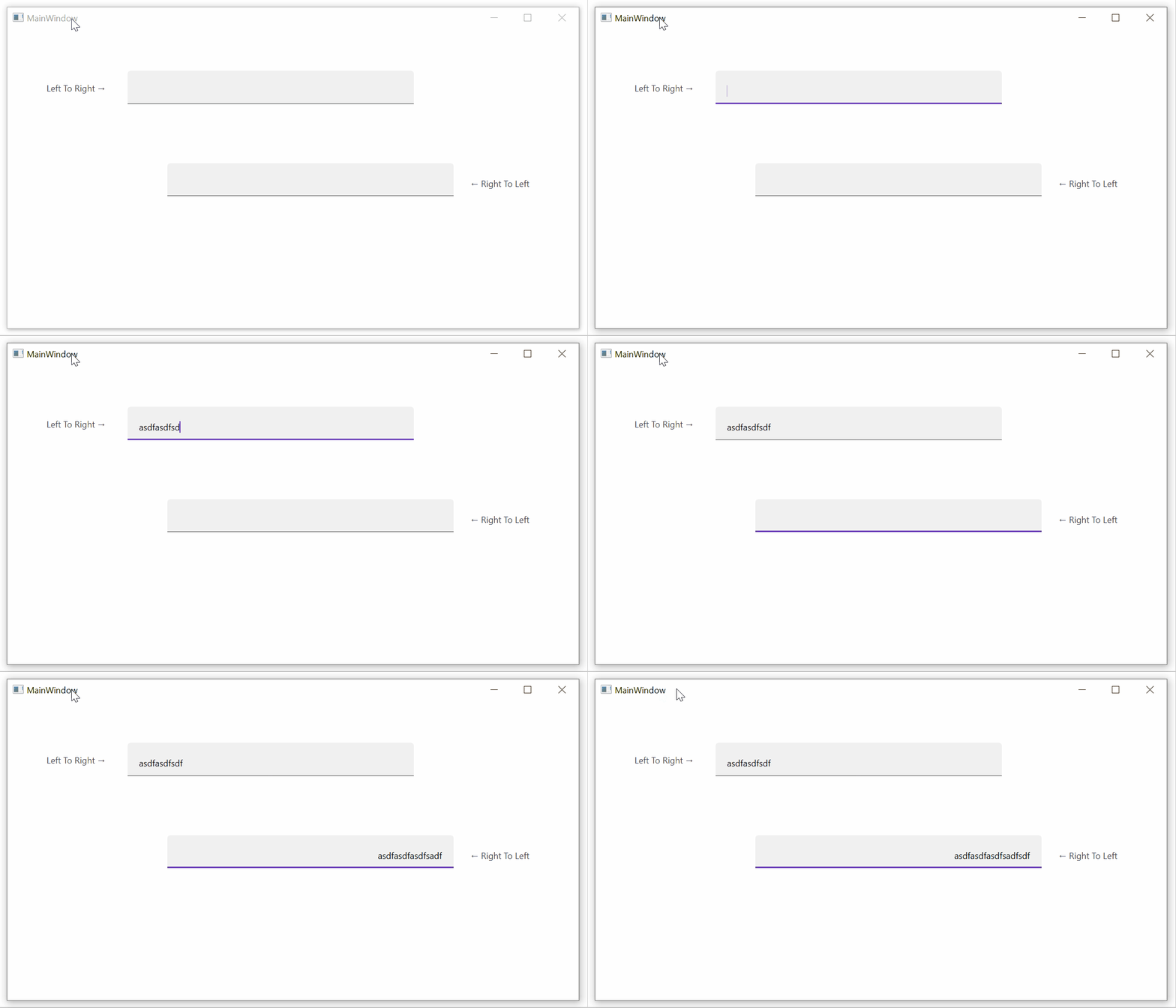
However, when I set the scaling to 100% (i.e. turn off scaling), then I can reproduce it:

-- Note that the IBeam is not visible in the RTL
TextBoxin this recording.I noted a similar visual artifact when adding the "reveal styles" for
PasswordBox; see the last part of the description in this PR: #2828I will dig further into it when I have some time.
nicolaihenriksen commentedon Nov 19, 2022
@Keboo @mojtabahakimian Forget my previous comment if you read it (I have deleted it). I had a little time this evening, so I tracked down the root cause I believe.
The base style for a MDIX
TextBoxhas the following setter inside a trigger forTextFieldAssist.HasFilledTextField=True(and outlined style as well):The property being set here (
TextFieldAssist.TextBoxViewMargin), is only explicitly used to set a margin on the hint text (if present). However, setting the property, invokes a callback which also sets the providedThicknesson thePart_ContentHostof the template. This is done inTextFieldAssist.ApplyTextBoxViewMargin(Control, Thickness).A proposed fix for the issue is to not set the attached property on the
TextBox, but rather target the "hint" element directly:This is of course a slight change in the
Marginof thePART_ContentHost, but also what I believe to be the root cause of the issue. @Keboo I will create a PR with the change, then you can evaluate it.mojtabahakimian commentedon Dec 6, 2022
May I ask you to give me a full example code that fixing the caret problem ?
nicolaihenriksen commentedon Dec 6, 2022
You should be able to pull the latest nightly build from nuget.org and verify that it fixes the issue. It would actually be good to know if you also consider the issue fixed with the changes in PR #2958.
I was able to reproduce the issue, and those changes solved the issue in my reproduction sample. Let me know if your issue is also solved with the changes.
mojtabahakimian commentedon Dec 8, 2022
hi please check it out this :

mojtabahakimian commentedon Dec 8, 2022
still caret issue for the MaterialDesignOutlinedTextBox
nicolaihenriksen commentedon Dec 8, 2022
@mojtabahakimian Are you sure you've updated to one of the latest pre-releases (nightly releases)? I just tested with the latest nightly build (4.7.0-ci385) and the sample project you added to this issue. With that, I am unable to reproduce the issue for any of the MDIX
TextBoxstyles (MaterialDesignOutlinedTextBox, MaterialDesignFilledTextBox, MaterialDesignFloatingHintTextBox). I tested both 100% scaling and 150% scaling.