You signed in with another tab or window. Reload to refresh your session.You signed out in another tab or window. Reload to refresh your session.You switched accounts on another tab or window. Reload to refresh your session.Dismiss alert
{{ message }}
Repository navigation
[IMPROVEMENT] Tap on avatar/username/channel to show info #729
@TheMythPT Totally! A normal press could open RoomInfoView and a long press could open an action sheet with "New Message" and "Info". Maybe "Video call" and "Audio call" (in the future).
Current user room info only has an avatar and timezone, we wanna add "Message"
Currently, if we long press avatar in the channel message, it will detect as long press message. Instead, when we long press users in channel message, it should pop up an actions including "New Message" and "Info"?
@diegolmello when will the user click channel avatar? Channel won't appear in chat message, will it? Or in room list, when you click channel avatar, it will go to room info
changed the title [-][Feature] Long press a username avatar could open a option to DM[/-][+][IMPROVEMENT] Tap on avatar/username/channel to show info[/+]on Jun 13, 2019


Activity
diegolmello commentedon Mar 15, 2019
@TheMythPT Totally! A normal press could open RoomInfoView and a long press could open an action sheet with "New Message" and "Info". Maybe "Video call" and "Audio call" (in the future).
weijia-yu commentedon Jun 12, 2019
I can take this one
weijia-yu commentedon Jun 13, 2019
@diegolmello Right now, when we long press the message, it will pop up message actions, should we just add an option "Direct Message"?
diegolmello commentedon Jun 13, 2019
@weijia-yu We don't want to create DMs every time.
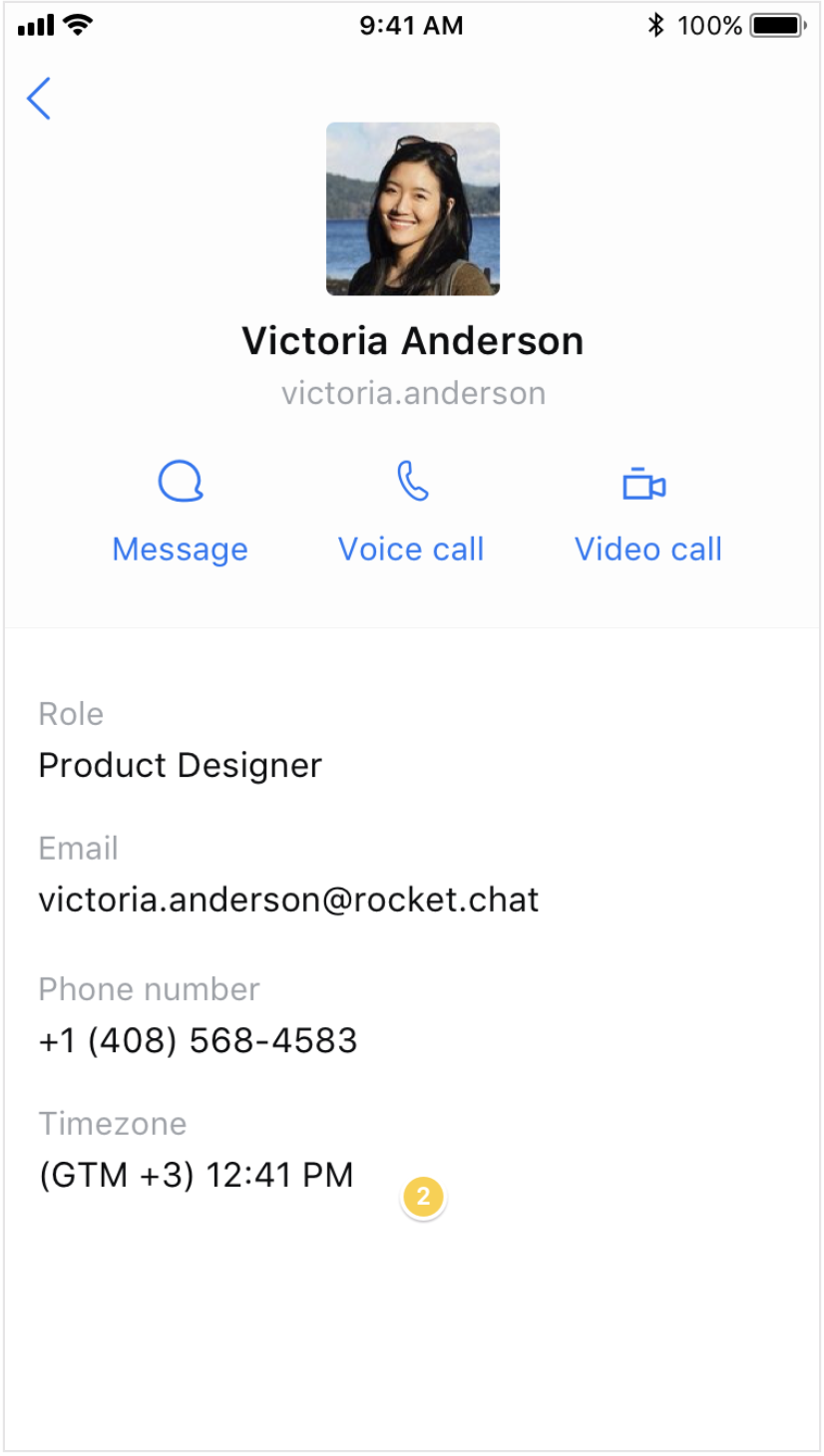
We should navigate to RoomInfoView and have an option there to Message.
Like this:
Feel free to open two PRs instead of one:
weijia-yu commentedon Jun 13, 2019
@diegolmello
so
Current user room info only has an avatar and timezone, we wanna add "Message"
Currently, if we long press avatar in the channel message, it will detect as long press message. Instead, when we long press users in channel message, it should pop up an actions including "New Message" and "Info"?
diegolmello commentedon Jun 13, 2019
@weijia-yu
@username/#channel) must navigate to RoomInfoView directly. No need for another actions sheet.weijia-yu commentedon Jun 13, 2019
@diegolmello when will the user click channel avatar? Channel won't appear in chat message, will it? Or in room list, when you click channel avatar, it will go to room info
diegolmello commentedon Jun 13, 2019
@weijia-yu
Never on the avatar, but the channel name can appear on the message, like
#generalYes, and the user may tap on it.
What do you mean by
room list? RoomsListView won't be changed.Rules:
@username/#channel) and it should navigate to RoomInfoView[-][Feature] Long press a username avatar could open a option to DM[/-][+][IMPROVEMENT] Tap on avatar/username/channel to show info[/+]pranavpandey1998official commentedon Aug 2, 2019
#1097