The main purpose of the project is to use Machine Learning Clustering algorithms to cluster the customers of an e-commerce site to get insights to how improve the marketing politics.

Different datasets have been tested:
- Online Retail II dataset: ~5.000 users
- Instacart dataset: ~200.000 users
- Multi Category Shop dataset: ~2.000.000 users
The datasets have been preprocessed to obtain features useful for the customer segmentation task, the features are based on the RFM model, that is a typical way to approach this kind of tasks where three feature are computed: Recency, Frequecy and Monetary Value.
Three different Machine Learning models are available in the project:
- K-Means: One of the most well-known and widely used clustering algorithms, simple and very fast
- K-Means||: A scalable version of K-Means with a different initialization stategy, that is not random
- DBSCAN: one of the most common clustering algorithms and also most cited in scientific literature, Density based clustering is a technique that separate regions with high density by regions of low density.
See the report to details about the implementation of the algorithms.
- sbt v1.4
- spark v3.0.1
- scala v2.12.8
| Folder | Description |
|---|---|
notebook |
contains Jupyter Notebook with data exploration and visualization for the three datasets |
src/main/scala |
contain the files of the project |
src/main/scala/clustering |
contains the classes that implement the clustering algorithms |
src/main/scala/DataPreprocessing |
contain the files used in the Data Preprocessing phase and obtain RFM based features starting from the original datasets |
src/main/scala/ScalaSparkDBSCAN |
library with the implementation of the distributed dbscan algorithm from: https://github.com/alitouka/spark_dbscan |
src/main/scala/Utils |
contains classes with utility functions for read/write files, plot graphs, etc... |
report |
contains the report and a presentation of the project |
this files are inside the clustering folder
| File | Description |
|---|---|
KMeans.scala |
implementation of k-means algorithm in scala+spark with different strategies to compare the coputational costs |
Kmeans||.scala |
implementation of the scalable k-means++ algorithm using the spark library MLlib. By changing some parameters it is also possible to run the standard K-Means |
DBSCAN_Distributed |
execution of the distributed dbscan algorithm based on the ScalaSparkDBSCAN library |
Other files
| File | Description |
|---|---|
Plot.scala |
contains function to realize some plots using the evilplot scala library |
Const.scala |
contains constant paths to file used in the project |
common.scala |
contains utility functions |
preprocessing.scala |
contains methods to obtain the final datasets used for segmentation (by computing Recency, Frequency and Monetary Value) starting from original one |
postprocessing.scala |
contains functions used to compute statistics of the clusters created by the models, such as mean, percentile, min, max |
In the notebook folder there are Jupyter Notebooks that can be used to visualize the data of the different datasets and visualize the results after the computation of the clusters. In the fist case for the data visualization each notebook is specific to a particular dataset, in the second case it's a general notebook that can be used also with other dataset files.
To run this application the main steps are:
- Create a bucket on S3
- Select the newly created bucket from the S3 console and upload dataset files inside it
- Create cluster on EMR choosing software configuration compatible with those of the app
- choose the
laurnch mode"cluster", with it the cluster will not terminate when the computation is finished, insted by choosing "step execution" at the end of a specific job the cluster will terminate automatically - choose "Spark" as
application - in the
instance typeoption, that determines the EC2 type, choose that is better to you - the
Number of instancesoption determines the number of EC2 instances to initialize, i.e. the number of nodes of the cluster - EC2 key-pair is needed to connect to the nodes in the cluster through SSH (create the Key-Pair in the same region of the cluster)
- wait 10 to 15 minutes for the creation of the cluster
- choose the
- Update the security settings to be able to access the cluster using SSH from your local machine:
- click the link in
Security groups for the masterin the cluster already created - inside the security group select the master (not the slave one)
- click
Inbound typeand thenEdit - click
Add rule - select
SSHin the first column andAnywherein the source column (with this we are able to access to the master machine via SSH from everywhere if we have a private key)
- click the link in
- Create a .jar file of the application, through sbt, usign the command
sbt assembly(important the paths to the datasets files in the application must be equal to those of S3 file loaded); the .jar file will be created in thetarget\<scala-version>folder - Upload the .jar file into S3
- Login into the master machine through SSH connection (key pairs are needed for this and can be easily created in Aws)
- Download the .jar file from S3 into the master node with the command:
aws s3 cp <path/to/the/file.jar> . - By running the command
spark-submityou can run the application:
spark-submit --class Main --master yarn
    <path/to/application/file.jar>
    [application-arguments]
    {1>output.log 2>error.log}
Inside {} there are the optional parameter to save the output produced by the application to log files, you can set a path to s3 to get persistent logs. EMR does not save automatically these data.
To open the log files in the terminal you can use the linux command cat output.log.
The application arguments accepted are:
--alg-name: Name of the algorithm to run, allowed "kmeans-naive", "kmeans", "scalable-kmeans", "dbscan"--dataset: Name of the dataset to analyse, allowed "onlineretail", "instacart", "multicatshop"--numK: Number of clusters to define, this is needed only in case of kmeans algorithm--epsilon: This represents the stopping threshold in case of kmeans or the local radius for expanding clusters in dbscan--minpts: Minimum number of points to form a cluster, this is needed only for dbscan algorithm--make-plot: If make or not a pairplot with the results of clustering, this is not recommended for very large datasets as it is extremely expensive. Accepted values "true" and "false". (Note: this does not work when you run the application on a cluster, it works only in local mode)--file: file path to test the model on a specific file if you do not want to use one of the default dataset, this file must be in csv format
An example of execution command:
spark-submit --class Main --master yarn
    s3://customer-segmentation-bucket/MapReduce_Customer_Segmentation-assembly-0.1.jar
    --alg-name scalable-kmenas
    --dataset onlineretail
    --numK 4
    --epsilon 0.0001
    1>output.log 2>error.log
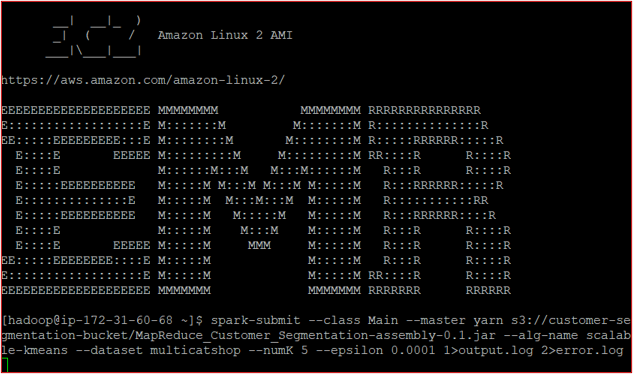
For more detail on how to run app on AWS, here is an useful article: Run a Spark job within Amazon EMR and the official spark documentation Submitting Applications.
You can run in local mode using spark-submit from comand line or you can also run specific class using intellij IDE, all the clustering classes have a main with defaut path to some file that can be changed.
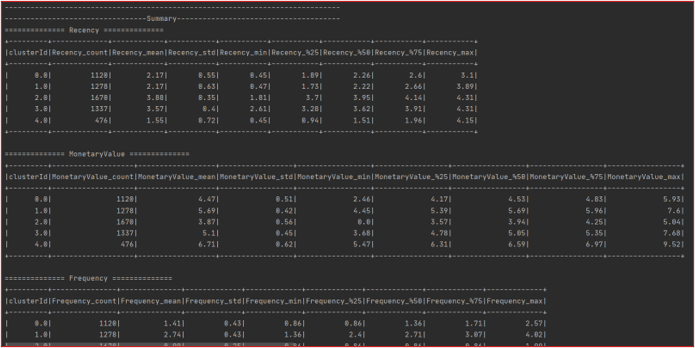
The execution of the application will produce a csv file with the clustering results, each rows will contain the coordinates of a point and the cluster id associated to that point (in the case of DBSCAN the cluster id 0 respresents the noise points). Moreover, if specified a pair plot will be produced where to each point is assigned a color on the base of the cluster id associated to that point. Also, on the console (or in the log file) statistical measures will be shown relating to the different clusters and the different features.
- Spark Documentation: https://spark.apache.org/docs/latest/
- Spark MLlinb:https://spark.apache.org/docs/latest/ml-guide.html
- Spark DBSCAN implementation: https://github.com/alitouka/spark_dbscan
- Evilplot: https://cibotech.github.io/evilplot/plot-catalog.html#bar-chart
- Spark logs on EMR: https://aws.amazon.com/it/premiumsupport/knowledge-center/spark-driver-logs-emr-cluster/
[Daniele Filippini]