You signed in with another tab or window. Reload to refresh your session.You signed out in another tab or window. Reload to refresh your session.You switched accounts on another tab or window. Reload to refresh your session.Dismiss alert
{{ message }}
Repository navigation
Microsoft.ML.OnnxRuntime.OnnxRuntimeException: 1 : FAIL : Failed to find kernel for Neg #4795
Windows 10
Microsoft.ML v.15.0/preview
Microsoft.Ml.OnnxRuntime v1.1.1
.NET Framework 4.8
Issue
I amtrying to run prediction engine using a pretrained .onnx model in ML.net. The Onnx model is Unet architecture and I used latest master build of ONNX and ONNXRUNTIME for creating .onnx file.
On calling "mlContext.Transforms.ApplyOnnxModel" i get RuntimeException (refer to figure attached)
usingSystem;usingSystem.IO;usingSystem.Collections.Generic;usingSystem.Linq;usingMicrosoft.ML;usingMicrosoft.ML.Data;namespaceOnnxMlUnet{classProgram{privateconststringimagesFolder="H:/c#code/OnnxMlUnet/OnnxMlUnet/assets/images";privatestaticreadonlystringmodelpath="H:/c#code/OnnxMlUnet/OnnxMlUnet/assets/model/Unet.onnx";privateconststringoutputimage="H:/c#code/OnnxMlUnet/OnnxMlUnet/assets/images/mlout.jpg";staticvoidMain(string[]args){MLContextmlContext=newMLContext();IEnumerable<ImageData>images=ImageData.LoadImagesFromDirectory(imagesFolder);vardata=mlContext.Data.LoadFromEnumerable(images);varpipeline=mlContext.Transforms.LoadImages(outputColumnName:"image",imageFolder:"",inputColumnName:nameof(ImageData.ImagePath)).Append(mlContext.Transforms.ExtractPixels(outputColumnName:"image")).Append(mlContext.Transforms.ApplyOnnxModel(modelFile:modelpath));varmodel=pipeline.Fit(data);PredictionEngine<ModelInput,ModelOutput>predictionEngine=mlContext.Model.CreatePredictionEngine<ModelInput,ModelOutput>(model);ModelInputimage=mlContext.Data.CreateEnumerable<ModelInput>(data,reuseRowObject:true).First();ModelOutputprediction=predictionEngine.Predict(image);File.WriteAllBytes(outputimage,prediction.Image);//MemoryStream ms = new MemoryStream(prediction);//Image i = Image.FromStream(ms);}}classImageData{publicstringImagePath{get;set;}publicbyte[]image{get;set;}publicstringoutputimage{get;set;}privatestaticbyte[]readbytefromImage(stringfile){Imageimg=Image.FromFile(file);byte[]arr;using(MemoryStreamms=newMemoryStream()){img.Save(ms,System.Drawing.Imaging.ImageFormat.Jpeg);arr=ms.ToArray();}returnarr;}publicstaticIEnumerable<ImageData>LoadImagesFromDirectory(stringfolder){List<ImageData>retCollection=newList<ImageData>();varfiles=Directory.GetFiles(folder,"*",searchOption:SearchOption.AllDirectories);foreach(varfileinfiles){if((Path.GetExtension(file)!=".jpg")&&(Path.GetExtension(file)!=".png"))continue;retCollection.Add(newImageData(){//read the image here as byte array//ImagePath = file,image=readbytefromImage(file)});}returnretCollection;}}classModelInput{publicbyte[]Image{get;set;}publicstringImagePath{get;set;}}classModelOutput{publicbyte[]Image{get;set;}publicstringOutImagePath{get;set;}}}
You mention that you used Microsoft.Ml.OnnxRuntime v1.1.1 (which is the latest official released build from master in there), and the problem is that version was created on January 23, whereas the changes that fixed this issue for you on microsoft/onnxruntime#2945 was merged into master on January 30. So I wouldn't expect v1.1.1 to include that fix, and so perhaps you might need to build the nuget from there.
Yes i did build the master of onnxruntime and linked the C# dll to my project. Then now i get another run time exception at OnnxTransformer. I use opsetversion 11 when exporting.
I have tried to load the test model squeezenet.onnx provided by you and Inference Session works for them perfectly with latest ONNXRuntime build.
Since your last update ML.NET v 1.5.0-preview2 was released, and it had several changes on OnnxTransformer and also has an updated dependency on OnnxRuntime 1.2.0.
I've now tried your sample with your model and I didn't get your exception. So my guess is that that problem is now gone. The Onnx model seems to be correctly loaded by the OnnxTransformer, so that's not a problem now.
Now the problem is that when applying the model, it expects an input of shape "5 x 1 x 256 x 256", whereas the images that you provided are loaded as "3 x 256 x 256". So I wonder where the "5" dimension comes from. Can you let me know?
Also, if you want to run your pipeline with ML.NET v 1.5.0-preview2, please change your pipeline to be:
So I still don't know what the 5 "channels" of the input and output of the ONNX model are supposed to be.
But I tried adding 2 more channels to the RGB channels that were already loaded from the images. I filled these 2 channels with '0's. And after making some changes to your code, I got this output:
I don't know what the expected pre- and post-processing should be for the onnx model (including what to do with the extra channels). So if the output isn't as expected, it's because that would need to be fixed. On the other hand, notice that I was able to run the pipeline with your onnx model, without getting any exceptions. Because of this I'll close this issue. Please feel free to reopen it if you still have problems loading the onnx model into your ml.net pipeline.
Here I leave you the code I made to generate the above output. Notice that since ML.NET doesn't have transformers to reshape arrays, I had to use a CustomMappingTransformer with a custom transformation to reshape the 3x256x256 loaded image into the 5x1x256x256 array that the onnx model expected as input.
usingSystem;usingSystem.IO;usingSystem.Collections.Generic;usingSystem.Drawing;usingSystem.Linq;usingMicrosoft.ML;usingMicrosoft.ML.Data;namespaceOnnxMlUnet{classModelInput{publicstringImagePath{get;set;}}classReshapeInput{[VectorType]publicfloat[]loadedImage{get;set;}}classReshapeOutput{[VectorType]publicfloat[]reshapedImage{get;set;}}classModelOutput{[VectorType]publicfloat[]onnxOutput{get;set;}}classProgram{privateconststringimagesFolder=@"C:\Users\anvelazq\source\repos\Bugs\is4795onnxerror\assets";privatestaticreadonlystringmodelpath=@"C:\Users\anvelazq\source\repos\Bugs\is4795onnxerror\Unet.onnx";privateconststringoutputimage=@"C:\Users\anvelazq\source\repos\Bugs\is4795onnxerror\assets\mlout.bmp";staticvoidMain(string[]args){MLContextmlContext=newMLContext();// Load DataIEnumerable<ModelInput>images=LoadImagesFromDirectory(imagesFolder);vardata=mlContext.Data.LoadFromEnumerable(images);// Define CustomTransformer action and schema definition// To reshape the loaded 3x256x256 images into arrays of 5x1x256x256 that are required by the onnx model inputvarreshapeSchemaDefinition=SchemaDefinition.Create(typeof(ReshapeOutput));reshapeSchemaDefinition[nameof(ReshapeOutput.reshapedImage)].ColumnType=newVectorDataViewType(NumberDataViewType.Single,newint[]{5,1,256,256});Action<ReshapeInput,ReshapeOutput>reshapeTransform=(rowIn,rowOut)=>{intoldSize=3*256*256;intnewSize=5*1*256*256;float[]reshapedOutput=newfloat[newSize];// Simply copy all the content of the input array into the output array, and leave the extra dimensions as 0.// Notice that inside ML.NET all of these arrays are 1-D and the information about the shape is saved in the schema definitionfor(inti=0;i<oldSize;i++)reshapedOutput[i]=rowIn.loadedImage[i];rowOut.reshapedImage=reshapedOutput;};// Define and run pipelinevarpipeline=mlContext.Transforms.LoadImages(outputColumnName:"loadedImage",imageFolder:null,inputColumnName:nameof(ModelInput.ImagePath)).Append(mlContext.Transforms.ResizeImages("loadedImage",inputColumnName:"loadedImage",imageWidth:256,imageHeight:256)).Append(mlContext.Transforms.ExtractPixels(outputColumnName:"loadedImage",outputAsFloatArray:true)).Append(mlContext.Transforms.CustomMapping(reshapeTransform,null,outputSchemaDefinition:reshapeSchemaDefinition)).Append(mlContext.Transforms.CopyColumns("input.1",nameof(ReshapeOutput.reshapedImage)))// The onnx model requires an input called "input.1".Append(mlContext.Transforms.ApplyOnnxModel(modelFile:modelpath)).Append(mlContext.Transforms.CopyColumns(nameof(ModelOutput.onnxOutput),"496"));// The onnx model has an output called "496"varmodel=pipeline.Fit(data);PredictionEngine<ModelInput,ModelOutput>predictionEngine=mlContext.Model.CreatePredictionEngine<ModelInput,ModelOutput>(model);ModelInputimage=mlContext.Data.CreateEnumerable<ModelInput>(data,reuseRowObject:true).First();ModelOutputprediction=predictionEngine.Predict(image);// Save output prediction as imageSaveFloatArrayAsImage(prediction.onnxOutput,outputimage);}publicstaticIEnumerable<ModelInput>LoadImagesFromDirectory(stringfolder){List<ModelInput>retCollection=newList<ModelInput>();varfiles=Directory.GetFiles(folder,"*",searchOption:SearchOption.AllDirectories);foreach(varfileinfiles){if((Path.GetExtension(file)!=".jpg")&&(Path.GetExtension(file)!=".png"))continue;yieldreturnnewModelInput(){ImagePath=file};}}publicstaticvoidSaveFloatArrayAsImage(float[]floatArray,stringoutputFilePath,intwidth=256,intheight=256){varredOffset=0;vargreenOffset=width*height;varblueOffset=2*width*height;BitmapoutImage=newBitmap(width,height);for(intx=0;x<width;x++){for(inty=0;y<height;y++){vari=y*width+x;// I don't think this is the way the output of onnx should be post-processed// But it gives an acceptable outputintr=(int)(floatArray[redOffset+i]*255);intg=(int)(floatArray[greenOffset+i]*255);intb=(int)(floatArray[blueOffset+i]*255);// Clip values to have Black and White outputr=r>122?255:0;g=g>122?255:0;b=b>122?255:0;Colorc=Color.FromArgb(r,g,b);outImage.SetPixel(x,y,c);}}// Notice that the last 2*256*256 elements of the array// Corresponding to the 2 extra 'channels' of the onnx output// were ignored above.outImage.Save(outputFilePath);}}}
Activity
antoniovs1029 commentedon Feb 6, 2020
Hi, @patmaasridharan , can you please share your code, the ONNX model you're using, and a sample dataset to reproduce your problem? Thanks!
patmaasridharan commentedon Feb 7, 2020
Onnx model can be found here.
https://www.dropbox.com/s/1wypohlqp9mj41f/Unet.onnx?dl=0
Sample code
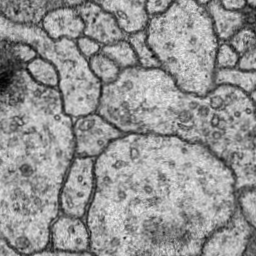
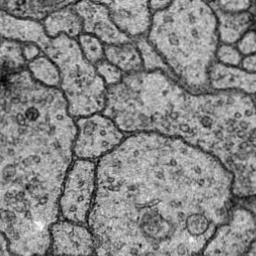
Images
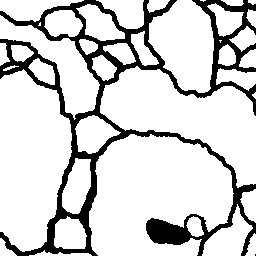
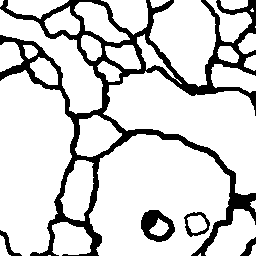
Output expected
antoniovs1029 commentedon Feb 8, 2020
So, I haven't tested this, but have you actually tried to build the nuget from OnnxRuntime master branch?
https://github.com/microsoft/onnxruntime
You mention that you used
Microsoft.Ml.OnnxRuntime v1.1.1(which is the latest official released build from master in there), and the problem is that version was created on January 23, whereas the changes that fixed this issue for you on microsoft/onnxruntime#2945 was merged into master on January 30. So I wouldn't expect v1.1.1 to include that fix, and so perhaps you might need to build the nuget from there.patmaasridharan commentedon Feb 10, 2020
Yes i did build the master of onnxruntime and linked the C# dll to my project. Then now i get another run time exception at OnnxTransformer. I use opsetversion 11 when exporting.
I have tried to load the test model squeezenet.onnx provided by you and Inference Session works for them perfectly with latest ONNXRuntime build.
antoniovs1029 commentedon Apr 14, 2020
Hi, @patmaasridharan . Are you still having this problem?
Sorry for the delay.
Since your last update ML.NET v 1.5.0-preview2 was released, and it had several changes on OnnxTransformer and also has an updated dependency on OnnxRuntime 1.2.0.
I've now tried your sample with your model and I didn't get your exception. So my guess is that that problem is now gone. The Onnx model seems to be correctly loaded by the OnnxTransformer, so that's not a problem now.
Now the problem is that when applying the model, it expects an input of shape "5 x 1 x 256 x 256", whereas the images that you provided are loaded as "3 x 256 x 256". So I wonder where the "5" dimension comes from. Can you let me know?
Also, if you want to run your pipeline with ML.NET v 1.5.0-preview2, please change your pipeline to be:
And also, notice that you'll now need to install the OnnxRuntime 1.2.0 nuget in your project.
antoniovs1029 commentedon Apr 14, 2020
So I still don't know what the 5 "channels" of the input and output of the ONNX model are supposed to be.
But I tried adding 2 more channels to the RGB channels that were already loaded from the images. I filled these 2 channels with '0's. And after making some changes to your code, I got this output:
I don't know what the expected pre- and post-processing should be for the onnx model (including what to do with the extra channels). So if the output isn't as expected, it's because that would need to be fixed. On the other hand, notice that I was able to run the pipeline with your onnx model, without getting any exceptions. Because of this I'll close this issue. Please feel free to reopen it if you still have problems loading the onnx model into your ml.net pipeline.
Here I leave you the code I made to generate the above output. Notice that since ML.NET doesn't have transformers to reshape arrays, I had to use a
CustomMappingTransformerwith a custom transformation to reshape the 3x256x256 loaded image into the 5x1x256x256 array that the onnx model expected as input.