Repository navigation
Error 1067 during windows service stop #81274
Description

Description
Following ms docs if I use windows Services ui to stop the service I will be getting Error 1067: The process terminated unexpectedly

It happens because Task.Delay is throwing TaskCanceledException which gets catched and Environment.Exit is terminating the process before service can stop gracefuly.
I think I can catch this exception explicitly and do something else to fix the problem but I've notice that documentation while I was investigating an issue after migrating my app to net6.
Are there any resources which can help me diagnose an issue where this error appears randomly on stopping the service? I have only 4 IHostedService instances in it and I went through code of these projectcs and I couldn't find evidence than any of these are causing that behaviour.
I've been removing all these hosted services and this issue was still appearing during stop even with just Serilog library used.
It would be very helpful if you could provide any knowledge on what scenarios this can happen
Reproduction Steps
Just follow ms docs pages
Expected behavior
Docs should not suggest to build BackgroundService that way
Actual behavior
Stoping the service is throwing an error to ui which is confusing and if recovery strategy is applied - service might get restarted which is not expected if a user stopped it intentionally
Regression?
No response
Known Workarounds
No response
Configuration
No response
Other information
No response
Activity
jgasiorowski commentedon Jan 27, 2023
Just an update:
I wanted to try if error 1067 occurs on clean net6 worker service. All I did is I've created a project from template
added package
Added
UseWindowsService()call onIHostBuilderinProgram.csinstalled windows service with
sc.exe createcommandand runned a powershell script to start, stop and check status of that service like:
I know it might look crazy but I would expect this to be reliable especially that on net core 3.1 we did not have that error ever.
I've runned this test 3 times. I was waiting for the first time for about 20 minutes to get that error. On second and third attempt I received result quicker (25 and 27 iterations) :
With empty worker it happens less often - but when using our normal service which is using more libraries like Serilog, MassTransit which are using resources mostly from Azure it happens much more frequently
View from EventViewer
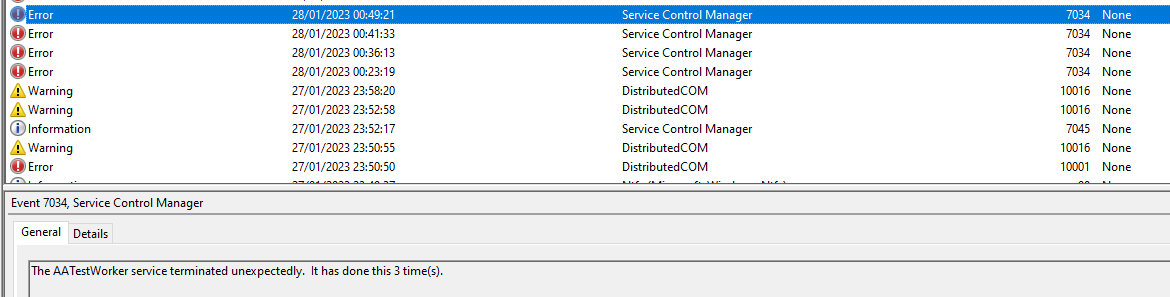
ericstj commentedon Feb 14, 2023
I believe this is the same race condition we found in #62579.
jgasiorowski commentedon Feb 15, 2023
Thanks @ericstj I think you are right. But I don't know really what is the status of the referenced issue? It is still open but you already found the issue. It is also assigned to Future milestone. Does it mean that there is no plan to fix it for .net 7 or even 8?
ericstj commentedon Feb 16, 2023
It's a bit of a fundamental design challenge with Windows Services + Hosting that's always been present in some form. It needs folks who own hosting to debate if there is a way to make the models work together.
As a workaround you can try adding a delay to your main routine after the call to Run() to see if that can help in the short term until the Hosting owners can determine a fix.
jgasiorowski commentedon Feb 16, 2023
Thanks @ericstj for suggestion. We are also planning to modify our script used for stoping the service to disable it as well - that way we will make sure that service will not start unexpectedly
ericstj commentedon Feb 16, 2023
If you have a chance to try the delay and report back here, it would be a useful data point to the team. It would confirm we're seeing the same issue.