
A command center for my agentic open source contributions.
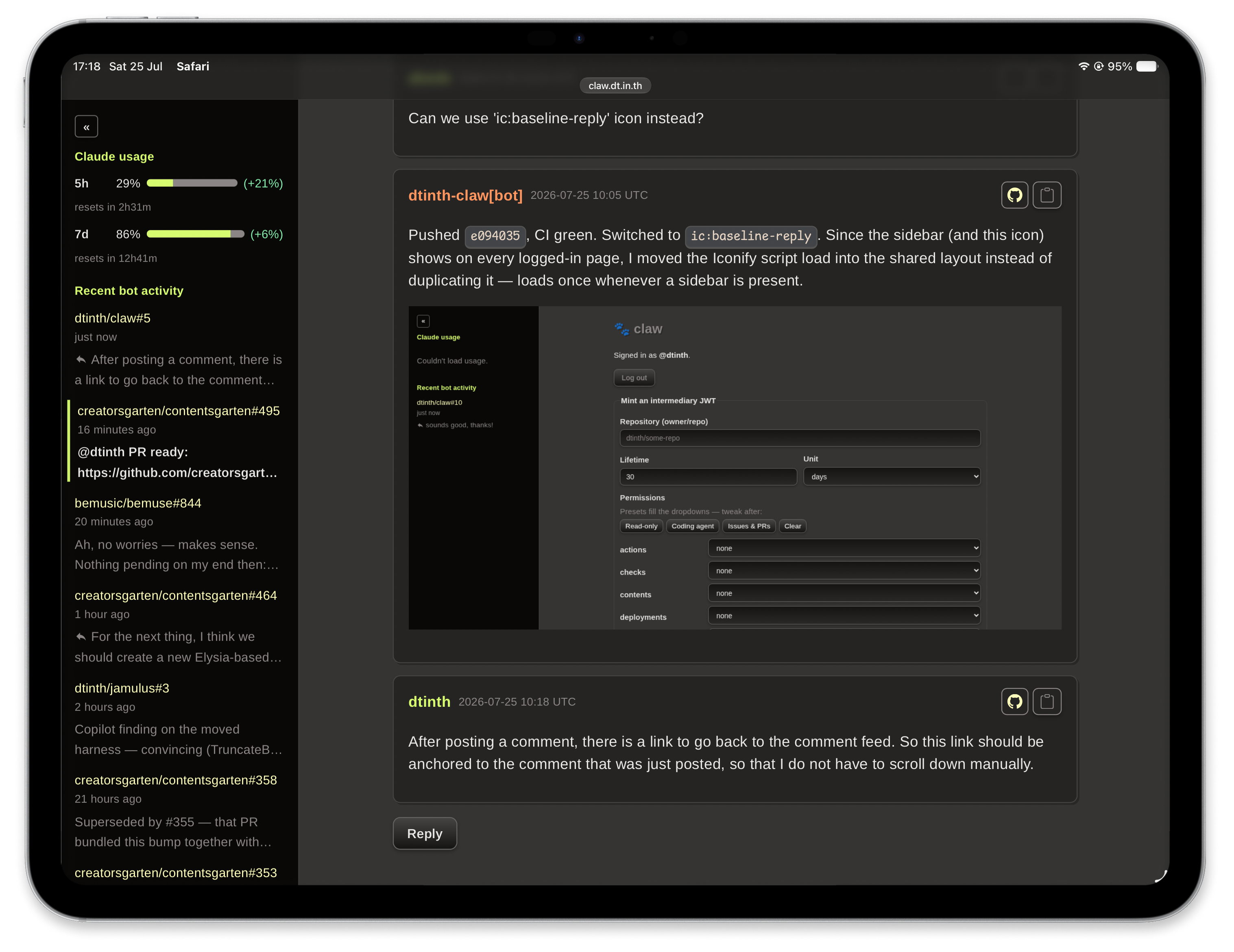
claw is built around a GitHub App (in this deployment, dtinth/claw) that is installed on my repositories, and gives my coding agents fine-grained, time-boxed access to them.
I mostly communicate with my coding agent publicly, on GitHub issues — see
#5 on this very repo for what that
looks like in practice. The agent posts under its own identity
(dtinth-claw[bot]), so it's always clear which comments and commits are
AI-generated.
On other people's repos, the agent never opens a PR or comments directly —
it only works on my personal fork and talks to me. I relay to upstream
maintainers myself: the agent's draft is usually a starting point — talking
points I rewrite in my own voice, though sometimes I do post it close to
as-is — but I review and post everything myself. The exception is projects I
lead myself — there I install dtinth-claw[bot] directly on the repo, e.g.
creatorsgarten/contentsgarten#464
and bemusic/bemuse#844.
claw is four things working together.
The control center where I monitor my agents' activity and chat with them publicly on GitHub.
- A sidebar shows the issues my agents are currently working on.
- It also shows my Claude subscription's usage meters, each with a small
pacemaker figure comparing how much of the usage window has elapsed
against how much of the limit is already used:
- Positive — a comfortable buffer at the current pace.
- Negative — a warning: usage is outpacing the clock and will hit the limit before it resets unless I slow down.
- A comment feed that's less janky than GitHub's own UI, so I can keep up with a conversation and reply to my agent more efficiently.
Lets me grant each coding agent fine-grained access to specific repositories while every agent shares the same GitHub identity.
- An agent requests a token from claw; claw mints a GitHub App installation token (~1 hour lifetime) scoped to just that repo and just those permissions, so every action any agent takes is scoped and auditable.
- Agents also need to notice new comments quickly, so claw runs a local database (built on Grist) fed by a GitHub webhook. New comments land there the moment they're posted, so agents poll claw's local copy instead of polling GitHub directly — staying responsive while remaining a well-behaved GitHub API citizen.
The piece of code my coding agent actually runs, to talk to the token broker and the comment relay (see Agent CLI below).
Teaches a coding agent how to behave and how to use the claw CLI —
skills/dtinth-claw/. To start working, I launch a
session and run /dtinth-claw with an issue link, which gets the agent
communicating with me on that GitHub issue.
All configuration comes from environment variables:
| Variable | Required | Description |
|---|---|---|
GITHUB_APP_ID |
✅ | The GitHub App's numeric id. |
GITHUB_APP_PRIVATE_KEY |
✅ | The app private key (PEM). Escaped \n or base64 is accepted. |
GITHUB_CLIENT_ID |
✅ | OAuth client id used for your browser login. |
GITHUB_CLIENT_SECRET |
✅ | OAuth client secret for the login. |
GITHUB_OAUTH_SCOPES |
— | OAuth scopes requested at login. Default public_repo. Set empty for a GitHub App login. |
CLAW_JWT_SECRET |
✅ | Secret used to sign intermediary claw JWTs (HS256). |
BASE_URL |
✅ | Public base URL, e.g. https://claw.example.com. |
ALLOWED_LOGIN |
— | The single GitHub login allowed to use claw. Default dtinth. |
PORT |
— | Port to listen on. Default 8000. |
GITHUB_WEBHOOK_SECRET |
— | Webhook secret for /webhook. Enables the comment relay together with the GRIST_* vars. |
GRIST_API_URL |
— | Grist base API URL including the document id, e.g. https://grist.example.com/api/docs/<docId>. |
GRIST_API_KEY |
— | Grist API key (sent as a bearer token). Required when GRIST_API_URL is set. |
GRIST_TABLE_ID |
— | Grist table name. Default Comments. |
UPLOAD_STORAGE_ENDPOINT |
— | S3-compatible endpoint URL, e.g. https://s3.example.com. Enables /api/upload together with the rest of the UPLOAD_STORAGE_* vars. |
UPLOAD_STORAGE_BUCKET |
— | Bucket name. Required when UPLOAD_STORAGE_ENDPOINT is set. |
UPLOAD_STORAGE_ACCESS_KEY_ID |
— | Access key id. Required when UPLOAD_STORAGE_ENDPOINT is set. |
UPLOAD_STORAGE_SECRET_ACCESS_KEY |
— | Secret access key. Required when UPLOAD_STORAGE_ENDPOINT is set. |
UPLOAD_STORAGE_REGION |
— | Region, e.g. us-east-1. Required when UPLOAD_STORAGE_ENDPOINT is set. |
UPLOAD_STORAGE_PUBLIC_URL |
— | Public base URL uploaded files are readable at, e.g. https://im.example.com. Required when UPLOAD_STORAGE_ENDPOINT is set. |
export GITHUB_APP_ID=… GITHUB_APP_PRIVATE_KEY="$(cat key.pem)" \
       GITHUB_CLIENT_ID=… GITHUB_CLIENT_SECRET=… \
       CLAW_JWT_SECRET=… BASE_URL=http://localhost:8000
deno task startagent/ is a standalone Deno CLI for the machine on the other end
of a claw JWT — a coding agent that needs gh/git to work against a repo
without ever touching the app's private key. It's a separate project (its own
deno.json, no import from src/) so the two halves can't accidentally share
secrets.
cd agent
deno task compile   # -> ./claw
ln -sf "$PWD/claw" ~/.local/bin/claw   # put it on PATH; re-run compile after any code change
Set up once per repo you want to delegate to an agent: mint a claw JWT from
the web UI, then hand it to claw grant — it decodes the token's own
repository claim, so there's nothing else to specify:
claw grant # paste the JWT when prompted, or: claw grant <jwt>This writes ~/.config/claw/grants.json ({"owner/repo": "<jwt>"}), adding
to or updating whatever's already there. Then, per machine:
export CLAW_BASE_URL=https://claw.example.com
claw setup   # point git's github.com credential helper at `gh auth git-credential`
claw doctor  # sanity-check config, grants and the git wiring
claw setup doesn't touch gh's own login state — it only rewires git's
credential helper to read whatever GH_TOKEN is in the environment when
invoked. From then on:
claw token                        # print a token for the repo (--repo, $CLAW_REPO, or git origin)
claw exec -- gh pr create …       # run a command with GH_TOKEN + CLAW_REPO set
claw exec -- git push
exec mints a token (or reuses a cached one with >5 minutes left) and sets it
as GH_TOKEN for the child process only — gh reads it directly, and git
picks it up through the credential helper setup installed. Tokens are
scoped to the single repo the JWT names, so wrap the command, not a whole
shell session: GH_TOKEN is a snapshot and doesn't renew mid-session.
claw read <issue> fetches claw's comment relay for one issue/PR once and
prints each matching comment as a single JSON line, then exits. claw long-poll <issue> --after <id> does the same fetch, but blocks — retrying
on an interval — until a comment newer than <id> shows up, then prints it
and exits. The pair replaces a monitor-style unbounded watcher: read
finds the last comment's id, then long-poll --after <that id> waits for
the next one, all inside one foreground command your agent just runs and
blocks on — no separate background-watch primitive (like Claude Code's
Monitor tool, which caps a watch at 30 minutes) required from the host:
claw read 24 --authors dtinth                       # everything so far from these logins
claw read 24 --after 5033663115                     # only comments newer than this id
claw long-poll 24 --authors dtinth --after 5033663115   # block until the next one, then exit
claw long-poll 24 --after 5033663115 --interval 30      # slower polling while waiting
claw long-poll 24 --after 5033663115 --timeout 300      # give up (exit 0) after 5 minutes
Unlike token/exec, neither mints an installation token — /api/comments
accepts the claw JWT directly, so both just read it straight from the grants
file. Status and errors go to stderr only, never stdout, so the jsonl stream
stays clean; a transient failure (network blip, 5xx) is logged and retried
(by long-poll; read is one-shot and simply fails), never crashes the
process, but an invalid/expired JWT (401) or a relay that isn't configured
on the server (503) exits — those won't fix themselves by retrying.
Both are stateless: nothing is written to disk, and commentId bounds
(--after/--before) are the only cursor. long-poll tracks that cursor
for the caller, though: on a match, its stdout brackets the comment(s)
with a reminder to restart the watch and the exact next long-poll command
(same flags, --after advanced) to run first, before acting on what the
comment says — print lines prefixed >>>, never mixed with jsonl comment
lines. No comment is ever lost between two long-poll runs, since each run
re-fetches the full backlog and filters client-side rather than resuming
from a saved position.
--timeout <seconds> bounds how long long-poll waits: past that, it
exits 0 having printed only an >>> No new comments after Ns seconds. ...
line (stdout, with the same next command to run) — useful for a host that
can't background a command indefinitely.
claw monitor is removed; running it prints a message pointing at read/
long-poll and exits 1.
claw upload <path> uploads a local file to public, IPFS-addressed storage
and prints the resulting URL — for attaching a screenshot, log, or build
artifact to a GitHub comment, which GitHub's API has no direct way to do:
claw upload screenshot.png                    # generic default: "image.png"
claw upload notes.txt                         # generic default: "file.txt"
claw upload screenshot.png --keep-filename     # keeps "screenshot.png"
claw upload screenshot.png --filename foo.png  # explicit rename
By default the uploaded filename is a generic image.ext/file.ext (image
extensions get image, everything else gets file) rather than the local
name — the object key already has the content's CID as a path segment
(ipfs/<cid>/<filename>), so the filename itself doesn't need to be unique,
just a sensible extension. --keep-filename and --filename are mutually
exclusive. Like read/long-poll, this authenticates with the claw JWT
directly, no installation token minted.
The repository ships a Dockerfile. Any platform that builds and
runs a Docker image works; pushing to main triggers a deploy in this setup.
claw is stateless — no database, no volume. Your browser session lives in an encrypted cookie (3-day expiry, so you re-authenticate every few days), comment drafts are just prefilled links, and relayed comments live in Grist. Redeploy freely; the only thing lost is your login cookie's validity.
Built with Deno 2.x and Hono. Everything is developed test-first; GitHub network calls sit behind an injectable client so the whole app is tested in-process.
deno task test    # run the test suite
deno task check   # type-check
deno task ci # fmt --check + lint + check + test (what CI runs)| Path | Responsibility |
|---|---|
src/config.ts |
Load and validate configuration from the environment. |
src/permissions.ts |
The delegatable permission catalog and validation. |
src/jwt.ts |
Mint and verify intermediary claw JWTs. |
src/session.ts |
Encrypted (JWE) stateless session cookie. |
src/draft.ts |
Parse prefilled comment-draft links. |
src/pkce.ts |
PKCE verifier/challenge helpers. |
src/github/ |
Repo parsing, app JWT, and the GitHub API client. |
src/storage/ |
CID calculation, S3-compatible storage, and the /api/upload orchestration. |
src/web/ |
The Hono app, routes and server-rendered views. |
src/main.ts |
Wire everything together and serve. |
agent/ |
The standalone agent CLI (claw token/exec/read/long-poll/upload/setup/doctor); its own deno.json, no import from src/. |
skills/dtinth-claw/ |
The dtinth-claw skill — installed by symlinking into ~/.claude/skills/. |