Repository navigation
When selecting field type date, nothing is submitted via emal #303
Description

When I select date as the field type, I submit the form to test it out and it returns everything else but the date field. I'm trying to get it to send the date in an American format of MM/dd/yyyy but I can't seem to get it to include that date in the email. If I change it to the date field just being a textbox, then it sends the date but in YYYY-MM-DD. I'm using my own form to submit by the way. I'm not sure if maybe there's an issue in my setup? Here's how I have it configured:
My coding:
<input type="date" id="date" name="date" />
Here's how I have it configured:


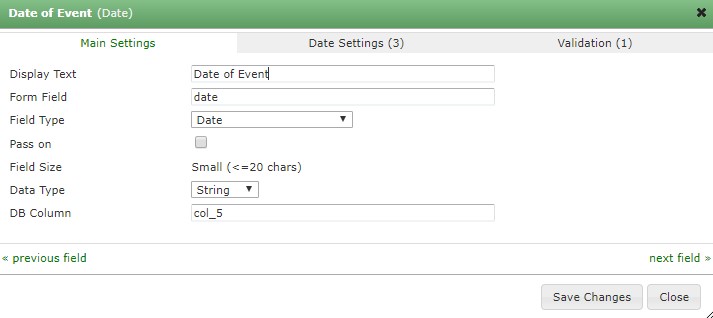
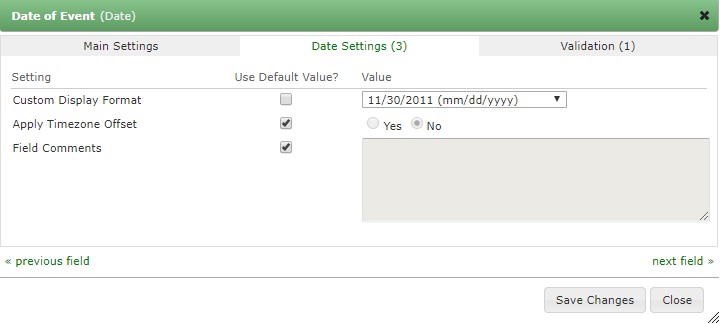
And here is how the email is configured:

Activity
benkeen commentedon Aug 21, 2018
Ah, sorry about that! This isn't obvious at all and I see the documentation doesn't mention this, sheesh. Date fields are kind of special: internally within the database they're all stored in the same MySQL datetime format, e.g. 2018-08-20 00:00:00 That way it's very easy to switch between different representations of the date, while the underlying datetime doesn't actually change.
So if submitting the date via your own form you'll need to convert the user inputted value to that format and submit it. This can be done via javascript or you check out the Submission Pre Parser module and do it via PHP.
I've created a ticket to fix the documentation, btw:
formtools/docs#6
wolftone1916 commentedon Aug 24, 2018
Thank you for the prompt reply. So let me see if I understand this correctly. So, if I set it to a custom format on the back end via the formtools settings and select it as a date on the settings as well, I need to convert the user inputted value to the YYYY-MM-DD format or the format that I want it to be? I guess I'm a little confused here.
benkeen commentedon Sep 7, 2018
Hi @wolftone1916, gah, sorry for not getting back to you sooner, I'm trying to put more time aside to keep up with responses now.
Only for external forms. Internal and Form Builder forms will just work "out the box". External forms are different because they send raw form data into the Form Tools database. The date field requires the information in the database table to be in a specific format, so when it presents the information in the UI it knows how to convert it into the appropriate format.
Hope that's clear...