Repository navigation
Windows page fault disk i/o slow on first load #705

Description

Hello,
As of #613 I have experienced significant regression in model loading speed (I'm on windows, compiled msvc llama.cpp, llama.cpp is located on HDD to prevent SSD wear in my case)
It takes roughly 15 minutes for model to load first time after each computer restart/hibernation, during this time my HDD usage is at 100% and my non-llama.cpp read/write operations are slowed down on my pc
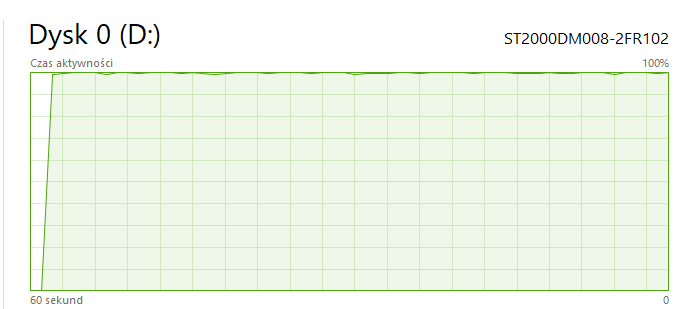
Before that, previous commits took 60 - 180 seconds at worst to load model first time, and after first loading occured, model loaded within 5 - 10 seconds on each program restart until pc reboot/hibernation
Before Commit:

After:
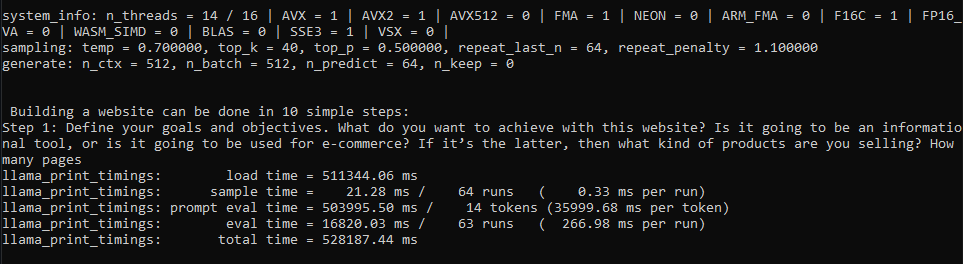
I see reason why model might load faster for some while slower (like my case) for others after recent changes, therefore in my opinion best solution is adding parameter that lets people disable llama.cpp's recent model loading changes if thats possible
- Thanks
Activity
jart commentedon Apr 2, 2023
I'm sorry page fault disk i/o on Windows is going slow for you!
The best we can do here is find some trick to coax better performance out of your Windows executive. Could you please try something for me? Take this code:
And put it at the end of the
mmap_file()function in llama.cpp. Then compile. Reboot, Try again. If it helps, we'll use that.Do you have a spinning disk? If you do, then another thing we could try if prefetch doesn't work, is having a loop where we do a volatile poke of each memory page so they're faulting sequentially. That could help the executive to dispatch i/o in a way that minimizes disk head movement. Although it's more of a long shot.
Other than those two things, I'm not sure how we'd help your first case load times. The good news though is that subsequent runs of the LLaMA process will go much faster than they did before!
[-]Significant model loading speed regression[/-][+]Windows page fault disk i/o slow on first load[/+]anzz1 commentedon Apr 2, 2023
There is still time to revert all this mess and go back to the previous model format.
I'm not saying mmapping couldn't or shouldn't be implemented, but that there is a right way and a wrong way and the current way is simply wrong. Unnecessarily padding the model files with overhead what amounts to basically "anti-compression" or "bloat" and making them incompatible when there are proper ways to achieve this like with the new kv_cache storing/loading mechanism implemented in #685 which wouldn't introduce any regressions.
fgdfgfthgr-fox commentedon Apr 2, 2023
I got similar issue as you, although on linux. Loading speed is unsatifying with current approach.
BadisG commentedon Apr 2, 2023
@anzz1 100% agree with you there
CoderRC commentedon Apr 2, 2023
I think FILE_MAP_LARGE_PAGES should be used as a dwDesiredAccess in MapViewOfFileEx and SEC_LARGE_PAGES on flProtect in CreateFileMapping because I think 1000 megabyte requests are better than 1000000 kilobyte requests.
PriNova commentedon Apr 2, 2023
I don't know if it helps, but there is also a mmap64 function for loading larger files.
jart commentedon Apr 2, 2023
FILE_MAP_LARGE_PAGESrequires special privileges. I've never managed to figure out how to configure Windows to let me use it at all. As far as I know, it's mostly only useful for optimizing TLB access. Very little chance it'd help us here.CoderRC commentedon Apr 2, 2023
Read https://learn.microsoft.com/en-us/windows/win32/memory/creating-a-file-mapping-using-large-pages
This will help you with privileges.
CoderRC commentedon Apr 2, 2023
Allocating huge pages using mmap
You can allocate huge pages using mmap(...MAP_HUGETLB). Either as a anonymous mapping or a named mapping on hugetlbfs. The size of a huge page mapping needs to be a multiple of the page size. For example to create an anonymous mapping of 8 huge pages of the default size of 2 MiB on AMD64 / x86-64:
void *ptr = mmap(NULL, 8 * (1 << 21), PROT_READ | PROT_WRITE,
MAP_PRIVATE | MAP_ANONYMOUS | MAP_HUGETLB,
-1, 0))
https://rigtorp.se/hugepages/
slaren commentedon Apr 2, 2023
@x02Sylvie I noticed that the new conversion tool creates files with a lot of fragments (in my case I measured 3m fragments in the 65B model). This is not much of a problem with an SSD, but with an spinning disk it may increase load times dramatically. Can you try defragmenting the disk or model file?
jart commentedon Apr 2, 2023
Linux requires that you decide ahead of time what percent of memory is going to be devoted to huge pages and nothing else. With LLaMA that means you'd have to give up the lion's share of your memory, just so that when you run the llama command on occasion it goes maybe 10% faster? A:t best? I haven't measured it, because the last time I tried doing this, I totally nuked my system. I imagine this huge page thing might be nice if you've got something like a Postgres database server where it can have a more clearly defined subset of memory that's your work area. But I'm pretty doubtful that, given Linux's huge TLB design, and its requirement of special privileges and systems configuration, that it's really something worth focusing on.
15 remaining items
CoderRC commentedon Apr 2, 2023
3 gb/s without mmap read compared to 500 mb/s read with mmap
patrakov commentedon Apr 2, 2023
With how many threads?
SSDs, you know, also prefer large linear reads.
CoderRC commentedon Apr 2, 2023
I tried with 1 and 8 threads same result 500 mb/s read
danielzgtg commentedon Apr 2, 2023
NVMe was invented because SSDs prefer parallel IO
CoderRC commentedon Apr 2, 2023
There is also a good way, first map the file then create multiple async read requests to one mb allocated memory in ram.
Or just another thread that reads the file
CoderRC commentedon Apr 3, 2023
Solved first model loading time in #734
comex commentedon Apr 3, 2023
Better to use an explicit hint:
PrefetchVirtualMemoryon Windows and madvise on Unix.Though I suspect this is unnecessary if you use
VirtualLock, as that would also tell Windows that the entire file is needed in memory.prusnak commentedon Apr 3, 2023
I came up with this untested code snippet: #740 - needs more testing
prusnak commentedon Apr 3, 2023
@x02Sylvie How much RAM do you have on your machine?
comex commentedon Apr 7, 2023
Hi,
My PR #801 will likely be merged soon. It includes a change that should theoretically fix the regression reported here, but I'd like to confirm that it actually does so.
If you're one of the people experiencing this issue, I'd love if you could test the PR and report how it affects performance. If possible, please do the following:
1. Current
master2. PR branch, same command line as before
3. PR branch, but add
--no-mmapto the command lineThanks in advance!
Update app.py (ggml-org#705)
github-actions commentedon Apr 11, 2024
This issue was closed because it has been inactive for 14 days since being marked as stale.
remove curious assertions (ggml-org#705)