Repository navigation
keyboard issue between ion-footer and header #12844
Description

Resources:
Before submitting an issue, please consult our troubleshooting guide (http://ionicframework.com/docs/troubleshooting/) and developer resources (http://ionicframework.com/docs/developer-resources/)
Ionic version: (check one with "x")
[ ] 1.x (For Ionic 1.x issues, please use https://github.com/ionic-team/ionic-v1)
[ ] 2.x
[ ] 3.x
I'm submitting a ... (check one with "x")
[ ] bug report
[ ] feature request
[ ] support request => Please do not submit support requests here, use one of these channels: https://forum.ionicframework.com/ or http://ionicworldwide.herokuapp.com/
Current behavior:
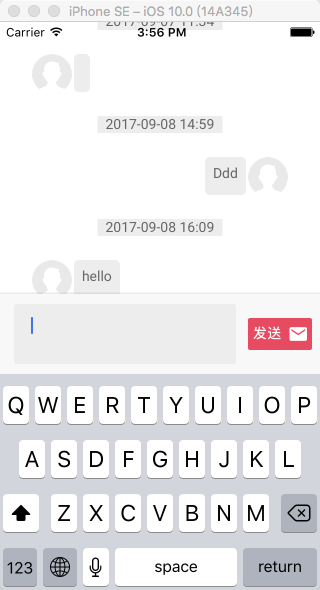
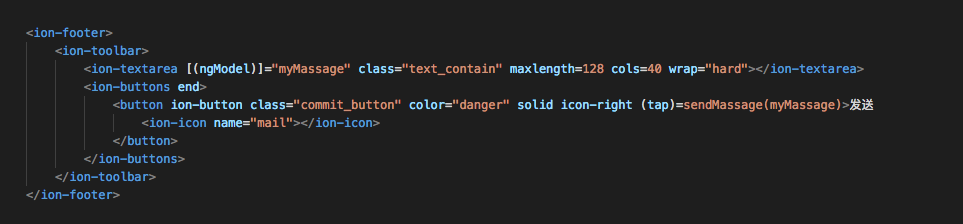
In my case, i have a messaging page, having ion-footer at the bottom. Footer have an ion-textarea and a SEND button inside. When we focus inside textarea, the keyboard comes up ,the footer float above the keyboard , also the header goes up out of the screen . But if i set "this.keyboard.disableScroll(true) " , the keyboard comes up hiding the footer beneath, that's prevent the header goes up out of the screen.
Expected behavior:
When keyboard comes up , the footer should appear above the keyboard, also header should be fixed at the top of the screen.
Steps to reproduce:
Related code:
insert any relevant code here
Other information:
Ionic info: (run ionic info from a terminal/cmd prompt and paste output below):
cli packages: (/Users/melody/Documents/sns_mobile_terminal/gzyx-sns/node_modules)
@ionic/cli-utils  : 1.8.0
ionic (Ionic CLI) : 3.8.0
global packages:
Cordova CLI : 7.0.1
local packages:
@ionic/app-scripts : 2.1.3
Cordova Platforms  : android 6.2.3 ios 4.4.0
Ionic Framework    : ionic-angular 3.6.0
System:
ios-deploy : 1.9.1
ios-sim    : 6.0.0
Node       : v8.1.1
npm        : 5.3.0
OS         : OS X El Capitan
Xcode      : Xcode 8.0 Build version 8A218a
insert the output from ionic info here
Activity
kensodemann commentedon Sep 8, 2017
Hello! Thank you for opening an issue with us! Would you be able to provide a sample application via GitHub that demonstrates the issue you are having? Thanks for using Ionic!
qcheng2 commentedon Sep 11, 2017
@kensodemann Ha! Here is the printscreen of my application. How can i prevent the header goes up out of the screen.
qcheng2 commentedon Sep 11, 2017
@kensodemann
kensodemann commentedon Sep 13, 2017
Thank you for the updated information. I duplicated this issue in an existing sample application that I have.
This appears to be a duplicate of #5432 and #12452. #5432 obviously makes this a long standing issue that we have not been able to fully solve for various reasons. However, the comments in that issue contain several work arounds that you may find helpful. Have a look in there and see if any of that works for you.
I am going to leave this open as something to look into after the Ionic v4 release is complete.
sjdrew commentedon Sep 27, 2017
I had some apps running ionic 3.3, after upgrading to 3.6.1 they now have same issue.
Easy to reproduce just create blank starter app, then add a ion-textarea and set its height to larger than available space such as
textarea {
height: 80vh;
}
then when you tap into the textarea it scrolls header off screen.
With version 3.3 of ionic it seemed to flash for a second and then reposition the header back, now it does not.
sjdrew commentedon Sep 27, 2017
As I workaround I created this directive "keyboardfix" (add to ion-content tag) that resets the window scroll position after keyboard is displayed (on ios). This results in the header dropping back down into view, not pretty, but better than user loosing access to the header/toolbar buttons. This is what seemed to happen before upgrading to ionic 3.6.
polfernandez commentedon Oct 25, 2017
I tried this approach but no solution. I have the exact same problem
Having similar issue. With ionic-angular 3.7.1, the entire screen moves up when ionic-native keyboard shows (from a ion-textarea input).
`global packages:
local packages:
System:
on all iOS devices. for Android works fine
BluebambooSRL commentedon Oct 26, 2017
Any news?
anhiliate commentedon Nov 1, 2017
i got no problem with ios 10.3 but after xcode update i got ios 11 and my header and footer dissappear after keyboard shown and closed
1 remaining item
richardshergold commentedon Nov 24, 2017
I'm having this issue - any solution to this?
aslaugsollilja commentedon Nov 24, 2017
having the same issue - would be nice to get a fix to this
qcheng2 commentedon Nov 29, 2017
@richardshergold We can resolve it with creating a cordova plugin. if the platform is 'iOS',build the program , modifying the iOS plugin, and then present the native controller to resolve the issue
qcheng2 commentedon Nov 29, 2017
@aslaugsollilja @pe1o2pl @polfernandez @sjdrew
dennis3001 commentedon Mar 5, 2018
Did anybody find any actual workaround (that does not hide the input behind keyboard)?
nits-ravis commentedon Mar 14, 2018
Really looking a solution for this problem my chat application is not looking standard with keyboard issue. :(
dennis3001 commentedon Mar 14, 2018
Me too, especially that there is no hardware back button on iphone.
With header out of screen there is no way back from the page, only by killing the app!
Kira2 commentedon Mar 15, 2018
Hi,
Maybe you can try this directive https://gist.github.com/Manduro/bc121fd39f21558df2a952b39e907754
alimardani commentedon May 11, 2018
Hi,
I have the same issue, any progress or workaround on this issue yet?
ionitron-bot commentedon Dec 8, 2018
Thanks for the issue! We have moved the source code and issues for Ionic 3 into a separate repository. I am moving this issue to the repository for Ionic 3. Please track this issue over there.
Thank you for using Ionic!
ionitron-bot commentedon Dec 8, 2018
Issue moved to: ionic-team/ionic-v3#887