Describe the bug
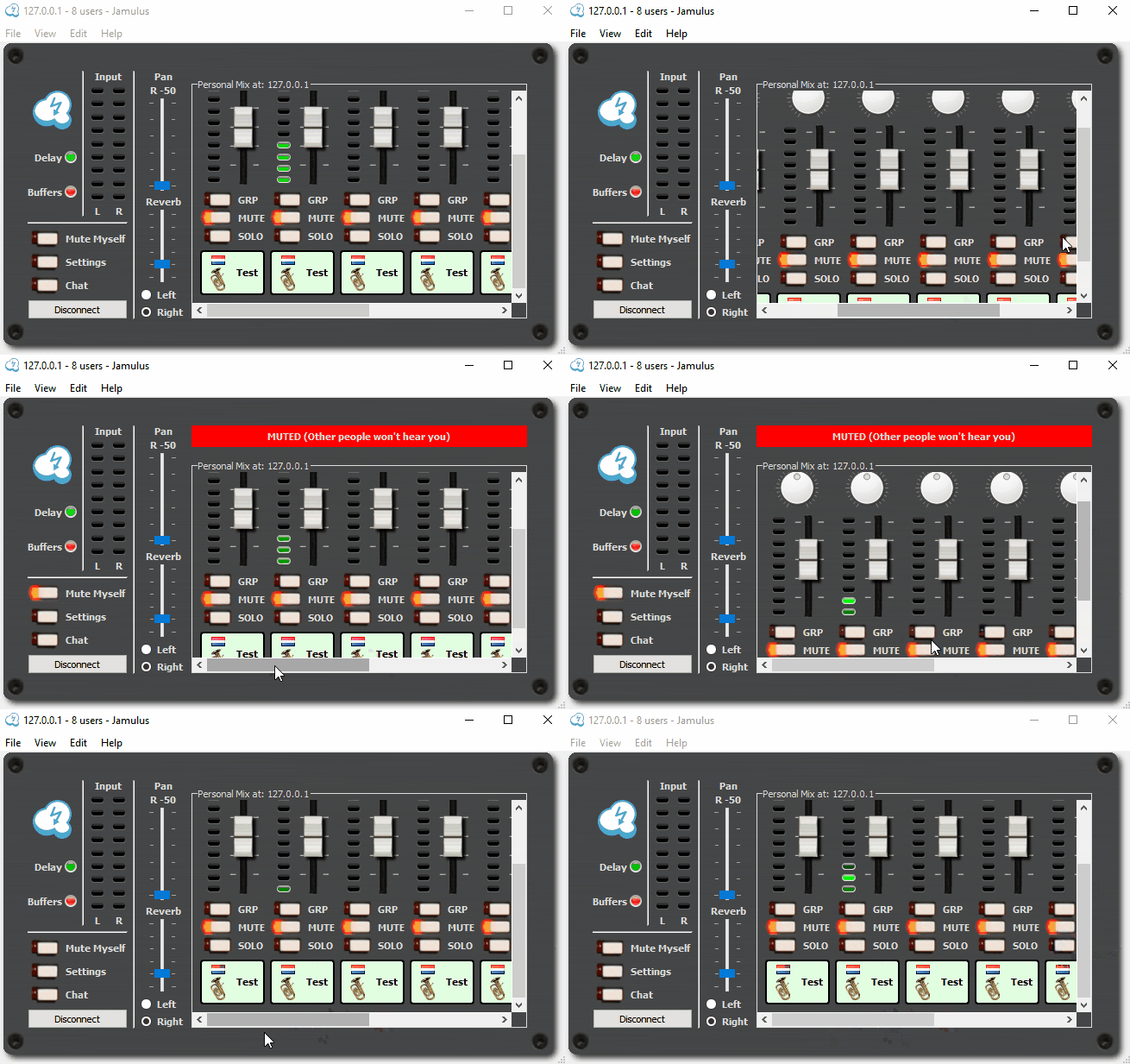
When I select the "Mute Myself" option, the position of the scrollbars are reset to the default in the mixingboard
This occurs for both the horizontal and vertical scrollbar.
Most likely caused by the "red" label which is shown or will be hidden when the "Mute Myself" status is changing
To Reproduce
Ensure the mixingboard is showing horizontal and/or vertical scrollbars.
Move the scrollbars to a position other then the default.
Select the "Mute Myself" option, the position of the scrollbars is reset to the default (horizontal moves to left, vertical moves to bottom).
Changing the position again to a custom position.
Select the "Mute Myself" option, the position of the scrollbars is reset to the default.
Expected behavior
Scrollbar should retain the selected position.
Screenshots
Operating system
Win 10
Version of Jamulus
v3.7.0
Additional context
I have noticed a potential new GUI, in which the "red" bar is placed different and does not effect the mixerboard anymore.
Not sure when that will be implemented, hence thought about to still report it here.
Obvious this is mainly an issue with a large group or a small screen. The upcoming changes to allow up to 8 mixer rows might also resolve this, but guessing there still will be people with smaller screen which cannot fit 3 or more rows.
Describe the bug
When I select the "Mute Myself" option, the position of the scrollbars are reset to the default in the mixingboard
This occurs for both the horizontal and vertical scrollbar.
Most likely caused by the "red" label which is shown or will be hidden when the "Mute Myself" status is changing
To Reproduce
Ensure the mixingboard is showing horizontal and/or vertical scrollbars.
Move the scrollbars to a position other then the default.
Select the "Mute Myself" option, the position of the scrollbars is reset to the default (horizontal moves to left, vertical moves to bottom).
Changing the position again to a custom position.
Select the "Mute Myself" option, the position of the scrollbars is reset to the default.
Expected behavior
Scrollbar should retain the selected position.
Screenshots

Operating system
Win 10
Version of Jamulus
v3.7.0
Additional context
I have noticed a potential new GUI, in which the "red" bar is placed different and does not effect the mixerboard anymore.
Not sure when that will be implemented, hence thought about to still report it here.
Obvious this is mainly an issue with a large group or a small screen. The upcoming changes to allow up to 8 mixer rows might also resolve this, but guessing there still will be people with smaller screen which cannot fit 3 or more rows.