Repository navigation
[Bug]: macOS spawns duplicate Dock icons for background helper/server processes #12975
Description
Activity
Triage
Verdict: Real macOS desktop symptom, but the cause in the report does not match the backend spawn. Keep this open. It is not a duplicate of #12926.
Nightly
0.0.43-nightly.20260921.2071is the current desktop line. The command line you quoted is the primary backend, and that spawn already asks Electron to run as Node.return { executablePath: process.execPath, args: [environment.backendEntryPath, "--bootstrap-fd", "3"], entryPath: environment.backendEntryPath, cwd: environment.backendCwd, env: { ...backendChildEnvPatch(), ELECTRON_RUN_AS_NODE: "1", }, // Primary wants process.env (PATH, dev-runner's T3CODE_HOME, etc.). extendEnv: true,
extendEnv: truemerges the GUI environment underneath that object, soELECTRON_RUN_AS_NODE=1wins.pswill not show the variable; it only shows argv.app.dock.hide()andNSApplicationActivationPolicyAccessoryalso do not apply to this child: with the flag set, the process is Node and never starts the ElectronappAPI.That path is one long-lived child, supervised by the desktop process. A restart tears the old child down before starting another. It does not explain 5–10 icons that accumulate while you work and stay until force quit.
What does match that pile of icons
On a desktop install,
resolveNodeExecutablereturns the Electron binary (packages/shared/src/nodeRuntime.tsreturnsHostProcessExecutablePathwhen the host is not a Node SEA). Several children then execContents/MacOS/T3 Code (Nightly)itself. macOS Launch Services treats that bundle executable as a foreground app. The bundled Helper apps are the ones markedLSUIElement.The confirmed unbounded case is #12926.
ensureAgentDeviceShimstill writes a wrapper with no flag:} else { const command = [node, launcherPath] .map((value) => "'" + value.replaceAll("'", "'\"'\"'") + "'") .join(" "); const script = `#!/bin/sh\nexec ${command} "$@"\n`;
Provider env from
agentDeviceEnvironmentinapps/server/src/provider/Layers/ProviderService.tsdoes not setELECTRON_RUN_AS_NODEeither. Eachagent-devicecall from an agent can open another full T3 GUI. Those stay in the Dock until force quit, and each one then spawns its ownbin.mjs --bootstrap-fd 3backend. That is the same failure as closed, unmerged #12241. No open PR fixes the shim.A smaller, bounded set also forces the main binary: the snapshot accessibility worker sets
execPath: process.execPathso it keeps the app's Accessibility grant (apps/desktop/src/snapShot/SnapShotAccessibilityProcess.ts). That is one process, not a growing set.Not the same issue
- [Bug] agent-device opens another T3 instance and marks running Cursor sessions as lost #12926 is the session-loss bug when
agent-devicestarts a second app. Same launch class, different report. Leave both open until the process list says they are the same processes. - [Bug]: Desktop starts a second backend against the background service database #6097 is a second backend from the desktop app plus the background service, not Dock icons from helper execs.
- fix(desktop): stop overwriting a custom dock icon on launch #7125 only stops a custom Dock icon from being overwritten on launch.
What would pin this down
From Activity Monitor or
ps eww -p <pid>, for two or three of the extra Dock processes, the full argv and whetherELECTRON_RUN_AS_NODEis set:- argv
…/bin.mjs --bootstrap-fd 3while only one T3 window is open and no agent is running: the primary backend is registering a Dock tile even with the flag, and the fix is to spawn that child through the Helper executable (keepELECTRON_RUN_AS_NODE=1). The accessibility worker has to stay on the main binary. - argv
agent-device-launcher.mjs, or a second GUI with no script: this is [Bug] agent-device opens another T3 instance and marks running Cursor sessions as lost #12926. Comment there with the Nightly version and we can close this as a duplicate. - Helper
(GPU)/(Renderer)/(Plugin)processes: say so. Those should already beLSUIElementand would be a separate helper-plist bug.
A screenshot of the Dock next to that process list is enough. No need for a second full repro beyond what you already hit.
- [Bug] agent-device opens another T3 instance and marks running Cursor sessions as lost #12926 is the session-loss bug when
Here is the breakdown from
ps ewwand LaunchServices for the running processes:1.
argv …/bin.mjs --bootstrap-fd 3- PID: 34633
- Command:
/Applications/T3 Code (Nightly).app/Contents/MacOS/T3 Code (Nightly) /Applications/T3 Code (Nightly).app/Contents/Resources/app.asar/apps/server/dist/bin.mjs --bootstrap-fd 3 ELECTRON_RUN_AS_NODE:1(confirmed set in the environment)
2.
SnapShotAccessibilityWorker.cjs- PID: 34630
- Command:
/Applications/T3 Code (Nightly).app/Contents/MacOS/T3 Code (Nightly) /Applications/T3 Code (Nightly).app/Contents/Resources/app.asar/apps/desktop/dist-electron/snapShot/SnapShotAccessibilityWorker.cjs read ELECTRON_RUN_AS_NODE:1(confirmed set in the environment)
3. LaunchServices & Helper Processes
- In
lsappinfo, besides the main app (PID 34597), anosascriptchild process (PID 34632) also checked in withtype="Foreground"and inheritedbundleID="com.t3tools.t3code". - Helper processes are running under the Helper bundle (
--type=gpu-process,--type=renderer,--type=utility).
This confirms the first scenario: the backend is launched through the main binary and registers a Dock tile despite
ELECTRON_RUN_AS_NODE=1being set. Spawning that child through the Helper executable (while keepingELECTRON_RUN_AS_NODE=1) should resolve it.Screenshot (Process List & Dock)
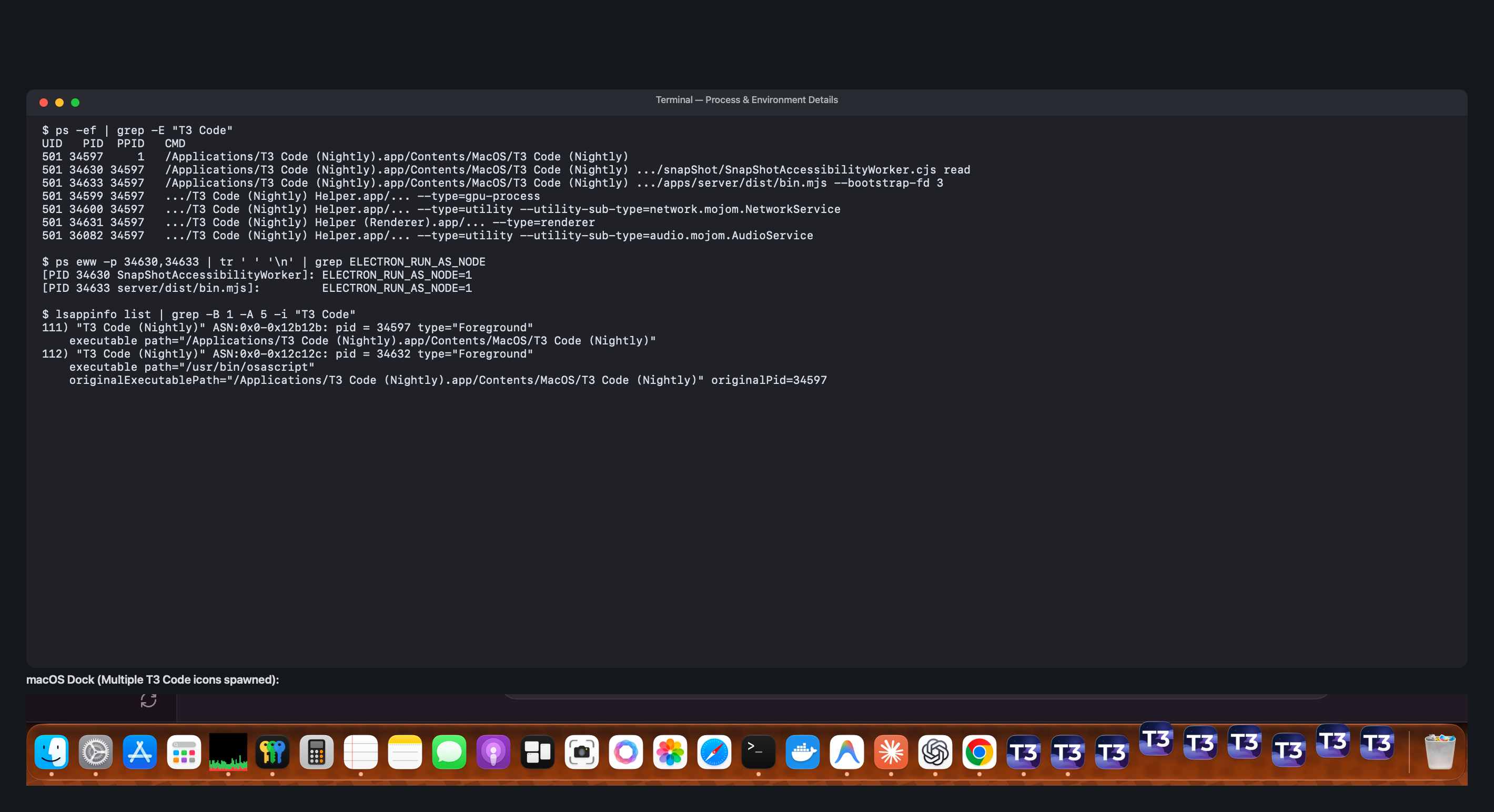
Root cause for (at least one of) the extra Dock icons: the SnapShot modifier-pair poller (
osascript)I reproduced this on Nightly and pinned the phantom Dock tile to a specific process. It is not the backend or the accessibility worker.
What happened
After updating to0.0.43-nightly.20260922.2110, a second "T3 Code (Nightly)" appears in the Dock on every launch. It has no window, macOS shows it as "not responding", and it stays until force quit.Diagnosis
lsappinfo listshows the extra tile is/usr/bin/osascript(a child of the main app process). It checked in astype="Foreground"and took over the app'sbundleID="com.t3tools.t3code"and its name. This is the sameosascriptentry @cornishandy saw above. Its argv is the JXA poller fromapps/desktop/src/snapShot/MacModifierPairShortcutProcess.ts: anObjC.import("CoreGraphics")loop callingCGEventSourceFlagsStateevery 50 ms, run with args2 4(both Shift keys).Importing AppKit/CoreGraphics through the JXA ObjC bridge and querying the event source opens a WindowServer connection. LaunchServices then registers
osascriptas a foreground app, attributed to the parent bundle it is responsible for. The poller never runs an event loop, so macOS shows it as "not responding". Force-quitting it only kills the poller: the main app keeps running, and the Shift+Shift shortcut stops until relaunch.The backend (
bin.mjs --bootstrap-fd 3) andSnapShotAccessibilityWorker.cjswere both running and did not have their own Dock tiles here. Only the osascript process did.Repro
- macOS, Nightly ≥ 0.0.43-nightly.20260921.
- Settings → SnapShots: enable, shortcut = "both Shift keys" (
snapShotShortcut.kind = both-shift-keys). - Launch the app. A second "T3 Code (Nightly)" tile appears in the Dock with no window and shows as "not responding".
lsappinfo list | grep -A4 osascriptshows the osascript entry withbundleID="com.t3tools.t3code".- Switch to a regular accelerator shortcut (e.g. ⌘⇧S): no poller is spawned and no phantom tile appears. (Confirmed: after switching to Ctrl+S, the osascript process and the extra Dock tile are gone.)
Environment
- Desktop: T3 Code (Nightly)
0.0.43-nightly.20260922.2110, macOS 27.2 (Darwin 27.2.0), arm64 - CLI:
t30.0.42 via npx
Possible fix direction
Keep the poller out of LaunchServices' foreground apps. For example, make it a background-only helper (a tiny native helper, or have the script set the accessory/prohibited activation policy before it touches CoreGraphics), or use a nativeNSEventflags-changed monitor in-process instead ofosascript.Related: #12926 (agent-device relaunch, a different launch path), #12769 (SnapShots triggering while typing).
Diagnosed via
t3 triagewith Claude Code (Claude Opus 5.5).I hit the same Dock clutter and found another way to reproduce it, alongside the
osascriptcase above.My setup: T3 Code Nightly
0.0.45-nightly.20260930.2510, macOS 27.2 (26B5091g), Apple Silicon.In the reduced test, the extra T3 icon belongs to Playwright's
chrome-headless-shellaudio helper:--type=utility --utility-sub-type=audio.mojom.AudioServiceIt registers as
T3 Code (Nightly), bundle IDcom.t3tools.t3code, with activation policy Regular (0). The browser main process has Accessory policy (1).Creating
new AudioContext()is enough to trigger this. The context stayed suspended throughout the test, so no sound needs to play.Playwright 1.63.0 adds
--no-sandboxunlesschromiumSandbox: trueis set. I compared Chromium 151.0.7922.34 and 153.0.8010.12:- With
--no-sandbox, both versions create the foreground audio helper. - With the sandbox enabled, neither creates a foreground helper. Screenshots still render.
- Ordinary screenshots without an AudioContext create no foreground helper with either setting.
I also reproduced the registration with a small native Cocoa app that launches the browser through
NSTask. The audio helper takes that app's name and bundle ID, so T3 Code and Electron are not required. With anLSUIElementaccessory app as parent, the helper instead has Accessory policy and stays off the Dock.The Chromium source points to the audio helper's UI loop. With
--no-sandbox, it skips the NSRunLoop substitution and LaunchServices suppression used for sandboxed helpers.The original short-lived children exited before I captured their arguments, so I cannot attribute every original icon to AudioService. The reduced audio test reproduces the extra icon on both Chromium versions.
- With


Environment
0.0.43-nightly.20260921.2071Description
While using T3 Code Nightly, multiple instances (5–10) of the T3 Code app icon continuously spawn in the macOS Dock and remain until force quit. It doesn't seem to break anything directly, but clutters the Dock significantly as work continues.
Probable Cause / Technical Details
Background helper processes (e.g.,
.../Contents/MacOS/T3 Code (Nightly) .../app.asar/apps/server/dist/bin.mjs --bootstrap-fd 3) appear to be executed using the main Electron binary withoutELECTRON_RUN_AS_NODE=1orapp.dock.hide()/NSApplicationActivationPolicyAccessory. macOS Launch Services therefore treats each spawned child process as a distinct GUI application and registers a new icon in the Dock.Note: This is my first time submitting a bug report or using GitHub!