Repository navigation
Improve data import workflow in the UI #61
Description

Is your feature request related to a problem? Please describe.
Importing a file from the UI can require several unnecessary steps when the user wants to specify types, column names, designated timestamp, or partitioning.
- First the file (or data from the clipboard) is imported using the automatically recognized schema
- Then the user can update the column types in the GUI, however this triggers a whole new import, which can be long
- The user needs to run
rename tableif they don't like the current name which defaults to the file name (e.gmyfile.csv, orclibboard-7291384923) - The user needs to create a new table and copy from the first one if they want to rename a column, designate a timestamp column or to use partitioning. Then they need to delete the first table.
Describe the solution you'd like
Ideally, the import from the UI would flow as follows
First, QuestDB peroforms analysis on a subset of the data to recognise and suggest a schema. However, no import is performed.
Then, an editor appears similar to the one currently available to change the schema after import. In this editor, where the user can
- amend the schema (column types), and can rename the columns
- mark a column as designated timestamp
- override the default table name
- choose whether the data should be partitioned or not
- starts the import with a button
Describe alternatives you've considered
All the above is possible but requires multiple manual steps and unnecessary import.
Screenshot
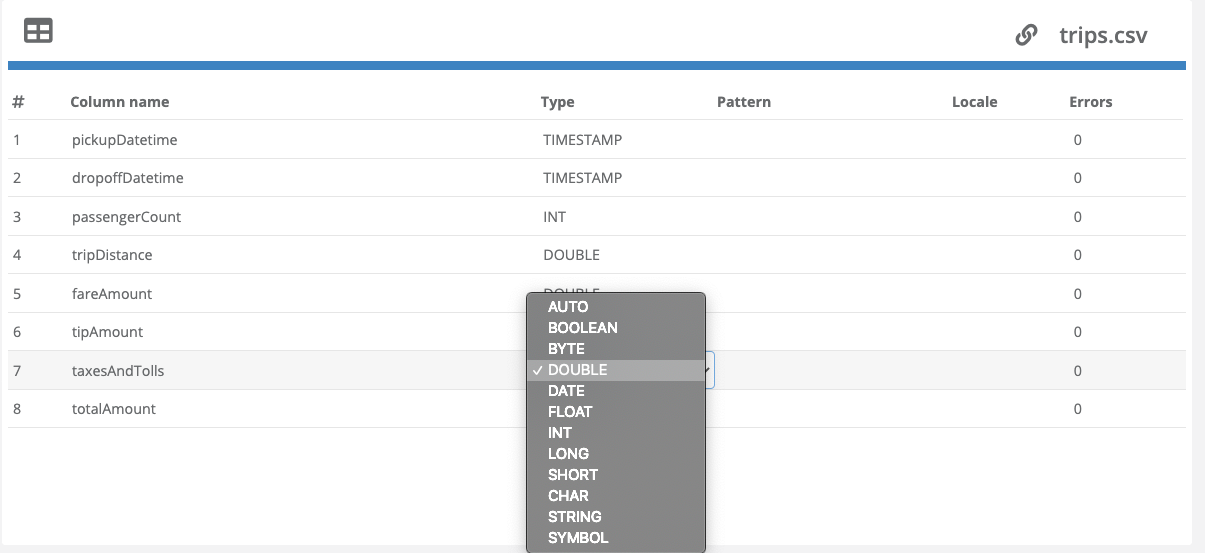
This is the current schema editor. However it only allows to change column types, and is only available after performing the import once.
Activity
insmac commentedon May 19, 2023
@TheTanc The completely new Import UI is now available for use in 7.1.2 and it (by chance 😄 ) should now have the flow you liked back then - it performs table analysis first, pulls the schema, detects partitioning and timestamp settings and allows the user to set settings before the actual import is performed. Enjoy!
Closing - solved by #130