Repository navigation
contextMenuHidden blocks Cmd+V and VoiceOver paste on iOS, while Android only hides the menu #59143
Description

Description
contextMenuHidden is documented as "If true, context menu is hidden." On iOS it also turns off every edit action of the field: RCTUITextField and RCTUITextView return NO from canPerformAction:withSender: for every action while it is set (singleline, multiline). That method decides more than the menu: in such a field Cmd+V does nothing, VoiceOver's rotor has no Edit item, and the keyboard's Paste key is greyed out. On Android the prop hides the menu, and Ctrl+V still pastes.
A UIKit app can reshape its edit menu and keep the commands, through UITextFieldDelegate's edit-menu methods (iOS 16 and later); canPerformAction turns a command off everywhere.
The prop fits one-time-code and password fields, where paste matters: the WCAG 2.2 understanding of SC 3.3.8 says "it must be possible for a user to at least paste the code" (Understanding 3.3.8).
Should contextMenuHidden hide only the menu on iOS, as its documentation says and as Android does? It was added to keep users from pasting into some fields (#17335), so if that is still the intent, the documentation and Android are what disagree.
Steps to reproduce
- Use the reproducer as RNTester's
packages/rn-tester/js/examples/Playground/RNTesterPlayground.jsand open the Playground on an iPad with a hardware keyboard. - In the first field, press Cmd+A and Cmd+C.
- Tap the second field, which sets
contextMenuHidden, and press Cmd+V: nothing is pasted, and the line under the fields still showswith the flag: "". - Tap the third field and press Cmd+V:
123456is pasted. - With VoiceOver on, edit each field and turn the rotor either way: the third field offers Edit, whose paste pastes; the second never offers Edit.
- On Android with a hardware keyboard, Ctrl+V pastes into both fields.
React Native Version
0.88.0
Affected Platforms
Runtime - iOS
Output of npx @react-native-community/cli info
System:
  OS: macOS 27.0.1
  CPU: (8) arm64 Apple M1
  Memory: 335.11 MB / 8.00 GB
  Shell:
    version: "5.9"
    path: /bin/zsh
Binaries:
  Node:
    version: 24.18.0
    path: ~/.nvm/versions/node/v24.18.0/bin/node
  Yarn: Not Found
  npm:
    version: 12.0.1
    path: ~/.nvm/versions/node/v24.18.0/bin/npm
  Watchman:
    version: 2026.07.20.00
    path: /opt/homebrew/bin/watchman
Managers:
  CocoaPods:
    version: 1.17.0
    path: /opt/homebrew/bin/pod
SDKs:
  iOS SDK:
    Platforms:
      - DriverKit 27.0
      - iOS 27.0
      - macOS 27.0
      - tvOS 27.0
      - visionOS 27.0
      - watchOS 27.0
  Android SDK: Not Found
IDEs:
  Android Studio: Not Found
  Xcode:
    version: 27.0/27A266a
    path: /usr/bin/xcodebuild
Languages:
  Java: Not Found
  Ruby:
    version: 4.0.6
    path: /opt/homebrew/bin/ruby
npmPackages:
  "@react-native-community/cli": Not Found
  react: Not Found
  react-native: Not Found
  react-native-macos: Not Found
npmGlobalPackages:
  "*react-native*": Not Found
Android:
  hermesEnabled: false
  newArchEnabled: false
iOS:
  hermesEnabled: true
  newArchEnabled: true
Run in RNTester on main at e04aaf62f7, which I measured on; 0.88.0 has the same canPerformAction.
Stacktrace or Logs
No crash. iPad Pro, iPadOS 27.0.1, RNTester Release from main at e04aaf62f7:
after Cmd+V in the field with contextMenuHidden: with the flag: "", without: ""
after Cmd+V in the field without it:             with the flag: "", without: "123456"
Android 16 emulator, RNTester from the same commit:
after Ctrl+V in both fields:                     123456 and 123456
MANDATORY Reproducer
Screenshots and Videos
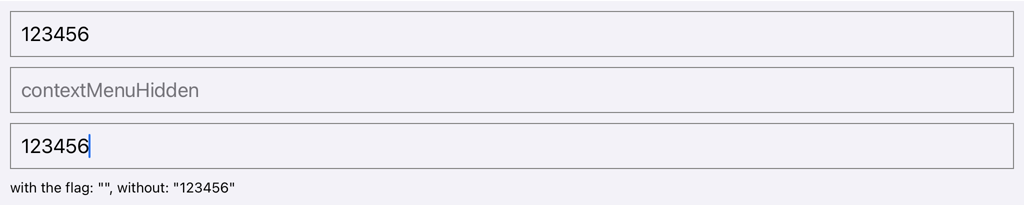
The iPad after Cmd+V in the field with contextMenuHidden, then in the field without it.

The keyboard's shortcut bar while the field without the prop (top) and the field with it (bottom) is edited.
The builds, the steps, VoiceOver's rotor in both fields and every reading are on this page.
Activity