
Please ⭐ this repo if you find it useful

Botvid-19 is an easy-to-use Telegram bot, powered by Telepot and Selenium, for signing COVID-19 digital health statements. It was built for Israeli parents (and Amdocs employees) who had to fill in a daily health declaration on school and workplace portals: send the bot a command, and it logs in to the portal with a headless Chrome browser, signs the statement, and sends you back a screenshot of the result.
- Adam Russak for working with me on this project and writing the Selenium part
- Features
- Supported Platforms
- How It Works
- Requirements
- Installation
- Configuration
- Usage
- Security Notes
- Troubleshooting
- Development
- Contributing
- License
- Donation
- Signs the COVID-19 health statement on five portals (see Supported Platforms).
- One Telegram command per portal; the bot replies with a screenshot of the portal page after the attempt (check it: "Signed" does not guarantee the form was submitted, see Troubleshooting).
- Mashov supports several children: each
kidNblock in the config is signed in turn. /start(or/?) lists only the commands for the portals you have configured.- Access control: only the Telegram chat IDs listed in
ALLOWED_IDScan use the bot; anyone else gets a "No Trespassing" image. - A default
config.ymlis created in the mounted config folder on first run, and restored if it is deleted. - Runs as a single Docker container with headless Google Chrome and ChromeDriver.
| Portal | Command | What is signed |
|---|---|---|
| edu (Ministry of Education parents portal) | /sign_edu or /sign |
Kindergarten health statement, logging in with Ministry of Education credentials |
| Mashov | /sign_mashov |
Daily COVID-19 report for each configured child |
| InfoGan | /sign_infogan |
Health declaration form at the URL you configure |
| Webtop | /sign_webtop |
COVID-19 statement, logging in through Ministry of Education authentication |
| Amdocs (internal ServiceNow portal) | /sign_amdocs |
Employee health declaration, logging in with Microsoft / ADFS credentials |
flowchart LR
    U[You in Telegram] -- /sign_xxx --> B[dockerbot.py<br>Telepot bot]
    B -- reads --> C[(config.yml)]
    B -- calls --> W[Portal worker<br>workers/*.py]
    W -- headless Chrome<br>via Selenium --> P[School / work portal]
    W -- screenshot --> B
    B -- "photo + Signed" --> U
supervisordstartsdockerbot.py, which listens for Telegram messages with the token inAPI_KEY.- Messages from chat IDs that are not in
ALLOWED_IDSare rejected. - For a sign command, the bot loads the matching worker from
workers/, which opens the portal in headless Chrome, logs in with the credentials fromconfig.yml, and submits the statement. - The worker saves a screenshot to
/opt/dockerbot/images, and the bot sends it back to you.
- Docker (and Docker Compose, if you use the compose file).
- A Telegram bot token. If you do not have a bot yet, create one as described in Bots: An introduction for developers.
- Your Telegram chat ID. Use @myidbot in Telegram and send the
/getidcommand; the result is your ID. - Credentials for the portals you want to sign.
The published image is techblog/botvid-19 on Docker Hub (linux/amd64).
version: "3.7"

services:
  botvid:
    image: techblog/botvid-19
    container_name: botvid
    restart: always
    labels:
      - "com.ouroboros.enable=true"
    environment:
      - API_KEY=
      - ALLOWED_IDS=
    volumes:
      - ./botvid/config/:/opt/dockerbot/config
Replace API_KEY with your bot token, and set ALLOWED_IDS to your chat ID (see Configuration).
Run:
docker compose up -dA config file will be created in ./botvid/config/config.yml. Fill in the parameters for the portals you use (see below), then restart the container so the bot reloads it:
docker compose restart botvidThe com.ouroboros.enable=true label is optional; it lets Ouroboros update the container automatically. Ouroboros is no longer maintained.
git clone https://github.com/t0mer/Botvid-19.git
cd Botvid-19
docker build -t botvid-19 .
Then use image: botvid-19 in the compose file above. The arm/ folder contains an older, separate Dockerfile for 32-bit ARM (Chromium with an Electron ChromeDriver build); it is not built by CI.
| Variable | Required | Default | Description |
|---|---|---|---|
API_KEY |
Yes | empty | Telegram bot token. |
ALLOWED_IDS |
Yes | none | Comma-separated Telegram chat IDs that may use the bot. The bot cannot handle messages if it is not set. See Security Notes for a known weakness in this check. |
| Container path | Description |
|---|---|
/opt/dockerbot/config |
Holds config.yml. A default file is copied here on first start, and restored within about 10 seconds if it is deleted. You must bind-mount this path. The image also declares VOLUME /opt/config, but the code does not use it. |
The config file is read once, when the bot starts. You only need to fill in the sections that are relevant to you. Keep every section and key, and leave the values blank for the portals you do not use: a section with no keys (or a missing section or kid1 block) makes the bot crash at startup or on /start, despite what the comment in the template says.
edu:
    USER_ID:
    USER_KEY:
mashov:
#Add Kids Block as needed
#UNused Kid Block should be left empty or removed from file
    kid1:
        MASHOV_USER_ID_KID:
        MASHOV_USER_PWD_KID:
        MASHOV_SCHOOL_ID_KID:
    kid2:
        MASHOV_USER_ID_KID:
        MASHOV_USER_PWD_KID:
        MASHOV_SCHOOL_ID_KID:
infogan:
    BASE_URL:
    PARENT_NAME:
    PARENT_ID:
    KID_NAME:
    KID_ID:
webtop:
    USER_ID:
    USER_KEY:
amdocs:
    EMAIL:
    USER_ID:
PASSWORD:| Section | Key | Description |
|---|---|---|
edu |
USER_ID |
Ministry of Education user ID (ID number). |
edu |
USER_KEY |
Ministry of Education password. |
mashov.kidN |
MASHOV_USER_ID_KID |
Mashov username of child N. |
mashov.kidN |
MASHOV_USER_PWD_KID |
Mashov password of child N. |
mashov.kidN |
MASHOV_SCHOOL_ID_KID |
School number (semel mosad), used to pick the school on the login page. |
infogan |
BASE_URL |
URL of your InfoGan health declaration form. |
infogan |
PARENT_NAME |
Parent's full name. |
infogan |
PARENT_ID |
Parent's ID number. |
infogan |
KID_NAME |
Child's full name. |
infogan |
KID_ID |
Child's ID number. |
webtop |
USER_ID |
Ministry of Education user ID, used to log in to Webtop. |
webtop |
USER_KEY |
Ministry of Education password. |
amdocs |
EMAIL |
Amdocs email address (Microsoft sign-in page). |
amdocs |
USER_ID |
Amdocs network user name (sent as ntnet\<USER_ID>). |
amdocs |
PASSWORD |
Amdocs network password. |
Mashov children must be numbered kid1, kid2, kid3, … with no gaps, and kid1 must be filled in for Mashov to be enabled.
Open the bot in Telegram and run the relevant command:
| Command | Description |
|---|---|
/? or /start |
Show the commands for the portals that are configured. |
/sign or /sign_edu |
Sign on the Ministry of Education parents portal (edu only). |
/sign_mashov |
Sign on Mashov for every configured child. |
/sign_infogan |
Sign the InfoGan form. |
/sign_webtop |
Sign on Webtop. |
/sign_amdocs |
Sign the Amdocs health declaration. |
You will get the signed form after about 10 seconds.
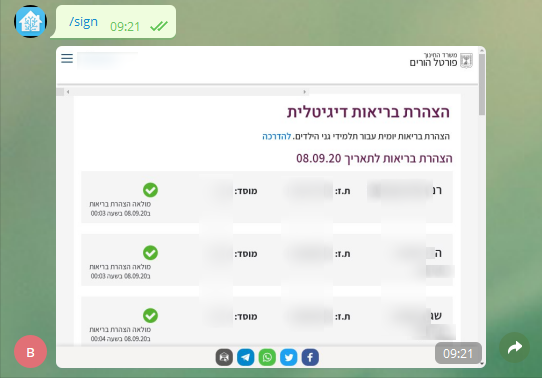
- Portal passwords are stored in plain text in
config.yml. Protect the config folder and do not commit it anywhere. - Always set
ALLOWED_IDS, so only your own chat IDs can trigger sign-ins with your credentials. Known weakness: the check is a substring test on the rawALLOWED_IDStext, so any chat ID whose digits appear inside the value passes (for example,12345678is accepted when123456789is allowed). - Before opening a portal, each worker loads
https://bots.techblog.co.il/edu.html(edu worker) orhttps://bots.techblog.co.il/infogan.html(all other workers) as a full page load in the same headless browser (a usage ping). Your portal credentials are not part of that request. - The bot only makes outgoing connections (Telegram API and the portals); it does not expose any port.
- "Well, Somthing went wrong, please check the logs for more info" or
ERROR: ...in Telegram: the worker failed, usually because the portal page changed or the login failed. Check the container logs withdocker logs botvid. - "xxx NOT configured": the matching section in
config.ymlis empty. Fill it in and restart the container, since the config is only read at startup. - The bot answers with a "No Trespassing" image: your chat ID is not in
ALLOWED_IDS. - "Signed" does not guarantee anything was signed:
/sign_mashovignores the worker result, and the edu and Webtop workers report success when the sign button is missing or disabled. Always check the returned screenshot and the container logs. - The bot crashes at startup or on
/start: a section or key is missing fromconfig.yml. Restore the full template and leave unused values blank.
Project layout:
dockerbot.py          # Telegram bot: commands, access control, config loading
helpers.py            # Chrome/Selenium setup, screenshots, logging
workers/              # One Selenium worker per portal
  Health_Statements.py            # edu
  Mashov_Health_Statements.py
  Infogan_Health_Statements.py
  Webtop_Health_Statements.py
  Amdocs_Health_Statements.py
config.yml            # Default config template
supervisord.conf      # Runs dockerbot.py in the container
Dockerfile            # amd64 image (Chrome + ChromeDriver)
arm/                  # Legacy ARM Dockerfile and helpers
The paths in the code (/opt/dockerbot/..., the ChromeDriver path) assume the Docker image layout, so build and run the bot with Docker.
CI:
.github/workflows/docker.ymlbuilds and pushestechblog/botvid-19:latestandtechblog/botvid-19:<VERSION>when a GitHub release is published..github/workflows/publish-ghcr.ymlis a manual workflow that pushesghcr.io/t0mer/botvid-19.
Issues and pull requests are welcome. For a new portal, add a worker in workers/, a section in config.yml, a command in dockerbot.py, and a COPY line in the Dockerfile.
This project is licensed under the Apache License 2.0.
If you find this project helpful, you can give me a cup of coffee :)


