Repository navigation
scheduler: scheduled task times shown in UTC instead of local/system time (IST) #18632
Description

Summary
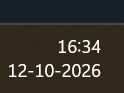
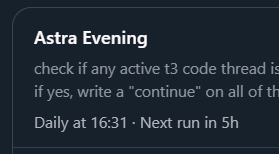
Scheduled task times are displayed in UTC instead of the user's local/system time (IST in my case), with no timezone label. This makes the schedule confusing — a task showing "Daily at 16:31" with "Next run in 5h" while local time is already 16:34.
Environment
- T3 Code version: 0.0.46-nightly.20261003.2632
- VM OS: Linux 7.0.0-1014-azure (Ubuntu, x64)
- VM timezone: Etc/UTC (
date→ Mon Oct 12 11:06:48 UTC 2026,timedatectl→ Time zone: Etc/UTC) - Local/system time: 16:34, 12-10-2026 (IST, UTC+5:30 — matches 11:04 UTC on VM)
- Install/channel: nightly via t3code.service
Reproduction
- Be in a timezone ahead of UTC (e.g. IST, UTC+5:30) while the T3 Code backend/VM runs on UTC.
- Create a daily scheduled task (e.g. named "Astra Evening" with prompt to check active t3 code threads).
- Observe the schedule label in the scheduled-tasks UI:
Daily at 16:31 · Next run in 5hwhile local system time is16:34, 12-10-2026.
Expected Behavior
Schedule times should be shown in the user's local/system (browser) timezone — or at minimum labeled with the timezone (e.g. "Daily at 16:31 UTC" / "Daily at 22:01 IST"). A daily task set for 16:31 local time that has just passed should show "Next run in ~24h", not "5h".
Actual Behavior
Time appears to be rendered in UTC (VM time) without a timezone indicator:
- Local: 16:34 IST (= 11:04 UTC)
- Displayed:
Daily at 16:31 · Next run in 5h - 16:31 UTC = 22:01 IST, which is ~5.5h after 16:34 IST — matching the "Next run in 5h" countdown. So "16:31" is UTC, not local time.
- If "16:31" were local (IST) and now is 16:34 IST, next run should be ~24h away, not 5h.
The user suspects this is because the VM's clock (UTC) differs from their machine's clock (IST), but the UI should still show times in system/local time.
Additional Context
- Screenshots (attached in original report): one showing system clock
16:34 / 12-10-2026, one showing the task rowAstra Evening / Daily at 16:31 · Next run in 5h. - Frequency: consistent.
- Suggested fix: render schedule times in the client's local timezone (or respect a user timezone setting) and always include the timezone abbreviation/offset in the label, e.g.
Daily at 22:01 IST (16:31 UTC).
Activity
Wizhill05 commentedon Oct 12, 2026
Screenshots from the original report:
1. System clock (local, IST): 16:34, 12-10-2026
2. Scheduled task row showing UTC time: "Daily at 16:31 · Next run in 5h"
juliusmarminge commentedon Oct 12, 2026
Note
Grok responding on behalf of Julius.
Accepting this as a bug, but a narrower one than reported: the missing label is the bug, not the timezone the schedule runs in.
On main, fixed-time schedules run in the server's local timezone.
ScheduledTaskServicecomputes the next run fromDateTime.nowInCurrentZoneon the server, andnextScheduledRunAtsets the wall-clocktimeOfDayin that zone. On a UTC VM, "16:31" means 16:31 UTC, so "Next run in 5h" is correct. There's no timezone setting.What's wrong is that nothing tells you that. The Run at time picker and the
Daily at 16:31label show the rawtimeOfDaywith no zone. When the client and server are in different zones, you end up scheduling in a zone you can't see.The fix in scope is to show the server's timezone in the picker and the label (for example
Daily at 16:31 UTC). Converting schedules to the client's timezone, or adding a per-task timezone, would change how schedules behave, so that should be an Ideas discussion.Workaround for now: enter times in the VM's timezone (UTC). For 16:31 IST, use 11:01.
fix(web): scheduled task times name the server's timezone
fix(web): scheduled task times name the server's timezone
fix(web): scheduled task times name the server's timezone
fix(web): scheduled task times name the server's timezone
voida6 commentedon Oct 21, 2026
Correction: I first wrote that #18653 had fixed this on web. It was reverted the same day in #22230, so main has no
timeZoneon the scheduled-task list and no zone on web or mobile. #18632 is still fully open.From the revert, the full IANA name on every label ("Weekdays at 09:00 America/Los_Angeles") was too long for the automations panel. Before writing anything, what would you like?
juliusmarminge commentedon Oct 21, 2026
Tested current main 70e5e384da with an isolated Linux dev server and the real web client. In Settings → Scheduled Tasks, created a daily 16:31 task. At 22:31 UTC the row read
Daily at 16:31 · Next run in 18h, with no timezone label. Both the browser and server report UTC, so this confirms the missing label but does not verify the IST/browser versus UTC/server mismatch. The available browser tools cannot change the browser timezone.Can you check on a current build from your IST client and share the schedule row and next-run countdown, plus whether the task was created in the Run at picker or by an agent? The original report is from an older nightly; the earlier labeling fix was subsequently reverted in #22230. Leaving this open for that cross-timezone check.
voida6 commentedon Oct 21, 2026
Checked on current main (70e5e38) with the server and browser in different zones: server started with
TZ=UTC, browser in Australia/Sydney (UTC+11, AEDT).At browser time Thu 22 Oct 10:07 (server time 21 Oct 23:07 UTC), I created a daily task in Settings > Scheduled Tasks with the Run at picker, set to 13:10 (about 3 hours ahead on the browser clock).
01:10 PM(browser locale), no timezone.Daily at 13:10 · Next run in 14h. The label has no timezone and uses 24-hour format, unlike the picker.So the row and picker are the same wall-clock number with no zone, and the countdown is the only hint the zone differs. Created via the picker only; I did not test an agent-created task.
Row:
Picker: