Skip to content

Update the accounting software options and switch to a tile layout - #102267

Merged
roryabraham merged 2 commits into
Expensify:mainfrom
samarroy84:fix-100691
Sep 26, 2026
Merged

roryabraham merged 2 commits into
Expensify:mainfrom
samarroy84:fix-100691

Conversation

@samarroy84

@samarroy84 samarroy84 commented Sep 25, 2026 •

Copy link
Copy Markdown
Contributor

Explanation of Change

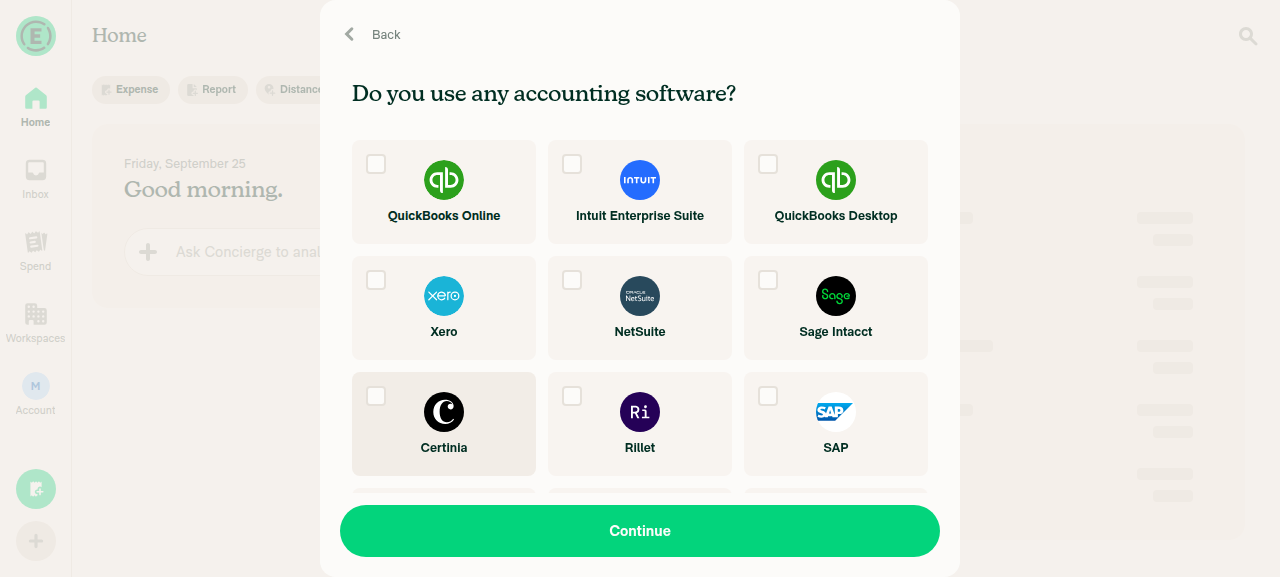
Onboarding accounting step now shows options as tiles, driven by ONBOARDING_ACCOUNTING_MAPPING.

  • Adds Intuit Enterprise Suite, Certinia, Rillet. A type check fails if a new accounting connection is neither offered nor explicitly excluded.
  • "Other" uses the pencil illustration. Its input label is now "Name of software". Removes unused onboarding.accounting.none.
  • Picking Intuit Enterprise Suite, Certinia or Rillet creates a Control workspace, since they need Control to connect. Product call, please confirm.
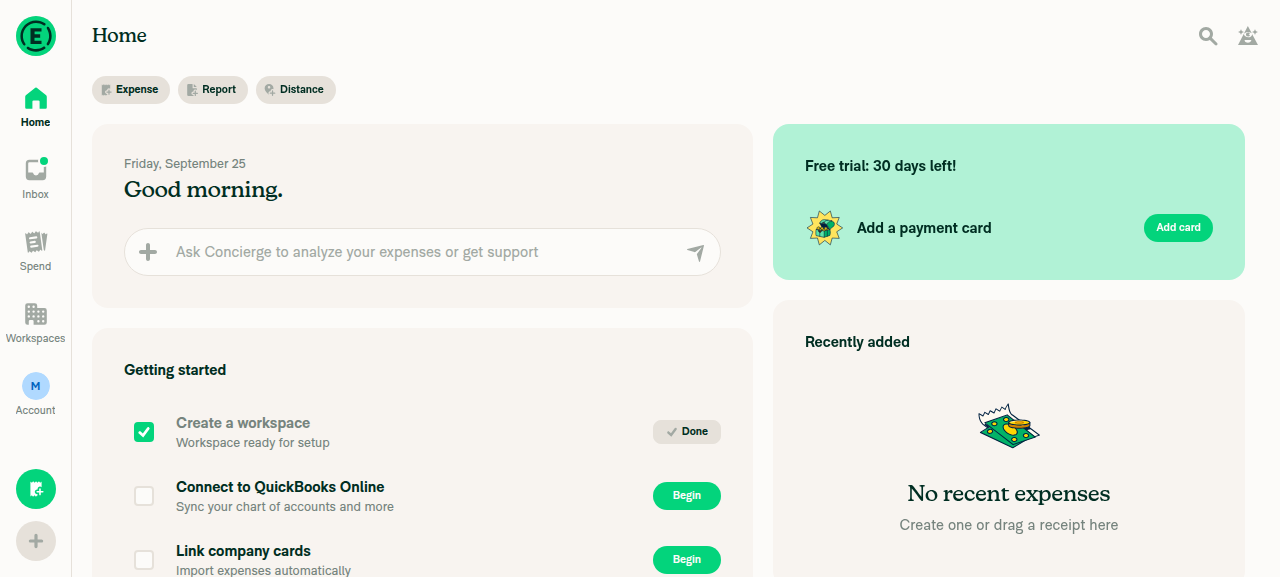
  • Getting Started "Connect to X" links these three to the Connections page.

Fixed Issues

$ #100691
PROPOSAL: #100691 (comment)

Tests

  1. Sign up with a new account, pick "Manage my team's expenses", continue to "Do you use any accounting software?".
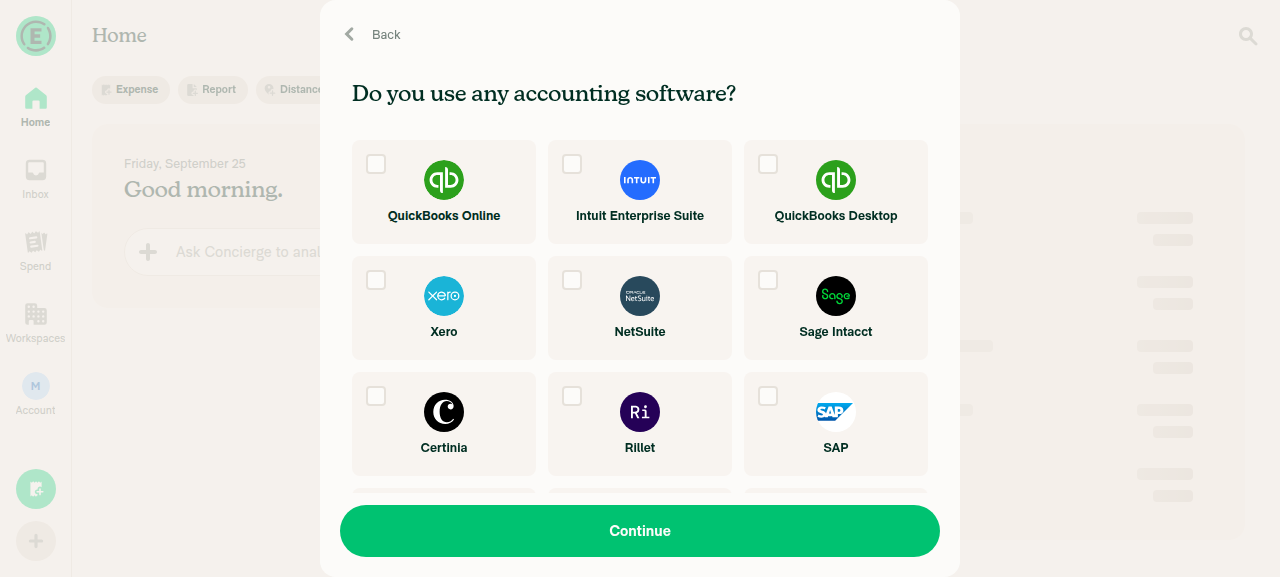
  2. Verify 12 tiles in this order: QuickBooks Online, Intuit Enterprise Suite, QuickBooks Desktop, Xero, NetSuite, Sage Intacct, Certinia, Rillet, SAP, Oracle, Microsoft Dynamics, Other. 3 columns on wide screens, 2 on narrow.
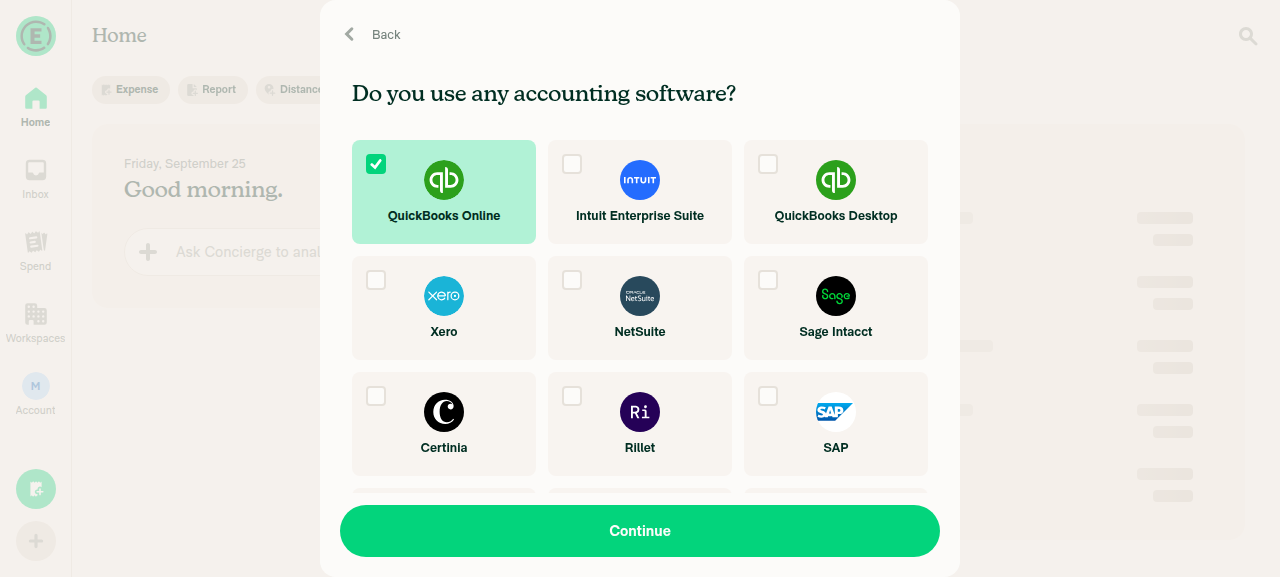
  3. Select a tile. Verify it turns green, its checkbox is checked, and only one tile is selected.
  4. Select Other. Verify the "Name of software" input appears and is focused.
  5. Select Certinia, press Continue. Verify the workspace is Control and the task reads "Connect to Certinia".
  6. On Home, tap "Connect to Certinia" in Getting Started. Verify it opens Connections.
  7. Repeat steps 2–3 in dark mode.
  • Verify that no errors appear in the JS console

Offline tests

Same as Tests

QA Steps

Same as Tests

  • Verify that no errors appear in the JS console

PR Author Checklist

  • I linked the correct issue in the ### Fixed Issues section above
  • I wrote clear testing steps that cover the changes made in this PR
    • I added steps for local testing in the Tests section
    • I added steps for the expected offline behavior in the Offline steps section
    • I added steps for Staging and/or Production testing in the QA steps section
    • I added steps to cover failure scenarios (i.e. verify an input displays the correct error message if the entered data is not correct)
    • I turned off my network connection and tested it while offline to ensure it matches the expected behavior (i.e. verify the default avatar icon is displayed if app is offline)
    • I tested this PR with a High Traffic account against the staging or production API to ensure there are no regressions (e.g. long loading states that impact usability).
  • I included screenshots or videos for tests on all platforms
  • I ran the tests on all platforms & verified they passed on:
    • Android: Native
    • Android: mWeb Chrome
    • iOS: Native
    • iOS: mWeb Safari
    • MacOS: Chrome / Safari
  • I verified there are no console errors (if there's a console error not related to the PR, report it or open an issue for it to be fixed)
  • I followed proper code patterns (see Reviewing the code)
    • I verified that any callback methods that were added or modified are named for what the method does and never what callback they handle (i.e. toggleReport and not onIconClick)
    • I verified that comments were added to code that is not self explanatory
    • I verified that any new or modified comments were clear, correct English, and explained "why" the code was doing something instead of only explaining "what" the code was doing.
    • I verified any copy / text that was added to the app is grammatically correct in English. It adheres to proper capitalization guidelines (note: only the first word of header/labels should be capitalized), and is either coming verbatim from figma or has been approved by marketing (in order to get marketing approval, ask the Bug Zero team member to add the Waiting for copy label to the issue)
  • If a new code pattern is added I verified it was agreed to be used by multiple Expensify engineers
  • I followed the guidelines as stated in the Review Guidelines
  • I tested other components that can be impacted by my changes (i.e. if the PR modifies a shared library or component like Avatar, I verified the components using Avatar are working as expected)
  • If any new file was added I verified that:
    • The file has a description of what it does and/or why is needed at the top of the file if the code is not self explanatory
  • If a new CSS style is added I verified that:
    • A similar style doesn't already exist
    • The style can't be created with an existing StyleUtils function (i.e. StyleUtils.getBackgroundAndBorderStyle(theme.componentBG))
  • If new assets were added or existing ones were modified, I verified that:
    • The assets are optimized and compressed (for SVG files, run npm run compress-svg)
    • The assets load correctly across all supported platforms.
  • If the PR modifies code that runs when editing or sending messages, I tested and verified there is no unexpected behavior for all supported markdown - URLs, single line code, code blocks, quotes, headings, bold, strikethrough, and italic.
  • If the PR modifies a generic component, I tested and verified that those changes do not break usages of that component in the rest of the App (i.e. if a shared library or component like Avatar is modified, I verified that Avatar is working as expected in all cases)
  • If the PR modifies a component related to any of the existing Storybook stories, I tested and verified all stories for that component are still working as expected.
  • If the PR modifies a component or page that can be accessed by a direct deeplink, I verified that the code functions as expected when the deeplink is used - from a logged in and logged out account.
  • If the PR modifies the UI (e.g. new buttons, new UI components, changing the padding/spacing/sizing, moving components, etc) or modifies the form input styles:
    • I verified that all the inputs inside a form are aligned with each other.
    • I added Design label and/or tagged @Expensify/design so the design team can review the changes.
  • I added unit tests for any new feature or bug fix in this PR to help automatically prevent regressions in this user flow.
  • If the main branch was merged into this PR after a review, I tested again and verified the outcome was still expected according to the Test steps.

Screenshots/Videos

Android: Native
android.mov
Android: mWeb Chrome
iOS: Native
iOS: mWeb Safari
MacOS: Chrome / Safari
web1.mov
web2.mov

@melvin-bot

melvin-bot Bot commented Sep 25, 2026

Copy link
Copy Markdown

Hey, I noticed you changed src/languages/en.ts in a PR from a fork. For security reasons, translations are not generated automatically for PRs from forks.

If you want to automatically generate translations for other locales, an Expensify employee will have to:

  1. Look at the code and make sure there are no malicious changes.
  2. Run the Generate static translations GitHub workflow. If you have write access and the K2 extension, you can simply click: [this button]

Alternatively, if you are an external contributor, you can run the translation script locally with your own OpenAI API key. To learn more, try running:

npx bun ./scripts/generateTranslations.ts --help

Typically, you'd want to translate only what you changed by running npx bun ./scripts/generateTranslations.ts --compare-ref main

@codecov

codecov Bot commented Sep 25, 2026 •

Copy link
Copy Markdown

Codecov Report

❌ Looks like you've decreased code coverage for some files. Please write tests to increase, or at least maintain, the existing level of code coverage. See our documentation here for how to interpret this table.

Files with missing lines Coverage Δ
src/CONST/index.ts 94.06% <ø> (ø)
src/libs/ReportUtils.ts 87.58% <100.00%> (+0.04%) ⬆️
...tingStartedSection/hooks/useGettingStartedItems.ts 98.64% <ø> (ø)
src/styles/index.ts 63.90% <ø> (ø)
src/styles/theme/themes/dark.ts 100.00% <ø> (ø)
src/styles/theme/themes/light.ts 100.00% <ø> (ø)
.../OnboardingAccounting/BaseOnboardingAccounting.tsx 97.77% <95.23%> (-0.05%) ⬇️
... and 17 files with indirect coverage changes

@samarroy84
samarroy84 marked this pull request as ready for review September 25, 2026 11:30
@samarroy84
samarroy84 requested review from a team as code owners September 25, 2026 11:30
@melvin-bot
melvin-bot Bot requested review from dylanexpensify and mkhutornyi and removed request for a team September 25, 2026 11:30
@melvin-bot

melvin-bot Bot commented Sep 25, 2026

Copy link
Copy Markdown

@mkhutornyi Please copy/paste the Reviewer Checklist from here into a new comment on this PR and complete it. If you have the K2 extension, you can simply click: [this button]

@MelvinBot

Copy link
Copy Markdown
Contributor

Review

I found no blocking issues. The code looks correct and all CI checks pass, except the independent-approval check.

What I verified

  • The type guard works. I removed rillet from ONBOARDING_ACCOUNTING_MAPPING and ran npm run typecheck. It failed with Type '"rillet"' does not satisfy the constraint 'never', and the satisfies check in BaseOnboardingAccounting failed too.
  • The Control requirement matches the App. Intuit Enterprise Suite, Certinia and Rillet are already behind the Control upgrade on the Accounting page (src/CONST/index.ts:8409-8433). Creating a Control workspace for them is consistent. Product still owns the final call.
  • The removed keys are unused. Nothing else uses onboarding.accounting.none or onboardingSmallIcon. The contrast themes spread the base themes, so they get selectedOptionBG too.

Suggestions (non-blocking)

  1. Two Control lists need to stay in sync. New workspaces use CONST.POLICY.CONNECTIONS.CORPORATE (Policy.ts:2813). Existing onboarding workspaces use requiresControlPlan (ReportUtils.ts:12966). The two already differ, because only CORPORATE includes SAP, Oracle, Microsoft Dynamics and Other. Consider deriving one list from the other, or adding a comment that explains the difference.
  2. The guard does not cover DIRECT_CONNECT_INTEGRATIONS (useGettingStartedItems.ts:59). Only a comment keeps it in sync. You could type the Set with OnboardingAccountingOption so a typo or stale key fails typecheck.
  3. Confirm the backend matches. The Control type for intuitEnterpriseSuite, financialforce and rillet is only optimistic. If the API does not also create Control for these values, the workspace falls back to Collect when the response arrives. An internal engineer should confirm this before merge.

view run

@MelvinBot

Copy link
Copy Markdown
Contributor

Regression check

I found no regressions in the App code. Existing options (QuickBooks Online, Xero, NetSuite, Other and the rest) keep the same stored values, the same Collect or Control choice, and the same Getting Started task. The web test results follow in the next comment.

What I checked

  • Control choice. This PR only adds entries to the two Control lists (CONST/index.ts:4845 and ReportUtils.ts:12966). Existing options behave as before. On web, picking QuickBooks Online still created a Collect workspace.
  • Restoring a saved choice. isIntegrationKey still recognizes every old key. Unknown values still fall back to Other.
  • Removed code. Nothing else uses onboarding.accounting.none, onboardingSmallIcon or the removed spacer test ID. The contrast themes get selectedOptionBG from the base themes.

Needs internal confirmation (not verifiable from App)

  • The API now receives three new userReportedIntegration values: intuitEnterpriseSuite, financialforce and rillet. If the backend rejects them, finishing onboarding could fail. If it doesn't create a Control workspace for them, the workspace falls back to Collect after the response. An internal engineer should confirm both before merge.

Not covered by the web test

  • The "Other" input and hovering over the selected tile. The tester's click on Other landed on Continue, because scrolling didn't work in the test session. This looks like a test-tool problem, but please re-check test step 4 by hand.

view run

@MelvinBot

MelvinBot commented Sep 25, 2026 •

Copy link
Copy Markdown
Contributor

🤖 Web test steps verification results: ⚠️ partial

Tile order, the empty-selection error, single selection, hover on an unselected tile, finishing onboarding with QuickBooks Online (Collect plan) and the Getting Started link to Connections all passed. The "Other" input and hover over the selected tile weren't verified, because a click meant for the Other tile hit Continue and finished onboarding early (scrolling didn't work in the test session).
Accounting Connections page from Getting Started

Step Status
12 tiles in the specified order, 3 per row, with no truncation or overlapThe accessibility tree showed this exact order: QuickBooks Online, Intuit Enterprise Suite, QuickBooks Desktop, Xero, NetSuite, Sage Intacct, Certinia, Rillet, SAP, Oracle, Microsoft Dynamics, Other. The screenshot shows 3 tiles per row, and none of the first 9 labels are truncated. The last row (Oracle, Microsoft Dynamics, Other) is present in the accessibility tree but isn't in the screenshot, because scrolling didn't work.
First 9 tiles, 3 per row
✅
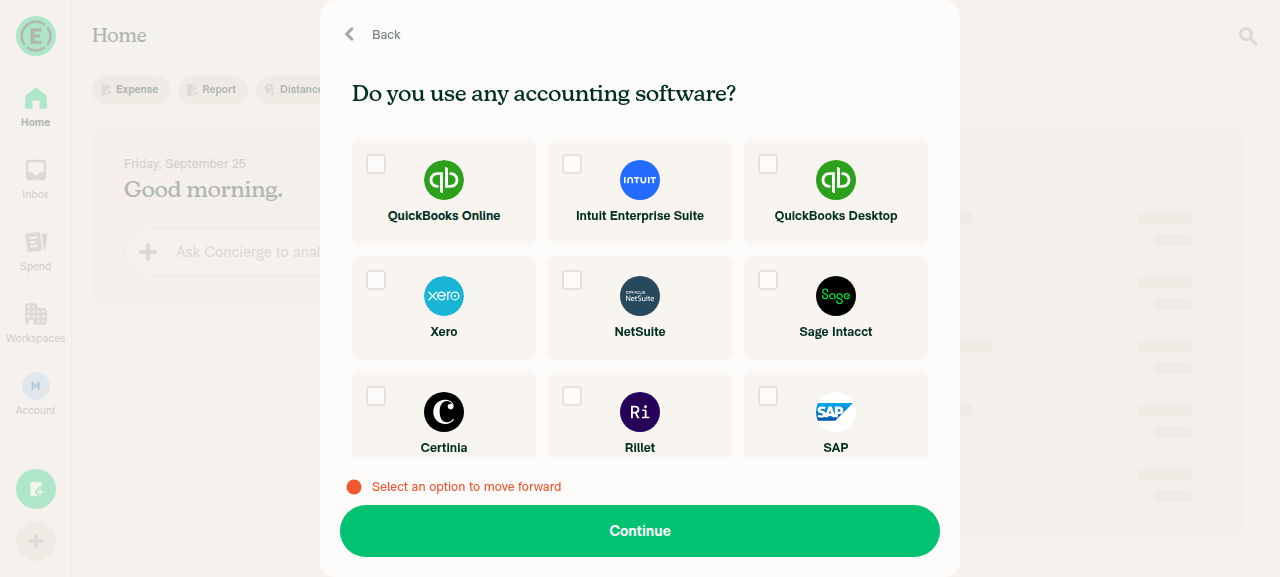
Continue with nothing selected shows the selection error"Select an option to move forward" appeared above Continue.
Validation error with no tile selected
✅
Selecting Xero, then QuickBooks Online, leaves only QuickBooks Online selectedOnly the QuickBooks Online tile has the green fill and a checked box.
Only QuickBooks Online selected
✅
Selecting Other shows a focused "Name of software" input, and selecting Xero hides itNot tested. The click meant for Other landed on Continue, which submitted the QuickBooks Online choice and finished onboarding.
❌
Hovering an unselected tile shows a hover background, and the selected tile keeps its green fillHovering the unselected Certinia tile showed a grey background. Hovering the selected tile wasn't tested before onboarding finished.
Hover on unselected Certinia tile
⚠️
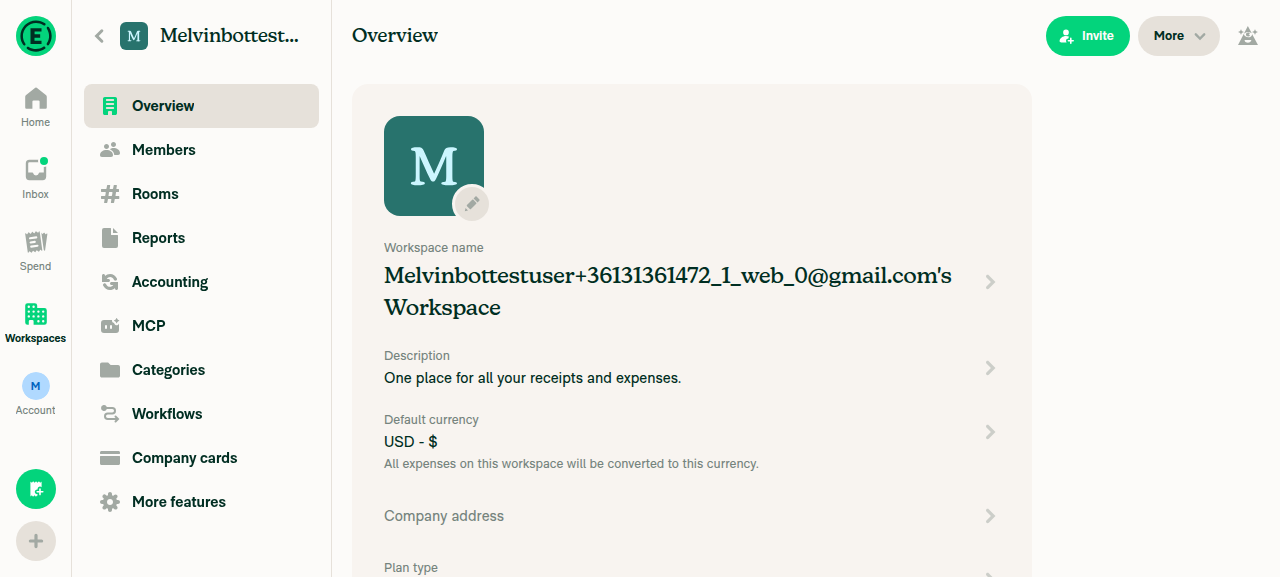
Picking QuickBooks Online and pressing Continue finishes onboarding on Home, and the plan type is reportedOnboarding finished on Home with no errors. The workspace overview shows "Plan type, Collect".
Home after onboarding with QuickBooks OnlineWorkspace overview
✅
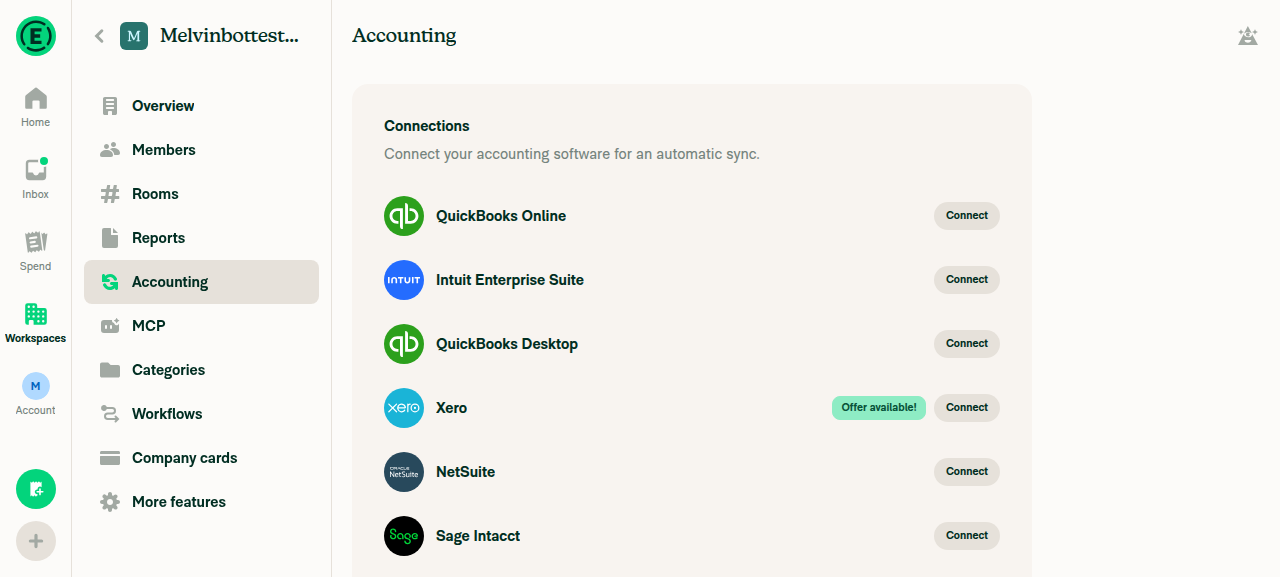
Getting Started shows "Connect to QuickBooks Online" and opens Accounting > ConnectionsThe task appeared with a Begin button. Tapping it opened the workspace Connections page.
Home after onboarding with QuickBooks OnlineAccounting Connections page from Getting Started
✅

view run · view recording

@mkhutornyi

Copy link
Copy Markdown
Contributor

Reviewer Checklist

  • I have verified the author checklist is complete (all boxes are checked off).
  • I verified the correct issue is linked in the ### Fixed Issues section above
  • I verified testing steps are clear and they cover the changes made in this PR
    • I verified the steps for local testing are in the Tests section
    • I verified the steps for Staging and/or Production testing are in the QA steps section
    • I verified the steps cover any possible failure scenarios (i.e. verify an input displays the correct error message if the entered data is not correct)
    • I turned off my network connection and tested it while offline to ensure it matches the expected behavior (i.e. verify the default avatar icon is displayed if app is offline)
  • I checked that screenshots or videos are included for tests on all platforms
  • I included screenshots or videos for tests on all platforms
  • I verified that the composer does not automatically focus or open the keyboard on mobile unless explicitly intended. This includes checking that returning the app from the background does not unexpectedly open the keyboard.
  • I verified tests pass on all platforms & I tested again on:
    • Android: HybridApp
    • Android: mWeb Chrome
    • iOS: HybridApp
    • iOS: mWeb Safari
    • MacOS: Chrome / Safari
  • If there are any errors in the console that are unrelated to this PR, I either fixed them (preferred) or linked to where I reported them in Slack
  • I verified proper code patterns were followed (see Reviewing the code)
    • I verified that any callback methods that were added or modified are named for what the method does and never what callback they handle (i.e. toggleReport and not onIconClick).
    • I verified that comments were added to code that is not self explanatory
    • I verified that any new or modified comments were clear, correct English, and explained "why" the code was doing something instead of only explaining "what" the code was doing.
    • I verified any copy / text that was added to the app is grammatically correct in English. It adheres to proper capitalization guidelines (note: only the first word of header/labels should be capitalized), and is either coming verbatim from figma or has been approved by marketing (in order to get marketing approval, ask the Bug Zero team member to add the Waiting for copy label to the issue)
  • If a new code pattern is added I verified it was agreed to be used by multiple Expensify engineers
  • I verified that this PR follows the guidelines as stated in the Review Guidelines
  • I verified other components that can be impacted by these changes have been tested, and I retested again (i.e. if the PR modifies a shared library or component like Avatar, I verified the components using Avatar have been tested & I retested again)
  • If a new component is created I verified that:
    • A similar component doesn't exist in the codebase
    • All props are defined accurately and each prop has a /** comment above it */
    • The file is named correctly
    • The component has a clear name that is non-ambiguous and the purpose of the component can be inferred from the name alone
    • The only data being stored in the state is data necessary for rendering and nothing else
    • For Class Components, any internal methods passed to components event handlers are bound to this properly so there are no scoping issues (i.e. for onClick={this.submit} the method this.submit should be bound to this in the constructor)
    • Any internal methods bound to this are necessary to be bound (i.e. avoid this.submit = this.submit.bind(this); if this.submit is never passed to a component event handler like onClick)
    • All JSX used for rendering exists in the render method
    • The component has the minimum amount of code necessary for its purpose, and it is broken down into smaller components in order to separate concerns and functions
  • If any new file was added I verified that:
    • The file has a description of what it does and/or why is needed at the top of the file if the code is not self explanatory
  • If a new CSS style is added I verified that:
    • A similar style doesn't already exist
    • The style can't be created with an existing StyleUtils function (i.e. StyleUtils.getBackgroundAndBorderStyle(theme.componentBG)
  • If the PR modifies code that runs when editing or sending messages, I tested and verified there is no unexpected behavior for all supported markdown - URLs, single line code, code blocks, quotes, headings, bold, strikethrough, and italic.
  • If the PR modifies a generic component, I tested and verified that those changes do not break usages of that component in the rest of the App (i.e. if a shared library or component like Avatar is modified, I verified that Avatar is working as expected in all cases)
  • If the PR modifies a component related to any of the existing Storybook stories, I tested and verified all stories for that component are still working as expected.
  • If the PR modifies a component or page that can be accessed by a direct deeplink, I verified that the code functions as expected when the deeplink is used - from a logged in and logged out account.
  • If the PR modifies the UI (e.g. new buttons, new UI components, changing the padding/spacing/sizing, moving components, etc) or modifies the form input styles:
    • I verified that all the inputs inside a form are aligned with each other.
    • I added Design label and/or tagged @Expensify/design so the design team can review the changes.
  • For any bug fix or new feature in this PR, I verified that sufficient unit tests are included to prevent regressions in this flow.
  • If the main branch was merged into this PR after a review, I tested again and verified the outcome was still expected according to the Test steps.
  • I have checked off every checkbox in the PR reviewer checklist, including those that don't apply to this PR.

Screenshots/Videos

Android: HybridApp
Android: mWeb Chrome
iOS: HybridApp
ios.mp4
iOS: mWeb Safari
msafari.mp4
MacOS: Chrome / Safari
web.mov

@melvin-bot
melvin-bot Bot requested a review from roryabraham September 25, 2026 14:07

@roryabraham roryabraham left a comment

Copy link
Copy Markdown
Contributor

Choose a reason for hiding this comment

The reason will be displayed to describe this comment to others. Learn more.

LGTM 👍🏼

@roryabraham
roryabraham merged commit 8906166 into Expensify:main Sep 26, 2026
41 of 43 checks passed
@github-actions

Copy link
Copy Markdown
Contributor

🚧 roryabraham has triggered a test Expensify/App build. You can view the workflow run here.

@OSBotify

Copy link
Copy Markdown
Contributor

✋ This PR was not deployed to staging yet because QA is ongoing. It will be automatically deployed to staging after the next production release.

@OSBotify

Copy link
Copy Markdown
Contributor

🚀 Deployed to staging by https://github.com/roryabraham in version: 9.4.95-0 🚀

platform result
🕸 web 🕸 success ✅
🤖 android 🤖 success ✅
🍎 iOS 🍎 success ✅

@MelvinBot

Copy link
Copy Markdown
Contributor

Help site review: no changes needed

This PR doesn't require any help site changes, so I didn't create a docs PR.

No article under App/docs/articles covers the onboarding step Do you use any accounting software? None of them list its options, the "Other" input label, or which plan onboarding creates. Nothing in the help site is out of date because of this PR.

What I checked
  • Onboarding accounting step (new tiles, 3 new options, "Name of software" label): No article covers this screen. I searched for the screen title, the old "Your accounting software" label, and onboarding plus accounting.
  • Control workspace for Intuit Enterprise Suite, Certinia and Rillet: Each connection article already says the integration needs the Control plan: Connect-to-Intuit-Enterprise-Suite.md:24, Connect-To-Certinia.md:12, Connect-to-Rillet.md:26. No article says which plan onboarding picks.
  • Getting started "Connect to X" task linking to Connections: Expensify-Home-Overview.md:135-139 only says the checklist depends on your onboarding intent. It doesn't list tasks or where they link, so it's still accurate.
  • Unrelated gap (not caused by this PR): Create-a-company-workspace.md:26-36 lists only QuickBooks Online, Xero, NetSuite and Sage Intacct. It covers connecting from a workspace, not onboarding. If you want it updated, ask me and I'll open a separate docs PR.

@samarroy84, no help site PR was needed for this change, so there's nothing to mark Ready for review. If you'd still like the onboarding accounting step documented, reply with @MelvinBot and I'll draft it.


view run

@nlemma

nlemma commented Sep 28, 2026

Copy link
Copy Markdown

Deploy Blocker #102469 was identified to be related to this PR.

@nlemma

nlemma commented Sep 28, 2026

Copy link
Copy Markdown

Deploy Blocker #102475 was identified to be related to this PR.

@OSBotify

Copy link
Copy Markdown
Contributor

🚀 Deployed to production by https://github.com/Julesssss in version: 9.4.95-4 🚀

platform result
🕸 web 🕸 success ✅
🤖 android 🤖 failure ❌
🍎 iOS 🍎 failure ❌

Sign up for free to join this conversation on GitHub. Already have an account? Sign in to comment

Labels

None yet

Projects

None yet

Development

Successfully merging this pull request may close these issues.

6 participants