Skip to content

Localize remaining display dates - #105846

Closed
roryabraham wants to merge 1 commit into
mainfrom
fix/98088-localized-display-dates
Closed

roryabraham wants to merge 1 commit into
mainfrom
fix/98088-localized-display-dates

Conversation

@roryabraham

@roryabraham roryabraham commented Nov 4, 2026 •

Copy link
Copy Markdown
Contributor

Explanation of Change

Display dates now follow the language selected in the app, including date order, punctuation, and connecting words.

The shared formatters distinguish calendar dates from timestamps and dates already adjusted to a selected timezone. Expense dates stay on their original day, year labels agree with the displayed date, and annual renewal dates no longer move back a day in timezones behind UTC. Stored transaction dates, status expiry values, and the persisted per-diem merchant format remain unchanged.

Fixed Issues

$ #98088

Tests

  1. Open https://dev.new.expensify.com:8582/ with this branch's development server running.
  2. Enter a disposable email address.
  3. Click Continue.
  4. Click Join if the address is new.
  5. Enter 000000 if the local development app asks for a verification code.
  6. Complete any setup questions until the Home screen appears.
  7. Click Expense above the Home greeting.
  8. Click Not now if a location-access prompt appears.
  9. Select Manual.
  10. Enter 10 in Amount.
  11. Enter Locale date check in Merchant.
  12. Click Date to open its calendar.
  13. Click the month name above the calendar days.
  14. Select January.
  15. Select day 22 in the current calendar year.
  16. Click Create expense.
  17. Open https://dev.new.expensify.com:8582/settings/preferences/language.
  18. Select Deutsch.
  19. Click Save.
  20. Click Startseite on the left rail to return to Home.
  21. Verify the date above the greeting places the day before the month and does not include a year, such as Dienstag, 3. November.
  22. Click Ausgaben on the left rail to open the expense list.
  23. Verify the Locale date check expense shows 22. Jan. without a year.
  24. Click the expense row to open its details.
  25. Click the Datum field showing the expense's date.
  26. Click Date's input, labelled Datum, to open the calendar.
  27. Click Vorheriges Jahr to select the previous year.
  28. Select January 22.
  29. Click Speichern.
  30. Click Zurück to return to the expense list.
  31. Verify the expense shows 22. Jan. followed by the previous year, such as 22. Jan. 2025.
  32. Open https://dev.new.expensify.com:8582/settings/preferences/language.
  33. Select Español.
  34. Click Speichern.
  35. Click Gastos on the left rail.
  36. Verify the expense shows the day before the month, such as 22 ene 2025.
  37. Open https://dev.new.expensify.com:8582/settings/preferences/language.
  38. Select 日本語.
  39. Click Guardar.
  40. Click 支出 on the left rail.
  41. Verify the expense uses year/month/day order, such as 2025/01/22.
  42. Reload the page.
  43. Verify the language and expense date remain unchanged.
  44. Narrow the browser window to approximately a phone's width.
  45. Verify the Japanese expense date remains readable and unchanged.
  46. Open https://dev.new.expensify.com:8582/settings/preferences/language.
  47. Select English.
  48. Click 保存.
  49. Open https://dev.new.expensify.com:8582/search.
  50. Verify the expense keeps US English ordering, such as Jan 22, 2025.
  51. Open https://dev.new.expensify.com:8582/settings/profile/status.
  52. Click Clear after.
  53. Select Custom.
  54. Click Date.
  55. Open the Date calendar.
  56. Choose a day later in the current year, such as December 2.
  57. Click Save to save the selected date.
  58. Click Save to return to the Status editor.
  59. Enter Locale date check in Message.
  60. Click the status emoji button.
  61. Select 😀.
  62. Click Save.
  63. Open https://dev.new.expensify.com:8582/settings/preferences/language.
  64. Select Deutsch.
  65. Click Save.
  66. Open https://dev.new.expensify.com:8582/settings/profile/status.
  67. Verify the expiry label uses a German numeric date and 24-hour time, such as 02.12.2026 17:19.
  68. Click Speichern without changing the date or time.
  69. Open https://dev.new.expensify.com:8582/settings/profile/status again.
  70. Verify the selected expiry day and time are unchanged.
  71. Click Zurück to close the Status editor.
  72. Click Posteingang on the left rail, or in the bottom navigation on a narrow window.
  73. Open the personal chat named with your email address and (du).
  74. Hover over the 😀 beside your name above the expense preview.
  75. Verify its tooltip uses a German month/day date, such as Bis 02.12. 17:19, rather than 12-02.

Offline tests

  1. Open https://dev.new.expensify.com:8582/settings/preferences/language while online.
  2. Select 日本語.
  3. Save the language selection, or return with the back button if Japanese was already selected.
  4. Open https://dev.new.expensify.com:8582/search while online.
  5. Find the Locale date check expense created above.
  6. Note its year/month/day label, such as 2025/01/22.
  7. Turn off the browser's network connection.
  8. Verify the offline indicator appears and the loaded expense keeps the same date label.
  9. Restore the network connection.
  10. Verify the expense still shows the same day and year after reconnecting.

QA Steps

  1. Open https://staging.new.expensify.com/ after this change reaches staging.
  2. Sign in to a test account using the verification email sent to that account.
  3. Open https://staging.new.expensify.com/settings/preferences/language.
  4. Select English if another language is selected.
  5. Save the selection if the Save button is enabled, or return with the back button if English was already selected.
  6. Open Home from the navigation bar.
  7. Click Expense.
  8. Select Manual.
  9. Enter 10 in Amount.
  10. Enter Locale date check in Merchant.
  11. Open Date.
  12. Click the calendar's month heading.
  13. Select January.
  14. Select day 22 in the current year.
  15. Click Create expense.
  16. Open https://staging.new.expensify.com/settings/preferences/language.
  17. Select Deutsch.
  18. Click Save.
  19. Open https://staging.new.expensify.com/search.
  20. Verify the expense date is 22. Jan. without a year.
  21. Open the expense row.
  22. Open its Datum field.
  23. Open the calendar.
  24. Click Vorheriges Jahr.
  25. Select January 22.
  26. Click Speichern.
  27. Close the expense details with Zurück.
  28. Verify the expense date includes the previous year after the German day and month.
  29. Open https://staging.new.expensify.com/settings/preferences/language.
  30. Select 日本語.
  31. Click Speichern.
  32. Open https://staging.new.expensify.com/search.
  33. Verify the expense date is ordered year/month/day.
  34. Reload the page.
  35. Verify the language and expense day have not changed.
  36. Turn off the browser's network connection.
  37. Verify the loaded expense date remains unchanged while offline.
  38. Restore the network connection.
  39. Verify the expense still shows the same day after reconnecting.

PR Author Checklist

  • I linked the correct issue in the ### Fixed Issues section above
  • I wrote clear testing steps that cover the changes made in this PR
    • I added steps for local testing in the Tests section
    • I added steps for the expected offline behavior in the Offline steps section
    • I added steps for Staging and/or Production testing in the QA steps section
    • I added steps to cover failure scenarios (i.e. verify an input displays the correct error message if the entered data is not correct)
    • I turned off my network connection and tested it while offline to ensure it matches the expected behavior (i.e. verify the default avatar icon is displayed if app is offline)
    • I tested this PR with a High Traffic account against the staging or production API to ensure there are no regressions (e.g. long loading states that impact usability).
  • I included screenshots or videos for tests on all platforms
  • I ran the tests on all platforms & verified they passed on:
    • Android: Native
    • Android: mWeb Chrome
    • iOS: Native
    • iOS: mWeb Safari
    • MacOS: Chrome / Safari
  • I verified there are no console errors (if there's a console error not related to the PR, report it or open an issue for it to be fixed)
  • I verified there are no new alerts related to the canBeMissing param for useOnyx
  • I followed proper code patterns (see Reviewing the code)
    • I verified that any callback methods that were added or modified are named for what the method does and never what callback they handle (i.e. toggleReport and not onIconClick)
    • I verified that comments were added to code that is not self explanatory
    • I verified that any new or modified comments were clear, correct English, and explained "why" the code was doing something instead of only explaining "what" the code was doing.
    • I verified any copy / text shown in the product is localized by adding it to src/languages/* files and using the translation method
      • If any non-english text was added/modified, I used JaimeGPT to get English > Spanish translation. I then posted it in #expensify-open-source and it was approved by an internal Expensify engineer. Link to Slack message:
    • I verified all numbers, amounts, dates and phone numbers shown in the product are using the localization methods
    • I verified any copy / text that was added to the app is grammatically correct in English. It adheres to proper capitalization guidelines (note: only the first word of header/labels should be capitalized), and is either coming verbatim from figma or has been approved by marketing (in order to get marketing approval, ask the Bug Zero team member to add the Waiting for copy label to the issue)
    • I verified proper file naming conventions were followed for any new files or renamed files. All non-platform specific files are named after what they export and are not named "index.js". All platform-specific files are named for the platform the code supports as outlined in the README.
    • I verified the JSDocs style guidelines (in STYLE.md) were followed
  • If a new code pattern is added I verified it was agreed to be used by multiple Expensify engineers
  • I followed the guidelines as stated in the Review Guidelines
  • I tested other components that can be impacted by my changes (i.e. if the PR modifies a shared library or component like Avatar, I verified the components using Avatar are working as expected)
  • I verified all code is DRY (the PR doesn't include any logic written more than once, with the exception of tests)
  • I verified any variables that can be defined as constants (ie. in CONST.ts or at the top of the file that uses the constant) are defined as such
  • I verified that if a function's arguments changed that all usages have also been updated correctly
  • If any new file was added I verified that:
    • The file has a description of what it does and/or why is needed at the top of the file if the code is not self explanatory
  • If a new CSS style is added I verified that:
    • A similar style doesn't already exist
    • The style can't be created with an existing StyleUtils function (i.e. StyleUtils.getBackgroundAndBorderStyle(theme.componentBG))
  • If new assets were added or existing ones were modified, I verified that:
    • The assets are optimized and compressed (for SVG files, run npm run compress-svg)
    • The assets load correctly across all supported platforms.
  • If the PR modifies code that runs when editing or sending messages, I tested and verified there is no unexpected behavior for all supported markdown - URLs, single line code, code blocks, quotes, headings, bold, strikethrough, and italic.
  • If the PR modifies a generic component, I tested and verified that those changes do not break usages of that component in the rest of the App (i.e. if a shared library or component like Avatar is modified, I verified that Avatar is working as expected in all cases)
  • If the PR modifies a component related to any of the existing Storybook stories, I tested and verified all stories for that component are still working as expected.
  • If the PR modifies a component or page that can be accessed by a direct deeplink, I verified that the code functions as expected when the deeplink is used - from a logged in and logged out account.
  • If the PR modifies the UI (e.g. new buttons, new UI components, changing the padding/spacing/sizing, moving components, etc) or modifies the form input styles:
    • I verified that all the inputs inside a form are aligned with each other.
    • I added Design label and/or tagged @Expensify/design so the design team can review the changes.
  • If a new page is added, I verified it's using the ScrollView component to make it scrollable when more elements are added to the page.
  • I added unit tests for any new feature or bug fix in this PR to help automatically prevent regressions in this user flow.
  • If the main branch was merged into this PR after a review, I tested again and verified the outcome was still expected according to the Test steps.

Screenshots/Videos

Android: Native

Not tested on this platform. Native Intl compatibility remains to be verified before this draft is marked ready.

Android: mWeb Chrome

Not tested on an Android device. The narrow-layout screenshot below is desktop Chromium with a phone-sized viewport, not an Android result.

iOS: Native

Not tested on this platform. Native Intl compatibility remains to be verified before this draft is marked ready.

iOS: mWeb Safari

Not tested on this platform.

MacOS: Chrome / Safari

Verified with Playwright Chromium on macOS. Safari was not tested. All evidence was captured before PR creation.

German Home and previous-year expense:

German Home with day-before-month dates

German current-year expense:

German expense date without an unnecessary year

Japanese desktop and narrow layouts:

Japanese expense date in year-month-day order

Japanese expense date in a narrow desktop Chromium viewport

German status expiry and editor:

German status tooltip with localized numeric date

German status editor with localized date and time

Read-only browser fixtures for annual renewal and booking confirmation. Backend requests were blocked while inspecting these fixtures, and the original client values were restored afterward. No paid plan update, payment, or booking was submitted.

German annual renewal preserves January 22 and local date order

German booking confirmation with localized long date

Recorded fixed flow, including year inclusion, date selection, and Spanish/Japanese/English language changes:

fixed-flow-desktop.webm

@roryabraham
roryabraham requested a review from a team November 4, 2026 01:03
@roryabraham

Copy link
Copy Markdown
Contributor Author

@MelvinBot review

@roryabraham

Copy link
Copy Markdown
Contributor Author

@codex review

@chatgpt-codex-connector

chatgpt-codex-connector Bot commented Nov 4, 2026 •

Copy link
Copy Markdown

Codex Review Summary

This comment shows the latest Codex review activity on this pull request.

Review Status Commit Review trigger
📝 Code Review ✅ Completed 2026-11-04T01:48:11.965516Z 6c0021c Draft marked ready
ℹ️ About Codex in GitHub

Your team has set up Codex to review pull requests in this repo. Reviews are triggered when you

  • Open a pull request for review
  • Mark a draft as ready
  • Comment "@codex review" or "@codex security review".

Codex reacts with 👀 while any review is running, comments if it has suggestions, and reacts with 👍 once all reviews finish with no findings.

@codecov

codecov Bot commented Nov 4, 2026 •

Copy link
Copy Markdown

Codecov Report

❌ Looks like you've decreased code coverage for some files. Please write tests to increase, or at least maintain, the existing level of code coverage. See our documentation here for how to interpret this table.

Files with missing lines Coverage Δ
src/CONST/index.ts 95.96% <ø> (ø)
src/components/OnboardingHelpDropdownButton.tsx 96.66% <100.00%> (-0.16%) ⬇️
src/components/PerDiemEReceipt.tsx 93.44% <100.00%> (+93.44%) ⬆️
...components/Search/SearchList/ListItem/DateCell.tsx 100.00% <100.00%> (+8.33%) ⬆️
...SearchList/ListItem/WithdrawalIDListItemHeader.tsx 99.04% <100.00%> (-0.02%) ⬇️
...hList/ListItem/getExpenseReportRowDisplayValues.ts 100.00% <100.00%> (ø)
src/libs/PaymentHistoryUtils.ts 87.17% <100.00%> (ø)
src/libs/ReusableDistanceRoutesUtils.ts 96.66% <100.00%> (+10.00%) ⬆️
src/libs/TransactionPreviewUtils.ts 85.57% <100.00%> (-0.08%) ⬇️
src/libs/Violations/ViolationsUtils.ts 81.76% <100.00%> (ø)
... and 15 more
... and 18 files with indirect coverage changes

@chatgpt-codex-connector

Copy link
Copy Markdown

Codex Review: Didn't find any major issues. Can't wait for the next one!

Reviewed commit: 6c0021c3ef

ℹ️ About Codex in GitHub

Codex has been enabled to automatically review pull requests in this repo. Reviews are triggered when you

  • Open a pull request for review
  • Mark a draft as ready
  • Comment "@codex review".

If Codex has suggestions, it will comment; otherwise it will react with 👍.

When you sign up for Codex through ChatGPT, Codex can also answer questions or update the PR, like "@codex address that feedback".

@MelvinBot

MelvinBot commented Nov 4, 2026 •

Copy link
Copy Markdown
Contributor

🤖 Web test steps verification results: ⚠️ partial

Steps 7–13 passed; January selection was blocked by the test driver’s dialog targeting, leaving localized dates unverified. Static review found no actionable regressions, but browser coverage remains incomplete.
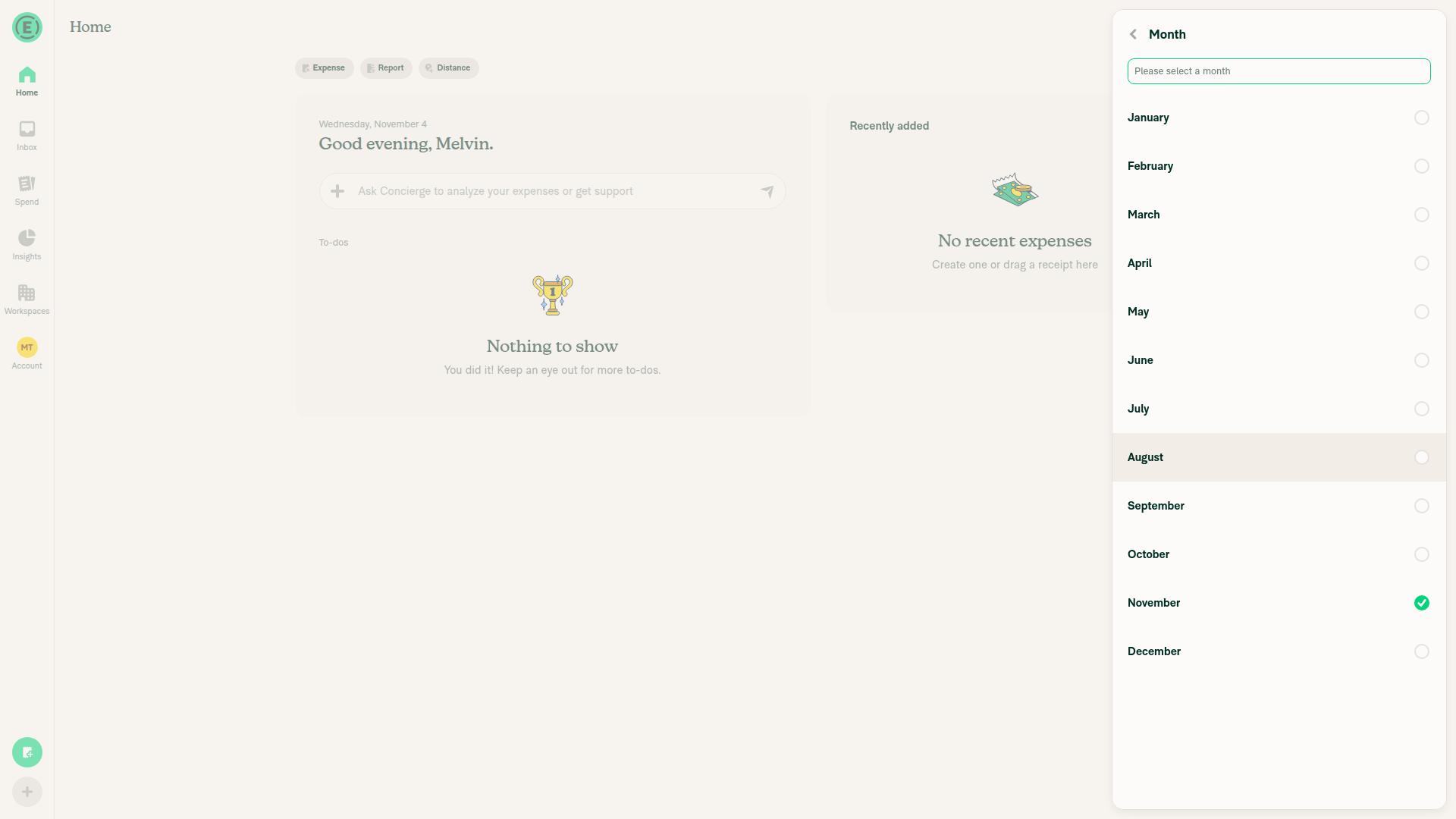
Month selection where browser automation stopped

Step Status
7. Open ExpenseCreate expense opened.
✅
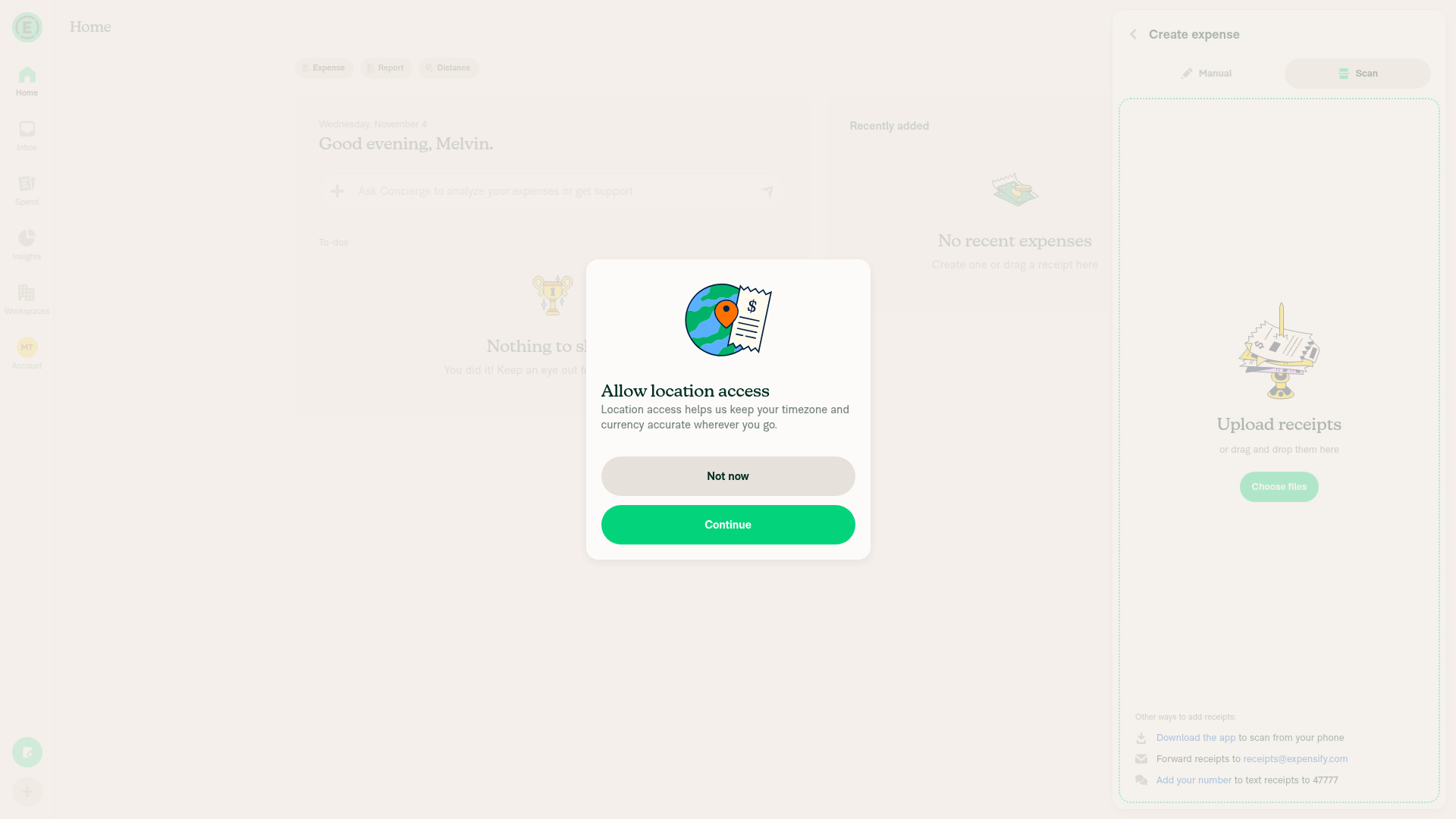
8. Dismiss location promptCoordinate click dismissed it. Screenshot shows the preceding prompt.
Location prompt before successful dismissal
✅
9. Select ManualManual expense fields appeared.
✅
10. Enter Amount 10Read back 10.
✅
11. Enter MerchantRead back Locale date check.
✅
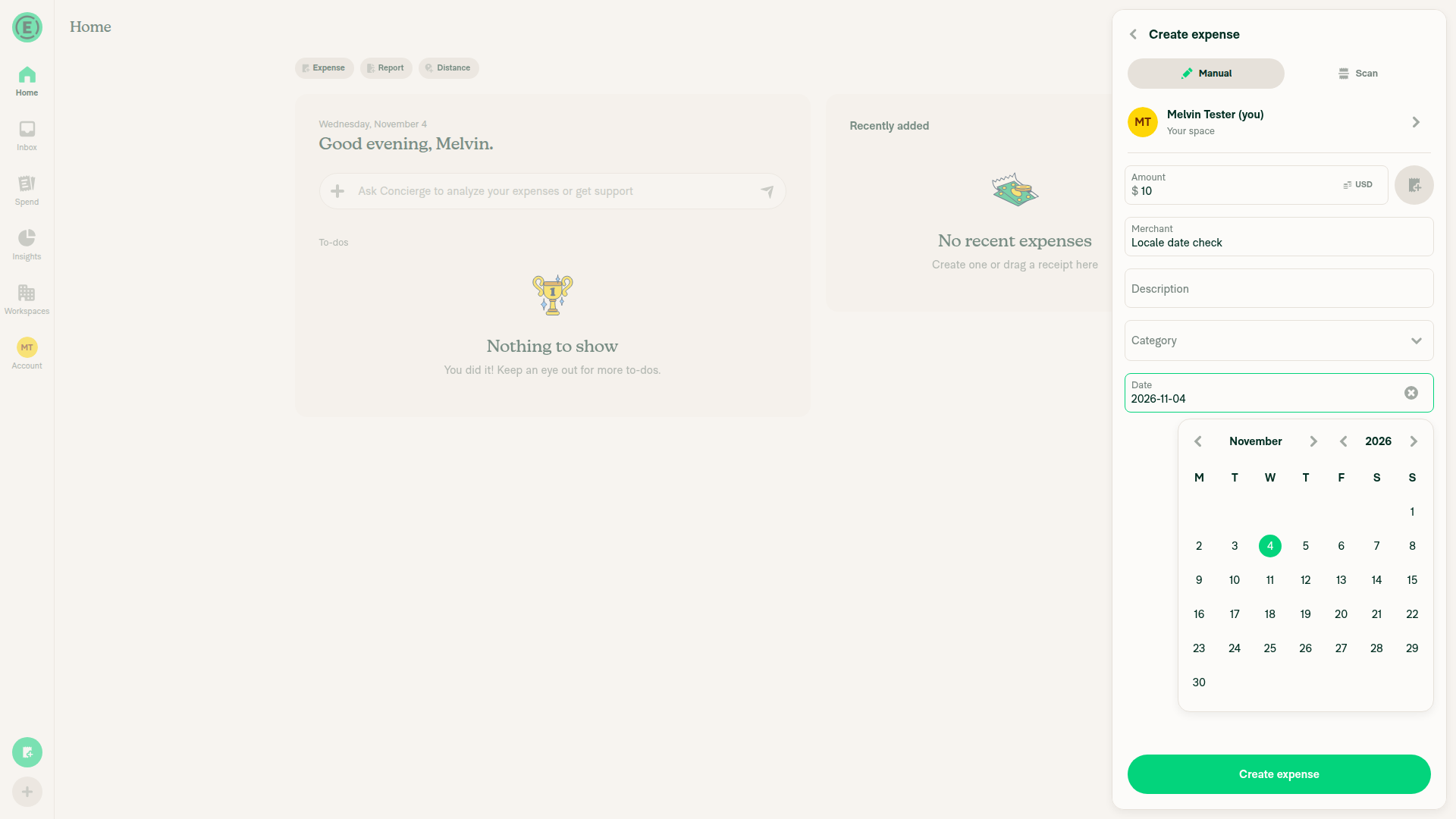
12. Open Date calendarNovember 2026 calendar appeared.
✅
13. Open month selectorCoordinate click opened twelve month options. Screenshot shows the preceding calendar.
Calendar heading before successful coordinate fallback
✅
14. Select JanuaryThe driver rejected selection because another dialog covered the option. This does not establish a product regression.
Month selection where browser automation stopped
⚠️
15. Select January 22 this yearNot attempted after step 14 blocked.
⚠️
16. Create expenseNot attempted after step 14 blocked.
⚠️
17. Open language preferencesNot attempted after step 14 blocked.
⚠️
18. Select DeutschNot attempted after step 14 blocked.
⚠️
19. Save languageNot attempted after step 14 blocked.
⚠️
20. Open StartseiteNot attempted after step 14 blocked.
⚠️
21. Verify German Home dateNot attempted after step 14 blocked.
⚠️
22. Open AusgabenNot attempted after step 14 blocked.
⚠️
23. Verify 22. Jan. without yearNot attempted after step 14 blocked.
⚠️
24. Open expenseNot attempted after step 14 blocked.
⚠️
25. Open Datum fieldNot attempted after step 14 blocked.
⚠️
26. Open Datum calendarNot attempted after step 14 blocked.
⚠️
27. Select previous yearNot attempted after step 14 blocked.
⚠️
28. Select January 22Not attempted after step 14 blocked.
⚠️
29. Save dateNot attempted after step 14 blocked.
⚠️
30. Return to expensesNot attempted after step 14 blocked.
⚠️
31. Verify German previous-year dateNot attempted after step 14 blocked.
⚠️
32. Open language preferencesNot attempted after step 14 blocked.
⚠️
33. Select EspañolNot attempted after step 14 blocked.
⚠️
34. Save languageNot attempted after step 14 blocked.
⚠️
35. Open GastosNot attempted after step 14 blocked.
⚠️
36. Verify Spanish date orderNot attempted after step 14 blocked.
⚠️
37. Open language preferencesNot attempted after step 14 blocked.
⚠️
38. Select 日本語Not attempted after step 14 blocked.
⚠️
39. Save languageNot attempted after step 14 blocked.
⚠️
40. Open 支出Not attempted after step 14 blocked.
⚠️
41. Verify Japanese year/month/dayNot attempted after step 14 blocked.
⚠️
42. ReloadNot attempted; test-session policy prohibits reload.
⚠️
43. Verify language and date persistNot attempted after step 14 blocked.
⚠️
44. Narrow browser windowNot attempted after step 14 blocked.
⚠️
45. Verify Japanese date readabilityNot attempted after step 14 blocked.
⚠️
46. Open language preferencesNot attempted after step 14 blocked.
⚠️
47. Select EnglishNot attempted after step 14 blocked.
⚠️
48. Save languageNot attempted after step 14 blocked.
⚠️
49. Open searchNot attempted after step 14 blocked.
⚠️
50. Verify US English date orderNot attempted after step 14 blocked.
⚠️
51. Open status settingsNot attempted after step 14 blocked.
⚠️
52. Open Clear afterNot attempted after step 14 blocked.
⚠️
53. Select CustomNot attempted after step 14 blocked.
⚠️
54. Select DateNot attempted after step 14 blocked.
⚠️
55. Open Date calendarNot attempted after step 14 blocked.
⚠️
56. Choose December 2Not attempted after step 14 blocked.
⚠️
57. Save selected dateNot attempted after step 14 blocked.
⚠️
58. Return to Status editorNot attempted after step 14 blocked.
⚠️
59. Enter status messageNot attempted after step 14 blocked.
⚠️
60. Open emoji pickerNot attempted after step 14 blocked.
⚠️
61. Select 😀Not attempted after step 14 blocked.
⚠️
62. Save statusNot attempted after step 14 blocked.
⚠️
63. Open language preferencesNot attempted after step 14 blocked.
⚠️
64. Select DeutschNot attempted after step 14 blocked.
⚠️
65. Save languageNot attempted after step 14 blocked.
⚠️
66. Open status settingsNot attempted after step 14 blocked.
⚠️
67. Verify German expiry date/timeNot attempted after step 14 blocked.
⚠️
68. Save unchanged statusNot attempted after step 14 blocked.
⚠️
69. Reopen status settingsNot attempted after step 14 blocked.
⚠️
70. Verify expiry unchangedNot attempted after step 14 blocked.
⚠️
71. Close Status editorNot attempted after step 14 blocked.
⚠️
72. Open PosteingangNot attempted after step 14 blocked.
⚠️
73. Open personal chatNot attempted after step 14 blocked.
⚠️
74. Hover status emojiNot attempted after step 14 blocked.
⚠️
75. Verify German tooltip dateNot attempted after step 14 blocked.
⚠️
Offline 1. Open language preferences onlineNot attempted after step 14 blocked.
⚠️
Offline 2. Select 日本語Not attempted after step 14 blocked.
⚠️
Offline 3. Save or returnNot attempted after step 14 blocked.
⚠️
Offline 4. Open search onlineNot attempted after step 14 blocked.
⚠️
Offline 5. Find test expenseNot attempted after step 14 blocked.
⚠️
Offline 6. Note expense dateNot attempted after step 14 blocked.
⚠️
Offline 7. Disable networkNot attempted; this driver does not support disabling the network.
⚠️
Offline 8. Verify offline indicator and dateNot attempted after step 14 blocked.
⚠️
Offline 9. Restore networkNot attempted after step 14 blocked.
⚠️
Offline 10. Verify unchanged day/yearNot attempted after step 14 blocked.
⚠️

view run · view recording

@roryabraham
roryabraham marked this pull request as ready for review November 4, 2026 01:44
@roryabraham
roryabraham requested a review from a team as a code owner November 4, 2026 01:44
@melvin-bot
melvin-bot Bot requested review from shubham1206agra and removed request for a team November 4, 2026 01:44
@melvin-bot

melvin-bot Bot commented Nov 4, 2026

Copy link
Copy Markdown

@shubham1206agra Please copy/paste the Reviewer Checklist from here into a new comment on this PR and complete it. If you have the K2 extension, you can simply click: [this button]

@melvin-bot
melvin-bot Bot requested review from flaviadefaria and removed request for a team November 4, 2026 01:44
@roryabraham
roryabraham removed the request for review from flaviadefaria November 4, 2026 01:44

@chatgpt-codex-connector chatgpt-codex-connector Bot left a comment

Copy link
Copy Markdown

Choose a reason for hiding this comment

The reason will be displayed to describe this comment to others. Learn more.

💡 Codex Review

Here are some automated review suggestions for this pull request.

Reviewed commit: 6c0021c3ef

ℹ️ About Codex in GitHub

Codex has been enabled to automatically review pull requests in this repo. Reviews are triggered when you

  • Open a pull request for review
  • Mark a draft as ready
  • Comment "@codex review".

If Codex has suggestions, it will comment; otherwise it will react with 👍.

When you sign up for Codex through ChatGPT, Codex can also answer questions or update the PR, like "@codex address that feedback".

Comment thread src/libs/DateUtils.ts

function formatUTCDateWithOptionalYear(datetime: string, dateFnsLocale: DateFnsLocale | undefined): string {
const date = toZonedTime(toDate(datetime, {timeZone: 'UTC'}), 'UTC');
return formatDateWithOptionalYear(date, dateFnsLocale, toZonedTime(new Date(), 'UTC'));

Copy link
Copy Markdown

Choose a reason for hiding this comment

The reason will be displayed to describe this comment to others. Learn more.

P2 Badge Compare the optional year in the viewer's timezone

When the viewer's local calendar year differs from UTC around New Year's, comparing against toZonedTime(new Date(), 'UTC') adds or removes the year incorrectly. For example, at 2027-01-01 01:00 UTC a Los Angeles viewer is still in 2026, but a 2026-12-31 expense is rendered with 2026 even though it belongs to the viewer's current year. Use the viewer's current calendar year (or accept the selected timezone) while keeping the stored expense date itself fixed in UTC.

Useful? React with 👍 / 👎.

Comment thread src/libs/DateUtils.ts
if (!isValid(date)) {
return '';
}
return isSameYear(date, now) ? formatDisplayDate(date, dateFnsLocale, MONTH_DAY_OPTIONS) : format(date, CONST.DATE.MONTH_DAY_YEAR_ABBR_FORMAT, {locale: dateFnsLocale ?? enUS});

Copy link
Copy Markdown
Contributor

Choose a reason for hiding this comment

The reason will be displayed to describe this comment to others. Learn more.

Same-year dates use Intl but other years use date-fns PP, so the style changes by locale. Checked on this branch (Nov 4 vs Nov 22, 2025): pt-BR 4 de nov. then 22 nov 2025, ja 11月4日 then 2025/11/22. Is that intended?

Comment thread src/libs/DateUtils.ts
}

/** The caller supplies now in the same timezone representation as date, so the year decision matches the visible day. */
function formatDateWithOptionalYear(date: Date, dateFnsLocale: DateFnsLocale | undefined, now = new Date()): string {

Copy link
Copy Markdown
Contributor

Choose a reason for hiding this comment

The reason will be displayed to describe this comment to others. Learn more.

SearchUIUtils still sizes the date column with doesDateBelongToAPastYear (device time), while this uses UTC isSameYear. On main both used the same function. Could they share one helper so they cannot drift?

@@ -26,7 +26,7 @@ function PayOverdueInvoice({gracePeriodEndUnixSeconds, isOverdue = false}: PayOv
const icons = useMemoizedLazyExpensifyIcons(['InvoiceGeneric']);

// formatWithUTCTimeZone needs ISO 8601. toUTCString (RFC 1123) would silently format as empty

Copy link
Copy Markdown
Contributor

Choose a reason for hiding this comment

The reason will be displayed to describe this comment to others. Learn more.

Nit: this comment still names formatWithUTCTimeZone, which the next line no longer calls.

@@ -80,15 +80,15 @@ function getBillingStatus({
const endDate = ownerTravelBillingGracePeriodEnd ?? ownerBillingGracePeriodEnd;

// formatWithUTCTimeZone parses ISO 8601, so an RFC 1123 string from toUTCString would silently format as empty

Copy link
Copy Markdown
Contributor

Choose a reason for hiding this comment

The reason will be displayed to describe this comment to others. Learn more.

Same stale comment: it names formatWithUTCTimeZone, but the next line calls formatUTCDateForDisplay.

shubham1206agra added a commit to shubham1206agra/App that referenced this pull request Nov 4, 2026
Port the test from Expensify#105846 that the per-diem e-receipt still separates the
destination from the unchanged stored merchant dates after a language change.
shubham1206agra added a commit to shubham1206agra/App that referenced this pull request Nov 4, 2026
Port the German and Japanese date picker label tests and the German Home
prompt date test from Expensify#105846.
shubham1206agra added a commit to shubham1206agra/App that referenced this pull request Nov 4, 2026
Parse the subscription end date with parseISO so the yyyy-MM-dd value is read
as a local calendar day instead of UTC midnight, which showed the previous day
in timezones behind UTC. Add the renewal date test from Expensify#105846.
shubham1206agra added a commit to shubham1206agra/App that referenced this pull request Nov 4, 2026
formatToMonthDayWithOptionalYearInUTC shows the date in UTC, so read the date's
year in UTC too before comparing it with the device's current year. Reading it
in the device's timezone added a year to January 1 dates behind UTC. Add the
DateCell, Last used and reused-route badge tests from Expensify#105846.
shubham1206agra added a commit to shubham1206agra/App that referenced this pull request Nov 4, 2026
Port the booking confirmation date test from Expensify#105846, which renders the
confirmation page in German and checks the day-first long date.
shubham1206agra added a commit to shubham1206agra/App that referenced this pull request Nov 4, 2026
Port the test from Expensify#105846 that getTransactionDetails returns yyyy-MM-dd in
German and Japanese, which the e-receipt now formats itself.
shubham1206agra added a commit to shubham1206agra/App that referenced this pull request Nov 4, 2026
Port the status tooltip and status editor tests from Expensify#105846, which check the
German and English dates and that saving keeps the machine clear-after value.
@shubham1206agra

Copy link
Copy Markdown
Contributor

@roryabraham I created small PRs from the changes you made and I have in my stash for sometime. Please start reviewing them and close this PR as changes are overlapping.

@linhvovan29546 See the draft PRs linked to the issue for review and you can do early review on all of them

@roryabraham

Copy link
Copy Markdown
Contributor Author

Ok, I'll close this in favor of smaller ones.

@roryabraham roryabraham closed this Nov 4, 2026
@roryabraham
roryabraham deleted the fix/98088-localized-display-dates branch November 4, 2026 15:40
Sign up for free to join this conversation on GitHub. Already have an account? Sign in to comment

Labels

None yet

Projects

None yet

Development

Successfully merging this pull request may close these issues.

4 participants